linkedin
TimeLake logo
play TimeLake WebApp Promo
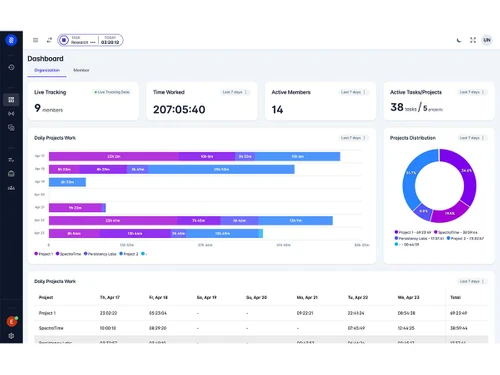
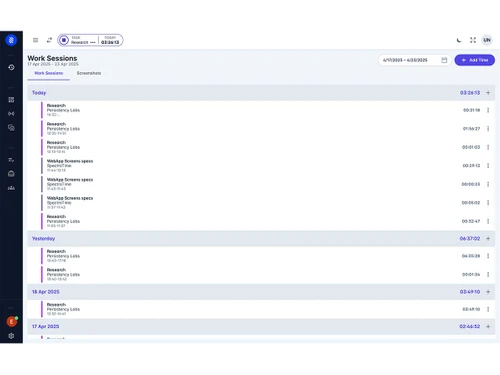
TimeLake dashboard
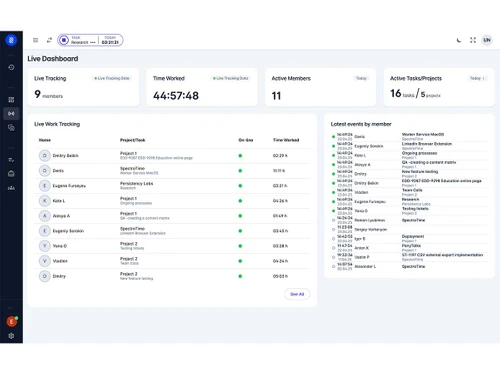
TimeLake live dashboards

TimeLake

Brand: TimeLake

  • 4.2

  • 3 Ratings

TimeLake is cloud-based business software for employee management and time tracking, to suit teams of all sizes.

See More

Have you used TimeLake before?

Share your insights for better experience

Add a Review
Starting Price
€4

View plans

100% Genuine
Products
Best Price
Guaranteed
Safe & Secure
Payment
  • Description

  • Pricing

  • Features

  • Specification

  • Review

  • Compare

  • Alternatives

  • FAQ

Starting at €4

TimeLake Software Overview

What is TimeLake?

TimeLake is a simple time tracking software that helps businesses track employee hours, manage attendance, and monitor work patterns. It replaces manual time logs and spreadsheets with an automated system that records work hours in real time. With features like automated timesheets and live tracking, managers gain clear visibility into who is working, when, and on which tasks.

Designed for small businesses to large enterprises, TimeLake also supports employee management tasks such as leave requests, shift scheduling, and performance tracking. Its intuitive interface and AI assistants guide users through tasks, reducing setup time and training needs. By integrating with payroll and HR systems, it ensures accurate data flow and reduces errors in salary calculations.

Why Choose TimeLake?

  • Real-Time Visibility: Instantly view employee work status and shift activities to make quick and smart business decisions.
  • Affordable Pricing: TimeLake starts at just 6 Euros, making it budget-friendly for startups and small businesses.
  • Automated Processes: Automatically manage timesheets, attendance, and approvals, reducing the need for manual work.
  • Easy Integrations: Seamlessly connect with your favorite HR and payroll systems for smoother operations.
  • AI Assistance: Get smart recommendations from AI to improve schedules, planning, and workforce analytics.
  • Custom Reports: Easily create reports that match your companys specific tracking and performance needs.
  • User-Friendly Setup: Clean and simple interface that is easy for all team members to learn and use quickly.
  • Scalable Solution: TimeLake grows with your business without needing complex configurations or IT help.

Benefits of Using TimeLake

  • Saves Manager Time: Cuts down on repetitive tasks by automating time entries, shift updates, and approvals.
  • Improves Accuracy: Automatically tracks working hours to reduce mistakes in payroll and attendance records.
  • Boosts Productivity: Real-time tracking shows where time is being spent and helps remove delays or idle periods.
  • Enhances Transparency: Employees can clearly view their work hours, breaks, and shift details in their dashboard.
  • Streamlines Payroll: With correct and updated timesheets, salary processing becomes faster and error-free.
  • Supports Remote Work: Keep track of remote or hybrid workers efficiently, no matter where they are working from.
  • Data-Driven Decisions: Use smart reports and analytics to understand trends and manage staffing better.
  • Ensures Compliance: Maintains records that help you meet local labor laws and audits without extra stress.

TimeLake Pricing

TimeLake price starts at Euros 3.99 per month per user at Techjockey.com. The pricing model is based on different parameters, including extra features, deployment type, and the total number of users. For further queries related to the product, you can contact our product team and learn more about the pricing and offers.

Read more

TimeLake Company Details

Founded Year:  2024

Time and Productivity Tracking Automation for Agile teams

Director/Founders TL
Company Size 1-100 Employees

TimeLake Pricing & Plans

Professional
Key Features
  • Live tracking features
  • Unlimited projects
  • Advanced roles system
  • Automatic time classification
  • Productivity tracking
  • Unlimited data storage
  • Unlimited users
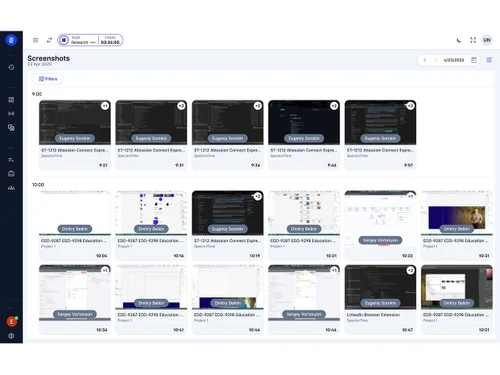
  • Screenshots
  • Idle detection & reminders
Starting at €4
    • Users

      Users
      Users
    • Monthly

      Monthly
      Monthly

Key Features

  • Live tracking features

  • Unlimited projects

  • Advanced roles system

  • Automatic time classification

  • Productivity tracking

  • Unlimited data storage

  • Unlimited users

  • Screenshots

  • Idle detection & reminders

TimeLake Features

  • icon_check Timesheet Management
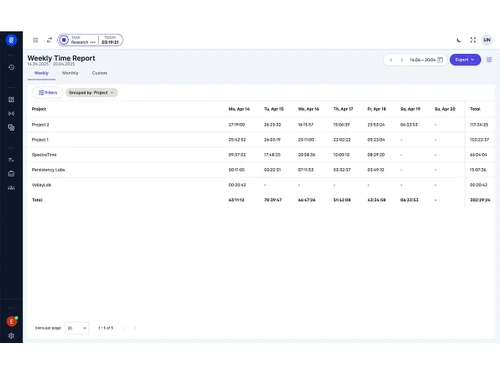
    Timesheets are built automatically from captured time data and calendar entries with minimal input.
  • icon_check Web Usage Tracking
    Logs which software and websites are used, helping analyse how working hours are spent.
  • icon_check Task Visualization
    Displays current tasks and timers across the team so managers can spot bottlenecks immediately.
  • icon_check Classification and Tagging
    Applies rules or AI to classify time entries into categories like project, client, internal work.
  • icon_check Third Party Integration
    Connects with payroll, accounting, project-management and other tools to sync time data and reduce duplication.
  • icon_check Data Import/Export
    Allows exporting time and usage data or using APIs to feed into BI tools or custom workflows.
  • icon_check Custom Reports
    Lets users build tailored reports and dashboards for metrics like productivity, utilisation and cost.
  • icon_check Idle Hours Tracking
    Detects inactivity and prompts users to confirm or stop time to maintain accuracy and reduce waste.
  • icon_check Data Retention
    Keeps full history of captured time and activities so past data can be reviewed and audited anytime.
  • icon_check Productivity Tracking
    Measures focus, distraction and time spent in productive vs non-productive apps to improve team efficiency.
  • icon_check Remote Support
    Built to work reliably for fully remote and hybrid teams without needing complex hardware or onsite servers.
TimeLake Demo Video play icon

Get TimeLake Demo

Watch the demo video to explore key features, real workflows, and how the software fits your business needs.

Understand
Key Features
Personal
Demo Insights
Interactive
Demo Support

TimeLake Specifications

Supported Platforms
Windows Windows MacOS MacOS
Devices
Desktop Desktop
Deployment
Cloud-Based Cloud-Based
Suitable For
All Industries
Business Specific
All Businesses
Business Size
Small Business Medium Business SMEs MSMBs
Customer Support
Forums
Language
English
Training Resources
Live Online
AI Features
AI Integrated

Explore the Best Alternative Solutions Similar to Your Business Size and Needs

TimeLake Review

4.2

Out of 5

img

Overall Rating

Based on
3 Verified Ratings

Rating Breakdown

  • Features 4.3
  • Value for Money 4.6
  • Ease of Use 4.1
  • Customer Support 3.6

96% Recommend this Product

Add Review

Techjockey Trusted Reviews from Verified Users

No reviews are currently available for TimeLake. Discover similar Time Tracking Software reviews

  • Desklog

    4.6

    Whats great - It's really a good time slot to have the demo version for 40 days. It is more than enough to understand all the features and ... read more

  • Ontime Employee Manager

    4.3

    Whats great - I needed to schedule regular meetings with employees to evaluate performance and also to chart out the future plan of action.... read more
  • Webwork Time Tracker

    5.0

    Whats great - Screenshot capturing, app/website usage monitoring and activity level recording are my favorite features since it gives you d... read more

Compare TimeLake With other Time Tracking Software

Products
Ratings
Pricing
Device Supported
Deployment
Supported Platforms
  • img

    TimeLake

  • 4.2

  • Price On Request

  • Desktop

    Mobile

  • Web based

    On Premises

  • Windows

    Mac OS

  • img

    Hubstaff

  • 4.3

  • Price On Request

  • Desktop

    Mobile

  • Web based

    On Premises

  • Windows

    Mac OS

  • img

    ADP SecurTime

  • 4.0

  • Price On Request

  • Desktop

    Mobile

  • Web based

    On Premises

  • Windows

    Mac OS

  • img

    Time Doctor

  • 4.4

  • Price On Request

  • Desktop

    Mobile

  • Web based

    On Premises

  • Windows

    Mac OS

  • img

    TopTracker

  • 4.4

  • Price On Request

  • Desktop

    Mobile

  • Web based

    On Premises

  • Windows

    Mac OS

  • img

    DeskViu

  • 4.1

  • ₹ 100

  • Desktop

    Mobile

  • Web based

    On Premises

  • Windows

    Mac OS

  • img

    TimeChart

  • 4.1

  • Price On Request

  • Desktop

    Mobile

  • Web based

    On Premises

  • Windows

    Mac OS

  • img

    OnTheClock

  • 4.4

  • Price On Request

  • Desktop

    Mobile

  • Web based

    On Premises

  • Windows

    Mac OS

  • img

    Beebole

  • 4.3

  • Price On Request

  • Desktop

    Mobile

  • Web based

    On Premises

  • Windows

    Mac OS

(0) Product(s) selected

TimeLake Alternatives

See All TimeLake Alternatives

Available

Price on Request

Available

Price on Request

Starting Price:

€9 /User/Month

Starting Price:

$50 /Month

Starting Price:

$28 /Month

Starting Price:

$12 /Month

Starting Price:

$4 /Month

Starting Price:

$14 /Seat/Month

Articles for TimeLake

See All Related Articles

How much does TimeLake cost?

TimeLake plans start at Euros 3.99 per month per user, with options for added features.

How does TimeLake work?

TimeLake records work hours automatically via web or mobile, then generates timesheets.

Who uses TimeLake?

Small businesses, HR teams, and managers use TimeLake for accurate time and attendance tracking.

Can TimeLake integrate with my payroll system?

Yes, TimeLake offers integrations with common payroll and HR software.

Is there a mobile app for TimeLake?

Yes, TimeLake has a mobile app for Android and iOS to track time on the go.

How secure is my data with TimeLake?

TimeLake uses encryption and secure cloud storage to protect your information.

Can I customize reports in TimeLake?

Yes, you can build custom reports to view any data you need.

Does TimeLake support shift scheduling?

Yes, it includes tools for scheduling shifts and managing leave requests.

What if my team works remotely?

TimeLake tracks remote and hybrid teams in real time using web and mobile check-ins.

Is there a free trial available?

Yes, you can sign up for a trial on TechJockey to test all features.

20,000+ Software Listed

Best Price Guranteed

Free Expert Consultation

2M+ Happy Customers

Terms and Condtions

close

Users with registered businesses can purchase goods from merchants on the platform to satisfy their business needs. Users are not permitted to utilize any products acquired through the platform for resale, advertising, business, or further distribution.

For each purchase made, users will receive a Tax Invoice (or 'GST invoice') that includes specific details such as:

  • the GSTIN of the user associated with their registered business, and

  • the specified Entity Name for their business.

It should be noted that not all products are eligible for GST Invoice. Only the products displayed by participating sellers with the 'GST-based Invoice Available' callout on the product description page would qualify.

Certain goods and services are not eligible to get a GST Invoice, including items with VAS, i.e., Value Added Services (e.g., Total Mobile Protection/Assured Buyback) and those involving an exchange offer at the time of purchase.

Users must ensure the accuracy of the GSTIN, and business entity name provided for the GST Invoice. Requests for corrections into GST Invoice would not be accommodated by Techjockey.com or any Seller, and any issues arising from user-provided information are the sole responsibility of users.

Techjockey.com is not liable for the GST Invoice or any associated input tax credit. To efficiently claim an input tax credit, users should select the registered place of business address as per the GST authority's data and follow the provisions of the GST Act and rules.

To claim an input tax credit, the delivery and billing addresses must match. Furthermore, input tax credits will not be granted if the delivery address and GSTIN on the invoice are from different states. In case of incorrect GST details provided during the order placement, the order will be canceled automatically.