linkedin
In4Suite ERP logo
play In4Suite 4.0 | ERP for real estate industry | Coming Soon
In4Suite ERP Customer
In4Suite ERP Sale

In4Suite ERP

Brand: In4velocity Systems Pvt

  • 4.2

  • 6 Ratings

Step into a world where managing your real estate empire feels effortless. In4Suite ERP makes it possible, with connected modules and powerful insights at your fingertips.

See More

Have you used In4Suite ERP before?

Share your insights for better experience

Add a Review

Price Available on Request

Questions about pricing or customization? We’re here to help, just a click away.

100% Genuine
Products
Best Price
Guaranteed
Safe & Secure
Payment
  • Description

  • Pricing

  • Features

  • Specification

  • Review

  • Compare

  • Alternatives

  • FAQ

In4Suite ERP Software Overview

What is In4Suite ERP Software?

If you find yourself overwhelmed by the chaos of managing your real estate business with countless sticky notes, In4Suite ERP is right here to be the ultimate solution. It's a software programme designed specifically for real estate and construction companies, acting like a digital filing cabinet and all-in-one command centre.

Instead of scattered spreadsheets and overflowing inboxes, In4Suite keeps everything well organised and readily accessible. It can be anything from managing projects and sales to tracking expenses and documents; the software works like a smart personal assistant for your entire business. It goes without saying that this frees you up to focus on the larger picture, which may include making deals and building your dream projects. In a nutshell, In4Suite helps you get rid of all the management and planning chaos and take control of your real estate world.

Why Choose In4Suite ERP?

  • Cast Aside Spreadsheet Blues: In4Suite ERP functions as the ultimate organiser for all your business needs! It takes all that messy data scattered across spreadsheets and inboxes and sorts it out into one user-friendly platform. Say goodbye to late nights deciphering cryptic formulas and embrace clear, easy-to-access information.
  • Communicate Like a Boss: A communication gap can make you feel like your team operates on different planets. This is why In4Suite ERP acts as a central hub and makes sure everyone has the same real-time data. No more playing telephone or chasing down updates; just smooth teamwork and clear communication.
  • Free Up Your Time to Actually Build Stuff: Let In4Suite ERP handle all that boring stuff! It automates repetitive tasks and streamlines processes, freeing you up to focus on the things that really matter, like winning new projects, closing deals, and building amazing properties.
  • Become a Business Pundit: In4Suite ERP gives you a complete picture of your finances, projects, and resources. It serves as your own business beacon that slices through the fog of confusion and provides the clarity you require to make informed and fruitful decisions confidently.

Benefits of In4Suite ERP Software

  • Happy Customers, Flourishing Business: In4Suite ERP helps you manage customer relationships like a champ. With desirable features such as lead tracking and contact management, you can nurture leads, close deals faster, and keep your customers happy and content.
  • Project Powerhouse: In4Suite ERP is your project management superhero! It keeps track of deadlines, budgets, and resources, ensuring everything runs smoothly from groundbreaking to ribbon-cutting. No more scrambling to meet deadlines or wondering where the budget went.
  • Say Goodbye to Data Silos: If you are tired of information being scattered here and there, let In4Suite ERP be your saviour! The system acts as a central hub that stores all your important data in one secure and accessible place. This simply means no more hunting for lost files or piecing together required information from a number of different sources.
  • Mobility on the Go: The world of real estate and construction doesn't stop at the office. In4Suite ERP's cloud-based platform lets you access your data and manage projects from anywhere, anytime. Ideal for on-the-go professionals with hectic schedules, the system seamlessly integrates into your fast-paced lifestyle.
  • Scalability for Growth: As your business grows, In4Suite grows hand in hand with it. With its impeccable scalability, the platform ensures you can effortlessly incorporate new features and modules as your requirements expand, eliminating concerns about outgrowing your software solution.

Pricing Of In4Suite ERP Software

In4Suite ERP price details are available on request at techjockey.com.

In4Suite ERP price may vary based on factors like customization, additional features required, number of users, and the deployment type. Please request a call back for subscription-related details and to avail offers on premium packages.

Read more

In4velocity Systems Pvt Company Details

Founded Year:  2004

Since its establishment in 2004, In4Velocity has earned a reputation as a trusted partner for real estate, construction, and infrastructure companies, skillfully streamlining their day-to-day operations.

Director/Founders In4velocity
Company Size 1-100 Employees

In4Suite ERP Pricing & Plans

Looking for The Right Pricing?

Share your requirements and get a plan built around your business.

  • Define your business needs
  • Get customised pricing
  • Choose features that fit your workflow

Price Available on Request

Get personalised In4Suite ERP pricing that fits your needs. Our team will connect with you.

In4Suite ERP Features

Financial/Accounts Management

  • icon_check Budgeting And Forecasting
    Planning financials based on historical and predictive data.
  • icon_check Fixed Asset Management
    Track, manage, and depreciate assets.
  • icon_check Tax Management
    Automates tax calculations, compliance, and reporting, ensuring accuracy and adherence to regulations.
  • icon_check General Ledger
    Unified accounting hub with real-time updates.
  • icon_check Accounts Payable & Accounts Receivable
    Invoice tracking and payment processing.
  • icon_check Multi-Currency Support
    Handling transactions in various currencies.
  • icon_check Bank Reconciliation
    Matches ERP records with bank statements to ensure financial accuracy and detect discrepancies.

Human Resource Management (HRM)

  • icon_check Payroll Management
    Automatic calculations for salaries, benefits, and deductions.
  • icon_check Employee Information Management
    Centralized database for employee data.
  • icon_check Performance Management
    Employee appraisals, KPI tracking, and reviews.
  • icon_check Recruitment and Onboarding
    Tools for hiring, job postings, and new hire integration.
  • icon_check Time and Attendance
    Tracking work hours and attendance schedules.
  • icon_check Learning Management
    Training programs and skill assessments.

Supply Chain Management

  • icon_check Inventory Management
    Real-time tracking of stock levels and warehouse locations.
  • icon_check Transportation Management
    Manages logistics, shipment tracking, and carrier performance for efficient delivery.
  • icon_check Supplier Relationship Management
    Monitoring supplier performance and communications.
  • icon_check Procurement and Purchasing
    Supplier management and purchase order automation.
  • icon_check Logistics and Distribution
    Shipment tracking and delivery scheduling.
  • icon_check Demand Planning
    Forecasting tools to predict inventory needs.
  • icon_check Route Planning
    Optimizes delivery routes to minimize costs and ensure timely deliveries.

Manufacturing

  • icon_check Maintenance Management
    Tracks and schedules maintenance tasks to ensure equipment reliability and reduce downtime.
  • icon_check Work Order Management
    Scheduling and tracking production tasks.
  • icon_check Production Planning and Scheduling
    Resource allocation and timeline planning.
  • icon_check Material Requirement Planning (MRP)
    Plans material needs based on demand, inventory, and lead times to prevent shortages.
  • icon_check Bill Of Materials (BOM)
    Manage components and materials for product creation.
  • icon_check Quality Control Management
    Tools for tracking and enforcing production standards.
  • icon_check Shop Floor Management
    Integration with IoT for real-time production data.

Customer Relationship Management (CRM)

  • icon_check Contact Management
    Centralized database for customer interactions.
  • icon_check Lead Management
    Captures, tracks, and nurtures leads to improve sales conversions and pipeline efficiency.
  • icon_check Sales Pipeline Management
    Tracking leads, opportunities, and deals.
  • icon_check Marketing Automation
    Tools for email, SMS, and social media campaigns.
  • icon_check Audience Segmentation
    Insights into customer behavior and preferences.

Project Management

  • icon_check Collaboration Tools
    Shared workspaces, chat, and document sharing.
  • icon_check Resource Management
    Allocation of team members and tools.
  • icon_check Cost Management
    Monitoring expenses and staying within budget.
  • icon_check Task Scheduling
    Gantt charts and timelines for projects.
  • icon_check Time Tracking
    Recording billable and non-billable hours.

Reporting and Analytics

  • icon_check Sales Reports
    Analyzes sales trends, revenue, and top performers to guide strategy.
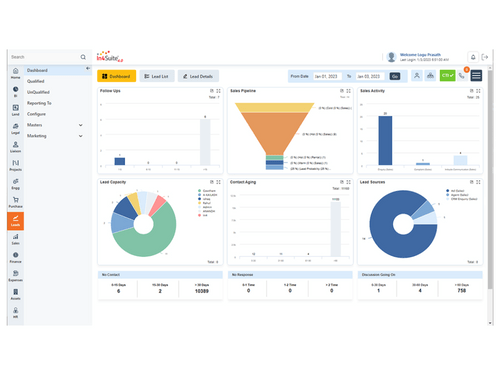
  • icon_check Dashboards
    Real-time performance insights with KPIs.
  • icon_check Financial Reports
    Provides insights into financial health with balance sheets, income, and cash flow statements.
  • icon_check Business Intelligence
    Advanced analytics, dashboards, and KPIs for strategic insights and trend forecasting.
  • icon_check Custom Reports
    Tailored reports for various business needs.
  • icon_check Real Time Reports
    Delivers live data and metrics for faster, informed decision-making.
  • icon_check Predictive Analytics
    Tools to forecast trends and outcomes.
  • icon_check Regulatory Compliance Reports
    Ensure adherence to industry standards.

Integrations

  • icon_check API Integration
    Connects ERP with third-party tools for seamless data exchange and process automation.
  • icon_check Third Party Integration
    Seamless integration with third-party applications.
  • icon_check Customer Support
    Integration with helpdesk and ticketing systems.
  • icon_check Payment Gateway Integration
    Support for various payment methods.
  • icon_check Ecommerce Integration
    Syncs ERP with e-commerce platforms for real-time order, inventory, and customer data updates.

Security and Compliance

  • icon_check Role-Based Access Control (RBAC)
    Granular permissions for users.
  • icon_check Data Encryption
    Protect sensitive information.
  • icon_check Audit Management
    Plan, execute and track audits within organisation
  • icon_check GDPR and Other Compliance
    Features to adhere to global data regulations.
  • icon_check Disaster Recovery
    Backup and recovery options for business continuity.

Administrative Features

  • icon_check Workflow Automation
    Customizable triggers for repetitive tasks.
  • icon_check Workflow Approval
    Automates approval processes with role-based actions to streamline tasks.
  • icon_check Centralized Database
    Stores all business data in one system, eliminating silos and ensuring accuracy.
  • icon_check Data Import/Export
    Transfers data efficiently using standard formats like CSV and Excel.
  • icon_check Admin Panel
    Central hub for user, system, and workflow management with real-time control.
  • icon_check User Access Management
    Controls user permissions and access for enhanced security.

Alerts & Notifications

  • icon_check Email and SMS Notifications
    Automates alerts for approvals, reminders, and updates via email/SMS.
  • icon_check Security Alerts
    Notifies of suspicious activities like unauthorized logins to protect data.
  • icon_check Custom Event Alerts
    Triggers alerts for specific events like overdue payments or inventory shortages.
  • icon_check Non-Compliance Issues
    Flags and resolves regulatory or policy breaches for compliance adherence.

Others

  • icon_check Expense Management
  • icon_check Travel Management
  • icon_check Customization
  • icon_check Security features
  • icon_check Project Management
  • icon_check Alerts & Notifications
In4Suite ERP Demo Video play icon

Get In4Suite ERP Demo

Watch the demo video to explore key features, real workflows, and how the software fits your business needs.

Understand
Key Features
Personal
Demo Insights
Interactive
Demo Support

In4Suite ERP Specifications

Supported Platforms
Ubuntu Ubuntu Windows Windows MacOS MacOS Linux Linux
Devices
Desktop Desktop
Deployment
Cloud-Based Cloud-Based
Suitable For
All Industries
Business Specific
All Businesses
Business Size
Small Business Startups Medium Business Enterprises SMBs SMEs MSMBs MSMEs
Customer Support
Email Communities
Language
English
Training Resources
Videos

Explore the Best Alternative Solutions Similar to Your Business Size and Needs

In4Suite ERP Review

4.2

Out of 5

img

Overall Rating

Based on
6 Verified Ratings

Rating Breakdown

  • Features 4.2
  • Value for Money 4.5
  • Ease of Use 4.4
  • Customer Support 4

95% Recommend this Product

Add Review

Techjockey Trusted Reviews from Verified Users

No reviews are currently available for In4Suite ERP. Discover similar ERP Software reviews

  • Dynamics 365 Business Central

    4.4

    Whats great - The capacity to use Excel to mass input data into the system and to extract data. read more

  • DataNote ERP

    4.8

    Whats great - The most impressive thing with this ERP is the reporting and analytics. I'm daily using the AI reports available in various f... read more

  • Eazy ERP

    4.7

    Whats great - Real-time data. Better sales tracking. Customizable reports. Since using EAZY ERP, our work and sales tracking have improved ... read more

Compare In4Suite ERP With other ERP Software

Products
Ratings
Pricing
Device Supported
Deployment
Supported Platforms
  • img

    In4Suite ERP

  • 4.2

  • Price On Request

  • Desktop

    Mobile

  • Web based

    On Premises

  • Windows

    Mac OS

  • img

    Fablead ERP

  • 5

  • ₹ 999

  • Desktop

    Mobile

  • Web based

    On Premises

  • Windows

    Mac OS

  • img

    Odoo ERP

  • 4.7

  • ₹ 760

  • Desktop

    Mobile

  • Web based

    On Premises

  • Windows

    Mac OS

  • img

    iXpert ERP

  • 4.7

  • ₹ 19999

  • Desktop

    Mobile

  • Web based

    On Premises

  • Windows

    Mac OS

  • img

    Bigsun ERP

  • 4.0

  • ₹ 6000

  • Desktop

    Mobile

  • Web based

    On Premises

  • Windows

    Mac OS

  • img

    Axolon ERP

  • 5

  • Price On Request

  • Desktop

    Mobile

  • Web based

    On Premises

  • Windows

    Mac OS

  • img

    MenThee ERP

  • 4.2

  • Price On Request

  • Desktop

    Mobile

  • Web based

    On Premises

  • Windows

    Mac OS

(0) Product(s) selected

In4Suite ERP Alternatives

See All In4Suite ERP Alternatives

Starting Price:

₹6,000 /User/Month

Available

Price on Request

Available

Price on Request

Available

Price on Request

Articles for In4Suite ERP

See All Related Articles

Which operating system does In4Suite ERP Software Support?

In4Suite ERP software is compatible with Windows, iOS, Android, and MacOS systems.

Is there any In4Suite ERP App?

Yes, In4Suite ERP software is available on Android and iOS devices.

What is the deployment type of In4Suite ERP?

In4Suite ERP system supports web-based deployment.

How much does In4Suite ERP Software Cost?

In4Suite ERP price details are available on request at techjockey.com.

Who are the potential users of In4Suite ERP?

In4Suite ERP typically appeals to a wide range of stakeholders in real estate, such as developers, construction companies, property managers, and real estate agencies. It provides solutions for managing various operations, including land procurement, legal processes, project management, sales, human resources, expenses, and financial reporting.

Is there any free trial or demo for In4Suite ERP Software?

Yes, a free demo of this product is available at techjockey.com.

Is In4Suite ERP Software Free?

No, the product is not available for free.

Does In4Suite ERP offer a free trial?

No, the product does not offer a free trial.

How can you download In4Suite ERP?

Since the product supports web-based deployment, there is no need for software installation. Just open the setup wizard and get started.

How does In4Suite ERP Work?

In4Suite ERP works by integrating core real estate modules into one cloud-based platform, providing users with a holistic view of their business operations. It streamlines processes such as purchase and sales management, expense tracking, document handling, and financial accounting, enabling efficient management of projects, assets, and customer relationships.

20,000+ Software Listed

Best Price Guranteed

Free Expert Consultation

2M+ Happy Customers

Terms and Condtions

close

Users with registered businesses can purchase goods from merchants on the platform to satisfy their business needs. Users are not permitted to utilize any products acquired through the platform for resale, advertising, business, or further distribution.

For each purchase made, users will receive a Tax Invoice (or 'GST invoice') that includes specific details such as:

  • the GSTIN of the user associated with their registered business, and

  • the specified Entity Name for their business.

It should be noted that not all products are eligible for GST Invoice. Only the products displayed by participating sellers with the 'GST-based Invoice Available' callout on the product description page would qualify.

Certain goods and services are not eligible to get a GST Invoice, including items with VAS, i.e., Value Added Services (e.g., Total Mobile Protection/Assured Buyback) and those involving an exchange offer at the time of purchase.

Users must ensure the accuracy of the GSTIN, and business entity name provided for the GST Invoice. Requests for corrections into GST Invoice would not be accommodated by Techjockey.com or any Seller, and any issues arising from user-provided information are the sole responsibility of users.

Techjockey.com is not liable for the GST Invoice or any associated input tax credit. To efficiently claim an input tax credit, users should select the registered place of business address as per the GST authority's data and follow the provisions of the GST Act and rules.

To claim an input tax credit, the delivery and billing addresses must match. Furthermore, input tax credits will not be granted if the delivery address and GSTIN on the invoice are from different states. In case of incorrect GST details provided during the order placement, the order will be canceled automatically.