USA
USA UAE
UAESmall Business
Designed for startups and growing businesses

See More




Brand: Microsoft Corporation
Microsoft Dynamics 365 is an ERP and CRM system designed to manage various business needs.
See MoreHave you used Microsoft Dynamics 365 before?
Share your insights for better experience
View plans
 Save upto 18%, Get GST Invoice on your business purchase T&C Buy Now & Pay Later, Check offer on payment page.
 Brand: Microsoft Corporation
Founded Year: 1975
Microsoft Corporation is an American multinational technology company with headquarters in Redmond, Washington.
Financial/Accounts Management
 Tax Management General Ledger Budgeting And Forecasting Accounts Payable & Accounts Receivable Fixed Asset Management Bank Reconciliation Multi-Currency Support
 Human Resource Management (HRM)
Payroll Management Performance Management Time and Attendance Recruitment and Onboarding Employee Information Management Learning Management Supply Chain Management
Inventory Management Transportation Management Route Planning Procurement and Purchasing Logistics and Distribution Demand Planning Supplier Relationship Management Manufacturing
Maintenance Management Bill Of Materials (BOM) Production Planning and Scheduling Quality Control Management Material Requirement Planning (MRP) Work Order Management Shop Floor Management Customer Relationship Management (CRM)
Lead Management Marketing Automation Contact Management Audience Segmentation Sales Pipeline Management Project Management
Time Tracking Collaboration Tools Resource Management Task Scheduling Cost Management Reporting and Analytics
Dashboards Financial Reports Custom Reports Sales Reports Regulatory Compliance Reports Real Time Reports Predictive Analytics Business Intelligence Integrations
Customer Support API Integration Third Party Integration Ecommerce Integration Payment Gateway Integration Security and Compliance
Disaster Recovery Data Encryption Audit Management Role-Based Access Control (RBAC) GDPR and Other Compliance Administrative Features
User Access Management Centralized Database Workflow Automation Data Import/Export Admin Panel Workflow Approval Alerts & Notifications
Email and SMS Notifications Custom Event Alerts Non-Compliance Issues Security Alerts Others
Business Intelligence Module Project Management Customization Mobile Access Security features Artificial Intelligence Alerts & Notifications Multi-Language Support 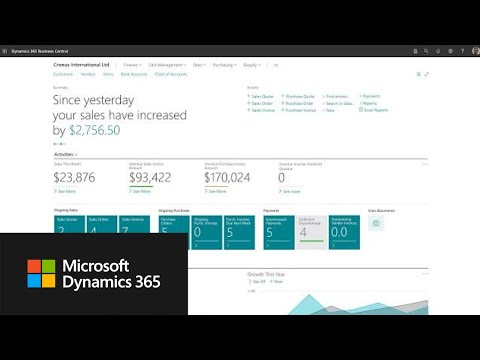

Watch the demo video to explore key features, real workflows, and how the software fits your business needs.
 Ubuntu
  Windows
  MacOS
MacOS  Linux
Linux  Desktop
  Mobile
  Cloud-Based
  Perpetual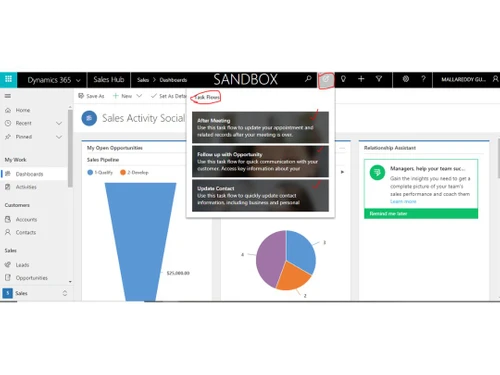
Small Business
Designed for startups and growing businesses
Medium Business
Built for business growth and flexibility
Enterprises
Designed for complex and large-scale business needs
4.3
Out of 5

Overall Rating
Based on
5 Verified Reviews
Rating Breakdown
86% Recommend this Product
Add Review


Microsoft Dynamics 365
₹ 34944.00 excl. GST
Desktop
Mobile
Web based
On Premises
Windows
Mac OS

Dynamics 365 Business Central
₹ 665
Desktop
Mobile
Web based
On Premises
Windows
Mac OS

Presence360
₹ 2999
Desktop
Mobile
Web based
On Premises
Windows
Mac OS
Fablead ERP
₹ 999
Desktop
Mobile
Web based
On Premises
Windows
Mac OS

Odoo ERP
₹ 760
Desktop
Mobile
Web based
On Premises
Windows
Mac OS

iXpert ERP
₹ 19999
Desktop
Mobile
Web based
On Premises
Windows
Mac OS

Bigsun ERP
₹ 6000
Desktop
Mobile
Web based
On Premises
Windows
Mac OS

Deskera All in One
₹ 36000
Desktop
Mobile
Web based
On Premises
Windows
Mac OS
Esarwa Enterprise ERP
Price On Request
Desktop
Mobile
Web based
On Premises
Windows
Mac OS
Axolon ERP
Price On Request
Desktop
Mobile
Web based
On Premises
Windows
Mac OS
MenThee ERP
Price On Request
Desktop
Mobile
Web based
On Premises
Windows
Mac OS
(0) Product(s) selected
Starting Price:
₹999 /Month
Starting Price:
₹6,000 /User/Month
Available
Price on Request
Available
Price on Request

Starting Price:
$300 /Year

Available
Price on Request
Starting Price:
₹10,000 /Month
Available
Price on Request
Available
Price on Request

Available
Price on Request

Starting Price:
₹1,500 /Month

The cost of Microsoft Dynamics 365 varies based on different modules.
Large enterprises are the target audiences of d365. However, small and medium-sized businesses also use Dynamics 365.
No, Dynamics 365 is not free. There are multiple price tiers for all modules.
Dynamics 365 consists of intelligent business apps that assist in managing your entire business and achieving better outcomes with predictive, AI-based insights.
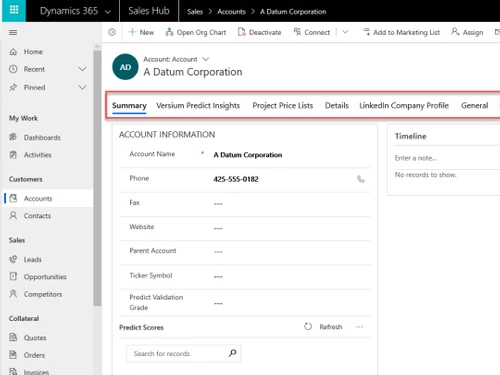
Dynamics 365 is a combination of Customer Relationship Management (CRM) and Enterprise Resource Planning (ERP).
To enable features exclusively for particular settings or users, use Microsoft Dynamics 365 feature flags (preview features, flighting).
Make security roles that only allow the pilot group to access the pilot features.
Use environment-level controls (pilot or sandbox) to keep changes away from users in production.
Before a broader rollout, audit usage using admin and telemetry logs to verify behavior.
0 0
AI in Dynamics 365 Supply Chain Management (SCM) supports businesses by boosting predictive analytics for demand, automating tasks like order processing, optimizing inventory with dynamic adjustments, enhancing supplier management with risk assessment, and providing intelligent insights via Copilot for faster decisions, leading to cost savings, reduced stockouts, and greater agility in responding to disruptions.
0 0
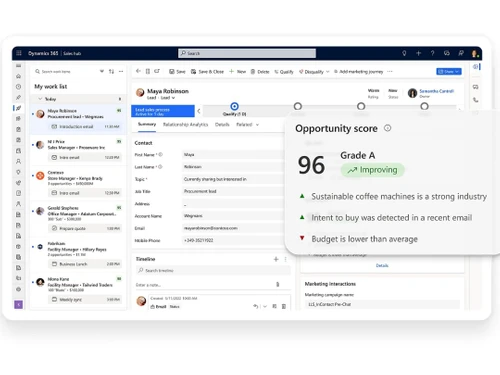
Microsoft Dynamics 365 helps in sales by offering a comprehensive set of tools that streamline and automate the sales process. Key features include:
0 0
The Field Service feature within Microsoft Dynamics 365 streamlines and enhances field operations to enhance service delivery. Important aspects comprise managing work orders, scheduling resources using AI technology, and overseeing inventory to guarantee technicians have the necessary equipment.
Field workers can access customer and equipment history on their mobile devices, increasing the likelihood of fixing issues on the first visit.
0 0
Microsoft Dynamics 365 for Finance and Operations is important because it includes the following features:
0 0
20,000+ Software Listed
Best Price Guranteed
Free Expert Consultation
2M+ Happy Customers
Terms and Condtions

Users with registered businesses can purchase goods from merchants on the platform to satisfy their business needs. Users are not permitted to utilize any products acquired through the platform for resale, advertising, business, or further distribution.
For each purchase made, users will receive a Tax Invoice (or 'GST invoice') that includes specific details such as:
the GSTIN of the user associated with their registered business, and
the specified Entity Name for their business.
It should be noted that not all products are eligible for GST Invoice. Only the products displayed by participating sellers with the 'GST-based Invoice Available' callout on the product description page would qualify.
Certain goods and services are not eligible to get a GST Invoice, including items with VAS, i.e., Value Added Services (e.g., Total Mobile Protection/Assured Buyback) and those involving an exchange offer at the time of purchase.
Users must ensure the accuracy of the GSTIN, and business entity name provided for the GST Invoice. Requests for corrections into GST Invoice would not be accommodated by Techjockey.com or any Seller, and any issues arising from user-provided information are the sole responsibility of users.
Techjockey.com is not liable for the GST Invoice or any associated input tax credit. To efficiently claim an input tax credit, users should select the registered place of business address as per the GST authority's data and follow the provisions of the GST Act and rules.
To claim an input tax credit, the delivery and billing addresses must match. Furthermore, input tax credits will not be granted if the delivery address and GSTIN on the invoice are from different states. In case of incorrect GST details provided during the order placement, the order will be canceled automatically.