 USA
USA UAE
UAESmall Business
Designed for startups and growing businesses
See More


Brand: KeePass
KeePass locks your digital secrets behind strong local encryption. Control forever stays firmly in your hands.
See MoreHave you used KeePass before?
Share your insights for better experience
Brand: KeePass
Founded Year: 2003
KeePass is a free open source password manager that allows its users to manage their passwords in a secure way.
This Product is Available Free Forever.
Start instantly with no fees, no subscriptions, and no commitments.
Free Forever Plan
Get started immediately at no cost. Upgrade anytime if your business demand more.
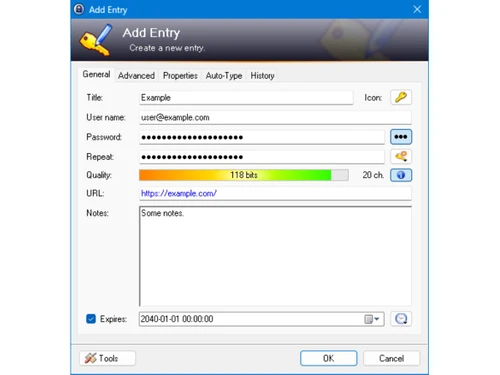
Free Forever Password Database Encryption Password Protection Key File Authentication Two-Factor Composite Keys Auto-Type Functionality Password Generator Cross-Platform Compatibility Portable Application Mode Secure Clipboard Handling Plugin Architecture Support Entry Expiration Management Hierarchical Process Organization Database Management Integrated Search Function Multiple User Keys Support Encrypted Backup System Transparency
  Windows
  MacOS
MacOS  Linux
Linux  Desktop
  Perpetual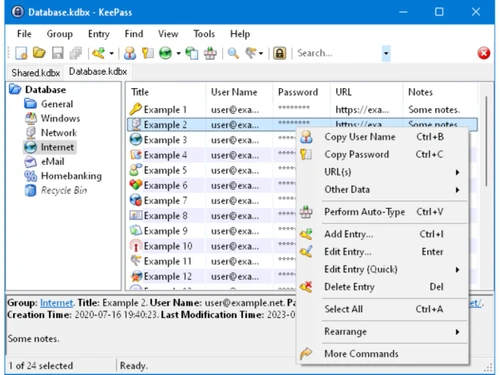
Small Business
Designed for startups and growing businesses
Medium Business
Built for business growth and flexibility
Enterprises
Designed for complex and large-scale business needs
4.1
Out of 5

Overall Rating
Based on
3 Verified Ratings
Rating Breakdown
80% Recommend this Product
Add ReviewTechjockey Trusted Reviews from Verified Users
No reviews are currently available for KeePass. Discover similar Password Management Software reviews

ElcomSoft Password Recovery Bundle
Whats great - I've utilized many programming in an eager exertion to beast power a secret phrase out of a solitary PDF. Up until this point... read more

Zoho Vault
Whats great - Two-factor confirmation accessible. Available from any program, any stage. Licenses sharing and exchanging of logins between ... read more

MailsDaddy PST Password Remover
Whats great - MailsDaddy PST Password Remover offers a fast and reliable password recovery process without compromising PST data integrity.... read more

KeePass
FREE
Desktop
Mobile
Web based
On Premises
Windows
Mac OS
ElcomSoft Password Recovery Bundle
Price On Request
Desktop
Mobile
Web based
On Premises
Windows
Mac OS

LastPass
Price On Request
Desktop
Mobile
Web based
On Premises
Windows
Mac OS

bitwarden
Price On Request
Desktop
Mobile
Web based
On Premises
Windows
Mac OS
Zoho Vault
₹ 60
Desktop
Mobile
Web based
On Premises
Windows
Mac OS

LogmeOnce
Price On Request
Desktop
Mobile
Web based
On Premises
Windows
Mac OS

Royal Passwords
₹ 4301
Desktop
Mobile
Web based
On Premises
Windows
Mac OS

Iolo ByePass
₹ 1450
Desktop
Mobile
Web based
On Premises
Windows
Mac OS
MailsDaddy PST Password Remover
Price On Request
Desktop
Mobile
Web based
On Premises
Windows
Mac OS
NordPass
Price On Request
Desktop
Mobile
Web based
On Premises
Windows
Mac OS

Shoviv Outlook Password Recovery
Price On Request
Desktop
Mobile
Web based
On Premises
Windows
Mac OS
(0) Product(s) selected
Starting Price:
₹4,301 /License
Starting Price:
$29 /License

Starting Price:
$20 /year

Starting Price:
$60 /Year

Starting Price:
$3 /Month

Starting Price:
$39 /License
KeePass password management software is available with a free pricing option at techjockey.com. The final price may, however, depend on usage needs, deployment type, and additional requirements.
KeePass Password Management Software can be used by individuals, professionals, and small teams. It suits any user who prefers strong local control over password storage.
There is no single official KeePass mobile app. That said, some trusted open-source apps support KeePass databases on Android and iOS.
KeePass Password Management Software works on Windows, macOS, and Linux systems. This allows smooth usage across common desktop environments.
Yes, KeePass software is available as a free option. Anyone can start using the platform without any trial limitations.
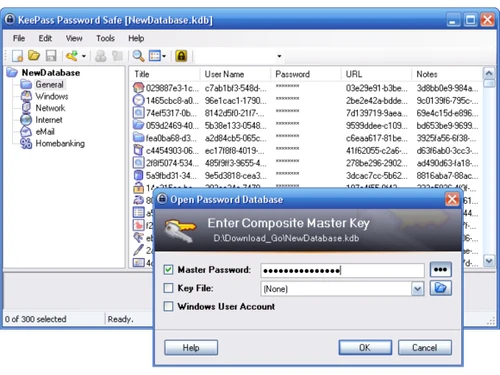
KeePass stores passwords in a locally saved, encrypted database file. Access is protected using a master password or key file.
20,000+ Software Listed
Best Price Guranteed
Free Expert Consultation
2M+ Happy Customers
Terms and Condtions

Users with registered businesses can purchase goods from merchants on the platform to satisfy their business needs. Users are not permitted to utilize any products acquired through the platform for resale, advertising, business, or further distribution.
For each purchase made, users will receive a Tax Invoice (or 'GST invoice') that includes specific details such as:
the GSTIN of the user associated with their registered business, and
the specified Entity Name for their business.
It should be noted that not all products are eligible for GST Invoice. Only the products displayed by participating sellers with the 'GST-based Invoice Available' callout on the product description page would qualify.
Certain goods and services are not eligible to get a GST Invoice, including items with VAS, i.e., Value Added Services (e.g., Total Mobile Protection/Assured Buyback) and those involving an exchange offer at the time of purchase.
Users must ensure the accuracy of the GSTIN, and business entity name provided for the GST Invoice. Requests for corrections into GST Invoice would not be accommodated by Techjockey.com or any Seller, and any issues arising from user-provided information are the sole responsibility of users.
Techjockey.com is not liable for the GST Invoice or any associated input tax credit. To efficiently claim an input tax credit, users should select the registered place of business address as per the GST authority's data and follow the provisions of the GST Act and rules.
To claim an input tax credit, the delivery and billing addresses must match. Furthermore, input tax credits will not be granted if the delivery address and GSTIN on the invoice are from different states. In case of incorrect GST details provided during the order placement, the order will be canceled automatically.


