USA
USA UAE
UAESmall Business
Designed for startups and growing businesses
See More




Brand: YUBICO
YubiKey is a hardware security key developed by Yubico, designed to provide strong two-factor authentication for individuals and organizations.
See MoreHave you used Yubico Yubikeys before?
Share your insights for better experience
Brand: YUBICO
Founded Year: 2007
Yubico (Nasdaq First North Growth Market Stockholm: YUBICO), the inventor of the YubiKey, offers the gold standard for phishing-resistant multi-factor authentication (MFA), stopping account takeovers in their tracks and making secure login easy and available for everyone.
Looking for The Right Pricing?
Share your requirements and get a plan built around your business.
Price Available on Request
Get personalised Yubico Yubikeys pricing that fits your needs. Our team will connect with you.
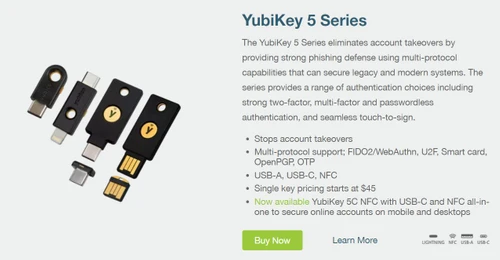
 Easy to Use Stops Account Takeovers Multi-Protocol Support USB-A, USB-C, NFC Suitable for Government & Regulated Industries Reduces IT Operational Costs Waterproof and Crush Resistant

Watch the demo video to explore key features, real workflows, and how the software fits your business needs.
 Ubuntu
  Windows
  MacOS
MacOS  Linux
Linux  Desktop
  Cloud-Based
Small Business
Designed for startups and growing businesses
Medium Business
Built for business growth and flexibility
Enterprises
Designed for complex and large-scale business needs
4.3
Out of 5

Overall Rating
Based on
5 Verified Ratings
Rating Breakdown
94% Recommend this Product
Add ReviewTechjockey Trusted Reviews from Verified Users
No reviews are currently available for Yubico Yubikeys. Discover similar Password Management Software reviews

ElcomSoft Password Recovery Bundle
Whats great - I've utilized many programming in an eager exertion to beast power a secret phrase out of a solitary PDF. Up until this point... read more

Zoho Vault
Whats great - Two-factor confirmation accessible. Available from any program, any stage. Licenses sharing and exchanging of logins between ... read more

MailsDaddy PST Password Remover
Whats great - MailsDaddy PST Password Remover offers a fast and reliable password recovery process without compromising PST data integrity.... read more

Yubico Yubikeys
Price On Request
Desktop
Mobile
Web based
On Premises
Windows
Mac OS
ElcomSoft Password Recovery Bundle
Price On Request
Desktop
Mobile
Web based
On Premises
Windows
Mac OS

KeePass
Price On Request
Desktop
Mobile
Web based
On Premises
Windows
Mac OS

LastPass
Price On Request
Desktop
Mobile
Web based
On Premises
Windows
Mac OS

bitwarden
Price On Request
Desktop
Mobile
Web based
On Premises
Windows
Mac OS
Zoho Vault
₹ 60
Desktop
Mobile
Web based
On Premises
Windows
Mac OS

LogmeOnce
Price On Request
Desktop
Mobile
Web based
On Premises
Windows
Mac OS

Royal Passwords
₹ 4301
Desktop
Mobile
Web based
On Premises
Windows
Mac OS

Iolo ByePass
₹ 1450
Desktop
Mobile
Web based
On Premises
Windows
Mac OS
MailsDaddy PST Password Remover
Price On Request
Desktop
Mobile
Web based
On Premises
Windows
Mac OS

Shoviv Outlook Password Recovery
Price On Request
Desktop
Mobile
Web based
On Premises
Windows
Mac OS
(0) Product(s) selected
Available
Price on Request
Starting Price:
$29 /License

Starting Price:
$20 /year

Starting Price:
$60 /Year

Starting Price:
$3 /Month

Starting Price:
$39 /License
YubiKey is used for two-factor authentication, adding an extra layer of security to online accounts by requiring physical possession of the key during login.
YubiKey works by generating a unique code when plugged into a USB port or tapped on an NFC-enabled device, which is then used to verify the user's identity.
YubiKey supports USB-A, USB-C, and NFC, making it compatible with a wide range of devices, including computers and smartphones.
Yes, a single YubiKey can be configured to secure multiple accounts across different platforms and services.
If you lose your YubiKey, it's important to have backup authentication methods in place. Many services allow you to register multiple keys or use alternative verification methods.
Absolutely, YubiKey is beneficial for both personal and professional use, enhancing security for individual users and organizations alike.
Setting up a YubiKey typically involves registering it with each service you wish to secure, following the specific instructions provided by those services.
In most cases, YubiKey does not require additional software installation, as it functions as a standard USB or NFC device.
Yes, many password managers support YubiKey for enhanced security during the login process.
Yes, YubiKey is designed to be waterproof and crush-resistant, ensuring it remains functional in various conditions.
The pricing of YubiKey is available on a call request to Techjockey.com. You can contact them for more information related to the software.
YubiKey software is used by individuals, businesses, and government organizations that require strong authentication for secure logins.
20,000+ Software Listed
Best Price Guranteed
Free Expert Consultation
2M+ Happy Customers
Terms and Condtions

Users with registered businesses can purchase goods from merchants on the platform to satisfy their business needs. Users are not permitted to utilize any products acquired through the platform for resale, advertising, business, or further distribution.
For each purchase made, users will receive a Tax Invoice (or 'GST invoice') that includes specific details such as:
the GSTIN of the user associated with their registered business, and
the specified Entity Name for their business.
It should be noted that not all products are eligible for GST Invoice. Only the products displayed by participating sellers with the 'GST-based Invoice Available' callout on the product description page would qualify.
Certain goods and services are not eligible to get a GST Invoice, including items with VAS, i.e., Value Added Services (e.g., Total Mobile Protection/Assured Buyback) and those involving an exchange offer at the time of purchase.
Users must ensure the accuracy of the GSTIN, and business entity name provided for the GST Invoice. Requests for corrections into GST Invoice would not be accommodated by Techjockey.com or any Seller, and any issues arising from user-provided information are the sole responsibility of users.
Techjockey.com is not liable for the GST Invoice or any associated input tax credit. To efficiently claim an input tax credit, users should select the registered place of business address as per the GST authority's data and follow the provisions of the GST Act and rules.
To claim an input tax credit, the delivery and billing addresses must match. Furthermore, input tax credits will not be granted if the delivery address and GSTIN on the invoice are from different states. In case of incorrect GST details provided during the order placement, the order will be canceled automatically.