linkedin
bitwarden logo
play  Up next 10:32 2023 Bitwarden Roadmap Bitwarden CANCELPLAY NOW 1:55 / 1:55 Bitwarden Send: Protected One-to-One Information Sharing
bitwarden-attachments
bitwarden-password

bitwarden

Brand: Bitwarden

  • 4.4

  • 8 Ratings & 3 Reviews

Bitwarden is a reliable, open-source password manager that helps individuals and businesses securely manage their passwords. With its focus on privacy and security, Bitwarden offers features like encrypted password storage, password protection, and strong two-factor authentication (2FA). This passwo...

See More

Have you used bitwarden before?

Share your insights for better experience

Add a Review
Starting Price
$3

View plans

100% Genuine
Products
Best Price
Guaranteed
Safe & Secure
Payment
  • Description

  • Pricing

  • Features

  • Specification

  • Review

  • Compare

  • Alternatives

  • FAQ

Starting at $3

bitwarden Software Overview

What is Bitwarden?

Bitwarden is a powerful password management software designed to help individuals and businesses store, manage, and protect passwords and sensitive information. As a reliable business software, it also supports Identity Access Management Software features, ensuring that only authorized users can access data. Bitwarden works by securely storing encrypted passwords in a digital vault, which is accessible only to the user. Bitwarden uses end-to-end encryption, ensuring that no one, not even the service provider, can access the stored data without the user’s master password.

Unlike traditional password managers, Bitwarden is open-source, meaning its code is available for review by anyone, which adds an extra layer of trust and transparency. It offers various features to help secure personal and business data, such as password protection, secure document storage, and identity management. Its robust two-factor authentication adds an extra layer of security by requiring an additional login method, making it harder for unauthorized users to gain access.

Bitwarden is also designed to be convenient for users, offering third-party integrations with multiple applications and platforms. This allows users to access their password vault seamlessly across different devices and browsers.

Why Choose Bitwarden Password Management Software?

  • CyberSecurity: Bitwarden focuses on providing top-notch security features, ensuring your passwords and sensitive data remain protected against cyber threats.
  • Password Protection: It offers strong password protection with its encrypted password vault, safeguarding your accounts from unauthorized access.
  • Privacy: Bitwarden ensures that your data remains private, using end-to-end encryption so that only you can access it.
  • Strong Two-Factor Authentication: With 2FA, Bitwarden adds an extra layer of security, making it harder for unauthorized users to access your accounts.
  • Convenience: Bitwarden is easy to use, offering features like auto-fill passwords and integration across multiple devices for a seamless user experience.

Benefits of Bitwarden

  • Secure Password Management: Bitwarden offers secure password storage that’s encrypted, ensuring your sensitive information is safe.
  • Affordable: Bitwarden is an open-source and cost-effective solution for individuals and businesses seeking a reliable password manager.
  • Cross-Platform Access: You can access your vault on multiple platforms, including web browsers, mobile devices, and desktop apps, ensuring flexibility and convenience.
  • Enhanced Privacy: The platform prioritizes user privacy, ensuring that no one other than you can access your stored passwords or data.
  • Easy Integration: Bitwarden integrates with third-party applications to make password management simpler and more accessible.
  • Business-Focused: For companies, Bitwarden offers enterprise-grade features, including identity management, access control, and secure document storage.
  • Two-Factor Authentication: The addition of 2FA provides additional protection, ensuring that only authorized users can access your vault.
  • User-Friendly Interface: Despite its advanced security features, Bitwarden is easy to navigate, even for users with little technical knowledge.
  • Regular Updates: The platform is consistently updated with new features and security patches, ensuring it stays ahead of emerging cyber threats.
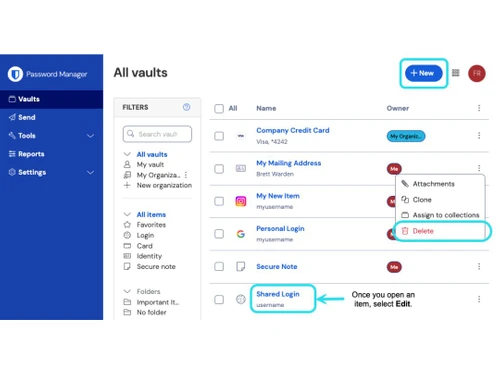
  • Secure Sharing: Bitwarden allows users to securely share passwords and sensitive information with trusted individuals without compromising security.

Pricing of Bitwarden

Bitwarden price starts at $3 at techjockey.com.

The pricing model is based on different parameters, including extra features, deployment type, and the total number of users. For further queries related to the product, you can contact our product team and learn more about the pricing and offers.

Read more

Bitwarden Company Details

Founded Year:  2015

Bitwarden is an open-source password management solution for individuals, teams, and business organizations. It enables users to store, share, and sync sensitive data.

Director/Founders Kyle Spearrin
Company Size 101-500 Employees

bitwarden Pricing & Plans

Premium
Starting at $10
    • Licenses

      Licenses
      Licenses
    • Yearly

      Yearly
      Yearly

Key Features

  • Bitwarden Authenticator

  • File attachments

  • Emergency access

  • Security reports and more

Families-[Billed annually]
Starting at $3
    • Users

      Users
      Users
    • Monthly

      Monthly
      Monthly

Key Features

  • 6 premium accounts

  • Unlimited sharing

  • Unlimited collections

  • Organization storage

bitwarden Features

  • icon_check CyberSecurity
    Bitwarden ensures strong cybersecurity with end-to-end encryption, protecting sensitive data and reducing hacking risks.
  • icon_check Password Protection
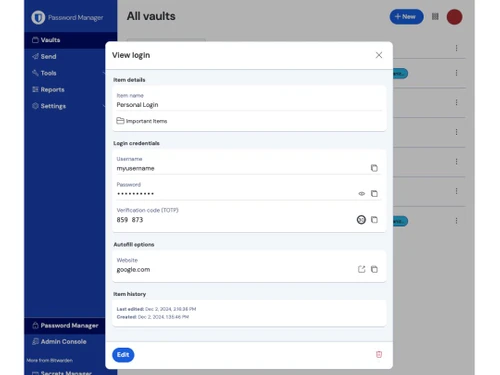
    With strong password protection features, Bitwarden ensures that all your login credentials are safely stored and encrypted.
  • icon_check Privacy
    Bitwarden ensures privacy by using advanced encryption techniques, which protect your data from unauthorized access.
  • icon_check Secure Document Storage
    Bitwarden offers secure document storage, allowing you to store sensitive files safely in your password vault.
  • icon_check Strong Two Factor Authentication
    Two-factor authentication (2FA) adds another layer of protection with your master password and secondary verification step.
  • icon_check Convenience
    Bitwarden offers a user-friendly interface and cross-platform support, making password management convenient and simple.
  • icon_check Identity Management
    Bitwarden helps businesses with identity management, ensuring that only authorized users have access to specific information.
  • icon_check Access Control
    Bitwarden allows businesses to control who has access to sensitive data with flexible permissions and roles.
  • icon_check Third Party Integration
    Bitwarden integrates with third-party tools, letting users manage passwords and sensitive data in a unified environment.
bitwarden Demo Video play icon

Get bitwarden Demo

Watch the demo video to explore key features, real workflows, and how the software fits your business needs.

Understand
Key Features
Personal
Demo Insights
Interactive
Demo Support

bitwarden Specifications

Supported Platforms
Windows Windows iOS iOS Android Android MacOS MacOS Linux Linux
Devices
Desktop Desktop Mobile Mobile Tablet Tablet iPad iPad
Deployment
Cloud-Based Cloud-Based Perpetual Perpetual
Suitable For
All Industries
Business Specific
All Businesses
Business Size
Small Business Startups Medium Business Enterprises SMBs SMEs MSMBs MSMEs
Customer Support
Email
Language
English
Integration
API Integration
Compliance Regulation
HIPAA GDPR

Explore the Best Alternative Solutions Similar to Your Business Size and Needs

bitwarden Reviews

4.4

Out of 5

img

Overall Rating

Based on
3 Verified Reviews

Rating Breakdown

  • Features 4.1
  • Value for Money 4.5
  • Ease of Use 4.5
  • Customer Support 4.5

93% Recommend this Product

Add Review

bitwarden Video Reviews

youtubeVideoId

4.8

“Bitwarden Review 2024 Is it Actually Secure”

Review by: Cyber Lab

youtubeVideoId

4.5

“Bitwarden Review 2023 Free Unlimited Password Storage”

Review by: Safety Detectives

youtubeVideoId

4.5

“Review Bitwarden For Secure Password Management for MSPs IT Providers”

Review by: Lawrence Systems

Compare bitwarden With other Password Management Software

Products
Ratings
Pricing
Device Supported
Deployment
Supported Platforms
  • img

    bitwarden

  • 4.4

  • Price On Request

  • Desktop

    Mobile

  • Web based

    On Premises

  • Windows

    Mac OS

  • img

    KeePass

  • 4.1

  • Price On Request

  • Desktop

    Mobile

  • Web based

    On Premises

  • Windows

    Mac OS

  • img

    LastPass

  • 4.4

  • Price On Request

  • Desktop

    Mobile

  • Web based

    On Premises

  • Windows

    Mac OS

  • img

    Zoho Vault

  • 4.4

  • ₹ 60

  • Desktop

    Mobile

  • Web based

    On Premises

  • Windows

    Mac OS

  • img

    LogmeOnce

  • 4.1

  • Price On Request

  • Desktop

    Mobile

  • Web based

    On Premises

  • Windows

    Mac OS

  • img

    Royal Passwords

  • 4.6

  • ₹ 4301

  • Desktop

    Mobile

  • Web based

    On Premises

  • Windows

    Mac OS

  • img

    Iolo ByePass

  • 4.3

  • ₹ 1450

  • Desktop

    Mobile

  • Web based

    On Premises

  • Windows

    Mac OS

  • img

    NordPass

  • Price On Request

  • Desktop

    Mobile

  • Web based

    On Premises

  • Windows

    Mac OS

(0) Product(s) selected

bitwarden Alternatives

See All bitwarden Alternatives

Available

Price on Request

Starting Price:

$20 /year

Starting Price:

$60 /Year

Starting Price:

$3 /Month

What is Bitwarden?

Bitwarden is a password manager that helps you securely store and manage your passwords and sensitive information, with end-to-end encryption and additional security features like two-factor authentication.

How does Bitwarden protect my passwords?

Bitwarden uses strong encryption to protect your passwords, ensuring they are safe and only accessible by you with your master password.

Is Bitwarden free to use?

Yes, Bitwarden offers a free version with essential features. Paid plans provide additional features such as secure file storage, advanced reporting, and more.

Can I use Bitwarden on multiple devices?

Yes, Bitwarden supports multiple devices, including web browsers, mobile phones, and desktop computers, allowing you to access your vault anywhere.

Does Bitwarden support two-factor authentication (2FA)?

Yes, Bitwarden supports 2FA to add an extra layer of security when accessing your vault, ensuring your data remains protected.

Is Bitwarden safe for businesses?

Yes, Bitwarden offers enterprise-level features such as access control, identity management, and secure document storage, making it a great choice for businesses.

How does Bitwarden ensure my privacy?

Bitwarden ensures privacy through end-to-end encryption, meaning that only you can access your stored passwords and data.

Can I securely share passwords using Bitwarden?

Yes, Bitwarden allows you to securely share passwords with trusted individuals without compromising the security of your accounts.

What is the pricing for Bitwarden?

Bitwarden offers both free and premium plans, with the premium version offering additional features like secure file storage, advanced 2FA, and priority support. Pricing information is available on request.

How does Bitwarden integrate with third-party applications?

Bitwarden seamlessly integrates with several third-party tools and services, helping you manage passwords and other sensitive data in one place.

20,000+ Software Listed

Best Price Guranteed

Free Expert Consultation

2M+ Happy Customers

Terms and Condtions

close

Users with registered businesses can purchase goods from merchants on the platform to satisfy their business needs. Users are not permitted to utilize any products acquired through the platform for resale, advertising, business, or further distribution.

For each purchase made, users will receive a Tax Invoice (or 'GST invoice') that includes specific details such as:

  • the GSTIN of the user associated with their registered business, and

  • the specified Entity Name for their business.

It should be noted that not all products are eligible for GST Invoice. Only the products displayed by participating sellers with the 'GST-based Invoice Available' callout on the product description page would qualify.

Certain goods and services are not eligible to get a GST Invoice, including items with VAS, i.e., Value Added Services (e.g., Total Mobile Protection/Assured Buyback) and those involving an exchange offer at the time of purchase.

Users must ensure the accuracy of the GSTIN, and business entity name provided for the GST Invoice. Requests for corrections into GST Invoice would not be accommodated by Techjockey.com or any Seller, and any issues arising from user-provided information are the sole responsibility of users.

Techjockey.com is not liable for the GST Invoice or any associated input tax credit. To efficiently claim an input tax credit, users should select the registered place of business address as per the GST authority's data and follow the provisions of the GST Act and rules.

To claim an input tax credit, the delivery and billing addresses must match. Furthermore, input tax credits will not be granted if the delivery address and GSTIN on the invoice are from different states. In case of incorrect GST details provided during the order placement, the order will be canceled automatically.