linkedin
Kommunicate logo
play Introducing Flow Designer | Kommunicate
kommunicate dashboard
kommunicate chats

Kommunicate

Brand: Kommunicate

  • 4.3

  • 5 Ratings

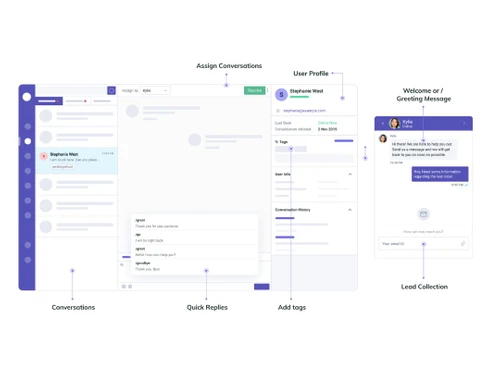
Kommunicate allows businesses to enhance their customer communication through live chat, chatbots, and AI-powered tools.

See More

Have you used Kommunicate before?

Share your insights for better experience

Add a Review
Starting Price
$40

View plans

100% Genuine
Products
Best Price
Guaranteed
Safe & Secure
Payment
  • Description

  • Pricing

  • Features

  • Specification

  • Review

  • Compare

  • Alternatives

  • FAQ

Starting at $40

KommunicateSoftware Overview

What is Kommunicate?

As a leading business software, it combines live chat with AI-powered chatbots, making it easier for companies to handle customer queries efficiently. Additionally, Kommunicate serves as an essential chatbot software and marketing tool, making it a popular choice among businesses for its user-friendly interface and comprehensive features that cater to various customer service needs. Kommunicate is a customer support software designed to help businesses improve their customer communication.

With Kommunicate, businesses can offer prompt responses to customer queries, automate routine tasks, and gather valuable customer insights. It’s particularly beneficial for companies looking to streamline their customer support operations and enhance customer satisfaction without incurring high costs.

Why Choose Kommunicate Chatbot Software?

  • Ease of Use: Kommunicate's intuitive interface makes it easy for businesses to set up and manage their customer support processes.
  • Efficient Automation: The platform supports AI-powered chatbots, which can handle repetitive tasks, freeing up human agents for more complex issues.
  • Seamless Integration: Kommunicate can be integrated with various other business tools, providing a unified customer support experience.
  • Scalable Solutions: Whether you are a small business or a large enterprise, Kommunicate offers scalable solutions to meet your growing customer support needs.
  • Cost-Effective: It provides a cost-effective way to manage customer interactions, reducing the need for extensive human resources.

Benefits of Kommunicate Charbot Software

  • Improved Customer Engagement: By integrating live chat and chatbots, Kommunicate helps businesses engage with customers in real-time, providing immediate responses and solutions.
  • 24/7 Support: The AI chatbots can operate around the clock, ensuring customers receive support anytime, anywhere.
  • Enhanced Customer Satisfaction: Quick and efficient customer service leads to higher customer satisfaction and loyalty.
  • Increased Efficiency: Automating routine queries allows support teams to focus on more critical issues, improving overall efficiency.
  • Data-Driven Insights: Kommunicate provides detailed analytics and reports, helping businesses understand customer behavior and improve their services.
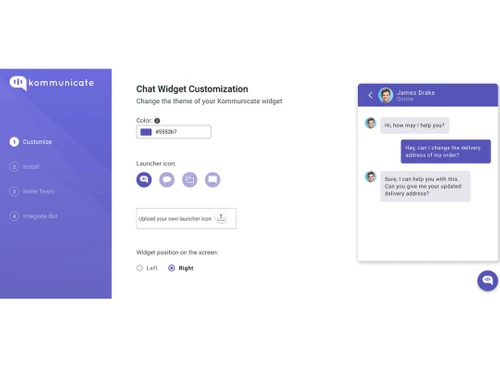
  • Customization: Businesses can customize chatbots and live chat settings to align with their specific needs and branding.
  • Seamless User Experience: The platform ensures a smooth and seamless experience for both the customer and the support team.

Pricing of Kommunicate Chatbot Software

Kommunicate price is $ 40 at techjockey.com.

The pricing model depends on different parameters, including extra features, deployment type, and the total number of users. For further queries related to the product, you can contact the TechJockey product team and learn more about the pricing and offers.

Read more

Kommunicate Company Details

Founded Year:  2020

Kommunicate

Director/Founders Adarsh Kumar, Devashish Mamgain
Company Size 1-100 Employees

Kommunicate Pricing & Plans

Starter
Starting at $40
    • Licenses

      Licenses
      Licenses
    • Monthly

      Monthly
      Monthly

Key Features

  • 1 AI agent and 1 team member

  • 250 conversations/month (~10K messages)

  • AI Email Automation

  • 3-month chat history

  • Additional team member or AI agent: $20/month

  • Additional conversations: $15/1,000 conversations

Professional
Starting at $200
    • Licenses

      Licenses
      Licenses
    • Monthly

      Monthly
      Monthly

Key Features

  • Everything in Starter, plus

  • 2 AI agents and 3 team members

  • Voice AI agent

  • 1-year chat history

  • Additional team member or AI agent: $30/month

  • Additional conversations: $10/1,000 conversations

  • AI Summary, Auto-resolve tickets, Agent Assist

  • Campaign Messaging

  • API & Webhooks access

Kommunicate Features

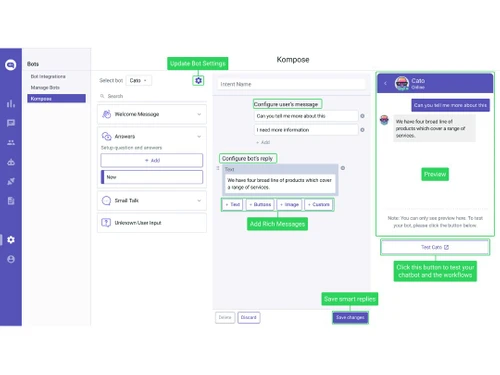
  • icon_check Codeless Bot Integration
    Integrate chatbots without coding, making it accessible for non-technical users to manage bots.
  • icon_check Lead Collection
    Automatically gather and manage customer leads through chat interactions, enhancing your sales funnel.
  • icon_check Push Notifications
    Send instant notifications to keep customers informed about their queries and other updates.
  • icon_check Conversation Transcripts
    Store and review chat transcripts for quality assurance and training purposes.
  • icon_check CSAT Ratings
    Collect customer satisfaction ratings to measure and improve service quality.
  • icon_check No-code FAQ Page
    Create and manage an FAQ page without coding, offering quick answers to common questions.
  • icon_check Reporting Dashboard
    Access a comprehensive dashboard that provides insights into your customer support performance.
  • icon_check Bot Analytics
    Track and analyze the performance of your chatbots to optimize their efficiency.
  • icon_check Downloadable Reports
    Generate and download detailed reports on customer interactions and support activities.
  • icon_check Hybrid SDKs
    Utilize hybrid SDKs to integrate Kommunicate with various platforms and enhance its functionality.
Kommunicate Demo Video play icon

Get Kommunicate Demo

Watch the demo video to explore key features, real workflows, and how the software fits your business needs.

Understand
Key Features
Personal
Demo Insights
Interactive
Demo Support

Kommunicate Specification

Supported Platforms
Ubuntu Ubuntu Windows Windows MacOS MacOS Linux Linux
Devices
Desktop Desktop Mobile Mobile Tablet Tablet iPad iPad
Deployment
Web-Based Web-Based
Suitable For
All Industries
Business Specific
All Businesses
Business Size
Small Business Startups Medium Business Enterprises
Customer Support
Email Live Chat Communities
Language
عربى English français Deutsche हिन्दी Italiano Português Español svenska اُردُو‬
Integration
API Integration
Training Resources
Videos
AI Features
AI Integrated

Explore the Best Alternative Solutions Similar to Your Business Size and Needs

Kommunicate Review

4.3

Out of 5

img

Overall Rating

Based on
5 Verified Ratings

Rating Breakdown

  • Features 4.4
  • Value for Money 4.2
  • Ease of Use 4.6
  • Customer Support 4

84% Recommend this Product

Add Review

Techjockey Trusted Reviews from Verified Users

No reviews are currently available for Kommunicate. Discover similar Chatbot Software reviews

  • Engati

    4.8

    Whats great - Interface Easy to use 14 deployment channels read more

  • TailorTalk

    5.0

    Whats great - Put all your Routine stuff on auto mode read more

  • REVE Chat

    4.9

    Whats great - It boosts my business by improving customer experience. It allows businesses to communicate with their customers in real-time... read more

Compare Kommunicate With other Chatbot Software

Products
Ratings
Pricing
Device Supported
Deployment
Supported Platforms
  • img

    Kommunicate

  • 4.3

  • Price On Request

  • Desktop

    Mobile

  • Web based

    On Premises

  • Windows

    Mac OS

  • img

    CometChat Pro

  • 4.5

  • Price On Request

  • Desktop

    Mobile

  • Web based

    On Premises

  • Windows

    Mac OS

  • img

    JioEVA

  • 4.4

  • ₹ 500000

  • Desktop

    Mobile

  • Web based

    On Premises

  • Windows

    Mac OS

  • img

    BotPenguin

  • 4.9

  • ₹ 2000

  • Desktop

    Mobile

  • Web based

    On Premises

  • Windows

    Mac OS

  • img

    ManyChat

  • 4.6

  • Price On Request

  • Desktop

    Mobile

  • Web based

    On Premises

  • Windows

    Mac OS

  • img

    TailorTalk

  • 4.9

  • ₹ 7999

  • Desktop

    Mobile

  • Web based

    On Premises

  • Windows

    Mac OS

  • img

    Vajra ai Chatbot

  • 5

  • ₹ 999

  • Desktop

    Mobile

  • Web based

    On Premises

  • Windows

    Mac OS

  • img

    REVE Chat

  • 4.8

  • Price On Request

  • Desktop

    Mobile

  • Web based

    On Premises

  • Windows

    Mac OS

  • img

    BotStar

  • 4.1

  • Price On Request

  • Desktop

    Mobile

  • Web based

    On Premises

  • Windows

    Mac OS

  • img

    Quora Poe

  • 4.2

  • Price On Request

  • Desktop

    Mobile

  • Web based

    On Premises

  • Windows

    Mac OS

(2) Product(s) selected

Kommunicate Alternatives

See All Kommunicate Alternatives

Starting Price:

$15 /month

Starting Price:

₹809 /month

Starting Price:

$29 /Month

Available

Price on Request

Starting Price:

₹7,000 /Month
Pi

4.3

Available

Price on Request

Available

Price on Request

Articles for Kommunicate

See All Related Articles

What is Kommunicate used for?

Kommunicate is used for enhancing customer support and engagement through live chat, chatbots, and AI-powered tools.

How does Kommunicate integrate with other tools?

Kommunicate can be easily integrated with various business tools, providing a seamless customer support experience.

Is Kommunicate suitable for small businesses?

Yes, Kommunicate is scalable and can be tailored to meet the needs of both small businesses and large enterprises.

Does Kommunicate require coding skills?

No, Kommunicate offers codeless bot integration and no-code FAQ pages, making it accessible for non-technical users.

Can Kommunicate operate 24/7?

Yes, with AI-powered chatbots, Kommunicate can provide 24/7 customer support.

How can I measure customer satisfaction with Kommunicate?

Kommunicate includes CSAT ratings, allowing you to collect and analyze customer satisfaction feedback.

Are there analytics available in Kommunicate?

Yes, Kommunicate provides detailed bot analytics and reporting dashboards for performance tracking.

What types of reports can I generate in Kommunicate?

You can generate and download various reports on customer interactions and support activities.

Is Kommunicate cost-effective?

Yes, Kommunicate offers a cost-effective solution for managing customer support without needing extensive human resources.

Can Kommunicate handle lead collection?

Yes, Kommunicate includes lead collection features, helping you manage and optimize your sales funnel.

20,000+ Software Listed

Best Price Guranteed

Free Expert Consultation

2M+ Happy Customers

Terms and Condtions

close

Users with registered businesses can purchase goods from merchants on the platform to satisfy their business needs. Users are not permitted to utilize any products acquired through the platform for resale, advertising, business, or further distribution.

For each purchase made, users will receive a Tax Invoice (or 'GST invoice') that includes specific details such as:

  • the GSTIN of the user associated with their registered business, and

  • the specified Entity Name for their business.

It should be noted that not all products are eligible for GST Invoice. Only the products displayed by participating sellers with the 'GST-based Invoice Available' callout on the product description page would qualify.

Certain goods and services are not eligible to get a GST Invoice, including items with VAS, i.e., Value Added Services (e.g., Total Mobile Protection/Assured Buyback) and those involving an exchange offer at the time of purchase.

Users must ensure the accuracy of the GSTIN, and business entity name provided for the GST Invoice. Requests for corrections into GST Invoice would not be accommodated by Techjockey.com or any Seller, and any issues arising from user-provided information are the sole responsibility of users.

Techjockey.com is not liable for the GST Invoice or any associated input tax credit. To efficiently claim an input tax credit, users should select the registered place of business address as per the GST authority's data and follow the provisions of the GST Act and rules.

To claim an input tax credit, the delivery and billing addresses must match. Furthermore, input tax credits will not be granted if the delivery address and GSTIN on the invoice are from different states. In case of incorrect GST details provided during the order placement, the order will be canceled automatically.