USA
USA UAE
UAESmall Business
Designed for startups and growing businesses

See More




Brand: Lyfo
Lyfo streamlines scheduling, billing, and member management with all-in-one gym software featuring an AI chatbot to automate tasks and support business growth.
See MoreHave you used Lyfo before?
Share your insights for better experience
Brand: Lyfo
Founded Year: 2017
Provider of cloud-based gym management software fitness centers
 Membership Management Billing & Invoicing Biometric Staff Management Alerts Analytics & Reporting Mobile App Multi Branch Diet Plan Management Refund Management Inventory Management Training Management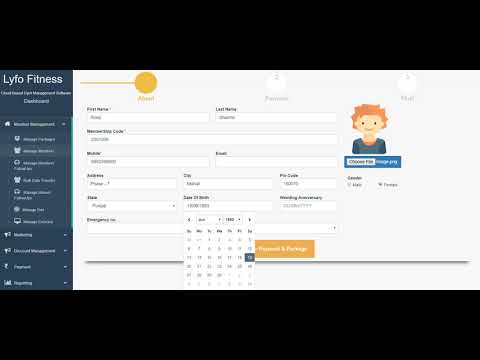

Watch the demo video to explore key features, real workflows, and how the software fits your business needs.
 Windows
  Android
  Desktop
  Mobile
  Cloud-Based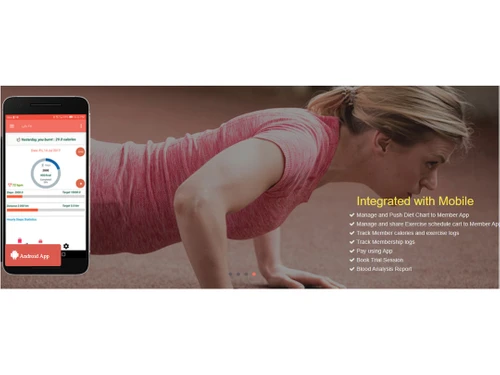

Small Business
Designed for startups and growing businesses
Medium Business
Built for business growth and flexibility
Enterprises
Designed for complex and large-scale business needs
5
Out of 5

Overall Rating
Based on
1 Verified Review
Rating Breakdown
100% Recommend this Product
Add Review
May 16, 2019
Techjockey Verified
“Easy to use software with powerful reporting”
Pros
Easy to use software for gym and powerful analytic reporting help to analyze revenue and gym performance
Cons
NO CONS

Lyfo
Price On Request
Desktop
Mobile
Web based
On Premises
Windows
Mac OS

YourDigitalLift
Price On Request
Desktop
Mobile
Web based
On Premises
Windows
Mac OS

Global Gym Software
₹ 5000
Desktop
Mobile
Web based
On Premises
Windows
Mac OS

Fitness NU
₹ 9999
Desktop
Mobile
Web based
On Premises
Windows
Mac OS

AdviceFit
₹ 8000
Desktop
Mobile
Web based
On Premises
Windows
Mac OS

Okfit Gym Software
₹ 500
Desktop
Mobile
Web based
On Premises
Windows
Mac OS

Traqade GYM & Club Management Software
Price On Request
Desktop
Mobile
Web based
On Premises
Windows
Mac OS

HealthRaja Gym Software
₹ 5000
Desktop
Mobile
Web based
On Premises
Windows
Mac OS

Gymex Gym & Club Management Software
Price On Request
Desktop
Mobile
Web based
On Premises
Windows
Mac OS

GymVale
₹ 3999
Desktop
Mobile
Web based
On Premises
Windows
Mac OS
MyGymDesk
₹ 999
Desktop
Mobile
Web based
On Premises
Windows
Mac OS
(0) Product(s) selected



No, Lyfo Gym Management App is not available for iPhone as of now. We will update if any changes are made.
Lyfo Gym Management software does not involve any installation fee. It has a plug n’ play feature that helps you get started in a short time.
No, your gym members will not be charged for accessing the app. It comes under your software purchase.
Yes, Lyfo prioritizes data security, and its on-premise based system works together with the firewall system of your PC for providing better security options.
No, there is no upper cap for the addition of members. The system is exceptionally scalable.
Lyfo is a next-generation gym and studio management software designed to simplify daily operations for staff and provide a seamless experience for members.
Lyfo price starts at USD 8,000 at techjockey.com.
Lyfo helps gym owners run and grow their business by managing key operations such as class scheduling, automated membership billing, door access control, and sales and marketing.
The main features of Lyfo include class and appointment scheduling, membership management, door access control, a branded members mobile app, sales and marketing tools, and an AI chatbot.
Lyfo is ideal for gyms, health clubs, fitness studios, CrossFit boxes, yoga and wellness studios, personal training businesses, and other member-based fitness facilities.
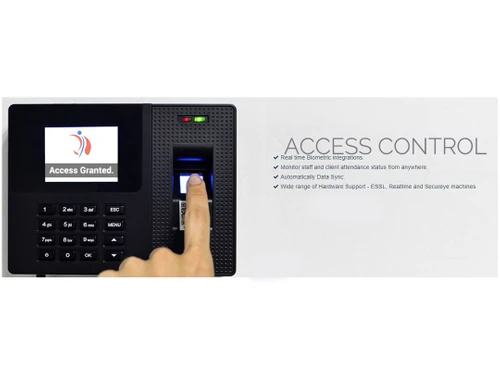
The door access control feature automatically grants or revokes gym access based on a member's current membership status and bookings, checking them in automatically upon arrival.
Yes, Lyfo provides a fully customizable mobile app that allows your members to register, purchase packages, book classes, manage their accounts, and access the gym.
20,000+ Software Listed
Best Price Guranteed
Free Expert Consultation
2M+ Happy Customers
Terms and Condtions

Users with registered businesses can purchase goods from merchants on the platform to satisfy their business needs. Users are not permitted to utilize any products acquired through the platform for resale, advertising, business, or further distribution.
For each purchase made, users will receive a Tax Invoice (or 'GST invoice') that includes specific details such as:
the GSTIN of the user associated with their registered business, and
the specified Entity Name for their business.
It should be noted that not all products are eligible for GST Invoice. Only the products displayed by participating sellers with the 'GST-based Invoice Available' callout on the product description page would qualify.
Certain goods and services are not eligible to get a GST Invoice, including items with VAS, i.e., Value Added Services (e.g., Total Mobile Protection/Assured Buyback) and those involving an exchange offer at the time of purchase.
Users must ensure the accuracy of the GSTIN, and business entity name provided for the GST Invoice. Requests for corrections into GST Invoice would not be accommodated by Techjockey.com or any Seller, and any issues arising from user-provided information are the sole responsibility of users.
Techjockey.com is not liable for the GST Invoice or any associated input tax credit. To efficiently claim an input tax credit, users should select the registered place of business address as per the GST authority's data and follow the provisions of the GST Act and rules.
To claim an input tax credit, the delivery and billing addresses must match. Furthermore, input tax credits will not be granted if the delivery address and GSTIN on the invoice are from different states. In case of incorrect GST details provided during the order placement, the order will be canceled automatically.