 USA
USA UAE
UAESmall Business
Designed for startups and growing businesses


See More





Brand: Mailchimp
An easy-to-use email marketing tool that helps you create, send, and track effective campaigns to grow your audience effortlessly.
See MoreHave you used Mailchimp before?
Share your insights for better experience
View plans
 Save upto 18%, Get GST Invoice on your business purchase T&C Buy Now & Pay Later, Check offer on payment page.
 Brand: Mailchimp
Founded Year: 2001
Mailchimp provides marketing automation for e-commerce businesses.
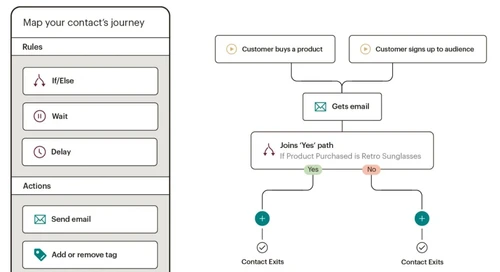
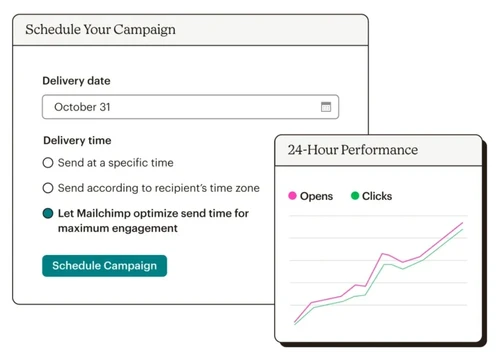
 Customer Journey Builder Predictive Analytics Advanced Segmentation Email Templates Marketing CRM Multivariate Testing Comparative Reporting Phone & Email Support Send Time Optimization Behavioral Targeting Dynamic Content Custom Branding

Watch the demo video to explore key features, real workflows, and how the software fits your business needs.
 Windows
  iOS
iOS  Android MacOS
  Linux
Linux  Desktop
  Mobile
  Cloud-Based
Small Business
Designed for startups and growing businesses
Medium Business
Built for business growth and flexibility
Enterprises
Designed for complex and large-scale business needs
4.4
Out of 5

Overall Rating
Based on
8 Verified Reviews
Rating Breakdown
88% Recommend this Product
Add ReviewCustomers generally appreciate Mailchimp for its user-friendly interface, robust analytics, and effective email campaign management, making it a reliable choice for email marketing. Users highlight the ease of sending bulk emails and generating reports, particularly with integrations like Google Analytics. However, some common concerns include emails landing in spam folders and a desire for a more polished user interface. Additionally, limitations in the free plan and perceived costs are noted as drawbacks by some users. Overall, the sentiment is positive, with many recommending the platform for its automation capabilities.


Sep 6, 2022
Techjockey Verified
“Perfect marketing automation tool for companies”
Pros
Mailchimp offers so many features to automate your marketing like email templates, segmentation, behavioral targeting, dynamic content, and so much more. It is a perfect solution for companies looking for marketing automation.
Cons
Mailchimp software might seem a bit expensive at the start, but with time it will definitely be worth it. It is worth your investment
Reason to switch
The reason for switching from SendinBlue was its limited features.
Sep 6, 2022
Techjockey Verified
“Quickly generate reports for your clients”
Pros
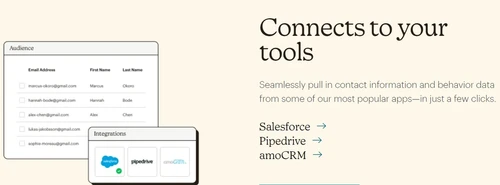
Mailchimp has really made it easy for me to generate reports whenever the clients ask for them. Especially Google Analytics integration has made it easier to maintain and analyze data.
Cons
The only con that I faced with Mailchimp is that they offer limited features in the free plan. They should increase it.
Reason to switch
The reason for switching from Omnisend was that at time we did not get timely alerts and notifications.
Sep 11, 2022
Techjockey Verified
“Sending bulk emails has never been this easy”
Pros
One of the best features of Mailchimp software is that it allows you to send bulk emails so easily. I don’t need to spend time writing them as well, I can just choose any email template and send it to whomever I want.
Cons
It would be great if Mailchimp offered email scheduling in the free plan as well, otherwise its nice.
Reason to switch
ActiveCampaign had a very complicated user interface, it was hard to use for us.

Mailchimp
₹ 575.00 excl. GST
Desktop
Mobile
Web based
On Premises
Windows
Mac OS
SendGrid
Price On Request
Desktop
Mobile
Web based
On Premises
Windows
Mac OS
Salesforce Email Studio
Price On Request
Desktop
Mobile
Web based
On Premises
Windows
Mac OS

Privy
Price On Request
Desktop
Mobile
Web based
On Premises
Windows
Mac OS

Litmus
Price On Request
Desktop
Mobile
Web based
On Premises
Windows
Mac OS
Knak
Price On Request
Desktop
Mobile
Web based
On Premises
Windows
Mac OS

PostyMan
₹ 2000
Desktop
Mobile
Web based
On Premises
Windows
Mac OS

Mumara One
₹ 1390
Desktop
Mobile
Web based
On Premises
Windows
Mac OS

Zoho Campaigns
₹ 240
Desktop
Mobile
Web based
On Premises
Windows
Mac OS

Convertkit
Price On Request
Desktop
Mobile
Web based
On Premises
Windows
Mac OS
MailTact
Price On Request
Desktop
Mobile
Web based
On Premises
Windows
Mac OS
(0) Product(s) selected
Starting Price:
$20 /Month
Starting Price:
$30 /Month
Starting Price:
$500 /Month
Available
Price on Request
Starting Price:
$29

Starting Price:
$38 /Month

Starting Price:
$15 /Month

Starting Price:
$59 /month

Starting Price:
$5 /Month

Starting Price:
$29

Starting Price:
$159


Mailchimp Software is compatible with Windows, Linux, iOS, Android and MacOS.
Yes, Mailchimp Software app is available for Android and iOS app users.
Mailchimp Software supports web-based deployment.
Mailchimp is available for FREE.
Small businesses, startups, marketers, bloggers, and online stores use Mailchimp to manage and grow their email marketing efforts.
Free demo of Mailchimp is available at techjockey.com.
Yes, it offers a free plan with limited features for small businesses or beginners starting with email marketing.
Yes, Mailchimp Software offers a free trial.
Mailchimp Software installation is not required, as it is web-based. Just open the Setup Wizard to get started.
It lets you create, send, and track emails to your audience while offering tools for automation, design, and analysis.
It’s used to send email campaigns, manage contacts, automate messages, track performance, and grow business communication easily.
20,000+ Software Listed
Best Price Guranteed
Free Expert Consultation
2M+ Happy Customers
Terms and Condtions

Users with registered businesses can purchase goods from merchants on the platform to satisfy their business needs. Users are not permitted to utilize any products acquired through the platform for resale, advertising, business, or further distribution.
For each purchase made, users will receive a Tax Invoice (or 'GST invoice') that includes specific details such as:
the GSTIN of the user associated with their registered business, and
the specified Entity Name for their business.
It should be noted that not all products are eligible for GST Invoice. Only the products displayed by participating sellers with the 'GST-based Invoice Available' callout on the product description page would qualify.
Certain goods and services are not eligible to get a GST Invoice, including items with VAS, i.e., Value Added Services (e.g., Total Mobile Protection/Assured Buyback) and those involving an exchange offer at the time of purchase.
Users must ensure the accuracy of the GSTIN, and business entity name provided for the GST Invoice. Requests for corrections into GST Invoice would not be accommodated by Techjockey.com or any Seller, and any issues arising from user-provided information are the sole responsibility of users.
Techjockey.com is not liable for the GST Invoice or any associated input tax credit. To efficiently claim an input tax credit, users should select the registered place of business address as per the GST authority's data and follow the provisions of the GST Act and rules.
To claim an input tax credit, the delivery and billing addresses must match. Furthermore, input tax credits will not be granted if the delivery address and GSTIN on the invoice are from different states. In case of incorrect GST details provided during the order placement, the order will be canceled automatically.



