linkedin
Microsoft Dynamics Crm logo
play Microsoft Dynamics CRM - Part 1
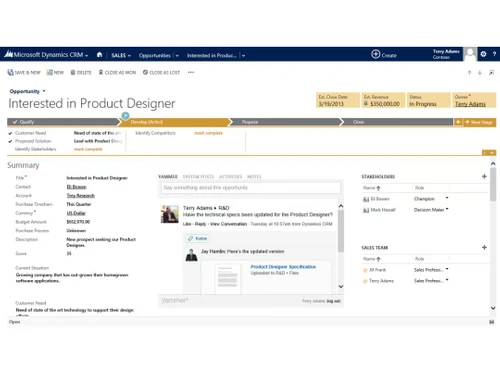
microsoft-dynamics-365-crm-design
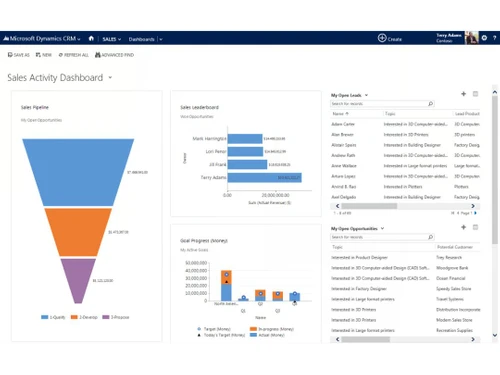
microsoft-dynamics-365-crm-dashbaord

Microsoft Dynamics Crm

Brand: Microsoft Corporation

  • 4.2

  • 15 Ratings & 11 Reviews

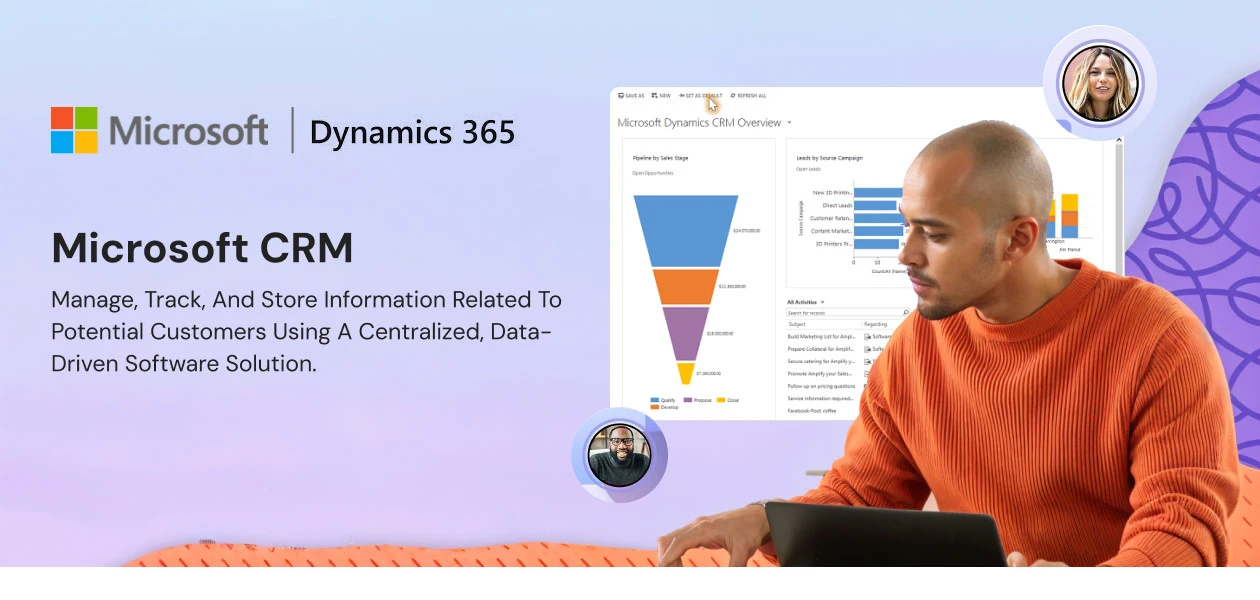
It is a cloud-based CRM software that facilitates easy monitoring of sales, service, and marketing departments.

See More

Have you used Microsoft Dynamics Crm before?

Share your insights for better experience

Add a Review
Starting Price
$65

View plans

100% Genuine
Products
Best Price
Guaranteed
Safe & Secure
Payment
  • Description

  • Pricing

  • Features

  • Specification

  • Review

  • Compare

  • Alternatives

  • FAQ

  • Questions

Starting at $65

Microsoft Dynamics Crm Software Overview

What is Microsoft Dynamics CRM?

Microsoft Dynamics provides solutions for sales, marketing, customer service, field service, supply chain, finance, and many more teams. Enterprises can avail of real-time solutions through AI-based self-service tools like conversational IVR. This CRM software helps boost productivity with functionalities like behaviour analysis, call transcription, and knowledge base.

Microsoft Dynamics offers omnichannel support and users can communicate with their preferred mode – WeChat, Messenger, LINE, WhatsApp, email, and more. Admins can customise dashboards and provide role-based access to analyse data and the performance of team members. This suite can help businesses close more deals and build strong customer relationships.

Why Choose Microsoft Dynamics CRM Software?

  • Business Growth: It facilitates expansion by allowing the admins to build their business pipeline based on high-quality prospects and leads. Further, organisations can identify the leading indicators from the past and present. They can improve their win rate based on the event-driven sale process.
  • Personalised Service: Agents can enhance the service provided to individual customers by offering personalised solutions. Microsoft Dynamics customises services based on the data gathered about each customer across multiple platforms.
  • Self-Service Portals: This CRM software offers assistance with AI-powered virtual agents/chatbots. It also provides access to a wide knowledge base and guides, enabling customers to resolve issues without any hassle.
  • Foster Leads: Organisations can schedule multichannel campaigns via email, events and web content. Users can reach out to target audiences based on LinkedIn Interactions, via the software’s connector.
  • Optimize Resources: Businesses can empower salespersons by assigning opportunities according to skills and territory. Enterprises can make the most out of all the billable resources by monitoring their utilization via dashboards.
  • Omnichannel Support: Customers can get assistance from support agents conveniently via multiple channels like WhatsApp, LINE, WeChat, Messenger, and more.

Features of Microsoft Dynamics CRM Software

  • Sales Automation: Managing leads, opportunities, accounts, contacts, products, prices, quotations, orders, and invoicing is possible with Microsoft.
  • Sales Engagement: Use relationship data, score leads, evaluate pipelines, and personalise sales procedures to make more intelligent sales.
  • Microsoft 365 Interoperation: For improved productivity and teamwork, seamlessly combine Dynamics CRM with Microsoft 365.
  • LinkedIn Sales Navigator: Use LinkedIn data to improve sales outreach, identify leads, and cultivate relationships.
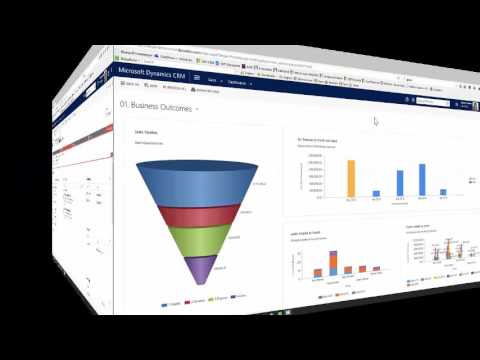
  • Dashboards & Reporting: Create advanced reports, export them to Excel, and use Power BI analytics to obtain insights.
  • Automation and Customisation: Adapt CRM workflows and automate procedures to your company's requirements.
  • Advanced Forecasting: To improve forecasting, identify sales patterns, establish objectives, oversee territory, and monitor rival performance.
  • Conversation Intelligence: Learn about pipeline, seller behaviour, and more by analysing calls and transcribing conversations.
  • Communication & Collaboration: Use Teams, real-time advice, deal rooms, and conversation insights driven by AI to improve teamwork.

Microsoft Dynamics CRM Pricing

Microsoft Dynamics CRM offers 4 pricing plans, i.e., Dynamics 365 Sales Professional, Dynamics 365 Sales Enterprise Edition, Dynamics 365 Sales Premium, and Microsoft Relationship Sales.

  • Dynamics 365 Sales Professional - $65.00 per user/month
  • Dynamics 365 Sales Enterprise Edition - $105.00 per user/month
  • Dynamics 365 Sales Premium - $150.00 per user/month
  • Microsoft Relationship Sales – Price on request

Users can also choose a 30-day free trial option or customise the plan as per their business requirements. If you want to know more about the software, request a callback and our customer support team will contact you.

Read more

Microsoft Corporation Company Details

Founded Year:  1975

Microsoft Corporation is an American multinational technology company with headquarters in Redmond, Washington.

Director/Founders Paul Allen , Bill Gates
Company Size 1000+ Employees

Microsoft Dynamics Crm Pricing & Plans

Dynamics 365 Sales Professional
Starting at $65
    • Users

      Users
      Users
    • Monthly

      Monthly
      Monthly

Key Features

  • Sales force automation

  • Mobile app

  • Microsoft 365 interoperation

  • Reporting and dashboards

  • Customization and automation-Limited

Dynamics 365 Sales Enterprise Edition
Starting at $105
    • Users

      Users
      Users
    • Monthly

      Monthly
      Monthly

Key Features

  • Sales force automation

  • Mobile app

  • Microsoft 365 interoperation

  • Reporting and dashboards

  • Customization and automation

  • Custom apps

  • Advanced sales force automation

  • Copilot capabilities in Dynamics 365 Sales

  • Copilot capabilities in Outlook

  • Copilot capabilities in Microsoft Teams

Dynamics 365 Sales Premium
Starting at $150
    • Users

      Users
      Users
    • Monthly

      Monthly
      Monthly

Key Features

  • Sales force automation

  • Mobile app

  • Microsoft 365 interoperation

  • Reporting and dashboards

  • Customization and automation

  • Custom apps

  • Advanced sales force automation

  • Copilot capabilities in Dynamics 365 Sales

  • Copilot capabilities in Outlook

  • Copilot capabilities in Microsoft Teams

Microsoft Dynamics Crm Features

Customer Data Management (CDM)

  • icon_check Contact Management
    Users can store and manage detailed information about individual contacts
  • icon_check Account Management
    Users can store and manage detailed information about individual contacts
  • icon_check Customer Profiles
    Centralized customer profiles with detailed information and interaction history.
  • icon_check Contact Segmentation
    Advanced segmentation tools for targeted marketing and sales strategies.
  • icon_check Activity History
    Complete interaction history tracking for better customer insights.

Sales Management

  • icon_check Lead Management
    Centralized lead management with automated nurturing and scoring.
  • icon_check Territory Management
    Optimize sales territories for balanced workload and coverage.
  • icon_check Order Management
    Efficiently manages orders through the sales cycle.
  • icon_check Quote Management
    Generate and manage quotes with customizable templates and approval workflows.
  • icon_check Sales Forecasting
    Accurate sales forecasting with predictive analytics and reporting.
  • icon_check Deal Management
    Manage deals from initial contact to closing with detailed tracking.
  • icon_check Sales Automation
    Automate sales processes to increase efficiency and productivity.
  • icon_check Workflow Automation and Management
    Customize workflows to match your business processes and needs.
  • icon_check Opportunity & Pipeline Management
    Visualize and manage sales pipelines for better forecasting and planning.
  • icon_check Contract Management
    Managing contracts from their creation, execution, and performance tracking to their eventual termination.

Marketing Automation

  • icon_check Email Marketing
    Integrated email marketing tools for targeted campaigns and tracking.
  • icon_check Campaign Management
    Plan, execute, and track marketing campaigns with detailed analytics.
  • icon_check Lead Nurturing
    Nurture leads with personalized content and automated workflows.
  • icon_check Customer Journey Tracking
    Track customer journeys to optimize engagement and satisfaction.
  • icon_check Customer Segmentation
    Advanced segmentation tools for targeted marketing and sales strategies.
  • icon_check Event-Triggered Workflows
    Monitor customer touchpoints for a complete view of interactions.
  • icon_check Automated Campaigns
    Automate marketing campaigns for consistent and timely outreach.

Data Sourcing / Integrations

  • icon_check Social Media Integration
    Connect with social media platforms for broader customer engagement.
  • icon_check Data Import/Export
    Import and export data easily for seamless integration with other systems.
  • icon_check API Access
    Full API access for integrating with third-party tools.
  • icon_check Calendar Integration
    Integrate with calendars for streamlined scheduling and planning.
  • icon_check Third Party Integrations
    Manage accounting and billing processes with integrated tools.
  • icon_check Email Marketing Tools Integration
    Integrate with various marketing tools for enhanced campaign management.
  • icon_check Marketing Tools Integration
    Integrate with various marketing tools for enhanced campaign management.
  • icon_check eCommerce Integrations
    Connects with eCommerce sites for smooth order handling.
  • icon_check Interactive Voice Response (IVR) Integration
    Real-time sales call activity, including Incoming, Outgoing, Missed, Rejected, and Unique calls.

Collaboration Tools

  • icon_check Team Communication
    Enhance team collaboration with integrated communication tools.
  • icon_check Task / Activity Management
    Organize and prioritize tasks and activities to ensure timely and efficient follow-up.
  • icon_check Document Sharing & File Storage
    Share and track documents with secure access controls.
  • icon_check Omnichannel Support & Engagement
    Engage with customers on multiple platforms, including email, live chat, and social media.

Security & Compliance

  • icon_check Data Encryption
    Ensure data security with advanced encryption methods.
  • icon_check Role-Based Access Control (RBAC)
    Control access with role-based permissions and security settings.
  • icon_check Backup & Disaster Recovery
    Regular backups ensure data recovery in case of failure.
  • icon_check GDPR & Data Privacy
    Comply with GDPR and CCPA regulations for data privacy.
  • icon_check Audit Trail
    Track changes and updates within the system for enhanced security and transparency.

AI & Machine Learning

  • icon_check Predictive Analytics
    Get AI-driven sales recommendations for better outcomes.
  • icon_check Lead Scoring
    Leverage AI for actionable insights and recommendations.
  • icon_check Chatbots
    Use chatbots for automated customer support and engagement.

Reporting & Analytics

  • icon_check Predictive Analytics
    Get AI-driven sales recommendations for better outcomes.
  • icon_check Real Time Analytics
    Access real-time analytics for informed decision-making.
  • icon_check Campaign Performance
    Tracks campaign performance for better ROI analysis.
  • icon_check Custom Dashboards
    Create customizable dashboards for real-time insights and reporting.
  • icon_check Sales Performance Reports
    Monitors and reports on sales performance and targets.
  • icon_check Customer Insights
    Accurate sales forecasting with predictive analytics and reporting.
  • icon_check Forecasting & Trends
    Use forecasting tools to predict future trends and outcomes.
  • icon_check Performance Tracking
    Track performance metrics to measure success and identify areas for improvement.

Alerts & Notifications

  • icon_check Event-Triggered Notifications
    Sends notifications based on triggered events.
  • icon_check Custom Workflow Alerts
    Custom alerts based on workflow triggers for efficiency.
  • icon_check System Errors/Failures
    Identifies system errors and tracks failures.
  • icon_check Customer Interaction Alerts
    Sends alerts for customer interactions and follow-ups.
  • icon_check Workflow Trigger Alerts
    Automates workflow actions based on specific events.
  • icon_check SLA Violations
    Identifies SLA violations and alerts for resolution.
  • icon_check Lead Activity Alerts
    Set reminders and notifications for important tasks and deadlines.

Others

  • icon_check Budget Tracking
    Track and manage sales budgets with real-time updates and reporting.
  • icon_check Touchpoint Monitoring
    Monitor customer touchpoints for a complete view of interactions.
  • icon_check Landing Pages & Forms
    Use customizable templates for emails, quotes, and documents.
  • icon_check Call Tracking and Recording
    Real-time sales call activity, including Incoming, Outgoing, Missed, Rejected, and Unique calls.
  • icon_check Ticketing System
    Manage customer support tickets with streamlined workflows.
Microsoft Dynamics Crm Demo Video play icon

Get Microsoft Dynamics Crm Demo

Watch the demo video to explore key features, real workflows, and how the software fits your business needs.
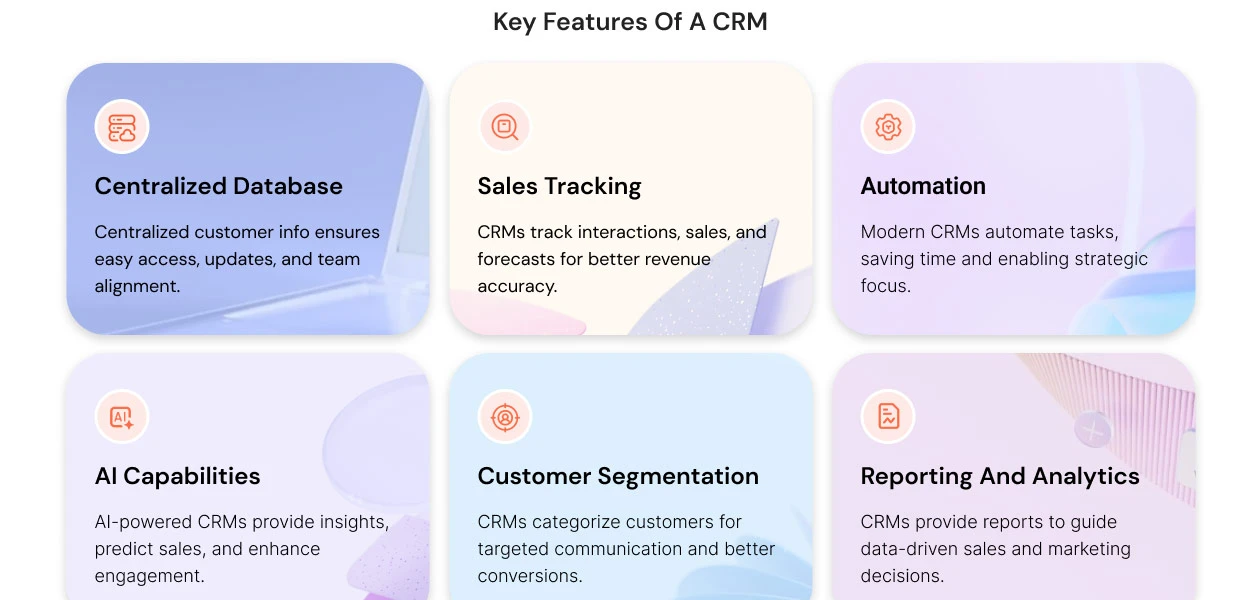
Understand
Key Features
Personal
Demo Insights
Interactive
Demo Support
Product Enrichment Section Image

Microsoft Dynamics Crm Specifications

Supported Platforms
Ubuntu Ubuntu Windows Windows MacOS MacOS Linux Linux
Devices
Desktop Desktop Mobile Mobile Tablet Tablet iPad iPad
Deployment
Cloud-Based Cloud-Based
Suitable For
All Industries
Business Specific
All Businesses
Business Size
Small Business Startups Medium Business Enterprises
Customer Support
Email Communities
Language
English
Training Resources
Documentation Videos

Explore the Best Alternative Solutions Similar to Your Business Size and Needs

Microsoft Dynamics Crm Reviews

4.2

Out of 5

img

Overall Rating

Based on
11 Verified Reviews

Rating Breakdown

  • Features 4.3
  • Value for Money 4.1
  • Ease of Use 4.1
  • Customer Support 4.4

88% Recommend this Product

Add Review

Pros

  • "Comprehensive features that enhance productivity and drive growth."

    Vikas Jul 1, 2025

  • "Seamless integration with Microsoft tools enhances overall productivity."

    Nareshkannan Jun 21, 2025

  • "Comprehensive features that cover almost every aspect of business operations."

    Sandeep May 22, 2025

Cons

  • "New users might find the feature-rich interface overwhelming, requiring significant training. "

    Vikas Jul 1, 2025

  • "Integrating with non-Microsoft third-party applications can sometimes require additional effort. "

    Nareshkannan Jun 21, 2025

  • "Dynamics 365 can be expensive, especially for small and mid-sized businesses. "

    Sandeep May 22, 2025

Ayan

Manager

Industry: Real Estate User since: 6-12 months

4.3

Reviewed on: Mar 8, 2025

Techjockey Verified

“Unified Platform for Sales and Customer Service”

Dynamics 365 truly revolutionizes how businesses operate, making it a top choice for modern enterprises seeking success. However, its complexity can be a hurdle, and new users might find the feature-rich interface overwhelming, requiring significant training to unlock its full potential.

Pros

Comprehensive features that enhance productivity and drive growth.

Cons

New users might find the feature-rich interface overwhelming, requiring significant training.

Switched from SugarCRM

Reason to switch

SugarCRM doesn't publish product roadmaps, making it difficult for businesses to plan for future updates and improvements.

Shyam Parmar

Chief Product Officer

Industry: Consumer Electronics User since: 1-2 years

4.5

Reviewed on: Feb 11, 2025

Techjockey Verified

“Streamlines Business Operations Effectively”

Dynamics 365 includes seamless integration with other Microsoft products, such as Office 365, PowerApps, and Power BI, which enhances overall productivity and collaboration within organizations. The cloud-based integration of Dynamics 365 allows for easy access from anywhere, promoting remote work flexibility.

Pros

Seamless integration with other Microsoft products enhances overall productivity.

Cons

The complexity of implementation and customization can be challenging for organizations without ample IT support.

Switched from Salesforce CRM

Reason to switch

While Salesforce offers robust customization options, deep customization can require coding knowledge and may not always be feasible or efficient for all business needs.?

Muhammad Saqib

Lead

Industry: E-commerce User since: 1-2 years

4.3

Reviewed on: Jan 29, 2025

Techjockey Verified

“Ideal for Large Organizations”

Dynamics 365 is suitable for large organizations. Its integration with other Microsoft products is excellent. Once adapted to the system, it becomes very convenient and time-efficient. However, for small groups, the cost may be burdensome.

Pros

Integration with other Microsoft products is excellent, making it very convenient and time-efficient.

Cons

For small groups, the cost may be burdensome.

Switched from Zoho CRM

Reason to switch

Some users report dissatisfaction with Zoho's customer support.?

See All Microsoft Dynamics Reviews

Compare Microsoft Dynamics Crm With other CRM Software

Products
Ratings
Pricing
Device Supported
Deployment
Supported Platforms
  • img

    Microsoft Dynamics Crm

  • 4.2

  • Price On Request

  • Desktop

    Mobile

  • Web based

    On Premises

  • Windows

    Mac OS

  • img

    Bitrix24

  • 4.3

  • ₹ 2390

  • Desktop

    Mobile

  • Web based

    On Premises

  • Windows

    Mac OS

  • img

    Zoho CRM

  • 4.4

  • ₹ 1300

  • Desktop

    Mobile

  • Web based

    On Premises

  • Windows

    Mac OS

  • img

    Odoo CRM

  • 4.4

  • ₹ 760

  • Desktop

    Mobile

  • Web based

    On Premises

  • Windows

    Mac OS

  • img

    CrmOne

  • 4.9

  • Price On Request

  • Desktop

    Mobile

  • Web based

    On Premises

  • Windows

    Mac OS

  • img

    Kylas CRM

  • 4.1

  • ₹ 12999

  • Desktop

    Mobile

  • Web based

    On Premises

  • Windows

    Mac OS

  • img

    Zendesk Sell

  • 4.3

  • Price On Request

  • Desktop

    Mobile

  • Web based

    On Premises

  • Windows

    Mac OS

  • img

    Cleomitra

  • 4.8

  • ₹ 999

  • Desktop

    Mobile

  • Web based

    On Premises

  • Windows

    Mac OS

(0) Product(s) selected

Microsoft Dynamics Crm Alternatives

See All Microsoft Dynamics Crm Alternatives
SAVE UPTO 27%
SAVE UPTO 25%

Starting Price:

$99 /Month

Starting Price:

₹999 /Month ₹2,000

SAVE UPTO 50%

Starting Price:

$97 /Month

Starting Price:

€300 /User/Year
SAVE UPTO 20%

Articles for Microsoft Dynamics Crm

See All Related Articles

What is MS Dynamics CRM used for?

Microsoft Dynamics 365 CRM helps businesses in building better customer relationships. This CRM improves customer service and user efficiency levels.

Is MS Dynamics easy to learn?

If you have basic knowledge of CRM and the Microsoft ecosystem, then using Dynamics 365 would be relatively easy. However, if you are new to CRM and Microsoft, then you can spend your time on guides and a knowledge base for a quick understanding of tools.

Which is best SAP or Microsoft Dynamics?

While SAP's price complexity may result in greater expenditures for smaller enterprises, Microsoft Dynamics 365 might provide a more transparent and affordable pricing plan.

What are the three main areas in Dynamics CRM?

Microsoft Dynamics CRM covers three main areas of business, i.e., Sales, Marketing, and Service.

What are the disadvantages of Microsoft Dynamics?

Two main disadvantages of Microsoft Dynamics are Complexity and Learning Curve. For some users, who are not familiar with CRM basics or the Microsoft ecosystem, using D365 would be slightly tough.

What are the benefits of Microsoft Dynamics?

The top benefits of Microsoft Dynamics CRM are easy deployment, easy integration, better customer service experience, built-in analytics, data privacy, and scalability.

What are the limitations of the Dynamics CRM plugin?

The two-minute time limit for the plugin to complete execution is one of the primary limitations that you will encounter in any Dynamics CRM online project. This will be an issue if you have a large amount of data and records.

How can I purchase Microsoft Dynamics CRM from techjockey.com?

You can buy Microsoft Dynamics CRM directly from techjockey.com. Simply choose your preferred subscription plan and complete the checkout process.

What payment methods are accepted on techjockey.com?

Techjockey.com accepts a range of payment methods, including credit/debit cards, net banking, UPI, and popular digital wallets.

Can I transfer my Microsoft Dynamics CRM license to another device?

Yes, you can move your license to a new device. Just uninstall the software from your current device and install it on the new one using the same license key.

Are there any special offers or discounts available for Microsoft Dynamics CRM on techjockey.com?

Yes, techjockey.com often has special discounts and deals on Microsoft Dynamics CRM. Visit our website to find the latest offers.

At what pricing Microsoft Dynamics CRM is available?

Microsoft Dynamics CRM price in India is available for $65.00 per user/month at techjockey.com. The pricing model is based on different parameters, including extra features, deployment type, and the total number of users.

Microsoft Dynamics Crm Questions

A:

MS Dynamics CRM enables personalized experiences by allowing detailed customer segmentation based on behavior, demographics, and interaction history, helping tailor marketing and sales efforts.

Aditya Dec 20, 2024
A:

Yes, MS Dynamics CRM integrates with ERP and finance systems, particularly those within the Microsoft ecosystem, such as Dynamics 365 for Finance and Operations.

gopalakrishnan Dec 3, 2024
A:

MS Dynamics CRM provides tools and services for a smooth migration, including data import wizards, integration support, and third-party services to help transfer data from other CRM systems.

Arpit Gupta Dec 3, 2024
A:

MS Dynamics CRM offers customer data management tools, including segmentation, advanced analytics, data visualization, and AI-powered insights for better decision-making.

Ravi raj shekhar Dec 3, 2024
A:

MS Dynamics CRM supports multi-departmental CRM by allowing sales, marketing, and customer service teams to access a centralized view of customer data, improving collaboration and efficiency.

Shivam Dec 3, 2024
See All Microsoft Dynamics Crm Questions

20,000+ Software Listed

Best Price Guranteed

Free Expert Consultation

2M+ Happy Customers

Terms and Condtions

close

Users with registered businesses can purchase goods from merchants on the platform to satisfy their business needs. Users are not permitted to utilize any products acquired through the platform for resale, advertising, business, or further distribution.

For each purchase made, users will receive a Tax Invoice (or 'GST invoice') that includes specific details such as:

  • the GSTIN of the user associated with their registered business, and

  • the specified Entity Name for their business.

It should be noted that not all products are eligible for GST Invoice. Only the products displayed by participating sellers with the 'GST-based Invoice Available' callout on the product description page would qualify.

Certain goods and services are not eligible to get a GST Invoice, including items with VAS, i.e., Value Added Services (e.g., Total Mobile Protection/Assured Buyback) and those involving an exchange offer at the time of purchase.

Users must ensure the accuracy of the GSTIN, and business entity name provided for the GST Invoice. Requests for corrections into GST Invoice would not be accommodated by Techjockey.com or any Seller, and any issues arising from user-provided information are the sole responsibility of users.

Techjockey.com is not liable for the GST Invoice or any associated input tax credit. To efficiently claim an input tax credit, users should select the registered place of business address as per the GST authority's data and follow the provisions of the GST Act and rules.

To claim an input tax credit, the delivery and billing addresses must match. Furthermore, input tax credits will not be granted if the delivery address and GSTIN on the invoice are from different states. In case of incorrect GST details provided during the order placement, the order will be canceled automatically.