linkedin
Microsoft 365 For Enterprise logo
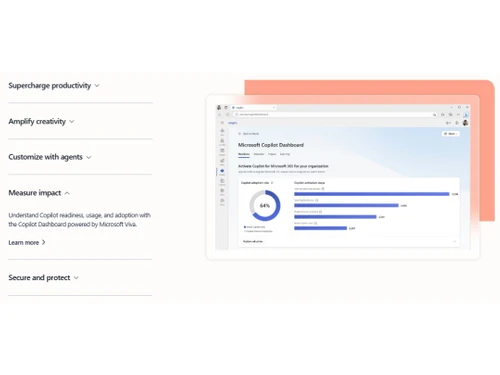
Microsoft 365 For Enterprise measure-impact
Microsoft 365 For Enterprise productivity
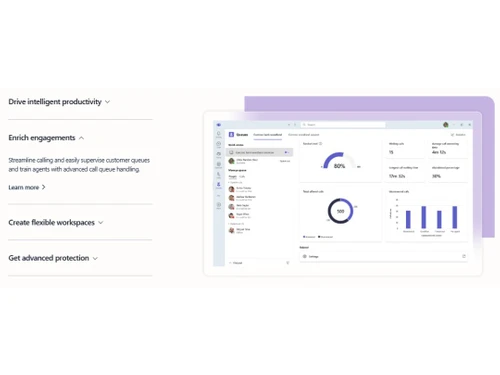
Microsoft 365 For Enterprise enrich

Microsoft 365 For Enterprise

Brand: Microsoft Corporation

  • 4.5

  • 1 Rating & 1 Review

Microsoft 365 For Enterprise is an integrated office suite for businesses that helps organisations in business structuring, remodeling, and elevation. The comprehensive cloud platform delivers a host of productivity apps like Excel, Word, Microsoft Teams, PowerPoint and more, protected by world-class security. Large teams can work together, co-author projects and schedule conferences with remote ...

See More

Have you used Microsoft 365 For Enterprise before?

Share your insights for better experience

Add a Review
Starting Price
₹1,700 excl.GST
₹ 2,006 incl. GST

View plans

offer Save upto 18%, Get GST Invoice on your business purchase T&C
offer Buy Now & Pay Later, Check offer on payment page.
Buy Now
100% Genuine
Products
Best Price
Guaranteed
Safe & Secure
Payment
  • Description

  • Pricing

  • Features

  • Specification

  • Review

  • FAQ

Starting at ₹1,700
Buy Now

Microsoft 365 For Enterprise Software Overview

What is Microsoft 365 For Enterprise?

Microsoft 365 For Enterprise is an integrated office suite for businesses that helps organisations in business structuring, remodeling, and elevation. The comprehensive cloud platform delivers a host of productivity apps like Excel, Word, Microsoft Teams, PowerPoint and more, protected by world-class security. Large teams can work together, co-author projects and schedule conferences with remote clients. Built-in intelligence modules in Microsoft 365 For Enterprise, the software helps organizations fueling creativity, elevate search, discover new insights and get access to a more personalized assistance as well.    

What makes Microsoft 365 For Enterprise stand out from the rest?

  1. Built for Teams: Members in large teams get to collaborate with each other in real-time. Robust in-app integrations and team management modules help users in getting the work done. 
  2. Responsive Agility: Employees get to connect, communicate, collaborate and share tasks with each other in a flexible format.
  3. Enhanced Protection: Organisations get to elevate and modernize their security measures, meet, set compliance standards, and manage risks based on a trusted Microsoft Cloud facility.
  4. Harness Business Knowledge: Microsoft 365 For Enterprise helps organizations in turning business-relevant data into insights, empowering employees with the information they need to improve individual working skills. 

Microsoft 365 For Enterprise pricing

Microsoft 365 For Enterprise is available in following prices options:

  1. Microsoft 365 E3: It is available at a price of Rs. 1844.36 per user/month.
  2. Microsoft 365 E5 without Audio Conferencing: It is available at a price of Rs.3285.26 per user/month.
  3. Microsoft 365 F3: It is available at a price of Rs. 576.36 per user/month
  4. Office 365 E1: It is available at a price of Rs. 461.09 per user/month.

To know more about the product, you can send us a callback request. 

Benefits of Microsoft 365 For Enterprise

  1. Productivity Tools: Users can get access to the latest version of Office, inclusive of PowerPoint, Word, Excel and Access platforms. 
  2. Enhanced Protection: Advanced threat protection facilities offered by Microsoft 365 For Enterprise, helps businesses in getting accurate safety against malware, phishing, viruses and malicious links.  
Read more

Microsoft Corporation Company Details

Founded Year:  1975

Microsoft Corporation is an American multinational technology company with headquarters in Redmond, Washington.

Director/Founders Paul Allen , Bill Gates
Company Size 1000+ Employees

Microsoft 365 For Enterprise Pricing & Plans

Microsoft 365 E3 (No Teams)

Calculated Price

₹ 33720 Exclusive of all taxes
    • Users

      Users
      Users
    • Yearly

      Yearly
      Yearly
Microsoft 365 E5 without Audio Conferencing (No Teams)

Calculated Price

₹ 54660 Exclusive of all taxes
    • Users

      Users
      Users
    • Yearly

      Yearly
      Yearly
Microsoft 365 F3

Calculated Price

₹ 7980 Exclusive of all taxes
    • Users

      Users
      Users
    • Yearly

      Yearly
      Yearly
Advanced Data Residency

Calculated Price

₹ 1700 Exclusive of all taxes
    • Quantity

      Quantity
      Quantity
    • Yearly

      Yearly
      Yearly
Office 365 E1 (No Team)

Calculated Price

₹ 7740 Exclusive of all taxes
    • Users

      Users
      Users
    • Yearly

      Yearly
      Yearly
Office 365 E3 (No Team)

Calculated Price

₹ 20700 Exclusive of all taxes
    • Users

      Users
      Users
    • Yearly

      Yearly
      Yearly
Office 365 E5 without Audio Conferencing (No Team)

Calculated Price

₹ 35700 Exclusive of all taxes
    • Users

      Users
      Users
    • Yearly

      Yearly
      Yearly

Microsoft 365 For Enterprise Features

  • icon_check Microsoft 365 Apps
     Users get access to a variety of Microsoft Apps like Excel, Word, OneNote, PowerPoint and Access.
  • icon_check Email & Calenders
    Enterprises get access to business class calendering, email, and contact options in a unified space. Microsoft 365 For Enterprise
  • icon_check Meetings & Voice
    Brands get to deliver enhanced meeting experiences powered by sophisticated call functionality and a central hub for chat,
  • icon_check Social & Intranet
    SharePoint and Yammer integration offered by the solution, help users engage and connect to an intelligent mobile intranet social
  • icon_check Files & Content
    Microsoft 365 For Enterprise can be used to generate visually attractive content in minutes. Users can get access to files from
  • icon_check Work Management
    Organisations can depend on the solution with their business process automation facility, they get access to apps that fall
  • icon_check Advanced Analytics
    Power BI Pro and MyAnalytics facility assures smart decision making in real-time.
  • icon_check Device & App Management
    Robust security solutions teamed with flexible management facilities, let users deliver secured mobile experiences to any device
  • icon_check Identity & Access Management
    Organisations get to optimize the solution to secure connections between devices, apps, people, and data. 
  • icon_check Advanced Threat Protection
    Microsoft 365 For Enterprise, can be used to identify malicious actions, advanced threats, and compromised identities across
  • icon_check Information Protection
    Integrated information protection technology featured by Microsoft 365 For Enterprise, helps you with sensitive data protection
  • icon_check Security Management
    Enterprises can control file sharing and usage options with their integrated data protection system deployed in Microsoft 365 For
  • icon_check Compliance
    Organisations get access to simplified assessment tools, using which, they can secure data across apps, devices, and clouds, and

Microsoft 365 For Enterprise Specifications

Supported Platforms
Windows Windows
Devices
Desktop Desktop
Deployment
Cloud-Based Cloud-Based
Suitable For
All Industries
Business Specific
All Businesses
Language
English

Microsoft 365 For Enterprise Review

4.5

Out of 5

img

Overall Rating

Based on
1 Verified Review

Rating Breakdown

  • Features 4.5
  • Value for Money 4.5
  • Ease of Use 4.5
  • Customer Support 4.5

90% Recommend this Product

Add Review

Kallu

User

4.5

Reviewed on: Jan 23, 2021

Techjockey Verified

“Ai powered office apps available for enterprise level”

Pros

best for offices and large scale usage

Cons

NO CONS
Articles for Microsoft 365 For Enterprise

See All Related Articles

What type of Microsoft services are included in Microsoft 365 For Enterprise?

Microsoft 365 For Enterprise offers a variety of services like PowerPoint, Excel, Word, OneNote, Outlook, Access, Publisher, and more.

Is it possible to use Microsoft 365 For Enterprise to generate team calendars for employees?

Yes, admins can generate a shared calendar for their in-house employees and set scheduled access rights to control data monitoring and editing tasks.

Is Microsoft 365 For Enterprise available for an online demo?

Yes, you can request an online demo of Microsoft 365 For Enterprise. Our software experts will get back to you in real-time.

What type of collaboration tools are offered by Microsoft 365 For Enterprise?

Microsoft 365 For Enterprise, offers active collaboration facilities with external platforms like SharePoint, Yammer, Planner and Office 365 Groups.

Who can use Microsoft 365 For Enterprise?

Microsoft 365 For Enterprise is appropriate for businesses associated with Manufacturing, Automotive, Healthcare, Financial Services and Retail Industries.

20,000+ Software Listed

Best Price Guranteed

Free Expert Consultation

2M+ Happy Customers

Terms and Condtions

close

Users with registered businesses can purchase goods from merchants on the platform to satisfy their business needs. Users are not permitted to utilize any products acquired through the platform for resale, advertising, business, or further distribution.

For each purchase made, users will receive a Tax Invoice (or 'GST invoice') that includes specific details such as:

  • the GSTIN of the user associated with their registered business, and

  • the specified Entity Name for their business.

It should be noted that not all products are eligible for GST Invoice. Only the products displayed by participating sellers with the 'GST-based Invoice Available' callout on the product description page would qualify.

Certain goods and services are not eligible to get a GST Invoice, including items with VAS, i.e., Value Added Services (e.g., Total Mobile Protection/Assured Buyback) and those involving an exchange offer at the time of purchase.

Users must ensure the accuracy of the GSTIN, and business entity name provided for the GST Invoice. Requests for corrections into GST Invoice would not be accommodated by Techjockey.com or any Seller, and any issues arising from user-provided information are the sole responsibility of users.

Techjockey.com is not liable for the GST Invoice or any associated input tax credit. To efficiently claim an input tax credit, users should select the registered place of business address as per the GST authority's data and follow the provisions of the GST Act and rules.

To claim an input tax credit, the delivery and billing addresses must match. Furthermore, input tax credits will not be granted if the delivery address and GSTIN on the invoice are from different states. In case of incorrect GST details provided during the order placement, the order will be canceled automatically.