linkedin
MightyCall logo
play What is a virtual phone number? | MightyCall
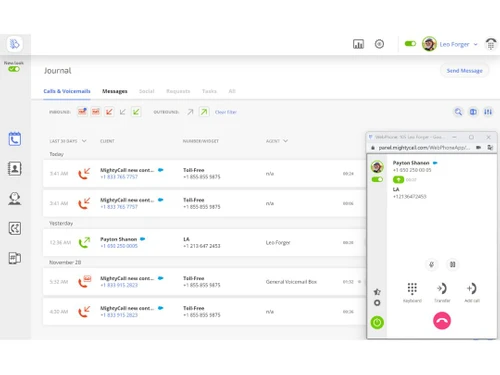
MightyCall Dashboard
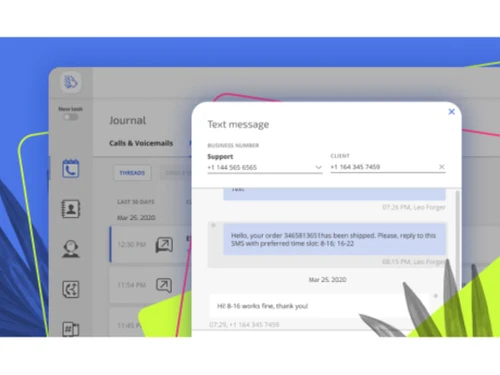
MightyCall Voicemails

MightyCall

Brand: Mightycall

  • 4.5

  • 3 Ratings

MightyCall is a cloud-based virtual phone system tailored for small businesses.

See More

Have you used MightyCall before?

Share your insights for better experience

Add a Review
Starting Price
$20

View plans

100% Genuine
Products
Best Price
Guaranteed
Safe & Secure
Payment
  • Description

  • Pricing

  • Features

  • Specification

  • Review

  • Compare

  • Alternatives

  • FAQ

Starting at $20

MightyCall Software Overview

What is MightyCall?

MightyCall is a cloud-based virtual phone system designed for small businesses and entrepreneurs. It offers features like call forwarding, voicemail, and call recording to help manage communications effectively.

With its user-friendly interface and affordable pricing plans, Mightycall enables businesses to create a professional phone presence without expensive hardware or complex setups. It also provides tools for managing customer interactions, such as IVR menus and customized greetings, to improve customer service and streamline operations.

Why Choose MightyCall Software?

  • Cost-effective: It offers affordable pricing plans tailored to suit small and medium-sized businesses, helping you save on communication expenses.
  • Professional Image: It helps you maintain a professional image with features like custom greetings, call routing, and voicemail transcription, enhancing customer experience and trust in your brand.
  • Easy to Use: The platform is user-friendly and intuitive, making it simple to set up and manage your virtual phone system without technical expertise.
  • Flexibility: With mobile and desktop apps, you can stay connected and manage your calls and messages from anywhere, providing flexibility and convenience to you and your team.
  • Scalability: It can grow with your business, offering scalable solutions that adapt to your changing needs and requirements as your business expands.

Benefits of MightyCall Platform

  • Automated Call Routing: Easily route incoming calls to the right department or team member based on preset rules and criteria.
  • CRM Integration: Seamlessly integrate customer relationship management tools to enhance customer interactions and improve data management.
  • Call Recording: Record important calls for training, quality assurance, or legal purposes to ensure smooth operations and compliance.
  • Virtual Receptionist: Set up a virtual receptionist to greet and direct callers, giving a professional touch to your business communication.
  • Customizable Voicemail: Create personalized greetings and manage voicemail messages efficiently to stay on top of client communications.
  • Conference Calling: Host conference calls easily with multiple participants to facilitate collaboration and communication within your team.
  • SMS Messaging: Send and receive SMS messages to interact with customers effectively through text-based communication channels.

Pricing of MightyCall VoIP Provider

MightyCall price in India starts at $20 at techjockey.com.

The pricing model is based on different parameters, including extra features, deployment type, and the total number of users. For further queries related to the product, you can contact our product team and learn more about the pricing and offers.

Read more

Mightycall Company Details

Founded Year:  2013

Flexible & scalable cloud-based call center solution designed for small & mid-sized businesses

Director/Founders Serg Bell
Company Size 1-100 Employees

MightyCall Pricing & Plans

Core
Key Features
  • Unlimited calling
  • Unlimited messages
  • 2 business phone numbers
  • Integrations and API access
Starting at $20
    • Monthly

      Monthly
      Monthly

Key Features

  • Unlimited calling

  • Unlimited messages

  • 2 business phone numbers

  • Integrations and API access

MightyCall Features

  • icon_check Call Forwarding
    Redirect incoming calls to another number or extension, ensuring that important calls are never missed.
  • icon_check Call Recording
    Capture and store conversations for training, quality assurance, or compliance.
  • icon_check Call Queuing
    Manage high call volumes by placing callers in a queue and connecting them to available agents in an orderly manner.
  • icon_check Call Logs
    Keep track of all incoming and outgoing calls, including timestamps and call duration, for reference and analysis.
  • icon_check Call Routing
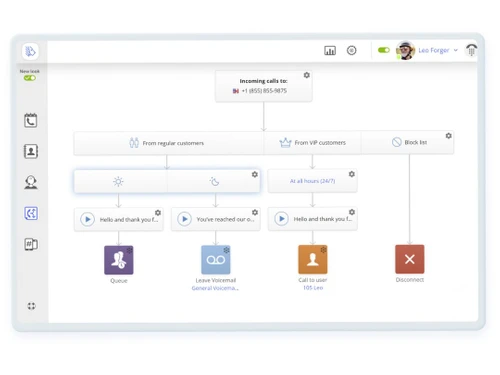
    Direct calls to specific departments, individuals, or locations based on pre-set criteria, ensuring efficient call handling.
  • icon_check High Quality Voice Over IP (VoIP)
    Utilize reliable VoIP technology to make crystal-clear voice calls over the internet, ensuring excellent call quality.
  • icon_check IVR/Voice Recognition
    Implement Interactive Voice Response systems for automated call handling & voice recognition.
  • icon_check Contact Management
    Organize and manage customer contact information easily for targeted communication.
  • icon_check SIP Trunking
    Enable direct connection between your VoIP system & the Public Switched Telephone Network for better communication.
  • icon_check Integrations
    Seamlessly connect Mightycall with other tools & systems through integrations to streamline workflows.
  • icon_check API Access
    Customize & extend the software's functionality, integrating it with other applications & systems.
MightyCall Demo Video play icon

Get MightyCall Demo

Watch the demo video to explore key features, real workflows, and how the software fits your business needs.

Understand
Key Features
Personal
Demo Insights
Interactive
Demo Support

MightyCall Specifications

Supported Platforms
Ubuntu Ubuntu Windows Windows iOS iOS Android Android MacOS MacOS Linux Linux
Devices
Desktop Desktop Mobile Mobile Tablet Tablet
Deployment
Cloud-Based Cloud-Based
Suitable For
All Industries
Business Specific
All Businesses
Business Size
Small Business Medium Business Enterprises SMBs SMEs MSMBs MSMEs
Customer Support
Phone Email Live Chat Communities
Language
English
Integration
API Integration
Training Resources
Documentation Videos
AI Features
AI Integrated
Compliance Regulation
PCI DSS

Explore the Best Alternative Solutions Similar to Your Business Size and Needs

Small Business

Designed for startups and growing businesses

DIDVN

4.1

OpenPhone

4.4

Zadarma

4.6

See More

MightyCall Review

4.5

Out of 5

img

Overall Rating

Based on
3 Verified Ratings

Rating Breakdown

  • Features 4
  • Value for Money 4.6
  • Ease of Use 4.5
  • Customer Support 5

86% Recommend this Product

Add Review

Techjockey Trusted Reviews from Verified Users

No reviews are currently available for MightyCall. Discover similar VoIP Providers reviews

  • CallHippo

    4.4

    Whats great - Callhippo tool offers the ability to connect with the customers in a matter of minutes. The dashboard allows you to monitor t... read more

  • SanIPPBX

    5.0

    Whats great - Easy to use and affordable read more

  • Zadarma

    5.0

    Whats great - Cheap prices, free PBX and CRM and other features. Call forwarding and IVR - my must-have tools read more

Compare MightyCall With other VoIP Providers

Products
Ratings
Pricing
Device Supported
Deployment
Supported Platforms
  • img

    MightyCall

  • 4.5

  • Price On Request

  • Desktop

    Mobile

  • Web based

    On Premises

  • Windows

    Mac OS

  • img

    Zoom Phone

  • 3.9

  • ₹ 9600

  • Desktop

    Mobile

  • Web based

    On Premises

  • Windows

    Mac OS

  • img

    TeleCMI

  • 4.3

  • ₹ 734

  • Desktop

    Mobile

  • Web based

    On Premises

  • Windows

    Mac OS

  • img

    SanIPPBX

  • 5

  • ₹ 60000

  • Desktop

    Mobile

  • Web based

    On Premises

  • Windows

    Mac OS

  • img

    CallHippo

  • 4.3

  • ₹ 2299

  • Desktop

    Mobile

  • Web based

    On Premises

  • Windows

    Mac OS

  • img

    Textable

  • 4.2

  • Price On Request

  • Desktop

    Mobile

  • Web based

    On Premises

  • Windows

    Mac OS

  • img

    OpenPhone

  • 4.4

  • Price On Request

  • Desktop

    Mobile

  • Web based

    On Premises

  • Windows

    Mac OS

  • img

    DIDVN

  • 4.1

  • Price On Request

  • Desktop

    Mobile

  • Web based

    On Premises

  • Windows

    Mac OS

  • img

    Linphone

  • 4.4

  • Price On Request

  • Desktop

    Mobile

  • Web based

    On Premises

  • Windows

    Mac OS

  • img

    Ooma Office

  • 4.4

  • Price On Request

  • Desktop

    Mobile

  • Web based

    On Premises

  • Windows

    Mac OS

  • img

    iPlum

  • 4.5

  • Price On Request

  • Desktop

    Mobile

  • Web based

    On Premises

  • Windows

    Mac OS

(2) Product(s) selected

MightyCall Alternatives

See All MightyCall Alternatives

Starting Price:

$5 /Month

Available

Price on Request

Starting Price:

$9 /Monthly

Starting Price:

$19 /Monthly

Bria

4.4

Starting Price:

$3 /Monthly

Available

Price on Request

Available

Price on Request

Articles for MightyCall

See All Related Articles

Which operating system does MightyCall Software Support?

MightyCall Software is compatible with Ubuntu, Windows, Linux, and macOS.

Is there any MightyCall Software App?

MightyCall Software is available for Android and iOS app users.

What is the deployment type of MightyCall Software?

MightyCall Software supports web-based deployment.

How much does MightyCall Software Cost?

MightyCall price in India starts at $20 at techjockey.com.

Who are the potential users of MightyCall Software?

MightyCall Software is typically used by all industries to manage and streamline their communication effectively.

Is there any free trial or demo for MightyCall Software?

Yes, MightyCall Software free demo is available at techjockey.com.

Is MightyCall Software Free?

MightyCall is not available for free. However, the premium plan with advanced features and exciting deals is available at techjockey.com.

Does MightyCall Platform offer a free trial?

Yes, the MightyCall platform provides a free trial to the users.

How can you download MightyCall Software?

MightyCall Software installation is not required, as it is web-based. Just open the Setup Wizard to get started.

How does MightyCall Software Work?

MightyCall software operates as a cloud-based virtual phone system. It routes calls using VoIP technology, allowing users to manage and customize call-handling features through a user-friendly online dashboard, such as call forwarding, queuing, recording, and more.

20,000+ Software Listed

Best Price Guranteed

Free Expert Consultation

2M+ Happy Customers

Terms and Condtions

close

Users with registered businesses can purchase goods from merchants on the platform to satisfy their business needs. Users are not permitted to utilize any products acquired through the platform for resale, advertising, business, or further distribution.

For each purchase made, users will receive a Tax Invoice (or 'GST invoice') that includes specific details such as:

  • the GSTIN of the user associated with their registered business, and

  • the specified Entity Name for their business.

It should be noted that not all products are eligible for GST Invoice. Only the products displayed by participating sellers with the 'GST-based Invoice Available' callout on the product description page would qualify.

Certain goods and services are not eligible to get a GST Invoice, including items with VAS, i.e., Value Added Services (e.g., Total Mobile Protection/Assured Buyback) and those involving an exchange offer at the time of purchase.

Users must ensure the accuracy of the GSTIN, and business entity name provided for the GST Invoice. Requests for corrections into GST Invoice would not be accommodated by Techjockey.com or any Seller, and any issues arising from user-provided information are the sole responsibility of users.

Techjockey.com is not liable for the GST Invoice or any associated input tax credit. To efficiently claim an input tax credit, users should select the registered place of business address as per the GST authority's data and follow the provisions of the GST Act and rules.

To claim an input tax credit, the delivery and billing addresses must match. Furthermore, input tax credits will not be granted if the delivery address and GSTIN on the invoice are from different states. In case of incorrect GST details provided during the order placement, the order will be canceled automatically.