linkedin
SanIPPBX logo
play About SanIPPBX Software |SanIPPBX Demo
SanIPPBX
SanIPPBX live call

SanIPPBX

Brand: SAN SOFTWARES

  • 5

  • 1 Rating & 1 Review

SanIPPBX is a specialized system connecting multi-branch offices for voice calls over the internet. The IVR software is available as a server-based solution as well as SanIP-PBX device. The software offers customizable IVR functionalities like remote barging, automated call distribution, three-way calling and flexible extension logic for high-quality customer support service. It is also effective...

See More

Have you used SanIPPBX before?

Share your insights for better experience

Add a Review
Starting Price
₹60,000 excl.GST
₹ 70,800 incl. GST

View plans

offer Save upto 18%, Get GST Invoice on your business purchase T&C
offer Buy Now & Pay Later, Check offer on payment page.
Buy Now
100% Genuine
Products
Best Price
Guaranteed
Safe & Secure
Payment
  • Description

  • Pricing

  • Features

  • Specification

  • Review

  • Compare

  • Alternatives

  • FAQ

Starting at ₹60,000
Buy Now

SanIPPBX Software Overview

What is SanIPPBX?

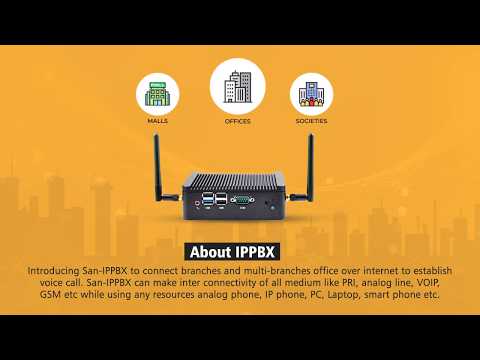
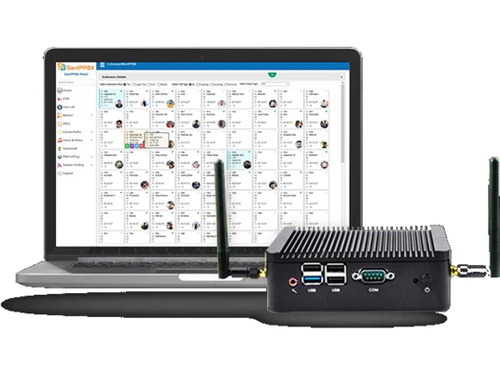
SanIPPBX is a specialized system connecting multi-branch offices for voice calls over the internet. The IVR software is available as a server-based solution as well as SanIP-PBX device. The software offers customizable IVR functionalities like remote barging, automated call distribution, three-way calling and flexible extension logic for high-quality customer support service. It is also effective in lead conversion given its live call monitoring, MIS reporting and remote barging functionalities.

SanIP-PBX can be scaled easily to fit any business size and helps foster meaningful customer relationship using code wise, extension wise & trunk wise utilization reports. SanIP-PBX further makes it easy to establish the interconnectivity of multiple mediums like GSM, VOIP, PRI and analog lines.

Why Use SanIPPBX?

  • Powerful and centralized CDR dashboard for monitoring outgoing, missed, intercom and incoming calls
  • SanIPPBX supports quick multitasking given its powerful automation and support.
  • You can automatically route the calls or respond with predefined answers to tickets with this VoIP solution.
  • The IVR software offers integration with hotel management software for handling check-ins/checkouts, room status, alarms, etc.
  • Different types of reports available like peak hours, trunk and extension.
  • Single click auto updates with bulk extension uploading and pick up.

Benefits of SanIPPBX

  • Availability of personalized rules for extension like barging, whisper, intercom and dynamic lock
  • Easy to set up configurable restore scheduler and auto backups on other devices
  • API/Answered & unanswered calls-based recordings
  • Support for up to two hundred concurrent calls without recording
  • Seamless address book tool for displaying caller names during incoming calls
  • Monitoring of live calls with call forwarding variables

Key Functionalities of SanIPPBX

  • Dynamic field selection
  • Outbound/DID route wise recording folders section
  • Restore scheduler and configuration auto backup
  • Barging/whisper, intercom and dynamic lock
  • Direct inward system access
  • Web voicemail interface
  • Call queuing/parking/retrieval
  • Automated agents

How Does SanIPPBX Work?

The latest version of SanIPPBX is primarily used for call management, dynamic field selection and escalation-based routing. It has an intuitive interface and is simple to use. SanIPPBX can be easily integrated with your existing systems to ensure a smooth workflow. For more information, you can also refer to user manuals and take online SanIPPBX at Techjockey.com.

How to use SanIPPBX?

Get started with SanIPPBX in 5 simple steps:

Step 1: Buy SanIPPBX installation key from techjockey.com

Step 2: Directly login through the official website (web-based)

Step 3: Sign up & create your account

Step 4: Add users & assign permissions

Step 5: Get started with SanIPPBX

What is the price of SanIPPBX?

SanIPPBX price in India starts at ₹70,800. SanIPPBX comes with multiple pricing plans and caters to the diverse customer base.

The price may vary based on factors like customization, additional features required, number of users, and the deployment type. For subscription-related details and offers on premium packages, please request a call back from our product experts.

Read more

SanIPPBX Pricing & Plans

SanIPPBX
Key Features
  • Live Call Monitoring
  • CDR Dashboard to Monitor Outgoing/Incoming/Interco
  • Trunk Wise Utilization Report
  • Extension Wise Utilization Report

Calculated Price

60000 Exclusive of all taxes
    • Quantity (30 Channel)

      Quantity (30 Channel)
      Quantity (30 Channel)

Key Features

  • Live Call Monitoring

  • CDR Dashboard to Monitor Outgoing/Incoming/Interco

  • Trunk Wise Utilization Report

  • Extension Wise Utilization Report

SanIPPBX Features

  • icon_check Live Call Monitoring
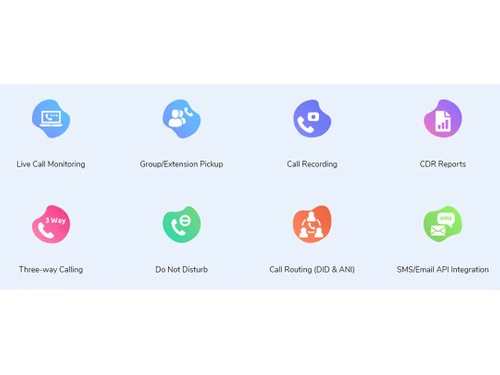
    Monitor the status of on-hold, live and disconnected calls with SanIPPBX IVR software.
  • icon_check CDR Dashboard to Monitor Outgoing/Incoming/Interco
    The CDR dashboard in this IVR solution maintains a log of all recorded calls for later access.
  • icon_check Trunk Wise Utilization Report
    The IVR software provides these reports for statistics and data in real-time on toll free numbers.
  • icon_check Extension Wise Utilization Report
    SanIPPBX provides location-based reports for assessing the productivity of multiple IVR systems.
  • icon_check Mobile Agent Management and Report
    The call recording software produces these report types for monitoring the productivity level of call centre agents.
  • icon_check Dynamic Field Selection
    The option connects the caller to more specific menu options for a more satisfactory customer experience.
  • icon_check Third Party API Integration
    The software allows for third-party integrations for higher business operational efficiency.
  • icon_check Call Recording
    SanIPPBX call recording software lets you record and monitor the calls for agent training purposes.
  • icon_check Remote Extension
    The IVR software supports remote extensions to let the distributed workforce connect with callers from remote.
  • icon_check ACD(Automatic Call Distribution)
    Automated call distribution system in SanIPPBX call recording software intelligently routes the calls to live agents.
  • icon_check Call Routing (DID & ANI)
    Call routing ensures smooth transferring of calls to the correct extension for reducing customer wait timings.
  • icon_check Call Conference/Caller ID/Waiting/Transfer
    Use the module in IVR solution for joining live conferences & recording them while also attending a live call at the same time.
  • icon_check Voicemail to Email
    Pre-recorded messaging system inbuilt into SanIPPBX for automatically answering the calls.
  • icon_check Blacklists/Blind Transfer
    The option is useful in blocking nonessential and unsolicited outbound/inbound calls.
  • icon_check VOIP/SIP Trunk/DISA/DOSA
    SanIPPBX helps centralize the phone calls for connecting unlimited SIP trunks and /local numbers.
SanIPPBX Demo Video play icon

Get SanIPPBX Demo

Watch the demo video to explore key features, real workflows, and how the software fits your business needs.

Understand
Key Features
Personal
Demo Insights
Interactive
Demo Support

SanIPPBX Specifications

Supported Platforms
Windows Windows
Devices
Desktop Desktop
Deployment
Cloud-Based Cloud-Based
Suitable For
All Industries
Business Specific
All Businesses
Business Size
Small Business Medium Business SMBs
Customer Support
Email
Language
English
Training Resources
Videos

Explore the Best Alternative Solutions Similar to Your Business Size and Needs

SanIPPBX Review

5

Out of 5

img

Overall Rating

Based on
1 Verified Review

Rating Breakdown

  • Features 5
  • Value for Money 5
  • Ease of Use 5
  • Customer Support 5

100% Recommend this Product

Add Review

Rajveer Singh

Manager

Industry: Hospitality User since: 1-2 years

5

Reviewed on: Nov 23, 2021

Techjockey Verified

“Best PBX Softwares”

Pros

Easy to use and affordable

Cons

No

Reason to switch

Helping in all kind of operation work

Compare SanIPPBX With other VoIP Providers

Products
Ratings
Pricing
Device Supported
Deployment
Supported Platforms
  • img

    SanIPPBX

  • 5

  • ₹ 60000.00 excl. GST

  • Desktop

    Mobile

  • Web based

    On Premises

  • Windows

    Mac OS

  • img

    Zoom Phone

  • 3.9

  • ₹ 9600

  • Desktop

    Mobile

  • Web based

    On Premises

  • Windows

    Mac OS

  • img

    TeleCMI

  • 4.3

  • ₹ 734

  • Desktop

    Mobile

  • Web based

    On Premises

  • Windows

    Mac OS

  • img

    CallHippo

  • 4.3

  • ₹ 2299

  • Desktop

    Mobile

  • Web based

    On Premises

  • Windows

    Mac OS

  • img

    Textable

  • 4.2

  • Price On Request

  • Desktop

    Mobile

  • Web based

    On Premises

  • Windows

    Mac OS

  • img

    OpenPhone

  • 4.4

  • Price On Request

  • Desktop

    Mobile

  • Web based

    On Premises

  • Windows

    Mac OS

  • img

    DIDVN

  • 4.1

  • Price On Request

  • Desktop

    Mobile

  • Web based

    On Premises

  • Windows

    Mac OS

  • img

    Linphone

  • 4.4

  • Price On Request

  • Desktop

    Mobile

  • Web based

    On Premises

  • Windows

    Mac OS

  • img

    Ooma Office

  • 4.4

  • Price On Request

  • Desktop

    Mobile

  • Web based

    On Premises

  • Windows

    Mac OS

  • img

    iPlum

  • 4.5

  • Price On Request

  • Desktop

    Mobile

  • Web based

    On Premises

  • Windows

    Mac OS

  • img

    Intermedia Unite

  • 4.6

  • Price On Request

  • Desktop

    Mobile

  • Web based

    On Premises

  • Windows

    Mac OS

(0) Product(s) selected

SanIPPBX Alternatives

See All SanIPPBX Alternatives

Starting Price:

$5 /Month

Available

Price on Request

Starting Price:

$9 /Monthly

Starting Price:

$19 /Monthly

Bria

4.4

Starting Price:

$3 /Monthly

Available

Price on Request

Available

Price on Request

Available

Price on Request

Articles for SanIPPBX

See All Related Articles

Which operating system does SanIPPBX support?

SanIPPBX is compatible with Windows operating systems.

Is there any SanIPPBX app?

SanIPPBX app is available for Windows.

What is the deployment type of SanIPPBX?

SanIPPBX IVR software supports web-based deployment.

How much does SanIPPBX cost?

SanIPPBX IVR software pricing starts at ? 70800 for Quantity 30 plan.

Who are the potential users of SanIPPBX?

SanIPPBX IVR software is typically used in banks, call centres and healthcare organizations.

Is there any free trial or demo for SanIPPBX?

SanIPPBX IVR software demo is available for free with techjockey.com.

Is SanIPPBX free?

SanIPPBX IVR offers a free trial. However, the premium plan with advanced features is available at techjockey.com with exciting deals.

How can you download SanIPPBX?

SanIPPBX software?installation is not required, as it is web-based.?Just open the Setup Wizard to get started.

How does SanIPPBX work?

SanIPPBX IVR software helps with escalation-based routing, call management and automated call distribution. It's a complete solution for call recording, third party integrations and mobile agent management.

20,000+ Software Listed

Best Price Guranteed

Free Expert Consultation

2M+ Happy Customers

Terms and Condtions

close

Users with registered businesses can purchase goods from merchants on the platform to satisfy their business needs. Users are not permitted to utilize any products acquired through the platform for resale, advertising, business, or further distribution.

For each purchase made, users will receive a Tax Invoice (or 'GST invoice') that includes specific details such as:

  • the GSTIN of the user associated with their registered business, and

  • the specified Entity Name for their business.

It should be noted that not all products are eligible for GST Invoice. Only the products displayed by participating sellers with the 'GST-based Invoice Available' callout on the product description page would qualify.

Certain goods and services are not eligible to get a GST Invoice, including items with VAS, i.e., Value Added Services (e.g., Total Mobile Protection/Assured Buyback) and those involving an exchange offer at the time of purchase.

Users must ensure the accuracy of the GSTIN, and business entity name provided for the GST Invoice. Requests for corrections into GST Invoice would not be accommodated by Techjockey.com or any Seller, and any issues arising from user-provided information are the sole responsibility of users.

Techjockey.com is not liable for the GST Invoice or any associated input tax credit. To efficiently claim an input tax credit, users should select the registered place of business address as per the GST authority's data and follow the provisions of the GST Act and rules.

To claim an input tax credit, the delivery and billing addresses must match. Furthermore, input tax credits will not be granted if the delivery address and GSTIN on the invoice are from different states. In case of incorrect GST details provided during the order placement, the order will be canceled automatically.