 USA
USA UAE
UAE
Booky
Whats great - Booky.io has a clean and minimal layout. It's perfect for keeping my most-used links all in one place. The drag-and-drop make... read more


Brand: NanaZip
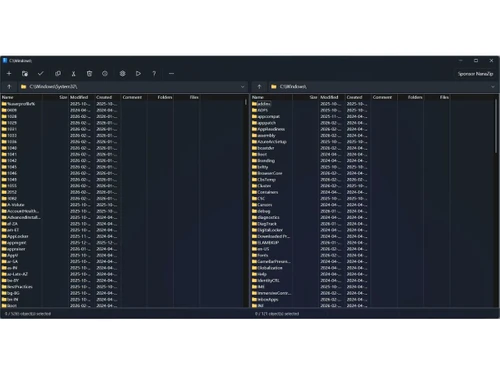
A modern open-source file archiver for Windows with a sleek interface, dark mode, and strong AES-256 encryption.
See MoreHave you used NanaZip before?
Share your insights for better experience
This Product is Available Free Forever.
Start instantly with no fees, no subscriptions, and no commitments.
Free Forever Plan
Get started immediately at no cost. Upgrade anytime if your business demand more.
Free Forever File Compression File Extraction Multi Format Support Encryption Password Protection Windows Context Menu Modern User Interface High Compression Ratio Fast Process Multi-Core CPU Support Archive Splitting Drag and Drop
  Windows
  Desktop
  Perpetual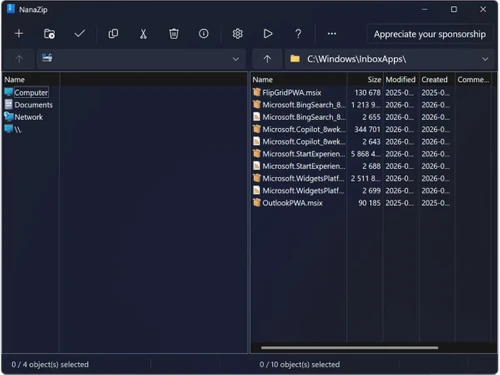
Techjockey Trusted Reviews from Verified Users
No reviews are currently available for NanaZip. Discover similar Utility Software reviews
Booky
Whats great - Booky.io has a clean and minimal layout. It's perfect for keeping my most-used links all in one place. The drag-and-drop make... read more

Defencebyte Computer Opmitizer
Whats great - Really I am happy now after using defencebyte Computer optimizer, My Pc performance boost after using defencebyte Computer op... read more

VMware
Whats great - Vmware offers a wide variety of management tools and features to help with both the initial configuration and ongoing adminis... read more









NanaZip is available as a free download at Techjockey.com.
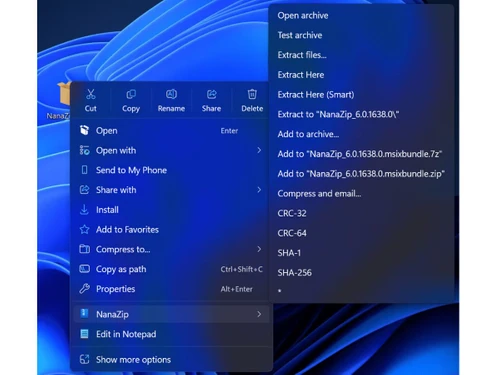
You right-click any file or folder in Windows Explorer, select NanaZip, choose compression or extraction options, and the tool handles archiving with a modern interface and advanced algorithms.
It is used by businesses, IT professionals, and Windows users needing a modern, secure file archiver with enterprise deployment capabilities.
Yes, it fully supports all 7-Zip formats and inherits its powerful compression engine while adding a modern interface.
Yes, NanaZip features a clean XAML-based interface with full dark mode and Windows 11 Mica effect support.
It is packaged as MSIX for easy deployment via Microsoft Store or offline installation using MSI packages from GitHub.
20,000+ Software Listed
Best Price Guranteed
Free Expert Consultation
2M+ Happy Customers
Terms and Condtions

Users with registered businesses can purchase goods from merchants on the platform to satisfy their business needs. Users are not permitted to utilize any products acquired through the platform for resale, advertising, business, or further distribution.
For each purchase made, users will receive a Tax Invoice (or 'GST invoice') that includes specific details such as:
the GSTIN of the user associated with their registered business, and
the specified Entity Name for their business.
It should be noted that not all products are eligible for GST Invoice. Only the products displayed by participating sellers with the 'GST-based Invoice Available' callout on the product description page would qualify.
Certain goods and services are not eligible to get a GST Invoice, including items with VAS, i.e., Value Added Services (e.g., Total Mobile Protection/Assured Buyback) and those involving an exchange offer at the time of purchase.
Users must ensure the accuracy of the GSTIN, and business entity name provided for the GST Invoice. Requests for corrections into GST Invoice would not be accommodated by Techjockey.com or any Seller, and any issues arising from user-provided information are the sole responsibility of users.
Techjockey.com is not liable for the GST Invoice or any associated input tax credit. To efficiently claim an input tax credit, users should select the registered place of business address as per the GST authority's data and follow the provisions of the GST Act and rules.
To claim an input tax credit, the delivery and billing addresses must match. Furthermore, input tax credits will not be granted if the delivery address and GSTIN on the invoice are from different states. In case of incorrect GST details provided during the order placement, the order will be canceled automatically.