 USA
USA UAE
UAESmall Business
Designed for startups and growing businesses


See More


Brand: VMware
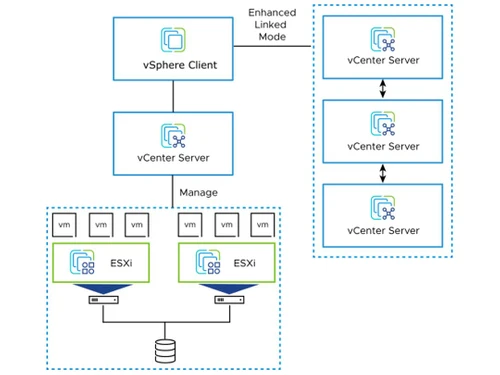
vSphere provides a powerful, flexible, and secure foundation for business agility that accelerates the digital transformation to hybrid cloud and success in the digital economy. It helps you run, manage, connect and secure your applications in a common operating environment across the hybrid cloud. ...
See MoreHave you used VMware before?
Share your insights for better experience
Brand: VMware
Founded Year: 1998
Pivotal Tracker is the story-based product management tool that makes collaboration easy and keeps cross-functional agile teams in sync.
Looking for The Right Pricing?
Share your requirements and get a plan built around your business.
Price Available on Request
Get personalised VMware pricing that fits your needs. Our team will connect with you.
 Operations Big Data Analytics Service & Support Performance Monitoring Dashboards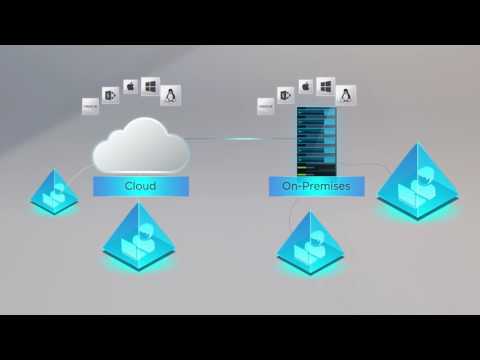

Watch the demo video to explore key features, real workflows, and how the software fits your business needs.
 Windows
  MacOS
MacOS  Desktop
  Cloud-Based
  Perpetual
Small Business
Designed for startups and growing businesses
Medium Business
Built for business growth and flexibility
Enterprises
Designed for complex and large-scale business needs
4.5
Out of 5

Overall Rating
Based on
6 Verified Reviews
Rating Breakdown
87% Recommend this Product
Add ReviewUsers generally appreciate VMware for its cost-effectiveness, ease of installation, and user-friendly interface, allowing for quick setup and management of virtual machines. Many administrators find the platform reliable and efficient for building servers. However, some users have noted confusion around licensing and the need for additional training and certifications. Overall, the sentiment is positive, with many recommending VMware for its robust capabilities despite minor drawbacks.
Pros
"I have used VMware for over 6 months now and have found it to be very cost-effective. The console interface is simple and easy to learn."
"Vmware offers a wide variety of management tools and features to help with both the initial configuration and ongoing administration of virtual machines"
Cons
"Require additional licenses, training, and certification in order to operate."
"Honestly not much! I've really never had any complaints about using this software."


Feb 17, 2022
Techjockey Verified
“VMware provides a cost-effective and flexible platform!”
Pros
Vmware offers a wide variety of management tools and features to help with both the initial configuration and ongoing administration of virtual machines
Cons
Honestly not much! I've really never had any complaints about using this software.
Reason to switch
I like the management of multiple servers for different applications and server environments within a centralized management platform feature.
Feb 19, 2022
Techjockey Verified
“VmWare software is easy to install and setup.”
Pros
I have used VMware for over 6 months now and have found it to be very cost-effective. The console interface is simple and easy to learn.
Cons
The licensing is a bit confusing,
Reason to switch
Minimum hardware requirements are small, and it can run on small VPS without impediment.
Feb 19, 2022
Techjockey Verified
“VMware is a reliable, easy-to-use platform that helps me build new servers quickly.”
Pros
I am impressed with how VMware has allowed me to build virtual machines in just a few minutes, even if I had a lot of work to do. I would recommend that you try this platform, it's a great tool.
Cons
Require additional licenses, training, and certification in order to operate.

VMware
Price On Request
Desktop
Mobile
Web based
On Premises
Windows
Mac OS

VMware vSphere
Price On Request
Desktop
Mobile
Web based
On Premises
Windows
Mac OS
Nero Platinum Suite
₹ 4065
Desktop
Mobile
Web based
On Premises
Windows
Mac OS

Truecaller
₹ 84
Desktop
Mobile
Web based
On Premises
Windows
Mac OS

WizTree
Price On Request
Desktop
Mobile
Web based
On Premises
Windows
Mac OS

RestoreX360
₹ 1499
Desktop
Mobile
Web based
On Premises
Windows
Mac OS

Xplorer
Price On Request
Desktop
Mobile
Web based
On Premises
Windows
Mac OS
CHIRP
Price On Request
Desktop
Mobile
Web based
On Premises
Windows
Mac OS

IrfanView
Price On Request
Desktop
Mobile
Web based
On Premises
Windows
Mac OS

Iobit Driver Booster 13 Pro
Price On Request
Desktop
Mobile
Web based
On Premises
Windows
Mac OS

Opal
Price On Request
Desktop
Mobile
Web based
On Premises
Windows
Mac OS
(0) Product(s) selected
Starting Price:
₹4,065 /PC/Year ₹5,350
Starting Price:
₹84 /Month
Starting Price:
$25 /Quantity
Available
Price on Request
Available
Price on Request
Starting Price:
$12 /License
Starting Price:
$19 /Year
Starting Price:
$20 /Month

Starting Price:
$60 /Year

Available
Price on Request

Available
Price on Request






VMware will continue to support existing versions of the current products as published in the VMware Enterprise Infrastructure Support Life Cycle Policy .
New vSphere courses are available.
An evaluation version of VMware vSphere is available for a complimentary 60-day evaluation period. Download it at the VMware vSphere Evaluation page for more information.
VMware has developed an extensive list of compatible hardware. To review the list, see the Hardware Compatibility Guide .
20,000+ Software Listed
Best Price Guranteed
Free Expert Consultation
2M+ Happy Customers
Terms and Condtions

Users with registered businesses can purchase goods from merchants on the platform to satisfy their business needs. Users are not permitted to utilize any products acquired through the platform for resale, advertising, business, or further distribution.
For each purchase made, users will receive a Tax Invoice (or 'GST invoice') that includes specific details such as:
the GSTIN of the user associated with their registered business, and
the specified Entity Name for their business.
It should be noted that not all products are eligible for GST Invoice. Only the products displayed by participating sellers with the 'GST-based Invoice Available' callout on the product description page would qualify.
Certain goods and services are not eligible to get a GST Invoice, including items with VAS, i.e., Value Added Services (e.g., Total Mobile Protection/Assured Buyback) and those involving an exchange offer at the time of purchase.
Users must ensure the accuracy of the GSTIN, and business entity name provided for the GST Invoice. Requests for corrections into GST Invoice would not be accommodated by Techjockey.com or any Seller, and any issues arising from user-provided information are the sole responsibility of users.
Techjockey.com is not liable for the GST Invoice or any associated input tax credit. To efficiently claim an input tax credit, users should select the registered place of business address as per the GST authority's data and follow the provisions of the GST Act and rules.
To claim an input tax credit, the delivery and billing addresses must match. Furthermore, input tax credits will not be granted if the delivery address and GSTIN on the invoice are from different states. In case of incorrect GST details provided during the order placement, the order will be canceled automatically.



