linkedin
VMware Workspace One logo
play VMware Workspace One Demo - TestDrive
vmWare Workspace one

VMware Workspace One

Brand: VMware

  • 4.0

  • 5 Ratings

VMware Workspace ONE is a digital workspace platform which delivers secure access to any cloud, mobile, web and windows app on smartphone, tablet or laptop device while ensuring a consumer-simple and simple sign-on (SSO) experience. It provides the leverage of a single platform with a user-friendly interface for managing all the devices and maintaining complete employee privacy. VMware Workspace ...

See More

Have you used VMware Workspace One before?

Share your insights for better experience

Add a Review

Price Available on Request

Questions about pricing or customization? We’re here to help, just a click away.

100% Genuine
Products
Best Price
Guaranteed
Safe & Secure
Payment
  • Description

  • Pricing

  • Features

  • Specification

  • Review

  • Compare

  • Alternatives

  • FAQ

VMware Workspace One Software Overview

What is VMWare Workspace ONE?

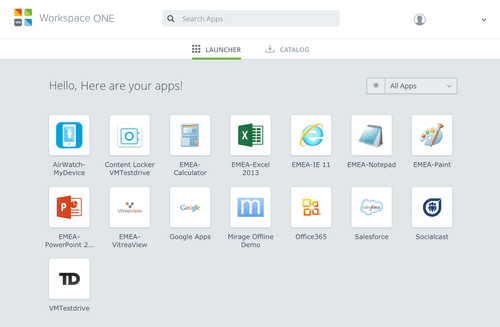
VMware Workspace ONE is a digital workspace platform which delivers secure access to any cloud, mobile, web and windows app on smartphone, tablet or laptop device while ensuring a consumer-simple and simple sign-on (SSO) experience. It provides the leverage of a single platform with a user-friendly interface for managing all the devices and maintaining complete employee privacy.

VMware Workspace ONE comes with powerful collaboration tools to engage employees through email, web, mobile, social media, documents and calendars. Employees can either continue with their own device or go with the organizational device to engage with other teams and departments as per the risk-based and fine-grained access policies. To further ensure secure collaboration, VMware Workspace ONE considers the device compliance information generated through the UEM technology.

The unified endpoint management technology further helps automate mobile and laptop configuration, and traditional onboarding. Application lifecycle management is possible in real-time by bridging the gap between the mobile-cloud era and legacy enterprise apps.

Workspace ONE aggregates and correlates the workspace data to provide useful insights and help organizations create an outstanding user experience without compromising on the information security.

Key Benefits of VMware Workspace One

Workspace ONE helps organizations replace time-consuming and labour-oriented processes with automated processes and improved user experiences. With VMware Workspace ONE, organizations can benefit in many ways:

  1. Quick Onboarding: Quick onboarding of new joiners with their apps and devices ready with the required setup in just a few minutes.
  2. No Need to Raise Tickets for IT Help: It eliminates the hassles of raising tickets and making frequent help desk call to get the device setup for new employees.
  3. Defined Data Usage & Access Policies: Access policies and data usage rules can be easily enforced across all apps and devices, whether its company-provided or self-owned.
  4. Defining Access Policies from Anywhere: All data access and setup processes can be completed from a mobile device from anywhere.
  5. Quick Device Provisioning: A new corporate laptop can be provisioned quickly from the cloud.
  6. Useful Insights: Provides useful insights in an automated manner across your digital workspace.

Key Capabilities of VMware Workspace ONE

Any app can be transferred from mobile cloud apps to legacy enterprise apps. The enterprise app catalogue can further provide SSO access to any device or any app.

  • SaaS apps
  • Internal web apps
  • Native public mobile apps
  • Legacy Windows apps
  • Record apps and secure sensitive systems
  • Modern MacOS apps & Windows apps
  • Virtualized and managed desktops
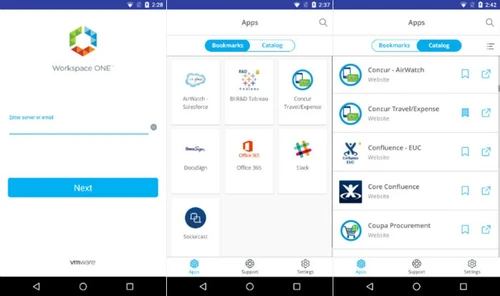
  1. Quick employee onboarding with a unified app catalogue: By simply downloading Workspace ONE Intelligent Hub app for Android and iOS devices, you can install the required native apps for your new employee. Workspace ONE provides an app catalogue that can be customized as per your business needs.
  2. SSO to federate on-premise topologies for Active Directory: Workspace ONE ensures easy integration with its own directories for LDAP, third-party identity providers, active directory, internal directory, etc. to provide access to native organizational apps.
  3. Password-free access to make the most of device trust, and biometric or PIN timeout setups to ensure authentication: It allows employees to use biometric devices and local PIN so that they can use an app or registered device as long as the authentication window permits.
  4. Authentication brokerage for third-party authentication, whether new or existing: Workspace ONE supports Imprivata Touch and Go, RADIUS, RSA SecurID, Symantec, etc. with third-party authentication.
Read more

VMware Company Details

Founded Year:  1998

Pivotal Tracker is the story-based product management tool that makes collaboration easy and keeps cross-functional agile teams in sync.

Director/Founders Rob Mee and Sherry Erskine
Company Size 1000+ Employees
Other info This foundation empowers businesses to build, run, manage, connect, and protect applications, anywhere–enabling technology-driven transformation without disruption.

VMware Workspace One Pricing & Plans

Looking for The Right Pricing?

Share your requirements and get a plan built around your business.

  • Define your business needs
  • Get customised pricing
  • Choose features that fit your workflow

Price Available on Request

Get personalised VMware Workspace One pricing that fits your needs. Our team will connect with you.

VMware Workspace One Features

  • icon_check Access Control
    Deliver secure access to cloud, mobile, web and Windows apps on any smartphone, tablet or laptop through a single catalog and a
  • icon_check Unify Access
    Leverage a single platform to manage all devices regardless of ownership model - bring your own (BYO) to fully managed - and
  • icon_check Windows Supportive Software
    Enable simple and secure end-user onboarding of Windows 10 endpoints with out-of-box enrollment (OOBE) using cloud-based device
  • icon_check Endpoint Access Management
  • icon_check Cloud Access Management
    VMware Recognized for Leading Cloud Identity Management Solution VMware Identity Manager, a component of Workspace ONE, is
  • icon_check Data Migration
    Streamline Migration to Office 365 Learn how the integration of identity, app and mobility management in Workspace ONE can help
  • icon_check Single sign-on
  • icon_check Multi-Factor Authentication (MFA)
  • icon_check Application Access Management
  • icon_check Secure Email
  • icon_check User Management
  • icon_check Centralize Role Management
VMware Workspace One Demo Video play icon

Get VMware Workspace One Demo

Watch the demo video to explore key features, real workflows, and how the software fits your business needs.

Understand
Key Features
Personal
Demo Insights
Interactive
Demo Support

VMware Workspace One Specifications

Supported Platforms
Windows Windows iOS iOS Android Android MacOS MacOS
Devices
Desktop Desktop Mobile Mobile
Deployment
Cloud-Based Cloud-Based Perpetual Perpetual
Suitable For
All Industries
Business Specific
All Businesses
Language
English

Explore the Best Alternative Solutions Similar to Your Business Size and Needs

VMware Workspace One Review

4.0

Out of 5

img

Overall Rating

Based on
5 Verified Ratings

Rating Breakdown

  • Features 4.4
  • Value for Money 3.5
  • Ease of Use 4.3
  • Customer Support 4.1

92% Recommend this Product

Add Review

Techjockey Trusted Reviews from Verified Users

No reviews are currently available for VMware Workspace One . Discover similar Productivity Software reviews

  • Microsoft Word

    4.4

    Whats great - Word is the industry standard—everyone accepts .docx files. I never worry about compatibility. read more

  • SysTools DBX To PST Converter

    5.0

    Whats great - I was looking for a solution to convert my all crucial DBX files into PST file format. But I did not get any solution. Then, ... read more

  • think cell

    4.7

    Whats great - My present partners with perpetual designer positions have completed a magnificent activity in their glassdoor surveys, depic... read more

Compare VMware Workspace One With other Productivity Software

Products
Ratings
Pricing
Device Supported
Deployment
Supported Platforms
  • img

    VMware Workspace One

  • 4.0

  • Price On Request

  • Desktop

    Mobile

  • Web based

    On Premises

  • Windows

    Mac OS

  • img

    Cold Turkey

  • 4.3

  • Price On Request

  • Desktop

    Mobile

  • Web based

    On Premises

  • Windows

    Mac OS

  • img

    Snippets AI

  • 4.4

  • Price On Request

  • Desktop

    Mobile

  • Web based

    On Premises

  • Windows

    Mac OS

  • img

    InboxPro

  • 4.5

  • Price On Request

  • Desktop

    Mobile

  • Web based

    On Premises

  • Windows

    Mac OS

  • img

    Raycast

  • 4.1

  • Price On Request

  • Desktop

    Mobile

  • Web based

    On Premises

  • Windows

    Mac OS

  • img

    SmartPanels

  • 4.4

  • Price On Request

  • Desktop

    Mobile

  • Web based

    On Premises

  • Windows

    Mac OS

  • img

    Rambox

  • 4.2

  • Price On Request

  • Desktop

    Mobile

  • Web based

    On Premises

  • Windows

    Mac OS

  • img

    Voxer

  • 4.7

  • Price On Request

  • Desktop

    Mobile

  • Web based

    On Premises

  • Windows

    Mac OS

  • img

    skillaPRO

  • 4.2

  • Price On Request

  • Desktop

    Mobile

  • Web based

    On Premises

  • Windows

    Mac OS

  • img

    Microsoft 365 F1

  • 4.2

  • ₹ 300

  • Desktop

    Mobile

  • Web based

    On Premises

  • Windows

    Mac OS

(2) Product(s) selected

VMware Workspace One Alternatives

See All VMware Workspace One Alternatives

Starting Price:

₹2,499 /One-Time

Starting Price:

$6 /User/Month

Starting Price:

$24

Starting Price:

$10 /Month

Starting Price:

$7 /Month

Starting Price:

$4 /Monthly

Starting Price:

$60
Starting Price:

$8 /Monthly

Rize

4.1

Starting Price:

$17 /Month

Articles for VMware Workspace One

See All Related Articles

Does Android App Restrictions (RestrictionsManager) require Android for Work?

Yes, these restrictions will only be delivered if the app is installed on an Android for Work enrolled device.

Do I need to include all the libraries in the iOS SDK zip file if I will only be using one feature?

Yes, currently there is not a way to partition the SDK based on what you would like to use. This will be included in a future version of the iOS SDK.

Do I need to include all the libraries in the Android SDK zip file if I will only be using one feature?

If you only require use of the Client SDK, then you simply need to include the gson and the AWClientSDK jar files. If you will be using the AWFramework, then all the library dependencies that come with the Android SDK zip must be included in your project (in addition to the AWFramework aar file).

20,000+ Software Listed

Best Price Guranteed

Free Expert Consultation

2M+ Happy Customers

Terms and Condtions

close

Users with registered businesses can purchase goods from merchants on the platform to satisfy their business needs. Users are not permitted to utilize any products acquired through the platform for resale, advertising, business, or further distribution.

For each purchase made, users will receive a Tax Invoice (or 'GST invoice') that includes specific details such as:

  • the GSTIN of the user associated with their registered business, and

  • the specified Entity Name for their business.

It should be noted that not all products are eligible for GST Invoice. Only the products displayed by participating sellers with the 'GST-based Invoice Available' callout on the product description page would qualify.

Certain goods and services are not eligible to get a GST Invoice, including items with VAS, i.e., Value Added Services (e.g., Total Mobile Protection/Assured Buyback) and those involving an exchange offer at the time of purchase.

Users must ensure the accuracy of the GSTIN, and business entity name provided for the GST Invoice. Requests for corrections into GST Invoice would not be accommodated by Techjockey.com or any Seller, and any issues arising from user-provided information are the sole responsibility of users.

Techjockey.com is not liable for the GST Invoice or any associated input tax credit. To efficiently claim an input tax credit, users should select the registered place of business address as per the GST authority's data and follow the provisions of the GST Act and rules.

To claim an input tax credit, the delivery and billing addresses must match. Furthermore, input tax credits will not be granted if the delivery address and GSTIN on the invoice are from different states. In case of incorrect GST details provided during the order placement, the order will be canceled automatically.