USA
USA UAE
UAESmall Business
Designed for startups and growing businesses
See More





Brand: VMware
Power your software-defined data center with flexible deployments and disaster recovery using VMware vSAN, the industry-leading vSphere-native HCI solution.
See MoreHave you used VMware vSAN before?
Share your insights for better experience
Brand: VMware
Founded Year: 1998
Pivotal Tracker is the story-based product management tool that makes collaboration easy and keeps cross-functional agile teams in sync.
Looking for The Right Pricing?
Share your requirements and get a plan built around your business.
Price Available on Request
Get personalised VMware vSAN pricing that fits your needs. Our team will connect with you.
 Disaster Recovery Remote Administration Access Control Encryption Data Storage Unified App Management Flexible Deployments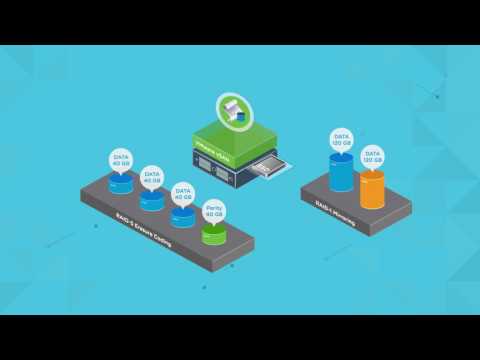

Watch the demo video to explore key features, real workflows, and how the software fits your business needs.
 Windows
  Desktop
  Cloud-Based
  Perpetual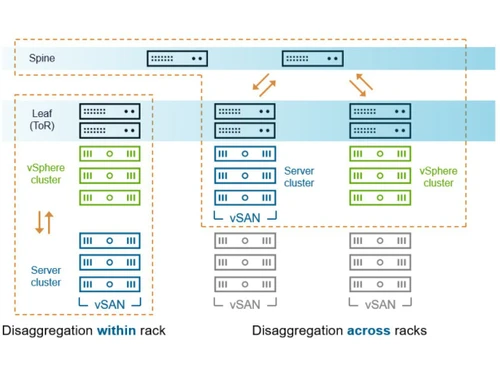
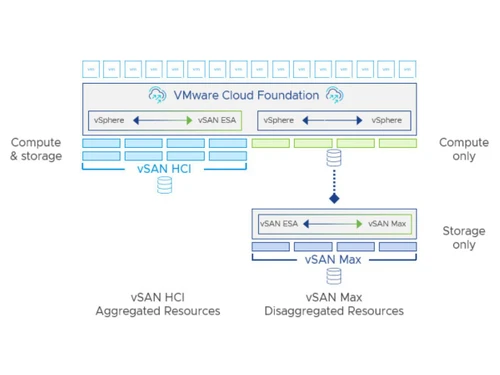
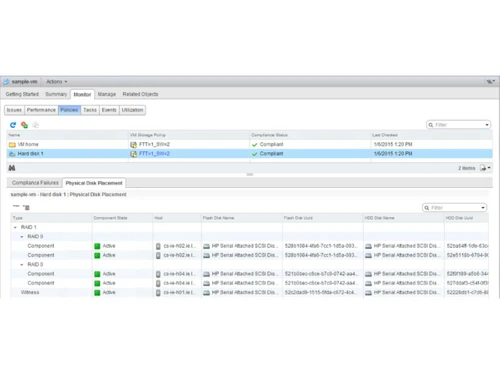
Small Business
Designed for startups and growing businesses
Medium Business
Built for business growth and flexibility
Enterprises
Designed for complex and large-scale business needs
4.4
Out of 5

Overall Rating
Based on
5 Verified Ratings
Rating Breakdown
90% Recommend this Product
Add ReviewTechjockey Trusted Reviews from Verified Users
No reviews are currently available for VMware vSAN. Discover similar Hyperconverged Infrastructure Solutions reviews

Dell EMC VxRail
Whats great - The top feature of this software is that storage is integrated with VxRail which eliminates the hassles of any sort of naviga... read more

NetApp HCI
Whats great - The app is designed with virtual computing infrastructure to enable an encrypted public cloud experience. This latest technol... read more

Split
Whats great - Split has everything we need for both feature flagging and experimenting. The ability to monitor and roll out features based ... read more

VMware vSAN
Price On Request
Desktop
Mobile
Web based
On Premises
Windows
Mac OS

Orgo
Price On Request
Desktop
Mobile
Web based
On Premises
Windows
Mac OS
Dell EMC VxRail
₹ 4200000
Desktop
Mobile
Web based
On Premises
Windows
Mac OS

E2B
Price On Request
Desktop
Mobile
Web based
On Premises
Windows
Mac OS

AgentStation
Price On Request
Desktop
Mobile
Web based
On Premises
Windows
Mac OS

Nutanix Acropolis
Price On Request
Desktop
Mobile
Web based
On Premises
Windows
Mac OS

Starwind Virtual San
Price On Request
Desktop
Mobile
Web based
On Premises
Windows
Mac OS

HC3 Virtualization Platform
Price On Request
Desktop
Mobile
Web based
On Premises
Windows
Mac OS

Hitachi Unified Compute HC Series
Price On Request
Desktop
Mobile
Web based
On Premises
Windows
Mac OS

Azure Stack HCI
Price On Request
Desktop
Mobile
Web based
On Premises
Windows
Mac OS

Maxta
Price On Request
Desktop
Mobile
Web based
On Premises
Windows
Mac OS
(2) Product(s) selected
Starting Price:
$20 /Month
Starting Price:
$150 /Month
Available
Price on Request
Available
Price on Request

Available
Price on Request

Available
Price on Request

Available
Price on Request

Available
Price on Request

Available
Price on Request
Yes, vSAN Encryption for data-at-rest is an option for vSAN 6.6 datastores to further improve security and provide compliance with increasingly stringent regulatory requirements. vSAN datastore encryption uses an AES 256 cipher. vSAN Encryption is hardware-agnostic, meaning it can be deployed on any supported hardware in all-flash or hybrid configurations. Self-encrypting drives (SEDs) are not required. Turning on encryption is a simple matter of clicking a checkbox. Encryption can be enabled when vSAN is enabled or after, with or without virtual machines (VMs) residing on the datastore.
2-factor authentication methods, such as RSA SecurID® and Common Access Card (CAC), are supported with vSAN, vSphere, and vCenter Server.
Yes, VMware vSAN is part of the VMware vSphere STIG Framework. The DISA STIG defines secure installation requirements for deploying vSAN on DoD networks. VMware worked closely with DISA to include vSAN in the existing vSphere STIG.
On December 05, 2017, the VMware VMkernel Cryptographic Module achieved FIPS 140-2 validation under the National Institute of Standards and Technology (NIST) Cryptographic Module Validation Program (CMVP).
VMware vSAN is used to power hyper-converged infrastructure (HCI) solutions by creating a high-performance, shared storage pool from server-based disks, serving as a core building block for the Software-Defined Data Center.
vSphere is VMware's server virtualization platform that includes the hypervisor, while vSAN is a software-defined storage solution that is natively integrated into the vSphere hypervisor to create shared storage from server-local disks.
VMware vSAN works by aggregating locally attached disks from a cluster of servers running vSphere, creating a single, software-defined shared datastore that is managed through a central interface.
The general requirements for VMware vSAN include a cluster of vSphere-compatible servers with local storage devices, and it is supported on Windows platforms with a web-based deployment model.
While vSAN provides shared storage functionality similar to a traditional Storage Area Network (SAN), it is a software-defined storage solution that creates this storage from server-local disks rather than from a dedicated hardware array.
VMware vSAN price is available on request at Techjockey.com.
Yes, VMware vSAN includes built-in security features such as data-at-rest encryption and access control to help protect your storage environment.
Yes, VMware vSAN provides disaster recovery capabilities, enabling businesses to protect their data and maintain operations by replicating virtual machines to a secondary site.
VMware vSAN is offered as a web-based solution with a perpetual license and is deployed directly within the vSphere environment that it is designed to support.
20,000+ Software Listed
Best Price Guranteed
Free Expert Consultation
2M+ Happy Customers
Terms and Condtions

Users with registered businesses can purchase goods from merchants on the platform to satisfy their business needs. Users are not permitted to utilize any products acquired through the platform for resale, advertising, business, or further distribution.
For each purchase made, users will receive a Tax Invoice (or 'GST invoice') that includes specific details such as:
the GSTIN of the user associated with their registered business, and
the specified Entity Name for their business.
It should be noted that not all products are eligible for GST Invoice. Only the products displayed by participating sellers with the 'GST-based Invoice Available' callout on the product description page would qualify.
Certain goods and services are not eligible to get a GST Invoice, including items with VAS, i.e., Value Added Services (e.g., Total Mobile Protection/Assured Buyback) and those involving an exchange offer at the time of purchase.
Users must ensure the accuracy of the GSTIN, and business entity name provided for the GST Invoice. Requests for corrections into GST Invoice would not be accommodated by Techjockey.com or any Seller, and any issues arising from user-provided information are the sole responsibility of users.
Techjockey.com is not liable for the GST Invoice or any associated input tax credit. To efficiently claim an input tax credit, users should select the registered place of business address as per the GST authority's data and follow the provisions of the GST Act and rules.
To claim an input tax credit, the delivery and billing addresses must match. Furthermore, input tax credits will not be granted if the delivery address and GSTIN on the invoice are from different states. In case of incorrect GST details provided during the order placement, the order will be canceled automatically.