 USA
USA UAE
UAESmall Business
Designed for startups and growing businesses


See More


Brand: Booky
Booky is a privacy-focused online bookmark manager that lets you organize and access your favorite links with simplicity and speed.
See MoreHave you used Booky before?
Share your insights for better experience
Looking for The Right Pricing?
Share your requirements and get a plan built around your business.
Price Available on Request
Get personalised Booky pricing that fits your needs. Our team will connect with you.
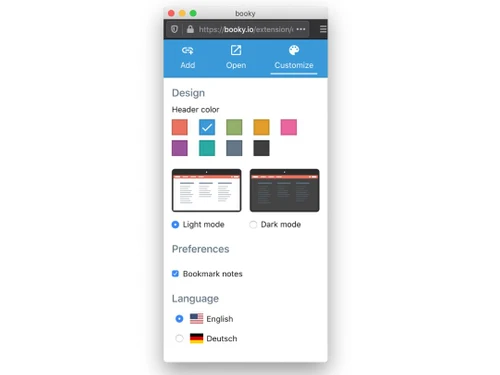
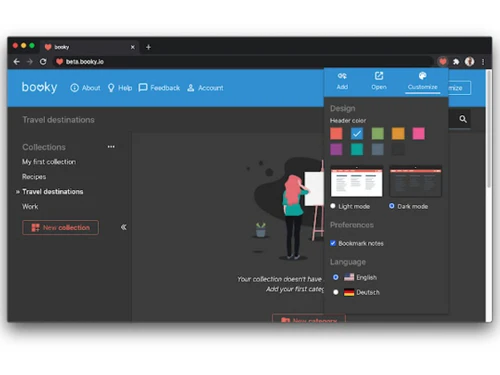
 Private or Public Collections Customizable Design Web App on Mobile Devices Bookmark Search Browser Extension Cross Browser Bookmarklet Collections and Categories Bookmark Notes Bookmark Import or Export Drag & Drop
  Ubuntu
  Windows
  MacOS
MacOS  Linux
Linux  Desktop
  Cloud-Based
  Perpetual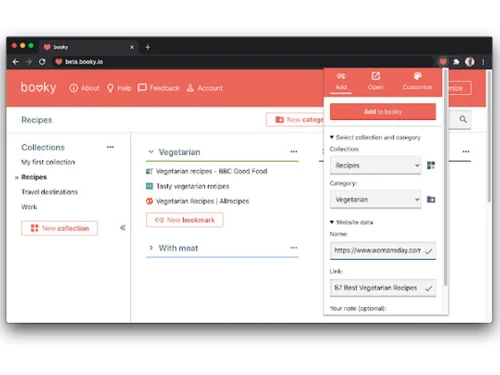
Small Business
Designed for startups and growing businesses
Medium Business
Built for business growth and flexibility
Enterprises
Designed for complex and large-scale business needs
4.4
Out of 5

Overall Rating
Based on
10 Verified Reviews
Rating Breakdown
90% Recommend this Product
Add ReviewUsers generally appreciate Booky for its clean and minimal design, which enhances bookmark organization and accessibility across devices. Many find it easy to use, allowing for quick saving and sharing of links, while the visual layout is favored over traditional browser bookmarks. However, some users express a desire for improved mobile functionality and additional features, such as batch-moving bookmarks or better public sharing options. Overall, the sentiment is positive, with users recommending the tool for its simplicity and effectiveness.
Pros
"Booky.io has a clean and minimal layout. It's perfect for keeping my most-used links all in one place. The drag-and-drop makes it super easy to organize."
"Allows saving contents and accessing them later; well-synced across devices; enables categorizing contents and sharing links; offline access."
"Easy to store links online and customize bookmarks; accessible on desktop and mobile; easy to save and share links; offers nice themes and backgrounds."
Cons
"I wish there was a better mobile version or app—it’s not bad but could be more responsive."
"Lacks batch-move and alphabetizing features; import doesn’t work for nested folders."
"Needs more features, no public/sharing options, no mobile apps."

Mar 30, 2025
Techjockey Verified
“Clean and Minimal Design, Perfect for Quick Access”
I’ve been using Booky for a few weeks now, and honestly, it’s such a handy tool. I love that I can open a tab and have all my important bookmarks right there, without all the clutter. It’s way better than the default bookmarks bar in my browser. Simple, clean, and does the job.
Pros
Booky.io has a clean and minimal layout. It's perfect for keeping my most-used links all in one place. The drag-and-drop makes it super easy to organize.
Cons
I wish there was a better mobile version or app—it’s not bad but could be more responsive.
Reason to switch
Raindrop had too many features I didn’t use. Booky keeps it simple, and that’s all I needed.
Mar 24, 2025
Techjockey Verified
“A Better Way to Organize and Save Your Contents”
With almost a billion contents published every day, Booky is a nice bookmark that lets you save your contents and access them later. It is well synced, meaning you can access your content from any device; this lets you read your content from anywhere you wish. You can also categorize content and share important links with friends with ease. Whenever I see anything that catches my fancy online, I save it with Booky. The best part is that you can access your content even when you're offline.
Pros
Allows saving contents and accessing them later; well-synced across devices; enables categorizing contents and sharing links; offline access.
Cons
None mentioned.
Reason to switch
I had too many random bookmarks in Chrome. Booky helped me sort everything.
Mar 11, 2025
Techjockey Verified
“easy to use”
Easy to store links online and customize bookmarks. Easy access to your bookmarks both on desktop and mobile. Easy to save and share links with people. Nice themes and background of your choice.
Pros
Easy to store links online and customize bookmarks; accessible on desktop and mobile; easy to save and share links; offers nice themes and backgrounds.
Cons
None mentioned.
Reason to switch
Raindrop had too many features. I like how Booky keeps things basic.

Booky
Price On Request
Desktop
Mobile
Web based
On Premises
Windows
Mac OS

Nero Platinum Suite
₹ 4065
Desktop
Mobile
Web based
On Premises
Windows
Mac OS

Truecaller
₹ 84
Desktop
Mobile
Web based
On Premises
Windows
Mac OS

WizTree
Price On Request
Desktop
Mobile
Web based
On Premises
Windows
Mac OS

RestoreX360
₹ 1499
Desktop
Mobile
Web based
On Premises
Windows
Mac OS

Xplorer
Price On Request
Desktop
Mobile
Web based
On Premises
Windows
Mac OS
CHIRP
Price On Request
Desktop
Mobile
Web based
On Premises
Windows
Mac OS

IrfanView
Price On Request
Desktop
Mobile
Web based
On Premises
Windows
Mac OS

Iobit Driver Booster 13 Pro
Price On Request
Desktop
Mobile
Web based
On Premises
Windows
Mac OS

Opal
Price On Request
Desktop
Mobile
Web based
On Premises
Windows
Mac OS

Iobit Protected folder
Price On Request
Desktop
Mobile
Web based
On Premises
Windows
Mac OS
(0) Product(s) selected
Starting Price:
₹4,065 /PC/Year ₹5,350
Starting Price:
₹84 /Month
Starting Price:
$25 /Quantity
Available
Price on Request
Available
Price on Request
Starting Price:
$12 /License
Starting Price:
$19 /Year
Starting Price:
$20 /Month

Starting Price:
$60 /Year

Available
Price on Request

Available
Price on Request








Booky price details can be obtained upon request at techjockey.com.
There is no dedicated mobile app, but Booky works as a mobile-friendly web app.
Booky is compatible with Ubuntu, Windows, MacOS and Linux that supports modern web browsers.
No, Booky does not offer a free trial; however, it provides a free-forever plan with essential bookmarking features.
Booky functions as an online bookmark manager accessible via web browsers.
Individuals who want to organize, manage, and access bookmarks easily across devices use Booky.
Booky Utility does not offer a demo since the full version is free and accessible online.
Yes, Booky Software is completely free to use.
Yes, you can make collections public and share them with others.
Yes, Booky allows you to import bookmarks from other browsers and services.
Yes, you can export your bookmarks for backup or transfer.
20,000+ Software Listed
Best Price Guranteed
Free Expert Consultation
2M+ Happy Customers
Terms and Condtions

Users with registered businesses can purchase goods from merchants on the platform to satisfy their business needs. Users are not permitted to utilize any products acquired through the platform for resale, advertising, business, or further distribution.
For each purchase made, users will receive a Tax Invoice (or 'GST invoice') that includes specific details such as:
the GSTIN of the user associated with their registered business, and
the specified Entity Name for their business.
It should be noted that not all products are eligible for GST Invoice. Only the products displayed by participating sellers with the 'GST-based Invoice Available' callout on the product description page would qualify.
Certain goods and services are not eligible to get a GST Invoice, including items with VAS, i.e., Value Added Services (e.g., Total Mobile Protection/Assured Buyback) and those involving an exchange offer at the time of purchase.
Users must ensure the accuracy of the GSTIN, and business entity name provided for the GST Invoice. Requests for corrections into GST Invoice would not be accommodated by Techjockey.com or any Seller, and any issues arising from user-provided information are the sole responsibility of users.
Techjockey.com is not liable for the GST Invoice or any associated input tax credit. To efficiently claim an input tax credit, users should select the registered place of business address as per the GST authority's data and follow the provisions of the GST Act and rules.
To claim an input tax credit, the delivery and billing addresses must match. Furthermore, input tax credits will not be granted if the delivery address and GSTIN on the invoice are from different states. In case of incorrect GST details provided during the order placement, the order will be canceled automatically.



