 USA
USA UAE
UAESmall Business
Designed for startups and growing businesses


See More





Brand: UQuick Technologies India Limited
Have you used RestoreX360 before?
Share your insights for better experience
View plans
 Save upto 18%, Get GST Invoice on your business purchase T&C Buy Now & Pay Later, Check offer on payment page.
 Brand: UQuick Technologies India Limited
Founded Year: 2022
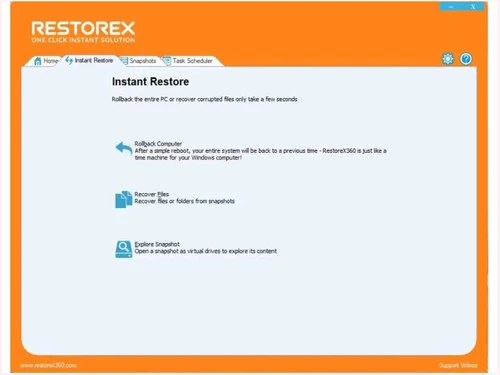
Windows Repair Tool RestoreX360 is a powerful solution for fixing Windows. Not only can it detect issues, but also it can resolve them efficiently. As a result, Windows runs more smoothly and reliably. Furthermore, RestoreX360 features a user-friendly
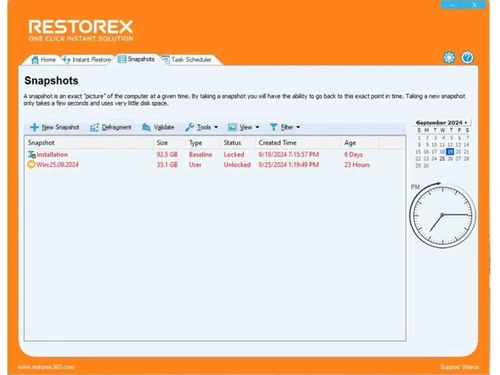
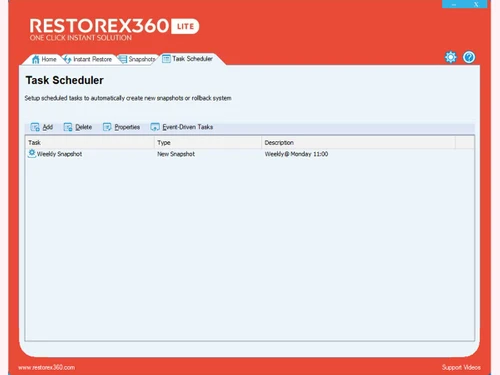
 Windows Restore Access Control Data Security Task Scheduler Remote Management Ransomware Protection Instant Rollback Advanced Snapshots Capture Snapshots Task Schedule Management Registry Exclusion Filters Custom File Remote Management Console Multi-Drive Protection Safe Software Testing

Watch the demo video to explore key features, real workflows, and how the software fits your business needs.
 Windows
  Desktop
  Perpetual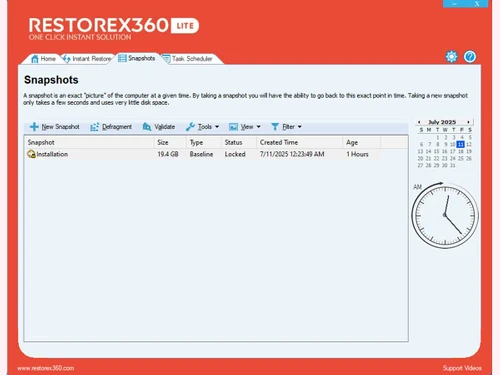
Small Business
Designed for startups and growing businesses
Medium Business
Built for business growth and flexibility
Enterprises
Designed for complex and large-scale business needs
5
Out of 5

Overall Rating
Based on
1 Verified Review
Rating Breakdown
100% Recommend this Product
Add Review
Jan 12, 2025
Techjockey Verified
“Nice Software and Very Useful”
RestoreX360 is a trusted name in restoration services, delivering reliable, efficient, and high-quality solutions.
Pros
Quickly recover from malware or virus attacks in just seconds. Repair any Windows system effortlessly and swiftly. Reverse system crashes instantly, even when Windows fails to boot. Operates without impacting computer performance, utilizing minimal resources. Includes an option to disable Windows updates and upgrades. Features a built-in snapshot defragmenter to optimize system resources and reclaim free space.
Cons
Can't Transfer Snapshots to Other PC or Hard Disk.

RestoreX360
₹ 1499.00 excl. GST
Desktop
Mobile
Web based
On Premises
Windows
Mac OS
Nero Platinum Suite
₹ 4065
Desktop
Mobile
Web based
On Premises
Windows
Mac OS

Truecaller
₹ 84
Desktop
Mobile
Web based
On Premises
Windows
Mac OS

WizTree
Price On Request
Desktop
Mobile
Web based
On Premises
Windows
Mac OS

Xplorer
Price On Request
Desktop
Mobile
Web based
On Premises
Windows
Mac OS
CHIRP
Price On Request
Desktop
Mobile
Web based
On Premises
Windows
Mac OS

IrfanView
Price On Request
Desktop
Mobile
Web based
On Premises
Windows
Mac OS

Iobit Driver Booster 13 Pro
Price On Request
Desktop
Mobile
Web based
On Premises
Windows
Mac OS

Opal
Price On Request
Desktop
Mobile
Web based
On Premises
Windows
Mac OS

EaseUS Partition Master
Price On Request
Desktop
Mobile
Web based
On Premises
Windows
Mac OS

Iobit Protected folder
Price On Request
Desktop
Mobile
Web based
On Premises
Windows
Mac OS
(0) Product(s) selected
Starting Price:
₹4,065 /PC/Year ₹5,350
Starting Price:
₹84 /Month
Starting Price:
$25 /Quantity
Available
Price on Request
Available
Price on Request
Starting Price:
$12 /License
Starting Price:
$19 /Year
Starting Price:
$20 /Month

Starting Price:
$60 /Year

Available
Price on Request

Available
Price on Request






RestoreX360 pricing plans start from INR 1499 at techjockey.com.
No, RestoreX360 doesn’t provide any specific mobile app.
It is primarily installed on Windows laptops and desktops to manage system snapshots and repair Windows issues.
Yes, RestoreX360 offers a free 7-day, fully functional trial version of their Windows recovery software.
RestoreX360 is a BIOS-level snapshot-based system recovery tool that lets users reverse PC malfunctions, including blue screens, malware, or system failures, within seconds.
Designed to fix BSODs and system crashes, this tool is used by IT professionals, small businesses, schools, and individuals seeking rapid, BIOS-level PC repair.
RestoreX360 is not free; it is a subscription-based Windows repair and recovery tool.
20,000+ Software Listed
Best Price Guranteed
Free Expert Consultation
2M+ Happy Customers
Terms and Condtions

Users with registered businesses can purchase goods from merchants on the platform to satisfy their business needs. Users are not permitted to utilize any products acquired through the platform for resale, advertising, business, or further distribution.
For each purchase made, users will receive a Tax Invoice (or 'GST invoice') that includes specific details such as:
the GSTIN of the user associated with their registered business, and
the specified Entity Name for their business.
It should be noted that not all products are eligible for GST Invoice. Only the products displayed by participating sellers with the 'GST-based Invoice Available' callout on the product description page would qualify.
Certain goods and services are not eligible to get a GST Invoice, including items with VAS, i.e., Value Added Services (e.g., Total Mobile Protection/Assured Buyback) and those involving an exchange offer at the time of purchase.
Users must ensure the accuracy of the GSTIN, and business entity name provided for the GST Invoice. Requests for corrections into GST Invoice would not be accommodated by Techjockey.com or any Seller, and any issues arising from user-provided information are the sole responsibility of users.
Techjockey.com is not liable for the GST Invoice or any associated input tax credit. To efficiently claim an input tax credit, users should select the registered place of business address as per the GST authority's data and follow the provisions of the GST Act and rules.
To claim an input tax credit, the delivery and billing addresses must match. Furthermore, input tax credits will not be granted if the delivery address and GSTIN on the invoice are from different states. In case of incorrect GST details provided during the order placement, the order will be canceled automatically.



