USA
USA UAE
UAESmall Business
Designed for startups and growing businesses


See More




Brand: NPAV
NPAV Net Protector Endpoint Security is a central admin console which provides total security for business networks. This software manages the security of all servers, laptops and desktops in a company. Through this software, a user can modify and control client settings. Users can also create repo...
See MoreHave you used Net Protector Endpoint Security before?
Share your insights for better experience
View plans
 Save upto 18%, Get GST Invoice on your business purchase T&C Buy Now & Pay Later, Check offer on payment page.
 Brand: NPAV
Founded Year: 2005
NPAV is a leading, award-winning Cyber Security Company. We are pioneers of Cyber-security with Antivirus, Anti-Ransomware, Secure Data Backup, Anti-malware which provides total security to your digital life. We provide next-generation Cybersecurity solutions and we are a robust must-have security.
 Process Management Data Security Centralized Installation Dashboards Automatic Centralized LAN Updates IP Protection Internet Security Multiple Authentication

Watch the demo video to explore key features, real workflows, and how the software fits your business needs.
 Windows
  iOS
iOS  Android
  Linux
Linux  Desktop
  Mobile
  Tablet
  iPad
iPad  Perpetual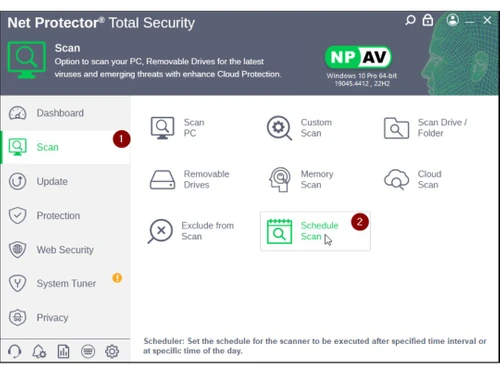
Small Business
Designed for startups and growing businesses
Medium Business
Built for business growth and flexibility
Enterprises
Designed for complex and large-scale business needs
4.5
Out of 5

Overall Rating
Based on
3 Verified Reviews
Rating Breakdown
83% Recommend this Product
Add ReviewUsers generally appreciate Net Protector Endpoint Security for its strong malware protection and reliability, with many noting their long-term positive experiences. The software is recognized for its effectiveness in safeguarding individual computers, contributing to a sense of security among users. However, while the reviews are largely favorable, the volume of feedback is limited, which may suggest a need for broader user experiences to assess its overall performance comprehensively.

Feb 13, 2019
Techjockey Verified
“Protection against malware”
Pros
This is a standout amongst the best antivirus for individual computers.I have been utilizing it for last 4to 5 years and I have never got any terrible experience about this software.it is exceptionally secure programming against infection and numerous sort of malwares are likewise can influence our PCs but at the same time is defendable
Cons
NO CONS
Jun 12, 2018
Techjockey Verified
“A fast reliable service”
Pros
Techjockey was very helpful in taking my listed requirements and narrowing my search to a usable list of providers. Techjockey then facilitated contact with these providers to provide a more in-depth evaluation. All recommended providers would have met my requirements.
Cons
N/A
Jun 5, 2018
Techjockey Verified
“economical & quick”
Pros
I never knew there were so many different software systems out there, or where to start when I was looking for a system for my small company to use. I was given 5 different companies to look at, with their reps contacting me within hours of talking with Techjockey and this service was free! We are in our final stages of moving forward to choose one of the companies recommended, and I'm very excited that this didn't drag out to take months in research. Thank you Techjockey!
Cons
N/A

Net Protector Endpoint Security
₹ 3500.00 excl. GST
Desktop
Mobile
Web based
On Premises
Windows
Mac OS

Seqrite Endpoint Security For Business
Price On Request
Desktop
Mobile
Web based
On Premises
Windows
Mac OS

Seqrite Endpoint Security Cloud
₹ 1550
Desktop
Mobile
Web based
On Premises
Windows
Mac OS

Avast Premium Business Security
₹ 231
Desktop
Mobile
Web based
On Premises
Windows
Mac OS

Sophos Endpoint Protection
Price On Request
Desktop
Mobile
Web based
On Premises
Windows
Mac OS

K7 Endpoint Security
Price On Request
Desktop
Mobile
Web based
On Premises
Windows
Mac OS

Webroot SecureAnywhere
₹ 1976
Desktop
Mobile
Web based
On Premises
Windows
Mac OS

NinjaOne
Price On Request
Desktop
Mobile
Web based
On Premises
Windows
Mac OS

ThreatLocker
Price On Request
Desktop
Mobile
Web based
On Premises
Windows
Mac OS

Syxsense
Price On Request
Desktop
Mobile
Web based
On Premises
Windows
Mac OS

ESET Endpoint Security
Price On Request
Desktop
Mobile
Web based
On Premises
Windows
Mac OS
(0) Product(s) selected
Available
Price on Request
Starting Price:
₹1,976
Available
Price on Request
Available
Price on Request
Available
Price on Request

Available
Price on Request

Available
Price on Request

Starting Price:
$70 /Licenses

Available
Price on Request

Available
Price on Request

Available
Price on Request
Step 1: Go to Scan Tab of Admin Console, and Select Specified machine or all machines. Step 2: For Instant Scan click on the Scan Now Icon on the bottom of the Dashboard
Step 1: Go to Update Tab of Admin Console, and Select Specified machine or all machines. Step 2: For Instant update click on the Update Now Icon on the bottom of the Dashboard
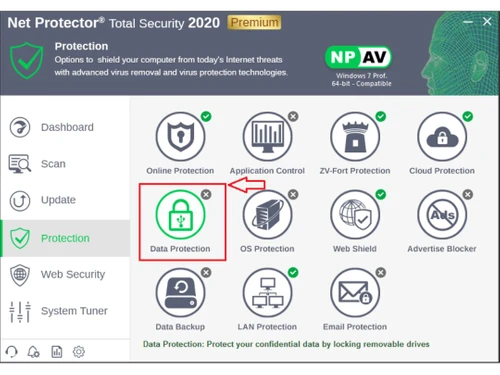
Device Control feature of Admin Console (EPS) is useful for Restricting Access of Removable Disks and Mobile Devices to Client Machines
Step:1 Select the Device Control tab from the Admin Console Dashboard.
Step:2 Administrator can see the detailed report of each PC in network . Report contains Client IP, Host Name, Removable Scan Count, USB Drive Status, Group Name, Mobile Device Status
Step:3 Select the PC on which you have to give Device Control Settings, click on Select Setting and select Device Control, or Select the Setting Icon present on the Bottom of Dashboard
Step:4 Click on USB Removable Devices, and Select Mode like Disable, Read/Write and Read Only and Click on Save to Apply the Settings. Disable:- For Permanently Disable the Access of USB Removable devices Read/Write:- User can Read the data and also Write on USB devices. Read Only:- User can only Read Data from USB devices
Step:5 Click on Mobile Devices, and Select Mode like Disable, Read/Write and Read Only and Click on Save to Apply the Settings. Disable:- For Permanently Disable the Access of Mobile Devices. Read/Write:- User can Read the data and also Write on Mobile Devices. Read Only:- User can only Read Data from Mobile Devices
Step:6 Administrator can see the additional shortcut menus at the end of dashboard
Step:7 For selection of all PCs in network, click on Select All option instead of selecting each PC'S in network
20,000+ Software Listed
Best Price Guranteed
Free Expert Consultation
2M+ Happy Customers
Terms and Condtions

Users with registered businesses can purchase goods from merchants on the platform to satisfy their business needs. Users are not permitted to utilize any products acquired through the platform for resale, advertising, business, or further distribution.
For each purchase made, users will receive a Tax Invoice (or 'GST invoice') that includes specific details such as:
the GSTIN of the user associated with their registered business, and
the specified Entity Name for their business.
It should be noted that not all products are eligible for GST Invoice. Only the products displayed by participating sellers with the 'GST-based Invoice Available' callout on the product description page would qualify.
Certain goods and services are not eligible to get a GST Invoice, including items with VAS, i.e., Value Added Services (e.g., Total Mobile Protection/Assured Buyback) and those involving an exchange offer at the time of purchase.
Users must ensure the accuracy of the GSTIN, and business entity name provided for the GST Invoice. Requests for corrections into GST Invoice would not be accommodated by Techjockey.com or any Seller, and any issues arising from user-provided information are the sole responsibility of users.
Techjockey.com is not liable for the GST Invoice or any associated input tax credit. To efficiently claim an input tax credit, users should select the registered place of business address as per the GST authority's data and follow the provisions of the GST Act and rules.
To claim an input tax credit, the delivery and billing addresses must match. Furthermore, input tax credits will not be granted if the delivery address and GSTIN on the invoice are from different states. In case of incorrect GST details provided during the order placement, the order will be canceled automatically.