linkedin

Get Free Advice

Get Quote

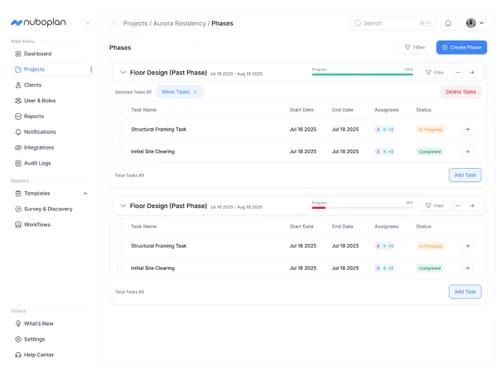
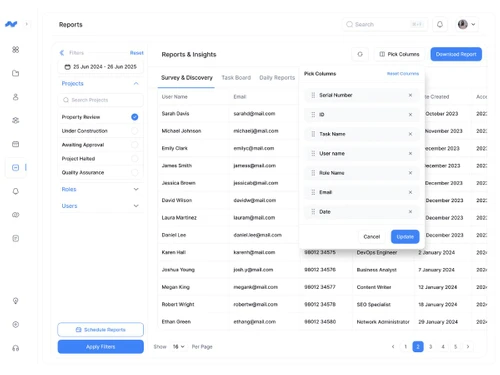
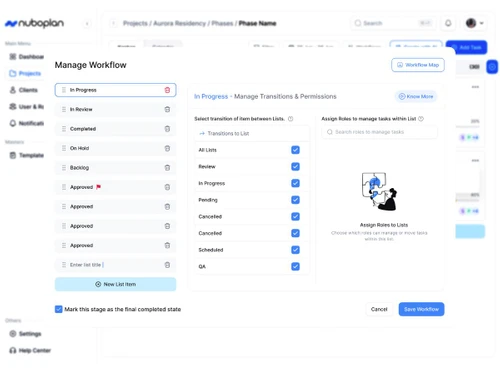
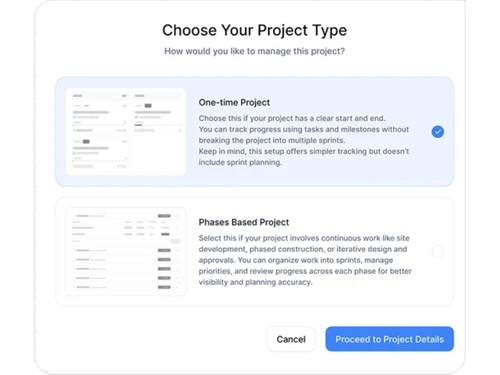
NuboPlan logo nuboplan dashboard nuboplan reports nuboplan workflow nuboplan project
nuboplan dashboard
nuboplan reports
nuboplan workflow
nuboplan project

NuboPlan

Brand : Techindo Systems

Price On Request

Save Extra with 2 Offers

  • offer_icon Save upto 18%, Get GST Invoice on your business purchase |
  • offer_icon Buy Now & Pay Later, Check offer on payment page.
  • AdviceGet Instant Expert
    Advice
  • PaymentSafe & Secure
    Payment
  • GuaranteedAssured Best Price
    Guaranteed

NuboPlan Pricing & Plans

Looking for pricing details or customization options?
Share your requirements and receive a tailored quote

  • Share your business specific requirements
  • Get pricing customised to your business needs
  • Explore feature-level customization options

Price Available on Request

Get a customized quotation based on your needs.
Our team will respond within 24 hours.

NuboPlan Features

Core Functionalities

  • icon_check Workforce Management Coordinates team schedules, tracking, and operational tasks across various projects.
  • icon_check Incident Management Logs, paths, and fixes unexpected workplace disruptions or system failures quickly.
  • icon_check Issue Management Identification, tracking, and resolution process for unforeseen bugs or project obstacles.
  • icon_check Pipeline Management Traces progress stages of strategic initiatives from inception to complete closure.
  • icon_check Workflow Management Maps out and maintains functional operational stages to elevate team efficiency.
  • icon_check Resource Management Allocates workforce personnel, budgets, and operational tools across dynamic tasks.
  • icon_check Risk Management Flags bottlenecks, budget overruns, and timeline issues early via predictive AI.
  • icon_check Task Management Organizes day-to-day to-do requirements from inception to complete deployment.
  • icon_check Backlog Management Organizes, refines, and preserves pending user stories or auxiliary tasks for future sprints.
  • icon_check Sprint Management Batches agile work into short, time-boxed blocks to maintain steady team delivery.

Task & Workflow Management

  • icon_check Workflow Automation Standardizes structural step loops to process or hand off repetitive tasks instantly.
  • icon_check Recurring Tasks Automatically populates repetitive project requirements based on custom routines.
  • icon_check Task Creation & Assignment Drafts actionable items and assigns responsibility to designated team professionals.
  • icon_check Task Prioritization Uses urgent/low labels or smart AI sorting to highlight high-priority action items.
  • icon_check Sub-Task Creation Divides complex primary project scopes into smaller, achievable work checklist steps.
  • icon_check Task Dependencies Establishes explicit links between tasks that require prior items to finish first.
  • icon_check Notifications/Reminders Sends alerts on upcoming deadlines or conversation tags directly to user channels.
  • icon_check Automated Task Assignment Matches tasks to optimal team operators automatically via smart workflow rule loops.

Task Views

  • icon_check Gantt Chart Offers a horizontal visual timeline illustrating project dependencies and schedules.
  • icon_check Kanban Boards Uses boards and moving cards to visualize work stages like To-Do, In-Progress, and Done.
  • icon_check Task List Provides a clear, vertical list layout of active team assignments and ownership tags.
  • icon_check Calendar View Displays scheduled project tasks across monthly, weekly, or daily grid layouts.
  • icon_check Timeline View Linear layout tracking long-term team execution schedules and sequential projects.
  • icon_check Spreadsheet View Grid layout displaying work lines to bulk edit fields and custom columns smoothly.
  • icon_check Mind Map Visual representation of tasks and ideas branching out from a central concept.

Progress & Performance Tracking

  • icon_check Time Tracking Records hours spent on tasks to manage project billing, payroll, and productivity.
  • icon_check Milestone Tracking Marks and observes critical checkpoints highlighting key successes in a project.
  • icon_check Team Capacity Tracking Measures team member bandwidth parameters to avoid overloading specific workers.

Resource & Budget Management

  • icon_check Auto Scaling Adjusts server processing power dynamically to balance complex enterprise workloads.
  • icon_check Automated Resource Allocation Intelligently distributes tasks across active teams using real-time capacity logs.
  • icon_check Budget Planning Models cost structures, operational funding thresholds, and asset spending caps.
  • icon_check Dynamic Budgeting Updates target expense limits instantly as project requirements pivot or expand.
  • icon_check Risk Scoring System Quantifies systemic project threats mathematically to prioritize critical fixes.
  • icon_check Workload Distribution Balances the volume of assignments evenly across teams to preserve focus.

Collaboration & Communication

  • icon_check Version Control Archives historical revisions of uploaded work assets to prevent loss of older logs.
  • icon_check Real-Time Collaboration Enables instant multi-user messaging, comment tags, and file updates simultaneously.
  • icon_check Integrated Chat & Messaging Offers direct chat spaces inside the platform to discuss tasks without context switching.
  • icon_check File Sharing & Document Collaboration Stores project documents and enables multi-user feedback threads on attachments.

Access Control & Security

  • icon_check Multi-Factor Authentication (MFA) Adds verification steps beyond passwords to protect organizational workspaces.
  • icon_check User Access Management Provisions precise software login privileges and data viewing scopes for team members.
  • icon_check Compliance Tracking Verifies that project operations follow required institutional and data privacy frameworks.
  • icon_check Activity Logs Retains searchable trails documenting all actions, status edits, and user logs.
  • icon_check Data Backup and Disaster Recovery Implements automated database replication loops to secure project info from losses.

Customization

  • icon_check Templates Pre-built reusable blueprints for projects, tasks, and routine workflows to save time.
  • icon_check Custom Fields Configures distinct metadata tags and tailored info parameters unique to your workflows.
  • icon_check Task Customization Modifies checklists, metadata fields, and layout components on individual tasks.
  • icon_check Custom Layouts Alters the structural formatting of dashboards to prioritize focus parameters.
  • icon_check Custom Views Lets users switch between list, board, calendar, and timeline layouts freely.

Integrations

  • icon_check CRM Integration Unifies customer relations platforms with task workflows to coordinate accounts easily.
  • icon_check API Integration Connects the platform securely with external applications to share structured work logs.
  • icon_check ERP Integration Syncs project tasks and costs directly with core company ERP tracking portals.
  • icon_check Communication and Collaboration Tools Connects distributed team members through mentions, shared workspaces, and threads.
  • icon_check File Storage and Sharing Acts as a secure, cloud-based repository for all project media and specifications.
  • icon_check Time Tracking Tools Built-in stopwatches and manual logging menus to capture active task durations.
  • icon_check Issue Tracking Tools Specialized pipelines to document, route, and clear technical bugs or user problems.
  • icon_check Automation Tools Low-code builders to create custom triggered actions when task statuses switch.
  • icon_check AI-Based Integrations Infuses predictive smart support to analyze workloads and prioritize tasks smoothly.
  • icon_check Third Party Integrations Extends workspace utility by connecting external cloud apps to your core pipelines.

Reporting & Analytics

  • icon_check Predictive Analytics Leverages AI data models to estimate project delivery milestones and potential delays.
  • icon_check Dashboards Unified interfaces showing high-level graphics on task completions and team progress.
  • icon_check Benchmarking Measures team work metrics against target operational baselines or industry rules.
  • icon_check Automated Reports Periodically builds and distributes team progress metrics without manual intervention.
  • icon_check Project Progress Reports Synthesizes current deliverables against scheduled timelines into clean files.
  • icon_check Resource Reports Tallies worker utilization rates to expose underused or overallocated positions.
  • icon_check Risk Reports Highlights high-risk tasks and project areas that threaten deadlines or budgets.
  • icon_check Workload Reports Displays task allocations per individual to check for burnout risks across teams.
  • icon_check Timesheet Reports Summarizes logged operational hours across teams for payroll or billing review.
  • icon_check Sprint Reports Evaluates team completion speed and item carry-over rates during agile sprints.
  • icon_check Burndown & Burnup Charts Visualizes remaining versus completed task volumes during active agile sprints.
  • icon_check Bottleneck Reports Exposes structural pipeline blocks causing delays in specific project stages.
  • icon_check Real-Time Reporting Generates instant, live data readouts reflecting the exact state of active workspaces.
  • icon_check Report Customization Filters and adjusts data widgets to build tailored summaries for stakeholders.

NuboPlan Specifications

  • Language:
  • English

NuboPlan Reviews and Ratings

banner

Would you like to review this product?

Submit Reviews

Techindo Systems Company Details

Brand Name Techindo Systems
Information Techindo is a global technology partner that helps organizations turn complexity into clarity through cutting-edge solutions in AI, cloud, enterprise automation, and digital product development. We empower businesses across industries to modernize systems, unlock insights, enhance efficiency
Founded Year 2021
Director/Founders Rahul Pandey
Company Size 1-100 Employees

NuboPlan Alternatives

See All
Why Choose Techjockey?

Software icon representing 20,000+ Software Listed 20,000+ Software Listed

Price tag icon for best price guarantee Best Price Guaranteed

Expert consultation icon Free Expert Consultation

Happy customer icon representing 2 million+ customers 2M+ Happy Customers