linkedin
Kernel Computer Activity Monitor logo
play Use Kernel Computer Activity Monitor Tool to Track All Sorts of Computer Activities - Kernel Computer Activity Monitor Demo
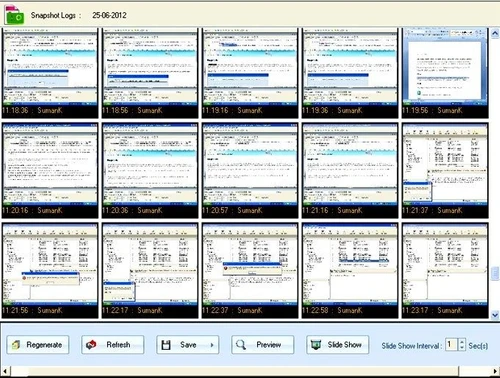
kernel computer activity monitor snapshots logs
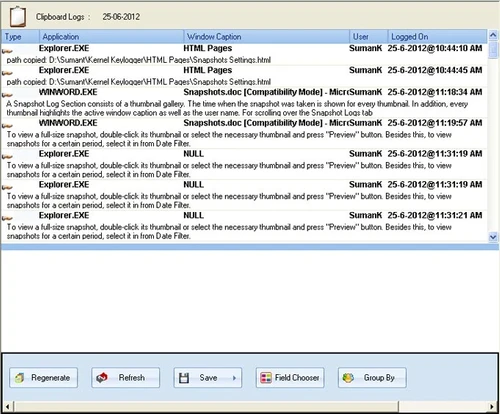
kernel computer activity monitor clipboard logs

Kernel Computer Activity Monitor

Brand: KernelApps

  • 4.7

  • 3 Ratings & 3 Reviews

Kernel Computer Activity Monitor is a comprehensive monitoring solution that can be used by organizations to record and track their employee’s computer activities. The monitoring teams of an organization can use the software to keep track of employee’s desktop activities, even when they are working from different geographical locations. With Kernel Computer Activity Monitor, the company can s...

See More

Have you used Kernel Computer Activity Monitor before?

Share your insights for better experience

Add a Review

Price Available on Request

Questions about pricing or customization? We’re here to help, just a click away.

100% Genuine
Products
Best Price
Guaranteed
Safe & Secure
Payment
  • Description

  • Pricing

  • Features

  • Specification

  • Review

  • Compare

  • Alternatives

  • FAQ

Kernel Computer Activity Monitor Software Overview

What is Kernel Computer Activity Monitor?

Kernel Computer Activity Monitor is a comprehensive monitoring solution that can be used by organizations to record and track their employee’s computer activities. The monitoring teams of an organization can use the software to keep track of employee’s desktop activities, even when they are working from different geographical locations. With Kernel Computer Activity Monitor, the company can send notifications directly to the employee’s computer in case of any disciplinary issues. Most importantly, employers can restart, lock and even turn off the computers that are being monitored with this remote desktop monitoring software. 

How does Kernel Computer Activity Monitor increase the productivity of an organization?

The employee monitoring software once installed within the employee’s device performs all the necessary monitoring activities in a stealth mode. The company admins or monitoring department can notify the employee that they are being monitored. This increases the employee’s productivity level as now they are aware that all their activities are getting recorded. Further, admins can lock, restart or shut down any monitored device. This feature is helpful for critical situations.  

Pricing of Kernel Remote Desktop Monitoring Software

The pricing of Kernel Computer Activity Monitor is available as per customer demands. You can send us a callback request, our product experts will get back to you with a negotiable quote.

Compatible Platforms for Kernel Computer Activity Monitor

Kernel desktop monitoring tool is compatible with Windows 2000, XP. 8.1, 8.7 and 10 versions along with Vista.

Benefits of Kernel Computer Activity Monitor as Employee Desktop Live Viewer

  1. Offline Recording Facility: Companies can keep track of their employee activities even when they are not connected to the net. This feature ensures accurate monitoring, enabling the companies to ensure that the employees are performing their daily tasks while abiding by the company policies.
  2. Inbuilt Messenger: Admins can send messages to their employees using the inbuilt messenger offered by the software. The messages can be as long as 200 characters. 
  3. Record Viewer: Computer recordings of an individual employee are stored and maintained in a proper way and can be accessed by the organization as per their requirements.
  4. Unlimited Computer Monitoring: Organizations can monitor their entire workforce at the same time. There is no limitation on the number of computers that can be monitored. Further, they can monitor computers from a single domain or different domains.
  5. Department Wise Monitoring: Admins can assign specific monitoring agents to keep track of their employee’s activities based on the departments they belong to. They can install the viewer application offered by the software and create accounts in it to monitor multiple computers.
  6. Multi-Screen Monitoring: This remote monitoring software uses the multi-screen monitoring tool to keep track of the employees’ activities even when they are working on dual screens. 
  7. Customizable Platform: Admins can perform multiple settings like video retention, popup notification and picture quality. 
Read more

KernelApps Company Details

Founded Year:  2005

Kernel Data Recovery

Director/Founders Rupesh Kumar
Company Size 1-100 Employees

Kernel Computer Activity Monitor Pricing & Plans

Looking for The Right Pricing?

Share your requirements and get a plan built around your business.

  • Define your business needs
  • Get customised pricing
  • Choose features that fit your workflow

Price Available on Request

Get personalised Kernel Computer Activity Monitor pricing that fits your needs. Our team will connect with you.

Kernel Computer Activity Monitor Features

  • icon_check Unified Call Recording
    The employee desktop live viewer software, can be used to record the calls made by employees via any video calling platforms.
  • icon_check No change in Employee Data
    Kernel Computer Activity Monitor only records the activities within a device, it does not change the existing data within the
  • icon_check User Interface
    Kernel Computer Activity Monitor features a friendly user interface and offers a wide variety of device monitoring tools to the
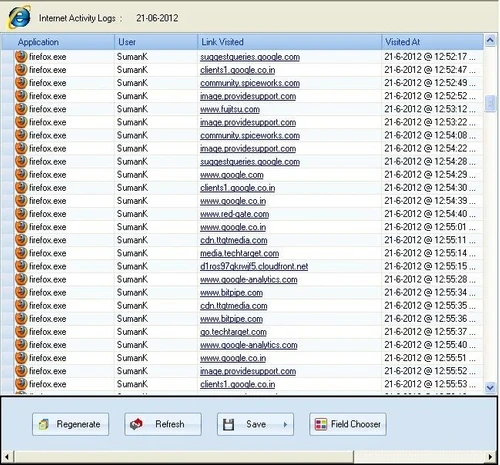
  • icon_check Internet Monitoring
    Kernel Computer Activity Monitor keeps track of employees’ computers by accessing the static IP, LAN and global IP of their
  • icon_check Invisible Screenshots
    Companies can take screenshots of their employee’s screen activities, to maintain a record for later use.
  • icon_check Accessed Applications Report
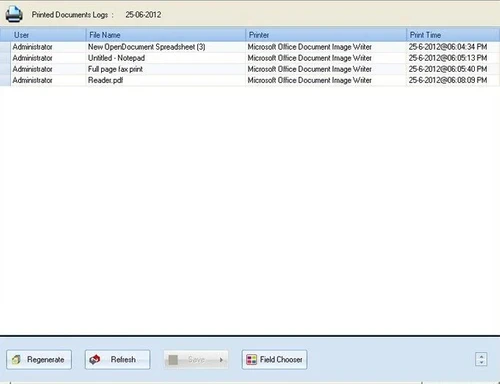
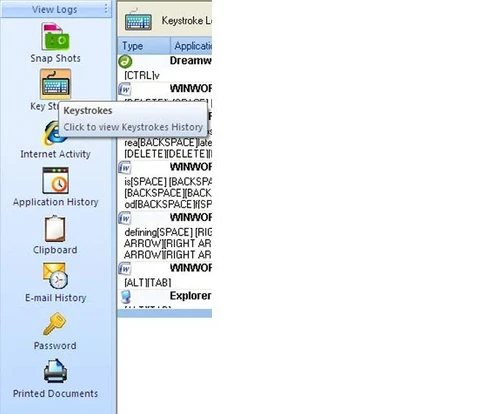
    This monitoring software maintains a detailed record of all the applications that have been accessed by the employee.
  • icon_check Report on Monitored Email Activity
    Kernel Computer Activity Monitor can also be used to keep track of the content shared by employees over emails.
  • icon_check Unique Tracking Ability
    The software features a wide variety of desktop monitoring tools that can record the activities within the employee’s computer
  • icon_check Enable Monitoring Schedule
    Organizations can set a scheduled time to monitor their employee’s computers.
Kernel Computer Activity Monitor Demo Video play icon

Get Kernel Computer Activity Monitor Demo

Watch the demo video to explore key features, real workflows, and how the software fits your business needs.

Understand
Key Features
Personal
Demo Insights
Interactive
Demo Support

Kernel Computer Activity Monitor Specifications

Supported Platforms
Windows Windows
Devices
Desktop Desktop
Deployment
Perpetual Perpetual
Suitable For
All Industries
Business Specific
All Businesses
Language
English

Kernel Computer Activity Monitor Reviews

4.7

Out of 5

img

Overall Rating

Based on
3 Verified Reviews

Rating Breakdown

  • Features 4.6
  • Value for Money 4.6
  • Ease of Use 4.8
  • Customer Support 4.6

93% Recommend this Product

Add Review

Baburam Sahu

User

4.7

Reviewed on: Feb 20, 2019

Techjockey Verified

“Nice tool to work with.”

Pros

A great deal of undesirable web and email exercises were going on in my organization. I was exceptionally concerned. I utilized Kernel Computer Activity Monitor, and I should state that the product settled every one of my questions. Its propelled highlights enabled me to monitor each PC action occurring in the association. What's more, I can roll out the improvements as needs be. Five stars for Kernel Computer Activity Monitor programming

Cons

NO CONS

Mayank Agarwal

User

4.8

Reviewed on: Jun 13, 2018

Techjockey Verified

“don?t think just trust them”

Pros

Within minutes, I was contacted by Brittany, who proceeded to listen to my company's needs, and ask insightful questions that helped me pinpoint aspects of my search that I hadn't previously considered.

Cons

N/A

Manoj Jagatap

User

4.8

Reviewed on: Jun 6, 2018

Techjockey Verified

“thank you for your help and service!”

Pros

Excellent service and aftercare with helping with questions relating to installation. Also a price that is amazing.?

Cons

N/A

Compare Kernel Computer Activity Monitor With other Employee Desktop Monitoring Software

Products
Ratings
Pricing
Device Supported
Deployment
Supported Platforms
  • img

    Kernel Computer Activity Monitor

  • 4.7

  • Price On Request

  • Desktop

    Mobile

  • Web based

    On Premises

  • Windows

    Mac OS

  • img

    StaffCop

  • 4.8

  • ₹ 3010

  • Desktop

    Mobile

  • Web based

    On Premises

  • Windows

    Mac OS

  • img

    Spytech SpyAgent

  • 4.4

  • Price On Request

  • Desktop

    Mobile

  • Web based

    On Premises

  • Windows

    Mac OS

  • img

    Ekran System

  • 4.3

  • Price On Request

  • Desktop

    Mobile

  • Web based

    On Premises

  • Windows

    Mac OS

  • img

    Spytech SentryPC

  • 4.3

  • Price On Request

  • Desktop

    Mobile

  • Web based

    On Premises

  • Windows

    Mac OS

  • img

    SpyAnywhere

  • 4.2

  • Price On Request

  • Desktop

    Mobile

  • Web based

    On Premises

  • Windows

    Mac OS

  • img

    SentryPC Software

  • 4.2

  • Price On Request

  • Desktop

    Mobile

  • Web based

    On Premises

  • Windows

    Mac OS

  • img

    KeyStroke Spy

  • 4.2

  • Price On Request

  • Desktop

    Mobile

  • Web based

    On Premises

  • Windows

    Mac OS

(0) Product(s) selected

Kernel Computer Activity Monitor Alternatives

See All Kernel Computer Activity Monitor Alternatives
SAVE UPTO 30%

For how many days the recordings are saved by Kernel Computer Activity Monitor?

By default, the employee desktop monitoring software saves the recordings for 7 days but users can exceed the limit up to 60 days, after which the recordings get deleted in an automatic manner.

Can I get snapshots of my employee’s computer with Kernel Computer Activity Monitor?

Yes, you can take snapshots of your employee’s screen while monitoring the device.

Can I get a demo of Kernel Computer Activity Monitor?

You can send in a demo request, Techjockey will get back to you as per the time and date mentioned by you.

What are the system requirements for installing Kernel Computer Activity Monitor?

The users’ system needs to have: ? Processor: Pentium IV or equivalent Processor ? RAM: 256MB ? Hard Disk: 100MB out of the total hard disk space.

Does Kernel Computer Activity Monitor have a mobile app?

Kernel Computer Activity Monitor does not have a mobile app as of now.

20,000+ Software Listed

Best Price Guranteed

Free Expert Consultation

2M+ Happy Customers

Terms and Condtions

close

Users with registered businesses can purchase goods from merchants on the platform to satisfy their business needs. Users are not permitted to utilize any products acquired through the platform for resale, advertising, business, or further distribution.

For each purchase made, users will receive a Tax Invoice (or 'GST invoice') that includes specific details such as:

  • the GSTIN of the user associated with their registered business, and

  • the specified Entity Name for their business.

It should be noted that not all products are eligible for GST Invoice. Only the products displayed by participating sellers with the 'GST-based Invoice Available' callout on the product description page would qualify.

Certain goods and services are not eligible to get a GST Invoice, including items with VAS, i.e., Value Added Services (e.g., Total Mobile Protection/Assured Buyback) and those involving an exchange offer at the time of purchase.

Users must ensure the accuracy of the GSTIN, and business entity name provided for the GST Invoice. Requests for corrections into GST Invoice would not be accommodated by Techjockey.com or any Seller, and any issues arising from user-provided information are the sole responsibility of users.

Techjockey.com is not liable for the GST Invoice or any associated input tax credit. To efficiently claim an input tax credit, users should select the registered place of business address as per the GST authority's data and follow the provisions of the GST Act and rules.

To claim an input tax credit, the delivery and billing addresses must match. Furthermore, input tax credits will not be granted if the delivery address and GSTIN on the invoice are from different states. In case of incorrect GST details provided during the order placement, the order will be canceled automatically.