 USA
USA UAE
UAE


Sep 4, 2018
Techjockey Verified
“gives best advice”
Pros
I bought software from here..cheaper and it works perfect?
Cons
N/A





Brand: Birch Grove Software
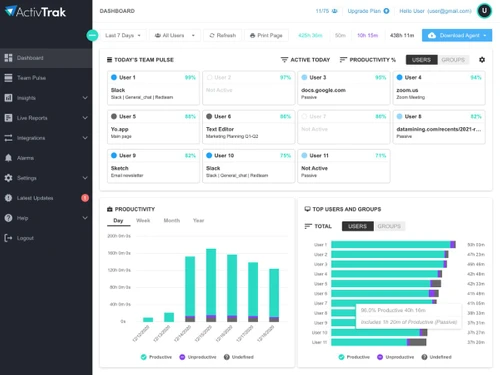
AviTrak is a cloud-based employee monitoring software that allows the user to track the tasks performed by their employees and the time spent on each. The software comes with ultra configurable settings that enable users to halt the monitoring of one or more systems when it is no longer needed. ActivTrak is stealthy monitoring software that enables users to have an accurate idea of how the employ...
See MoreHave you used ActivTrak Employee Monitoring before?
Share your insights for better experience
 Screen Capture Real Time Monitoring Analytics & Reporting Malicious Website Blocking Alerts Data Protection SQL Data Access

Watch the demo video to explore key features, real workflows, and how the software fits your business needs.
 Windows
  iOS
iOS  Android
  Desktop
  Mobile
  Cloud-Based
4.6
Out of 5

Overall Rating
Based on
3 Verified Reviews
Rating Breakdown
83% Recommend this Product
Add Review
Sep 4, 2018
Techjockey Verified
“gives best advice”
Pros
I bought software from here..cheaper and it works perfect?
Cons
N/A
Aug 1, 2018
Techjockey Verified
“Great tracking tool!”
Pros
This tool has been instrumental in increasing production on some individuals within our organization. Would recommend!
Cons
NO CONS

ActivTrak Employee Monitoring
Price On Request
Desktop
Mobile
Web based
On Premises
Windows
Mac OS

StaffCop
₹ 3010
Desktop
Mobile
Web based
On Premises
Windows
Mac OS
Spytech SpyAgent
Price On Request
Desktop
Mobile
Web based
On Premises
Windows
Mac OS
Spytech Realtime Spy
Price On Request
Desktop
Mobile
Web based
On Premises
Windows
Mac OS

Ekran System
Price On Request
Desktop
Mobile
Web based
On Premises
Windows
Mac OS

Kernel Computer Activity Monitor
Price On Request
Desktop
Mobile
Web based
On Premises
Windows
Mac OS
Spytech SentryPC
Price On Request
Desktop
Mobile
Web based
On Premises
Windows
Mac OS
Spyrix Employee Tracking
₹ 4899
Desktop
Mobile
Web based
On Premises
Windows
Mac OS

SentryPC Software
Price On Request
Desktop
Mobile
Web based
On Premises
Windows
Mac OS

SpyAnywhere
Price On Request
Desktop
Mobile
Web based
On Premises
Windows
Mac OS
KeyStroke Spy
Price On Request
Desktop
Mobile
Web based
On Premises
Windows
Mac OS
(0) Product(s) selected
Starting Price:
$80
Available
Price on Request
Available
Price on Request
Available
Price on Request
Available
Price on Request
Starting Price:
₹4,899
Starting Price:
$70 /Year
Available
Price on Request
Available
Price on Request

Starting Price:
₹30,708
Yes. Unless you want a user to know, ActivTrak is completely invisible. It does not appear in the Add/Remove programs list and is not recognizable by the Task Manager. However, if you download and install the Agent on the user’s device, the browser history will keep that activity. If you do not want users to know you have installed the ActivTrak Agent, we suggest copying the Agent onto a USB memory stick and install from that, or install from a local network location.
No. Up-to-date and virus-free computers have no issues running ActivTrak. It will not slow your computer down.
ActivTrak is not a spy tool. It’s a productivity monitoring and team behavior analytics service. You are only allowed to install the ActivTrak Agent on a computer that belongs to you or your company where you have network administrative rights.
Access your ActivTrak account and view your data anywhere, anytime with our iPhone app available from the Apple App store. The ActivTrak app does not currently monitor mobile phones. For now, ActivTrak only collects data from Windows, Mac OS, Chrome OS and a Chrome browser installed on any desktop operating system, including Linux, FreeBSD, and others.
No. ActivTrak does not have a keylogger feature. Internet Monitoring Software that keylogs is sometimes classified as a virus by antivirus programs. We want things to run smoothly for you, so ActivTrak intentionally does not record or monitor keystrokes. This allows us to stay on the safe lists of all popular antivirus software. Instead of recording keystrokes, we utilize fully customizable Screenshots to capture a clear and quick visual of what users are doing. Screenshots show you exactly what users see on their screens. We are currently building a Content Analysis tool for Screenshots that will allow you to search Screenshots by keyword. For example, you will be able to type in “games,” and this new Content Analysis tool will find all the Screenshots that have that text in them.
20,000+ Software Listed
Best Price Guranteed
Free Expert Consultation
2M+ Happy Customers
Terms and Condtions

Users with registered businesses can purchase goods from merchants on the platform to satisfy their business needs. Users are not permitted to utilize any products acquired through the platform for resale, advertising, business, or further distribution.
For each purchase made, users will receive a Tax Invoice (or 'GST invoice') that includes specific details such as:
the GSTIN of the user associated with their registered business, and
the specified Entity Name for their business.
It should be noted that not all products are eligible for GST Invoice. Only the products displayed by participating sellers with the 'GST-based Invoice Available' callout on the product description page would qualify.
Certain goods and services are not eligible to get a GST Invoice, including items with VAS, i.e., Value Added Services (e.g., Total Mobile Protection/Assured Buyback) and those involving an exchange offer at the time of purchase.
Users must ensure the accuracy of the GSTIN, and business entity name provided for the GST Invoice. Requests for corrections into GST Invoice would not be accommodated by Techjockey.com or any Seller, and any issues arising from user-provided information are the sole responsibility of users.
Techjockey.com is not liable for the GST Invoice or any associated input tax credit. To efficiently claim an input tax credit, users should select the registered place of business address as per the GST authority's data and follow the provisions of the GST Act and rules.
To claim an input tax credit, the delivery and billing addresses must match. Furthermore, input tax credits will not be granted if the delivery address and GSTIN on the invoice are from different states. In case of incorrect GST details provided during the order placement, the order will be canceled automatically.