linkedin
Spytech Realtime Spy logo
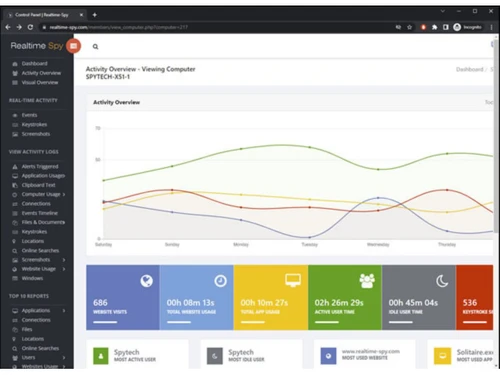
Spytech Realtime-Spy activity overwiew
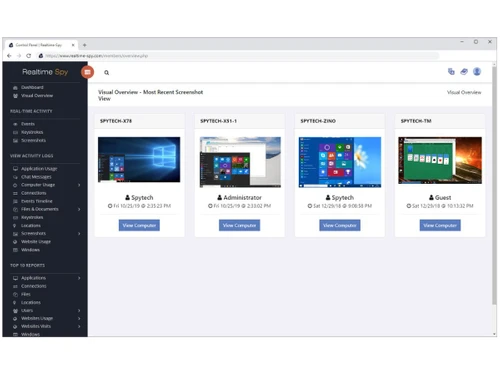
Spytech Realtime-Spy most recent screenshot
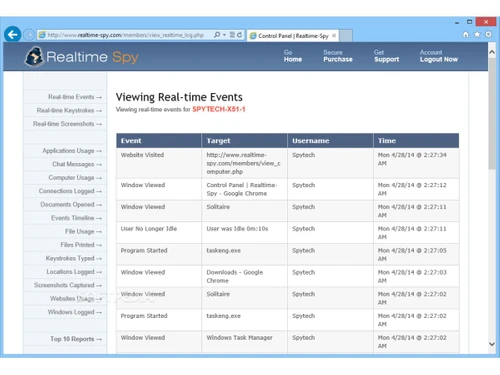
Spytech Realtime-Spy realtime events

Spytech Realtime Spy

Brand: Spytech Software

  • 4.4

  • 4 Ratings & 4 Reviews

Realtime Spy is an employee desktop monitoring software designed by Spytech. The software facilitates remote installation and monitoring of PCs of employees. Spytech Realtime Spy provides direct access to the activity logs of a PC from anywhere at any time. The software can showcase what the employees are doing and what are they typing in real-time. The software is able to record everything from...

See More

Have you used Spytech Realtime Spy before?

Share your insights for better experience

Add a Review

Price Available on Request

Questions about pricing or customization? We’re here to help, just a click away.

100% Genuine
Products
Best Price
Guaranteed
Safe & Secure
Payment
  • Description

  • Pricing

  • Features

  • Specification

  • Review

  • Compare

  • Alternatives

  • FAQ

Spytech Realtime Spy Software Overview

What is Spytech Realtime Spy? 

Realtime Spy is an employee desktop monitoring software designed by Spytech. The software facilitates remote installation and monitoring of PCs of employees. Spytech Realtime Spy provides direct access to the activity logs of a PC from anywhere at any time. The software can showcase what the employees are doing and what are they typing in real-time. The software is able to record everything from keystrokes to web usage, screenshots, and much more. It is important for companies that have to deal in with a lot of confidential file handling and programming. 

Spytech Realtime Spy captures the screen of the target user to monitor his/her exact activities. The software offers both real-time viewing and screen recording. This employee monitoring software offers a chronological log of activities to ease the process of employee monitoring. 

What are the benefits of using Spytech Realtime Spy?

Spytech Realtime Spy provides a complete access to a person’s device. It is one of the quintessential applications to have to prevent corporate espionage. Companies who deal in handling of critical data can use this software to check the chats, emails, and other social media activity of the user. Realtime Spy provides a summarized version of the daily activity that allows them to see how active an employee has been on the device and check for which apps have been used. This employee monitoring software also allows you to blacklist specific websites or keywords.

What are the features offered by Spytech Realtime Spy? 

Here are the features offered by Spytech Realtime Spy software:

  1. Remote installation
  2. Remote log viewing 
  3. Real-time activity alerts
  4. Works on various internet connections
  5. Advanced stealth and cloaking
  6. Keystroke tracking
  7. Email monitoring 
  8. Events timeline logging 
  9. Desktop screenshots
  10. Remote deployment

What is the price of Spytech Realtime Spy Software? 

The price of Spytech Realtime Spy Software varies based on the operational requirements of the user. Please request a call for the further information.

Read more

Spytech Realtime Spy Pricing & Plans

Looking for The Right Pricing?

Share your requirements and get a plan built around your business.

  • Define your business needs
  • Get customised pricing
  • Choose features that fit your workflow

Price Available on Request

Get personalised Spytech Realtime Spy pricing that fits your needs. Our team will connect with you.

Spytech Realtime Spy Features

  • icon_check Remote Installation
    The software allows remote installation to any computer without the requirement of physical presence.
  • icon_check User Activity Monitoring
    Users can monitor the daily activities of their employees and check for visited websites, keystrokes, socials, and much more.
  • icon_check Security
    Spytech Realtime Spy is completely undetectable, and it operates in complete stealth so that the person being monitored knows
  • icon_check Easy to Use
    This employee monitoring solution has an easy to use interface which facilitates quick learning of how to operate the software.
  • icon_check Location Tracking
    One of the key benefits of using this software is that it allows users to view the recorded activity logs from anywhere in the
  • icon_check Password Protection
    All the recorded log data is password protected from outside users.
  • icon_check Anywhere, Anytime Access
    The software allows users to access their monitoring data from anywhere at any time.
  • icon_check Centralized Control
    Spytech Realtime Spy allows users to log and record multiple PC’s activity log from any remote location. No extra configuration
  • icon_check Real Time Monitoring
    This software enables users to monitor the activities of their employees in time.

Spytech Realtime Spy Specification

Supported Platforms
Windows Windows iOS iOS Android Android MacOS MacOS
Devices
Desktop Desktop Mobile Mobile
Deployment
Web-Based Web-Based
Suitable For
ITES
Business Specific
All Businesses
Language
English

Spytech Realtime Spy Reviews

4.4

Out of 5

img

Overall Rating

Based on
4 Verified Reviews

Rating Breakdown

  • Features 4.5
  • Value for Money 4.4
  • Ease of Use 4.4
  • Customer Support 4.6

90% Recommend this Product

Add Review

Mukesh kumar

User

4.3

Reviewed on: Jun 21, 2018

Techjockey Verified

“The interface is user friendly”

Pros

The primary thing is the user friendly interface. Simple to-utilize interface, the capacity for an ongoing survey of various records and cloud-based will always keep you aware and you'll be able to monitor your device from any place on a real-time basis.

Cons

NO CONS

Bhaskar

User

4.6

Reviewed on: Aug 6, 2018

Techjockey Verified

“Easy Accessible”

Pros

The main thing is the userfriendly interface. Additionally, you'll have the option to screen your Macintosh from wherever and whenever, for example consistently.

Cons

NO CONS

Radhika Chitkara

User

4

Reviewed on: Sep 12, 2018

Techjockey Verified

“gives best advice”

Pros

I happened upon Techjockey by accident while researching and was glad that I did. The choice of the right software critically important and there are so many possibilities in the market. The advisor that I worked with quickly honed in on the needs of our organization and helped us think through additional criteria for selection. We identified 3 companies to interview. From there we completed our due diligence and selected one to move forward with. I highly recommend Techjockey.

Cons

N/A

See All Spytech Realtime Reviews

Compare Spytech Realtime Spy With other Employee Desktop Monitoring Software

Products
Ratings
Pricing
Device Supported
Deployment
Supported Platforms
  • img

    Spytech Realtime Spy

  • 4.4

  • Price On Request

  • Desktop

    Mobile

  • Web based

    On Premises

  • Windows

    Mac OS

  • img

    Spytech SpyAgent

  • 4.4

  • Price On Request

  • Desktop

    Mobile

  • Web based

    On Premises

  • Windows

    Mac OS

  • img

    Spytech SentryPC

  • 4.3

  • Price On Request

  • Desktop

    Mobile

  • Web based

    On Premises

  • Windows

    Mac OS

  • img

    SpyAnywhere

  • 4.2

  • Price On Request

  • Desktop

    Mobile

  • Web based

    On Premises

  • Windows

    Mac OS

  • img

    KeyStroke Spy

  • 4.2

  • Price On Request

  • Desktop

    Mobile

  • Web based

    On Premises

  • Windows

    Mac OS

  • img

    StaffCop

  • 4.8

  • ₹ 3010

  • Desktop

    Mobile

  • Web based

    On Premises

  • Windows

    Mac OS

  • img

    Ekran System

  • 4.3

  • Price On Request

  • Desktop

    Mobile

  • Web based

    On Premises

  • Windows

    Mac OS

  • img

    SentryPC Software

  • 4.2

  • Price On Request

  • Desktop

    Mobile

  • Web based

    On Premises

  • Windows

    Mac OS

(0) Product(s) selected

Spytech Realtime Spy Alternatives

See All Spytech Realtime Spy Alternatives
SAVE UPTO 30%

What are the system requirements for Spytech Realtime Spy?

Here are the system requirements for Spytech Realtime Spy: 1. Windows: NT4, 200x, XP, Vista, 7, 8, 8.1, 10 (both 32 and 64-bit) 2. Hard Disk Space: 3MB 3. Administrator access is necessary.

Is it legal to use Spytech Realtime Spy?

Realtime-Spy can only be installed on computers you own and have authorization to monitor.

Can I get a demo for Spytech Realtime Spy?

Techjockey offers a demo before purchase for Spytech Realtime Spy. Please request a call to avail the demo.

Can I use this Spytech Realtime Spy on mobile phones?

Spytech Realtime Spy is available for both Android and iPhone mobile platforms.

Can antivirus or anti-spyware software detect Spytech Realtime Spy app?

Some antivirus software may hinder the installation of Realtime Spy app. However, you can follow exclusion instructions to ensure that the antivirus and the Realtime Spy app work together.

Can I archive my Realtime-Spy logs?

Yes, you can use the Realtime-Spy archive utility in your member's area to download logs from your account for future viewing and saving.

20,000+ Software Listed

Best Price Guranteed

Free Expert Consultation

2M+ Happy Customers

Terms and Condtions

close

Users with registered businesses can purchase goods from merchants on the platform to satisfy their business needs. Users are not permitted to utilize any products acquired through the platform for resale, advertising, business, or further distribution.

For each purchase made, users will receive a Tax Invoice (or 'GST invoice') that includes specific details such as:

  • the GSTIN of the user associated with their registered business, and

  • the specified Entity Name for their business.

It should be noted that not all products are eligible for GST Invoice. Only the products displayed by participating sellers with the 'GST-based Invoice Available' callout on the product description page would qualify.

Certain goods and services are not eligible to get a GST Invoice, including items with VAS, i.e., Value Added Services (e.g., Total Mobile Protection/Assured Buyback) and those involving an exchange offer at the time of purchase.

Users must ensure the accuracy of the GSTIN, and business entity name provided for the GST Invoice. Requests for corrections into GST Invoice would not be accommodated by Techjockey.com or any Seller, and any issues arising from user-provided information are the sole responsibility of users.

Techjockey.com is not liable for the GST Invoice or any associated input tax credit. To efficiently claim an input tax credit, users should select the registered place of business address as per the GST authority's data and follow the provisions of the GST Act and rules.

To claim an input tax credit, the delivery and billing addresses must match. Furthermore, input tax credits will not be granted if the delivery address and GSTIN on the invoice are from different states. In case of incorrect GST details provided during the order placement, the order will be canceled automatically.