linkedin

Get Free Advice

Get quote

OOMS CRM logo ooms crm dashboard ooms crm payment reminder ooms crm tasks
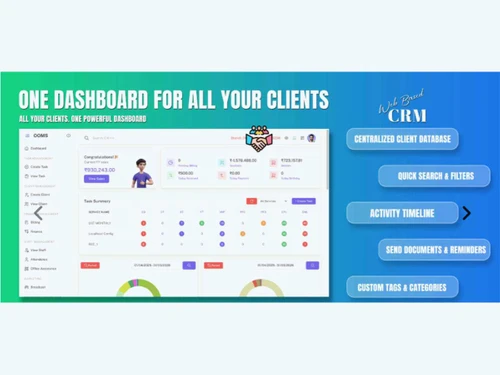
ooms crm dashboard
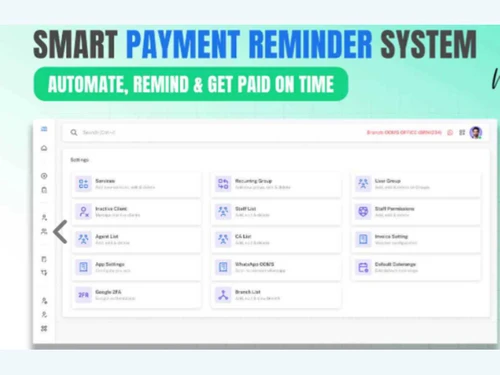
ooms crm payment reminder
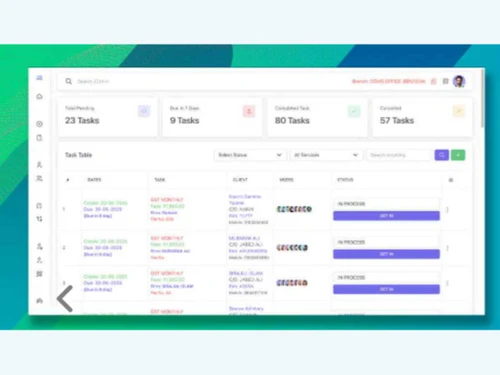
ooms crm tasks
Starting Price:

₹ 999 excl. GST

₹ 1,179 incl. GST

View plans

Save Extra with 2 Offers

  • offer_icon Save upto 18%, Get GST Invoice on your business purchase |
  • offer_icon Buy Now & Pay Later, Check offer on payment page.

OOMS CRM simplifies customer relationship management through automation, collaboration tools, and powerful analytics for growing businesses. ...Read more

  • AdviceGet Instant Expert
    Advice
  • PaymentSafe & Secure
    Payment
  • GuaranteedAssured Best Price
    Guaranteed

OOMS CRM Software Pricing, Features & Reviews

What is OOMS CRM?

OOMS CRM is an advanced business software designed to help businesses manage their customers and sales activities efficiently. It centralizes all your client information so that your team can easily access, track, and manage every customer interaction. With this tool, you can handle sales leads, automate workflows, and monitor ongoing tasks in a single system.

This CRM software also includes features like team communication, reporting, and marketing automation, making it suitable for both small and large enterprises. Businesses can track customer journeys, analyze performance, and make data-driven decisions faster. Whether you're managing leads, sending emails, or reviewing reports, OOMS CRM helps you save time and stay organized.

Why Choose OOMS CRM?

  • User-Friendly Interface: Designed with a simple layout that anyone can learn quickly.
  • Centralized Data: Keeps all customer information in one secure place.
  • Automated Workflows: Reduces manual work by automating repetitive sales and marketing tasks.
  • Better Sales Control: Helps manage leads, deals, and orders with clarity.
  • Improved Team Collaboration: Allows multiple team members to work together in real time.
  • Smart Reporting: Offers clear insights into sales and marketing performance.

Benefits of OOMS CRM

  • Better Customer Relationships: Build long-term connections through organized data.
  • Increased Productivity: Save time with automation and easy task management.
  • Faster Sales Cycles: Convert leads into customers more quickly.
  • Improved Collaboration: Teams can share files, updates, and tasks in real time.
  • Accurate Reporting: View performance data and track team progress easily.
  • Secure Data Storage: Keep all customer and sales data protected.
  • Easy Customization: Tailor the CRM according to your business needs.
  • Smarter Decision-Making: Get insights from AI-based analytics.
  • Automatic Alerts: Stay informed about leads, deals, and meetings.
  • All-in-One Platform: Manage marketing, sales, and service in one system.

Pricing of OOMS CRM

OOMS CRM price starts at INR 999 at Techjockey.com.

The pricing model is based on different parameters, including extra features, deployment type, and the total number of users. For further queries related to the product, you can contact our product team and learn more about the pricing and offers.

OOMS CRM Pricing & Plans

Silver
  • User Create-Unlimited
  • Branch Create-Unlimited
  • Broadcast
  • Gateway Access
  • Document Management
    • Licenses
    • Monthly

Calculated Price (Exclusive of all taxes)

999
Gold
  • User Create-Unlimited
  • Branch Create-Unlimited
  • Broadcast
  • Gateway Access
  • Document Management
    • Licenses
    • Monthly

Calculated Price (Exclusive of all taxes)

2799
Platinum
  • User Create-Unlimited
  • Branch Create-Unlimited
  • Broadcast
  • Gateway Access
  • Document Management
    • Licenses
    • Monthly

Calculated Price (Exclusive of all taxes)

5399
Diamond
  • User Create-Unlimited
  • Branch Create-Unlimited
  • Broadcast
  • Gateway Access
  • Document Management
    • Licenses
    • Yearly

Calculated Price (Exclusive of all taxes)

9999

OOMS CRM Features

Customer Data Management (CDM)

  • icon_check Contact Management Store, track, and organize all your client contact details.
  • icon_check Account Management Maintain records of every company account and activity.
  • icon_check Activity History Review past interactions, calls, and emails anytime
  • icon_check Customer Profiles Build comprehensive profiles with data on preferences, interactions, and purchase history.
  • icon_check Contact Segmentation Group contacts based on behavior, demographics, or interests for personalized engagement.

Sales Management

  • icon_check Lead Management Capture and manage leads from different sources efficiently
  • icon_check Order Management Handle customer orders and track progress smoothly.
  • icon_check Sales Automation Automate repetitive sales tasks and focus on conversions.
  • icon_check Workflow Automation and Management Set rules to streamline business processes.
  • icon_check Quote Management Generate accurate, branded quotes and proposals to accelerate sales processes.
  • icon_check Opportunity & Pipeline Management Visualize and track deals through stages from lead generation to closing.
  • icon_check Contract Management Managing contracts from their creation, execution, and performance tracking to their eventual termination.
  • icon_check Sales Forecasting Predict future sales and revenue using historical data and current opportunities.
  • icon_check Territory Management Assign, monitor, and optimize sales territories to improve regional sales efforts.
  • icon_check Deal Management Organize, prioritize, and manage deals, ensuring timely follow-up and closure.

Marketing Automation

  • icon_check Event-Triggered Workflows Send automatic messages or updates based on customer actions.
  • icon_check Email Marketing Design and send personalized email campaigns, track opens, clicks, and conversions.
  • icon_check Campaign Management Plan, execute, and monitor marketing campaigns across channels and touchpoints.
  • icon_check Lead Nurturing Engage and educate leads over time with targeted content to move them toward conversion.
  • icon_check Customer Journey Tracking Monitor and analyze the customer journey from awareness to purchase.
  • icon_check Customer Segmentation Group customers based on behavior, demographics, or preferences for tailored campaigns.
  • icon_check Automated Campaigns Automatically trigger campaigns based on customer behavior, interests, or milestones.

Data Sourcing / Integrations

  • icon_check API Access Connect OOMS CRM with your existing business tools.
  • icon_check Third Party Integrations Sync data across multiple apps and services
  • icon_check Data Import/Export Easily import/export customer and business data in bulk or via integration with other systems.
  • icon_check Social Media Integration Manage social media accounts and track customer engagement directly within the CRM.
  • icon_check Calendar Integration Sync CRM with calendars to schedule and manage appointments and follow-ups.
  • icon_check Email Marketing Tools Integration Connect CRM with email platforms like Mailchimp or SendGrid for seamless campaigns.
  • icon_check Marketing Tools Integration Integrate with marketing platforms (e.g., Google Ads, HubSpot) to enhance campaign effectiveness.
  • icon_check eCommerce Integrations Sync CRM with eCommerce platforms like Shopify, WooCommerce for a unified customer experience.
  • icon_check Interactive Voice Response (IVR) Integration Integrate CRM with IVR systems to manage customer calls and enhance support.

Collaboration Tools

  • icon_check Team Communication Improve communication among team members
  • icon_check Task / Activity Management Assign and track tasks for each member.
  • icon_check Document Sharing & File Storage Store and share files safely in one location.
  • icon_check Omnichannel Support & Engagement Provide consistent customer support across multiple channels, including email, chat, and social media.

Security & Compliance

  • icon_check Role-Based Access Control (RBAC) Restrict access based on user roles for better security.
  • icon_check Audit Trail Keep a record of all actions taken in the system for transparency.
  • icon_check Data Encryption Encrypt data both at rest and in transit to safeguard customer information.
  • icon_check Backup & Disaster Recovery Ensure business continuity with secure backups and disaster recovery plans.
  • icon_check GDPR & Data Privacy Comply with regulations such as GDPR, HIPAA, and CCPA. to protect customer privacy.

AI & Machine Learning

  • icon_check Predictive Analytics Leverage AI to predict future trends, sales, and customer behavior for better decision-making.
  • icon_check Lead Scoring Use AI to score leads based on their likelihood to convert, helping prioritize sales efforts.
  • icon_check Chatbots Automate customer interactions with AI-driven chatbots to assist or direct inquiries efficiently.

Reporting & Analytics

  • icon_check Predictive Analytics Leverage AI to predict future trends, sales, and customer behavior for better decision-making.
  • icon_check Custom Dashboards Create personalized dashboards to visualize key metrics and data relevant to your business.
  • icon_check Real Time Analytics Monitor and analyze real-time data to make timely, informed decisions.
  • icon_check Sales Performance Reports Track individual and team sales metrics, including revenue, win rates, and pipeline health.
  • icon_check Customer Insights Analyze customer behavior and interactions to gain actionable insights for better engagement.
  • icon_check Campaign Performance Measure the effectiveness of marketing campaigns, including ROI, reach, and conversion rates.
  • icon_check Forecasting & Trends Use historical data to forecast future sales and trends for improved business planning.
  • icon_check Performance Tracking Monitor team performance across various functions, tracking progress against KPIs.

Alerts & Notifications

  • icon_check Event-Triggered Notifications Receive alerts for new leads, updates, and deadlines.
  • icon_check Custom Workflow Alerts Create custom alerts for specific workflows or actions, ensuring nothing gets missed.
  • icon_check System Errors/Failures Receive immediate notifications for any system failures or errors for quick resolution.
  • icon_check Customer Interaction Alerts Get notified when customers engage with emails, forms, or other touchpoints.
  • icon_check Workflow Trigger Alerts Alert users when specific workflow conditions or triggers are met.
  • icon_check SLA Violations Receive notifications when service level agreements are breached or approaching deadlines.
  • icon_check Lead Activity Alerts Get alerts when leads take important actions (e.g., filling out a form or making a purchase).

Others

  • icon_check Case Management Track and resolve customer support cases effectively.
  • icon_check Dashboards View business insights and performance metrics visually.
  • icon_check Alerts & Notifications Email or in-app alerts for upcoming deadlines or updates.
  • icon_check Custom Fields Personalize forms and reports based on your company’s needs.

OOMS CRM Specifications

  • Supported Platforms :
  • Device:
  • Deployment :
  • Suitable For :
  • Business Specific:
  • Business Size:
  • Customer Support:
  • Training:
  • Language:
  • Windows MacOS
  • Desktop
  • Web-Based
  • All Industries
  • All Businesses
  • Small Business, Medium Business, SMBs, SMEs
  • Email
  • Documentation
  • English

OOMS CRM Reviews and Ratings

banner

Would you like to review this product?

Submit Reviews

OOMS CRM FAQ

A OOMS CRM price starts at INR 999 at Techjockey.com.
A OOMS CRM works by collecting all your customer and sales data in one place. It automates follow-ups, assigns leads to the right people, and helps track every stage of the sales process from inquiry to conversion.
A OOMS CRM is used by sales teams, marketing professionals, customer service teams, and managers who want a simple and efficient way to track business growth and customer relations.
A Yes, OOMS CRM is ideal for small businesses because of its low cost, easy setup, and customizable features. It grows with your business and adjusts to your needs.
A Yes, OOMS CRM allows third-party integrations and API access so you can connect it with tools like email platforms, accounting software, or marketing tools.

OOMS CRM Alternatives

See All
Why Choose Techjockey?

Software icon representing 20,000+ Software Listed 20,000+ Software Listed

Price tag icon for best price guarantee Best Price Guaranteed

Expert consultation icon Free Expert Consultation

Happy customer icon representing 2 million+ customers 2M+ Happy Customers