linkedin
PerfectServe logo
play What is PerfectServe?
perfectserve-chats
perfectserve-communication

PerfectServe

Brand: PerfectServe

  • No Ratings & Reviews

A healthcare software that connects care teams with secure messaging, smart routing, and workflow tools to improve patient care coordination.

See More

Have you used PerfectServe before?

Share your insights for better experience

Add a Review

Price Available on Request

Questions about pricing or customization? We’re here to help, just a click away.

100% Genuine
Products
Best Price
Guaranteed
Safe & Secure
Payment
  • Description

  • Pricing

  • Features

  • Specification

  • Review

  • FAQ

PerfectServe Software Overview

What is PerfectServe?

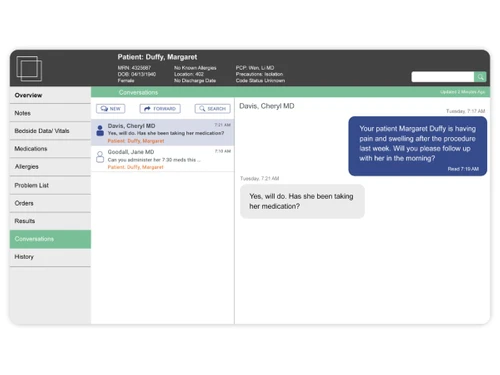
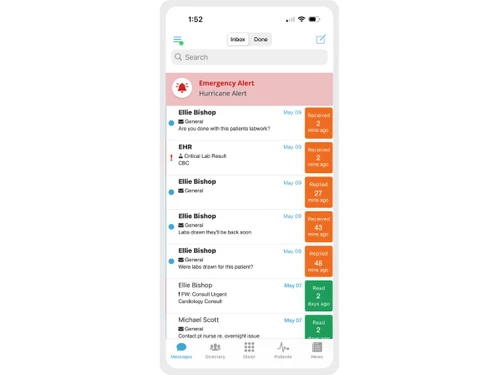
PerfectServe is a healthcare software that helps doctors, nurses, and care teams connect and coordinate patient care more efficiently. It combines tools like secure messaging, voice calls, scheduling, and answering services into one cloud-based system.

The software uses intelligent routing to automatically send messages to the right healthcare professional at the right time, reducing delays and errors. It also integrates with hospital systems like electronic health records (EHR), allowing seamless communication within existing workflows.

PerfectServe helps manage staff schedules, automate communication processes, and improve coordination across hospitals, clinics, and remote care settings. By enabling real-time communication and reducing missed messages, it helps healthcare teams respond faster and work more efficiently.

Why Choose PerfectServe Software?

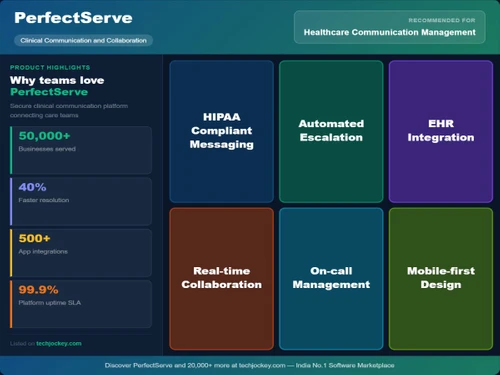
  • Unified Communication Platform: Combines messaging, calls, and scheduling in one system.
  • Intelligent Routing Technology: Automatically sends messages to the right care team member.
  • Faster Response Times: Reduces delays in critical healthcare communication.
  • Real-Time Collaboration: Enables instant communication among healthcare teams.
  • EHR Integration: Works directly with electronic health record systems.
  • Cloud-Based Platform: Accessible anytime without heavy IT setup.
  • Secure Messaging: Ensures HIPAA-compliant communication.
  • Multi-Channel Communication: Supports text, voice, video, and alerts.
  • Automated Workflows: Reduces manual communication tasks.
  • Improved Patient Care: Speeds up treatment and decision-making.
  • Centralized Scheduling: Manages staff schedules efficiently.
  • Reduces Communication Errors: Ensures accurate message delivery.
  • Supports All Care Settings: Works across hospitals, clinics, and remote care.
  • Enhances Team Productivity: Saves time and improves coordination.
  • Automated Escalation: Sends alerts if messages are not answered.
  • Patient & Family Communication: Enables direct communication with patients.
  • Reduces Call-Back Time: Speeds up communication cycles.

Benefits of PerfectServe Software

  • Improves Staff Satisfaction: Reduces workload and frustration.
  • Device Flexibility: Works on smartphones, desktops, and legacy devices.
  • No Special Hardware Needed: Runs on existing devices and systems.
  • Reduces IT Costs: Eliminates the need for multiple tools and vendors.
  • Seamless Integrations: Connects with 200Plus healthcare systems.
  • Real-Time Notifications: Instantly alerts teams about critical updates.
  • Improves Care Coordination: Connects all stakeholders efficiently.
  • Automated Call Management: Handles incoming calls intelligently.
  • Supports Remote Care: Enables communication beyond hospital settings.
  • Customizable Workflows: Adapts to different healthcare needs.
  • Proven Industry Adoption: Used by hundreds of hospitals and clinicians.
  • Drives Better Outcomes: Improves efficiency, reduces delays, and enhances patient experience.

PerfectServe Pricing

PerfectServe price is available upon request, as listed on Techjockey. The pricing model is based on different parameters, including extra features, deployment type, and the total number of users. For further queries related to the product, you can contact our product team and learn more about the pricing and offers.

Read more

PerfectServe Company Details

Founded Year:  1997

PerfectServe provides cloud-based communication and scheduling software for healthcare to enhance clinical collaboration and streamline patient care across various settings.

Director/Founders Terrell Edwards
Company Size 101-500 Employees

PerfectServe Pricing & Plans

Looking for The Right Pricing?

Share your requirements and get a plan built around your business.

  • Define your business needs
  • Get customised pricing
  • Choose features that fit your workflow

Price Available on Request

Get personalised PerfectServe pricing that fits your needs. Our team will connect with you.

PerfectServe Features

  • icon_check Dynamic Intelligent Routing
    Automatically routes clinical alerts to the correct on-call provider based on real-time schedules and pre-set hospital rules.
  • icon_check Lightning Bolt Scheduling
    Utilizes an AI-driven engine to generate complex physician shift rotations while balancing workload and department coverage.
  • icon_check EHR Integration
    Connects directly with electronic health records to push real-time patient data and critical lab results to mobile devices.
  • icon_check Patient Engagement Texting
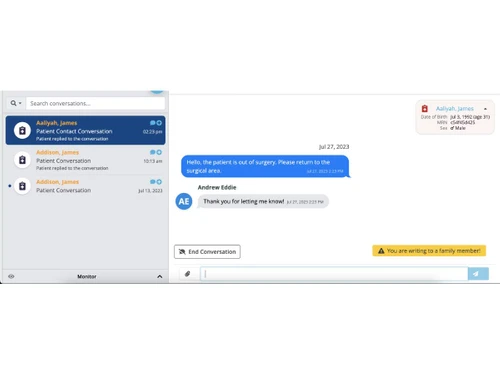
    Enables clinicians to send secure messages to patients or families without revealing the provider's personal cellular number.
  • icon_check Critical Alert Escalation
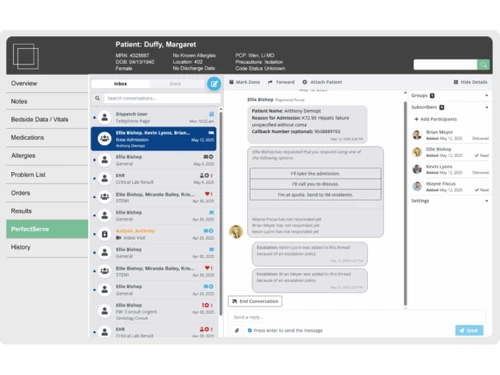
    Automatically forwards urgent notifications to the next available provider if the initial recipient fails to acknowledge.
  • icon_check Video Orchestration
    Facilitates high-definition, HIPAA-compliant telehealth sessions between providers and patients directly through the portal.
  • icon_check Operator Console Interface
    Centralized dashboard for hospital operators to manage high-volume calls and view real-time provider availability status.
  • icon_check Care Team Assignment
    Identifies and displays the full multidisciplinary team assigned to a specific patient for streamlined care coordination.
  • icon_check Broadcast Notifications
    Allows administrators to send high-priority mass alerts to all staff members during hospital emergencies or active codes.
  • icon_check Voice Over IP Calling
    Integrated VoIP functionality allows clinicians to place and receive secure voice calls directly within the software app.
  • icon_check Shared Device Support
    Optimized login workflows for shared hospital tablets or handsets, ensuring data security during shift-to-shift handoffs.
  • icon_check Shift Swap Management
    Mobile-native interface for physicians to request, approve, and finalize shift trades with immediate schedule synchronization.
  • icon_check Presence Status Tracking
    Displays real-time availability of staff members, including "Available," "In Surgery," or "Off-Duty" to reduce wasted pings.
  • icon_check Audit Trail
    Generates detailed logs of all communications and alert responses to ensure compliance and analyze clinical response times.
PerfectServe Demo Video play icon

Get PerfectServe Demo

Watch the demo video to explore key features, real workflows, and how the software fits your business needs.

Understand
Key Features
Personal
Demo Insights
Interactive
Demo Support

PerfectServe Specifications

Supported Platforms
Ubuntu Ubuntu Windows Windows iOS iOS Android Android MacOS MacOS Linux Linux
Devices
Desktop Desktop Mobile Mobile Tablet Tablet iPad iPad
Deployment
Cloud-Based Cloud-Based
Suitable For
Healthcare
Business Specific
Hospitals
Business Size
Medium Business Enterprises
Customer Support
Phone Email Communities
Language
English
Integration
API Integration
Training Resources
Documentation Videos
AI Features
AI Integrated
Technology
Next Generation
Compliance Regulation
HIPAA CCPA

PerfectServe Review

Techjockey Trusted Reviews from Verified Users

No reviews are currently available for PerfectServe. Discover similar Healthcare Software reviews

  • RecurHealth

    5.0

    Whats great - Patient users login has lot of feature avaliable, you can stores and maintain your health dashboard at one single place. read more
  • MocDoc Lab Management System

    4.9

    Whats great - The Implementation team is highly responsive and guided us well during setup and training. Integration with our machines was ... read more

  • Ezovion HMS

    5.0

    Whats great - Easy to use and a much productive functioning makes it one of the best software I’ve ever used! The features make this softwa... read more
Articles for PerfectServe

See All Related Articles

How much does PerfectServe cost?

PerfectServe price is available upon request, as listed on techjockey.com.

Is there a mobile app available for PerfectServe Software?

Yes, the PerfectServe mobile app is available on iOS and Android.

Which operating systems are compatible with PerfectServe Software?

PerfectServe is compatible with Ubuntu, Linux, Windows, and MacOS operating systems.

Does PerfectServe Software offer a free trial?

No, PerfectServe does not offer a free trial.

How does PerfectServe Software function?

PerfectServe works by integrating with healthcare systems, using intelligent routing to automatically send messages, calls, and alerts to the right care team member in real time.

Who uses PerfectServe Software?

PerfectServe is used by hospitals, health systems, clinics, and thousands of healthcare professionals like doctors and nurses.

Is PerfectServe Software available for free?

No, PerfectServe is not available for free.

Is a free demo available for PerfectServe Software?

Yes, PerfectServe offers a free demo for organizations to explore its features.

20,000+ Software Listed

Best Price Guranteed

Free Expert Consultation

2M+ Happy Customers

Terms and Condtions

close

Users with registered businesses can purchase goods from merchants on the platform to satisfy their business needs. Users are not permitted to utilize any products acquired through the platform for resale, advertising, business, or further distribution.

For each purchase made, users will receive a Tax Invoice (or 'GST invoice') that includes specific details such as:

  • the GSTIN of the user associated with their registered business, and

  • the specified Entity Name for their business.

It should be noted that not all products are eligible for GST Invoice. Only the products displayed by participating sellers with the 'GST-based Invoice Available' callout on the product description page would qualify.

Certain goods and services are not eligible to get a GST Invoice, including items with VAS, i.e., Value Added Services (e.g., Total Mobile Protection/Assured Buyback) and those involving an exchange offer at the time of purchase.

Users must ensure the accuracy of the GSTIN, and business entity name provided for the GST Invoice. Requests for corrections into GST Invoice would not be accommodated by Techjockey.com or any Seller, and any issues arising from user-provided information are the sole responsibility of users.

Techjockey.com is not liable for the GST Invoice or any associated input tax credit. To efficiently claim an input tax credit, users should select the registered place of business address as per the GST authority's data and follow the provisions of the GST Act and rules.

To claim an input tax credit, the delivery and billing addresses must match. Furthermore, input tax credits will not be granted if the delivery address and GSTIN on the invoice are from different states. In case of incorrect GST details provided during the order placement, the order will be canceled automatically.