linkedin
SimplePractice logo
play SimplePractice Quick Tips: Disable billing notifications for a specific client
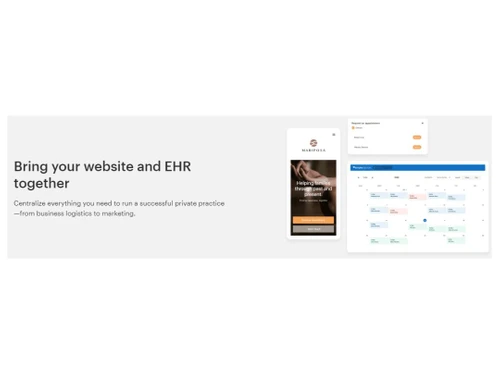
simplepractice-Bring your website and EHR together

SimplePractice

Brand: SimplePractice

  • 4.7

  • 3 Ratings & 3 Reviews

SimplePractice is a comprehensive healthcare software streamlining practice management and client engagement, offering features like appointment scheduling, electronic health records (EHR), and billing.

See More

Have you used SimplePractice before?

Share your insights for better experience

Add a Review
Starting Price
$29

View plans

100% Genuine
Products
Best Price
Guaranteed
Safe & Secure
Payment
  • Description

  • Pricing

  • Features

  • Specification

  • Review

  • Compare

  • Alternatives

  • FAQ

Starting at $29

SimplePractice Software Overview

What is SimplePractice Software?

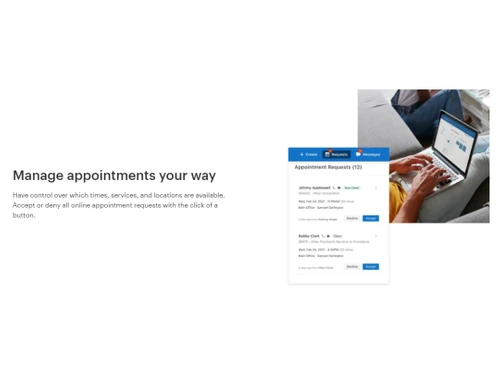
SimplePractice goes beyond being just an electronic health record (EHR) software. It's an all-in-one practice management solution to streamline your business operations and provide an exceptional client experience. Whether you prefer virtual, in-office, or a combination, SimplePractice has you covered. SimplePractice has everything you need to run your practice seamlessly, from booking to billing. Users can take advantage of features like scheduling, where you can send free reminders and set appointments on your terms.

It will help you simplify client payments with AutoPay and online credit card processing. It offers HIPAA-compliant video appointments, including screen-sharing, with its state-of-the-art telehealth functionality. Users can electronically file primary and secondary insurance claims in seconds. You can manage your practice on the go with SimplePractice mobile app.

SimplePractice will streamline intake and documentation with this comprehensive EHR solution. Whether you're a solo practitioner or part of a group practice, SimplePractice adapts to your needs. You will easily access top-rated customer support to assist you with any questions or challenges. As your practice grows, SimplePractice grows with you, allowing you to add clinical team members and additional support staff at no extra cost. Get ready to discover the simplicity and flexibility you need to run a thriving practice.

Why Choose SimplePractice System?

Private practitioners, such as therapists, counsellors, psychologists, and social workers, can use SimplePractice to streamline administrative tasks, manage client information securely, and maintain compliance with HIPAA regulations. Solo practitioners, including doctors, chiropractors, naturopaths, and other healthcare professionals, can also benefit from SimplePractice. It simplifies their practice management by integrating scheduling, billing, documentation, and client communication into a single platform.

Group practices with multiple clinicians, staff members, and administrative personnel can also find value in SimplePractice. It supports collaboration and coordination among team members by offering features such as employee management, customizable dashboards, and charting tools. With SimplePractice, group practices can effectively manage their operations, facilitate communication, and ensure consistency in client care across the entire practice.

Benefits of SimplePractice Healthcare Software

  • Simplify your practice management and streamline your workflow with an all-in-one solution.
  • Enhance client experience and engagement through a secure client portal.
  • Save time and reduce administrative tasks with automated appointment reminders and online billing capabilities.
  • Ensure compliance and protect patient data with a fully HIPAA-compliant system.
  • Access and manage patient records efficiently with an intuitive and customizable electronic medical record (EMR) system.

Pricing of SimplePractice Healthcare Solution

SimplePractice healthcare solution pricing is available on request at techjockey.com.

The overall pricing model is based on different factors such as personalization, extra features required, total users, and the deployment type. Please feel free to request a call from our product experts if you want to learn more about our subscription plans or premium package deals.

Read more

SimplePractice Company Details

Founded Year:  2012

We make software that simplifies the business side of private practice. But what we really do is empower practitioners to be successful entrepreneurs and effective service providers. With greater control and clarity over your business, you can not only manage it but grow it.

Director/Founders Howard Spector
Company Size 501-1000 Employees

SimplePractice Pricing & Plans

Starter
Starting at $29
    • Monthly

      Monthly
      Monthly

Key Features

  • Unlimited clients

  • Paperless intakes

  • Client portal

  • Progress notes

  • Integrated measurement-based care

  • Automated invoicing and billing

  • Credit card processing

  • Live customer support

  • Mobile app

  • Diagnosis and treatment plans

Essential
Starting at $69
    • Monthly

      Monthly
      Monthly

Key Features

  • Customizable notes and assessments

  • Appointment reminders

  • Online appointment requests

  • Secure client messaging

  • Professional website

  • Analytics dashboard

  • Snippets

  • Monarch directory

Plus
Starting at $99
    • Monthly

      Monthly
      Monthly

Key Features

  • Calendar sync

  • Appointment request widget

  • Advanced calendar filters

  • Client waitlist

  • Add practice managers ($39/mo per person)

  • Add clinicians ($59/mo per person)

  • Add team members

SimplePractice Features

  • icon_check Appointment Management
    Efficiently schedule and manage appointments with ease and flexibility.
  • icon_check Practice Management
    Streamline and organize your entire practice, from scheduling to billing, in one comprehensive solution.
  • icon_check HIPAA Compliant
    Ensure the security and privacy of patient information with a fully HIPAA-compliant system.
  • icon_check Electronic Medical Record (EMR)
    Digitally manage and access patient medical records for efficient and organized documentation.
  • icon_check Billing & Invoicing
    Simplify the billing process and generate accurate invoices for smooth financial transactions.
  • icon_check Employee Management
    Easily manage your practice staff, assign roles, and track their performance within the system.
  • icon_check Customizable Dashboard
    Personalize your dashboard to display the information and metrics that matter most to you and your practice.
  • icon_check Charting
    Efficiently document patient progress and treatment plans with user-friendly charting tools.
  • icon_check Client Portal
    Provide clients with a secure online portal to access their records, schedule appointments, etc.
  • icon_check Alerts & Notifications
    Stay informed and never miss important appointments, tasks, and reminder updates.
SimplePractice Demo Video play icon

Get SimplePractice Demo

Watch the demo video to explore key features, real workflows, and how the software fits your business needs.

Understand
Key Features
Personal
Demo Insights
Interactive
Demo Support

SimplePractice Specifications

Supported Platforms
Windows Windows iOS iOS Android Android MacOS MacOS
Devices
Desktop Desktop Mobile Mobile Tablet Tablet iPad iPad
Deployment
Cloud-Based Cloud-Based
Suitable For
Healthcare
Business Specific
Clinics
Business Size
Small Business Startups Medium Business Enterprises SMBs
Customer Support
Email Communities
Language
English
Training Resources
Videos
Compliance Regulation
HIPAA

Explore the Best Alternative Solutions Similar to Your Business Size and Needs

SimplePractice Reviews

4.7

Out of 5

img

Overall Rating

Based on
3 Verified Reviews

Rating Breakdown

  • Features 4.8
  • Value for Money 4.6
  • Ease of Use 4.6
  • Customer Support 4.8

100% Recommend this Product

Add Review

SimplePractice Video Reviews

youtubeVideoId

4.8

“SimplePractice Review: Essential”

Review by: Esther B

youtubeVideoId

4.8

“SimplePractice Quick Tips: Review a client's completed intake documents”

Review by: Simplepractice

youtubeVideoId

4.8

“How to create superbills & send them to clients - SimplePractice pro tips with Kelley Stevens, LMFT”

Review by: Simplepractice

Compare SimplePractice With other Healthcare Software

Products
Ratings
Pricing
Device Supported
Deployment
Supported Platforms
  • img

    SimplePractice

  • 4.7

  • Price On Request

  • Desktop

    Mobile

  • Web based

    On Premises

  • Windows

    Mac OS

  • img

    RecurHealth

  • 4.6

  • ₹ 999

  • Desktop

    Mobile

  • Web based

    On Premises

  • Windows

    Mac OS

  • img

    Healcon Practice

  • 4.0

  • ₹ 499

  • Desktop

    Mobile

  • Web based

    On Premises

  • Windows

    Mac OS

  • img

    Doctor Live

  • 4.1

  • ₹ 1499

  • Desktop

    Mobile

  • Web based

    On Premises

  • Windows

    Mac OS

  • img

    sterloCare

  • 4.3

  • Price On Request

  • Desktop

    Mobile

  • Web based

    On Premises

  • Windows

    Mac OS

  • img

    PointClickCare

  • 4.4

  • Price On Request

  • Desktop

    Mobile

  • Web based

    On Premises

  • Windows

    Mac OS

  • img

    OHCTECH

  • 4.2

  • ₹ 15000

  • Desktop

    Mobile

  • Web based

    On Premises

  • Windows

    Mac OS

  • img

    OccuCare

  • 4.4

  • Price On Request

  • Desktop

    Mobile

  • Web based

    On Premises

  • Windows

    Mac OS

  • img

    MedTrainer

  • 4.1

  • Price On Request

  • Desktop

    Mobile

  • Web based

    On Premises

  • Windows

    Mac OS

  • img

    NiftyHMS

  • 4.3

  • ₹ 1500

  • Desktop

    Mobile

  • Web based

    On Premises

  • Windows

    Mac OS

(0) Product(s) selected

SimplePractice Alternatives

See All SimplePractice Alternatives

Available

Price on Request

Available

Price on Request

Available

Price on Request

Starting Price:

$39 /Month

Available

Price on Request

Starting Price:

$19 /Month

Articles for SimplePractice

See All Related Articles

Which operating system does SimplePractice Software Support?

SimplePractice software is compatible with Windows and macOS systems.

Is there any SimplePractice App?

SimplePractice app is not available on Android and iOS devices.

What is the deployment type of the SimplePractice System?

SimplePractice system supports web-based deployment.

How much does SimplePractice cost?

SimplePractice pricing is available on request at techjockey.com.

Who are the potential users of the SimplePractice?

SimplePractice can be used by doctors, healthcare businesses, hospitals, patients, clinics and individuals who need healthcare software.

Is there any free trial or demo for SimplePractice?

SimplePractice demo is available for free with techjockey.com.

Is SimplePractice Free?

SimplePractice offers a 30-day free trial.

How can you download the SimplePractice?

SimplePractice is a web-based platform. So, you need not download any software or app to use it.

How Does SimplePractice System Work?

SimplePractice is a versatile healthcare software that caters to private practices by providing virtual and in-office solutions. It goes beyond being an electronic health record system, offering a comprehensive practice management solution that streamlines business operations and enhances client satisfaction.

20,000+ Software Listed

Best Price Guranteed

Free Expert Consultation

2M+ Happy Customers

Terms and Condtions

close

Users with registered businesses can purchase goods from merchants on the platform to satisfy their business needs. Users are not permitted to utilize any products acquired through the platform for resale, advertising, business, or further distribution.

For each purchase made, users will receive a Tax Invoice (or 'GST invoice') that includes specific details such as:

  • the GSTIN of the user associated with their registered business, and

  • the specified Entity Name for their business.

It should be noted that not all products are eligible for GST Invoice. Only the products displayed by participating sellers with the 'GST-based Invoice Available' callout on the product description page would qualify.

Certain goods and services are not eligible to get a GST Invoice, including items with VAS, i.e., Value Added Services (e.g., Total Mobile Protection/Assured Buyback) and those involving an exchange offer at the time of purchase.

Users must ensure the accuracy of the GSTIN, and business entity name provided for the GST Invoice. Requests for corrections into GST Invoice would not be accommodated by Techjockey.com or any Seller, and any issues arising from user-provided information are the sole responsibility of users.

Techjockey.com is not liable for the GST Invoice or any associated input tax credit. To efficiently claim an input tax credit, users should select the registered place of business address as per the GST authority's data and follow the provisions of the GST Act and rules.

To claim an input tax credit, the delivery and billing addresses must match. Furthermore, input tax credits will not be granted if the delivery address and GSTIN on the invoice are from different states. In case of incorrect GST details provided during the order placement, the order will be canceled automatically.