linkedin
pgAdmin logo
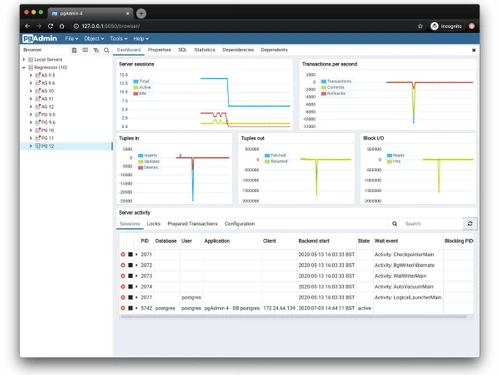
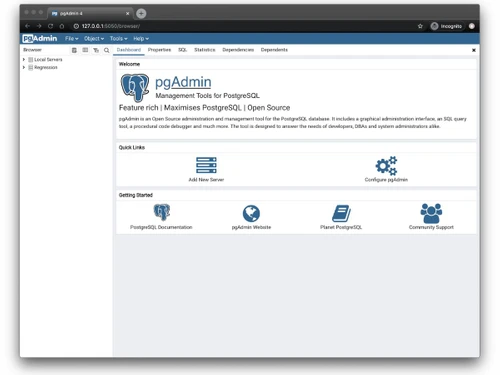
pgAdmin-dashboard
pgAdmin-server dashboard
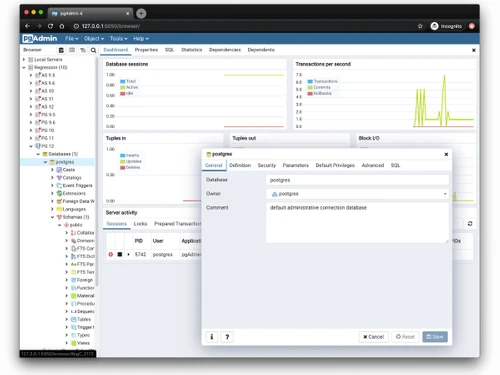
pgAdmin-database sessions

pgAdmin

Brand: pgAdmin

  • No Ratings & Reviews

pgAdmin is an open-source, cross-platform PostgreSQL management tool that provides a feature-rich interface for managing databases, servers, and development tasks.

See More

Have you used pgAdmin before?

Share your insights for better experience

Add a Review

Free Forever

Get started immediately at no cost. Upgrade anytime if your business demand more.

100% Genuine
Products
Best Price
Guaranteed
Safe & Secure
Payment
  • Description

  • Pricing

  • Features

  • Specification

  • Review

  • Compare

  • Alternatives

pgAdmin Software Overview

What is pgAdmin?

pgAdmin is a comprehensive, open-source administration and development platform specifically designed for PostgreSQL, one of the world's most advanced open-source relational databases. It serves as the leading graphical management tool for PostgreSQL, providing a feature-rich environment that simplifies the creation, maintenance, and use of database objects. Whether you are a database administrator, a developer, or a data analyst, pgAdmin offers an intuitive interface to manage all aspects of your PostgreSQL instances, from writing complex queries to monitoring performance and managing security.

The platform is designed to be accessible and powerful, abstracting the complexity of command-line operations into a user-friendly graphical user interface (GUI). This allows users to interact with their databases visually, increasing productivity and reducing the learning curve for managing PostgreSQL.

Why Choose pgAdmin?

  • Cross-Platform Versatility: pgAdmin offers exceptional deployment flexibility. It can be run as a native desktop application on Windows, macOS, and Linux. Alternatively, it can be deployed as a web application on a server, allowing access from any modern web browser, which is ideal for team environments and remote administration.
  • Comprehensive Database Management: It provides a complete suite of tools for managing the entire database ecosystem. Users can create, view, and edit all PostgreSQL objects, including tables, views, functions, and triggers, through an intuitive graphical interface, eliminating the need for manual SQL scripting for routine tasks.
  • Powerful Query Tool: The integrated SQL query tool is engineered for efficiency. It features essential development aids such as syntax highlighting and auto-completion to speed up coding and reduce errors. A standout feature is its graphical EXPLAIN plan viewer, which allows developers to visually analyze and optimize the performance of their queries.

Advanced Features of pgAdmin

  • AI-Assisted Functionality: Recent versions include AI capabilities such as an AI Chat Agent, AI Reports for database analysis, and AI Insights for EXPLAIN plans.
  • Security and Authentication: pgAdmin supports authentication mechanisms such as Kerberos and Active Directory, along with authentication through services such as GitHub. The project also regularly releases security updates and fixes.
  • Enhanced Data Handling and Visualization: pgAdmin provides options to limit the number of rows fetched when viewing table data. It also includes a Geometry Viewer for supported geospatial data.
  • Advanced Deployment Options: For modern infrastructure, pgAdmin supports sophisticated deployment configurations. The inclusion of a Gateway API HTTPRoute template in its Helm chart facilitates deployment in Kubernetes environments as an alternative to a standard Ingress.

Key Capabilities of pgAdmin

  • Graphical Object Management: Visually create, alter, and manage all database objects, including schemas, tables, indexes, sequences, and users, through context-sensitive menus and dialogs.
  • SQL Development and Execution: A sophisticated SQL editor for writing, executing, and saving queries. It includes a full data grid for viewing and editing results, along with an execution history.
  • Performance Monitoring and Tuning: Tools like the graphical EXPLAIN plan viewer and index statistics displays help administrators and developers identify and resolve performance issues within their queries and database structure.
  • Data Backup and Restore: pgAdmin provides user-friendly dialogs and wizards to perform backup and restore operations on databases and individual tables, ensuring data integrity and disaster recovery readiness.
  • User and Grant Management: A dedicated Grant Wizard simplifies the complex process of managing user roles and permissions, allowing for precise control over data access and security policies.
  • Schema Comparison Tool: The Schema Diff tool enables users to compare and synchronize database objects between two databases or schemas.

How to Use pgAdmin?

  1. Installation or Deployment: First, download and install the desktop client for your operating system (Windows, macOS, or Linux). For multi-user access, deploy pgAdmin in server mode on a central server.
  2. Connecting to a Database Server: Launch pgAdmin and register a new server connection. You will need to provide the hostname or IP address, port, database name, and user credentials for the PostgreSQL instance you wish to manage.
  3. Navigating the Interface: Once connected, the main window displays a tree view in the left-hand panel, listing all connected servers and their database objects. Selecting an object in the tree will display its properties and management options in the main workspace panel.
  4. Performing Database Operations: To execute a query, open the Query Tool for a specific database. To manage an object, right-click it in the object browser tree to access options like 'Create', 'Properties', or 'Delete'. Wizards are available for more complex tasks like backups or managing user grants.
  5. Analyzing and Optimizing: To analyze a query's performance, type it into the Query Tool and use the 'EXPLAIN' functionality (F7). The results can be viewed in a graphical format to easily understand the execution plan and identify bottlenecks.

pgAdmin Pricing

pgAdmin is available for free on techjockey.com.

The pricing model is based on different parameters, including extra features, deployment type, and the total number of users. For further queries related to the product, you can contact our product team and learn more about the pricing and offers.

Read more

pgAdmin Pricing & Plans

This Product is Available Free Forever.

Start instantly with no fees, no subscriptions, and no commitments.

  • Full access to basic version available
  • No credit card or sign-up required

Free Forever Plan

Get started immediately at no cost. Upgrade anytime if your business demand more.

Free Forever

pgAdmin Features

  • icon_check Database Administration
    Create, configure, and manage PostgreSQL databases, schemas, users, and server settings from a graphical interface.
  • icon_check SQL Query Editor
    Write, edit, execute, and debug SQL queries with syntax highlighting, auto-completion, and query history support.
  • icon_check Object Browser
    Browse and organize database objects including tables, views, functions, sequences, schemas, and indexes easily.
  • icon_check Backup & Restore
    Perform database backup and restore operations using PostgreSQL utilities with customizable configuration options.
  • icon_check User Role Management
    Create, modify, and manage database users, roles, privileges, and authentication settings securely.
  • icon_check Schema Management
    Design, create, modify, and maintain database schemas, tables, constraints, triggers, and relationships.
  • icon_check Query Execution Plans
    Analyze SQL query performance using graphical EXPLAIN and EXPLAIN ANALYZE execution plan visualizations.
  • icon_check Performance Monitoring
    Monitor active sessions, locks, server activity, database statistics, and resource utilization in real time.
  • icon_check Import & Export Data
    Import and export database data using multiple formats to simplify migration, reporting, and data sharing tasks.
  • icon_check Server Management
    Configure authentication methods, SSL connections, access permissions, and user privileges for secure databases.
  • icon_check Security Management
    Configure authentication methods, SSL connections, access permissions, and user privileges for secure databases.
  • icon_check Maintenance Management
    Execute VACUUM, ANALYZE, REINDEX, and maintenance operations to optimize database performance and storage.
  • icon_check Cross-Platform Compatibility
    Run seamlessly on Windows, Linux, macOS, and browser environments for flexible PostgreSQL administration.
  • icon_check Extension Management
    Install, enable, and manage PostgreSQL extensions to expand database functionality and support advanced features.

pgAdmin Specifications

Supported Platforms
Ubuntu Ubuntu Windows Windows MacOS MacOS Linux Linux
Devices
Desktop Desktop
Deployment
Cloud-Based Cloud-Based Perpetual Perpetual
Suitable For
All Industries
Business Specific
All Businesses
Business Size
Individual Small Business Startups Medium Business Enterprises SMBs SMEs MSMBs MSMEs Freelancers
Customer Support
Email Communities Forums
Language
English
Integration
API Integration
Training Resources
Documentation Videos

Explore the Best Alternative Solutions Similar to Your Business Size and Needs

pgAdmin Review

Techjockey Trusted Reviews from Verified Users

No reviews are currently available for pgAdmin. Discover similar Database Management Software reviews

  • EDB Postgres

    4.8

    Whats great - Excellent experience, staff prepared and available a problem solved during the installation and activation of the software. I... read more

  • Simego Data Synchronisation Studio

    4.5

    Whats great - Easily exports to flat files, connects library with drag and drop system, provides user active directory. read more

  • MySQL enterprise Edition

    4.5

    Whats great - easy to use read more

Compare pgAdmin With other Database Management Software

Products
Ratings
Pricing
Device Supported
Deployment
Supported Platforms
  • img

    pgAdmin

  • FREE

  • Desktop

    Mobile

  • Web based

    On Premises

  • Windows

    Mac OS

  • img

    ClickHouse

  • 4.2

  • Price On Request

  • Desktop

    Mobile

  • Web based

    On Premises

  • Windows

    Mac OS

  • img

    Supabase

  • 4.5

  • Price On Request

  • Desktop

    Mobile

  • Web based

    On Premises

  • Windows

    Mac OS

  • img

    EDB Postgres

  • 4.8

  • Price On Request

  • Desktop

    Mobile

  • Web based

    On Premises

  • Windows

    Mac OS

  • img

    Lio

  • 4.8

  • Price On Request

  • Desktop

    Mobile

  • Web based

    On Premises

  • Windows

    Mac OS

  • img

    MongoDB Compass

  • 4.0

  • Price On Request

  • Desktop

    Mobile

  • Web based

    On Premises

  • Windows

    Mac OS

  • img

    Beekeeper Studio

  • 4.4

  • Price On Request

  • Desktop

    Mobile

  • Web based

    On Premises

  • Windows

    Mac OS

  • img

    Akkio

  • 4.5

  • Price On Request

  • Desktop

    Mobile

  • Web based

    On Premises

  • Windows

    Mac OS

  • img

    ArangoDB

  • 4.4

  • Price On Request

  • Desktop

    Mobile

  • Web based

    On Premises

  • Windows

    Mac OS

  • img

    CUBRID

  • 4.1

  • Price On Request

  • Desktop

    Mobile

  • Web based

    On Premises

  • Windows

    Mac OS

(0) Product(s) selected

pgAdmin Alternatives

See All pgAdmin Alternatives

Starting Price:

$28 /Month

Starting Price:

$25 /Monthly

Starting Price:

$49 /user/month

Available

Price on Request

Available

Price on Request

Available

Price on Request

Available

Price on Request

Available

Price on Request

Articles for pgAdmin

See All Related Articles

20,000+ Software Listed

Best Price Guranteed

Free Expert Consultation

2M+ Happy Customers

Terms and Condtions

close

Users with registered businesses can purchase goods from merchants on the platform to satisfy their business needs. Users are not permitted to utilize any products acquired through the platform for resale, advertising, business, or further distribution.

For each purchase made, users will receive a Tax Invoice (or 'GST invoice') that includes specific details such as:

  • the GSTIN of the user associated with their registered business, and

  • the specified Entity Name for their business.

It should be noted that not all products are eligible for GST Invoice. Only the products displayed by participating sellers with the 'GST-based Invoice Available' callout on the product description page would qualify.

Certain goods and services are not eligible to get a GST Invoice, including items with VAS, i.e., Value Added Services (e.g., Total Mobile Protection/Assured Buyback) and those involving an exchange offer at the time of purchase.

Users must ensure the accuracy of the GSTIN, and business entity name provided for the GST Invoice. Requests for corrections into GST Invoice would not be accommodated by Techjockey.com or any Seller, and any issues arising from user-provided information are the sole responsibility of users.

Techjockey.com is not liable for the GST Invoice or any associated input tax credit. To efficiently claim an input tax credit, users should select the registered place of business address as per the GST authority's data and follow the provisions of the GST Act and rules.

To claim an input tax credit, the delivery and billing addresses must match. Furthermore, input tax credits will not be granted if the delivery address and GSTIN on the invoice are from different states. In case of incorrect GST details provided during the order placement, the order will be canceled automatically.