linkedin
Plannerly logo
play What is LOD Planner?: BIM Execution Planning, Scoping, Contracting and Management www.lodplanner.com -LOD Planner Demo
plannerly complete
plannerly plan

Plannerly

Brand: Lodplanner

  • 4.1

  • 3 Ratings

Plannerly is a BIM management platform that helps construction teams plan, coordinate, and manage BIM projects from initial planning through delivery.

See More

Have you used Plannerly before?

Share your insights for better experience

Add a Review
Starting Price
₹12,900 excl.GST
₹ 15,222 incl. GST

View plans

offer Save upto 18%, Get GST Invoice on your business purchase T&C
offer Buy Now & Pay Later, Check offer on payment page.
Buy Now
100% Genuine
Products
Best Price
Guaranteed
Safe & Secure
Payment
  • Description

  • Pricing

  • Features

  • Specification

  • Review

  • Compare

  • Alternatives

  • FAQ

Starting at ₹12,900
Buy Now

Plannerly Software Overview

What is Plannerly?

Plannerly is a cloud-based Building Information Modeling (BIM) management platform designed for the Architecture, Engineering, and Construction (AEC) industry. It serves as a central hub for project teams to collaboratively plan, scope, and verify BIM deliverables. The software simplifies the creation of BIM Execution Plans (BEPs), automates model checking, and ensures that all project stakeholders are aligned with the required standards and outcomes. By replacing static documents with a dynamic, data-driven environment, Plannerly helps reduce errors, minimize rework, and improve overall project efficiency from design through to handover.

The core mission of the platform is to streamline complex BIM workflows. It provides a visual and intuitive interface that makes it easy for teams to define precisely what needs to be modeled, by whom, and to what level of detail (LOD). This clarity ensures that project models are fit for purpose and contain the exact information required for each project stage, eliminating ambiguity and enhancing collaboration.

Why Choose Plannerly?

  • Centralized Source of Truth: It consolidates all BIM requirements, scopes, and execution plans into a single, accessible cloud platform. This eliminates confusion caused by multiple document versions and ensures everyone is working from the most current information.
  • Simplified BIM Scoping: The platform features a unique drag-and-drop visual interface for scoping. This allows teams to easily define requirements for each building element, system, and project phase, making a complex process simple and transparent.
  • Enhanced Collaboration: Plannerly connects the entire project team, including architects, engineers, contractors, and clients, in one collaborative space. This fosters better communication and ensures all parties have a clear understanding of their responsibilities.
  • Automated Verification: By automating the process of checking models against the agreed-upon scope and BEP, Plannerly drastically reduces the time and effort spent on manual quality control. This leads to higher quality models and faster issue resolution.
  • Standardization and Compliance: The software includes templates and workflows that support international standards like ISO 19650, helping organizations maintain consistency and compliance across all their projects.

Advanced Features of Plannerly

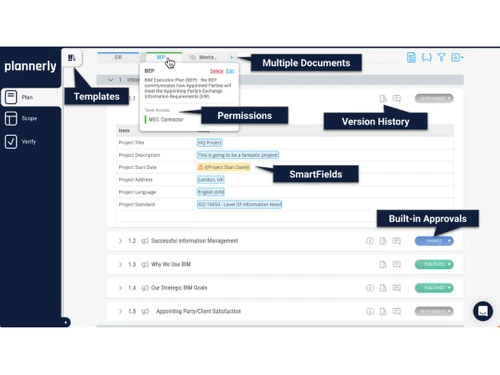
  • Smart BIM Execution Plans (BEPs): Move beyond static documents with dynamic, online BEPs. These plans are directly linked to the project scope and can be easily updated and shared, ensuring the BEP remains a relevant and useful guide throughout the project lifecycle.
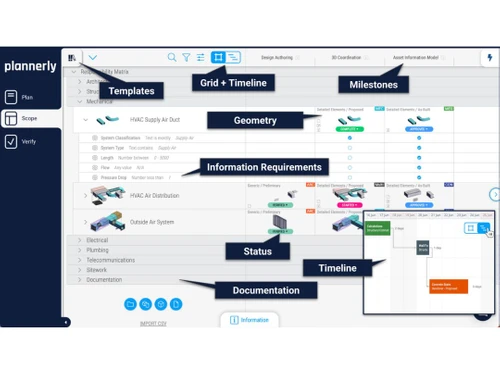
  • Visual Scoping Module: A standout feature that allows users to visually define the scope of work. Teams can select project elements and define Level of Information Need (LOIN), including staged geometry and information requirements, creating an unambiguous and easily understood scope.
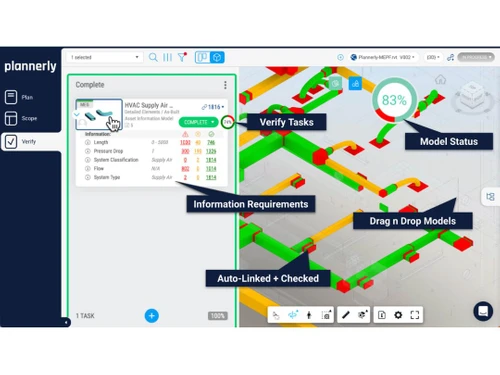
  • Automated Model Checking: The Verify module automatically checks submitted models for compliance with the defined scope. It can identify missing elements, incorrect information, and other deviations, generating clear reports for the modeling team to address.
  • Task Management and Progress Tracking: Assign specific BIM tasks to team members, set deadlines, and monitor progress in real-time. This functionality provides project managers with a clear overview of deliverable status and team accountability.
  • Rich Content Libraries: Accelerate project setup by leveraging extensive libraries of predefined scopes, components, and information requirements. These libraries can be customized to fit specific project or company standards.

Modules of Plannerly

  • The Plan Module: This is where the foundation for BIM success is laid. Users can create comprehensive BIM Execution Plans, define project goals, establish standards, and outline team roles and responsibilities. It includes templates aligned with ISO 19650 to ensure best practices.
  • The Scope Module: The heart of the platform, this module provides the tools to visually define and agree upon the BIM scope. It ensures complete clarity on what information is required at every project stage, preventing both under-modeling and over-modeling.
  • The Track Module: This module focuses on execution and accountability. It allows project managers to assign tasks derived from the scope, monitor their completion, and maintain a clear view of the project's progress against the plan.
  • The Verify Module: Serving as the quality control engine, this module automates the verification of models. It checks for geometric and data compliance against the BEP and scope, ensuring that all deliverables meet the required standards before they are accepted.

How to Use Plannerly?

  1. Project Initialization: Begin by creating a new project within the platform. Invite all relevant stakeholders, including designers, engineers, and contractors, and assign them appropriate roles and permissions.
  2. Develop the BIM Execution Plan: Utilize the Plan module to establish the project's BIM strategy. Define standards, deliverables, and collaboration protocols using the built-in templates and tools.
  3. Define the Scope Visually: Move to the Scope module to detail the modeling requirements. Use the intuitive interface to specify the LOD and information requirements for every element across all project phases.
  4. Execute and Monitor: With the scope defined, use the Track module to assign tasks to the team. Team members can then proceed with modeling, while project managers monitor progress and ensure deadlines are met.
  5. Submit and Verify Models: As model deliverables are completed, they are submitted to the Verify module. The platform automatically runs checks and generates compliance reports, highlighting any non-conformities for quick resolution.
  6. Review and Collaborate: The team uses the verification reports to identify and correct issues. This iterative process of submission, verification, and refinement continues throughout the project, ensuring a high-quality final model.

Plannerly Pricing

Plannerly price starts at INR 12,900 at techjockey.com.

The pricing model is based on different parameters, including extra features, deployment type, and the total number of users. For further queries related to the product, you can contact our product team and learn more about the pricing and offers.

Read more

Lodplanner Company Details

Founded Year:  2017

Providing owners, architects and contractors with beautiful, online, simple, smart and magical software.

Director/Founders Clive Jordan
Company Size 1-100 Employees

Plannerly Pricing & Plans

Pro (Docs)
Key Features
  • Five projects included free
  • Unlimited editors and viewers
  • 50 GB of project files
  • Included AI and model processing
  • Add projects as your work grows

Calculated Price

₹ 12900 Exclusive of all taxes
    • Quantity

      Quantity
      Quantity
    • Monthly

      Monthly
      Monthly

Key Features

  • Five projects included free

  • Unlimited editors and viewers

  • 50 GB of project files

  • Included AI and model processing

  • Add projects as your work grows

Plannerly Features

  • icon_check Scope Management
    Define, track, and visualize deliverables using LOD and LOIN to ensure clarity and accountability across teams.
  • icon_check BIM Execution Plan
    Create structured BIM Execution Plans with drag-and-drop templates aligned to ISO 19650 and global standards.
  • icon_check Document Management
    Store, organize, and control access to project documents in a secure, version-controlled common data environment.
  • icon_check Collaboration Tools
    Enable real-time collaboration with tasks, comments, and activity tracking for seamless project communication.
  • icon_check Automated Reporting
    Generate customizable reports and PDFs instantly to share project updates and status with all stakeholders.
  • icon_check Compliance Management
    Ensure BIM processes meet ISO 19650, AIA, and PAS1192 standards with structured workflows and templates.
  • icon_check Integrations
    Connect with Autodesk Construction Cloud and support 80+ file formats including Revit and IFC for smooth workflows.
Plannerly Demo Video play icon

Get Plannerly Demo

Watch the demo video to explore key features, real workflows, and how the software fits your business needs.

Understand
Key Features
Personal
Demo Insights
Interactive
Demo Support

Plannerly Specifications

Supported Platforms
Ubuntu Ubuntu Windows Windows MacOS MacOS Linux Linux
Devices
Desktop Desktop
Deployment
Cloud-Based Cloud-Based
Suitable For
All Industries
Business Specific
All Businesses
Business Size
Small Business Startups Medium Business SMBs
Customer Support
Email Live Chat Communities
Language
English
Training Resources
Webinars Documentation Videos

Explore the Best Alternative Solutions Similar to Your Business Size and Needs

Plannerly Review

4.1

Out of 5

img

Overall Rating

Based on
3 Verified Ratings

Rating Breakdown

  • Features 3.8
  • Value for Money 4.1
  • Ease of Use 4.6
  • Customer Support 4

86% Recommend this Product

Add Review

Techjockey Trusted Reviews from Verified Users

No reviews are currently available for Plannerly. Discover similar BIM Software reviews

  • CSI Etabs

    4.4

    Whats great - Etabs is the best software for Structural building design because We can design all building models with earthquake design. read more

  • EdiLus CONCRETE

    4.8

    Whats great - Not only does the site have links to demo videos, but I received a call very quickly and after a short interview I was emaile... read more

  • Autodesk Revit

    4.4

    Whats great - Autodesk Revit helps in creating accurate designs and provides document sheets with ease. read more

Compare Plannerly With other BIM Software

Products
Ratings
Pricing
Device Supported
Deployment
Supported Platforms
  • img

    Plannerly

  • 4.1

  • ₹ 12900.00 excl. GST

  • Desktop

    Mobile

  • Web based

    On Premises

  • Windows

    Mac OS

  • img

    Tekla Structures

  • 4.5

  • ₹ 95500

  • Desktop

    Mobile

  • Web based

    On Premises

  • Windows

    Mac OS

  • img

    Renga

  • 4.2

  • ₹ 99000

  • Desktop

    Mobile

  • Web based

    On Premises

  • Windows

    Mac OS

  • img

    StreamBIM

  • 4.1

  • Price On Request

  • Desktop

    Mobile

  • Web based

    On Premises

  • Windows

    Mac OS

  • img

    Catenda

  • 4.4

  • Price On Request

  • Desktop

    Mobile

  • Web based

    On Premises

  • Windows

    Mac OS

  • img

    Dalux

  • 4.1

  • Price On Request

  • Desktop

    Mobile

  • Web based

    On Premises

  • Windows

    Mac OS

  • img

    EdiLus CONCRETE

  • 4.7

  • Price On Request

  • Desktop

    Mobile

  • Web based

    On Premises

  • Windows

    Mac OS

  • img

    CSI Etabs

  • 4.3

  • Price On Request

  • Desktop

    Mobile

  • Web based

    On Premises

  • Windows

    Mac OS

  • img

    BIMcloud

  • 4.3

  • Price On Request

  • Desktop

    Mobile

  • Web based

    On Premises

  • Windows

    Mac OS

(0) Product(s) selected

Plannerly Alternatives

See All Plannerly Alternatives

Available

Price on Request

Available

Price on Request

Available

Price on Request

Starting Price:

€19 /Month

Articles for Plannerly

See All Related Articles

What is Plannerly?

Plannerly is a BIM and Information Management platform for the AEC industry. It helps teams manage BIM requirements and workflows, including project documents, BIM Execution Plans, information scopes, model verification, task tracking, and file management, with support for ISO 19650 workflows.

How much does Plannerly cost?

Plannerly price starts at INR 12,900 at techjockey.com.

Is Plannerly free?

Yes. Plannerly offers a Free plan for getting started. Free accounts also include unlimited Viewer users, while Editor access is limited.

What does Plannerly do?

Plannerly helps AEC teams plan, manage, and verify BIM and project information. It supports structured information requirements, BIM Execution Plans, scope definition, task tracking, model checking, document management, and connected project data.

Who can use Plannerly?

Plannerly is designed for AEC professionals and project teams, including owners, designers, contractors, and consultants. It is also used by BIM and Information Management professionals working with ISO 19650 workflows.

What are the key features of Plannerly?

Key capabilities include smart project documents, BIM Execution Plans, visual scoping, automated BIM/model checking, task tracking, file management/CDE workflows, information requirements, templates, and ISO 19650-aligned workflows.

Does Plannerly offer integrations with other software?

Yes. Plannerly provides integrations with Autodesk Construction Cloud (ACC), Autodesk BIM 360, Revit, and the buildingSMART Data Dictionary (bSDD). Its ACC/BIM 360 integration allows teams to connect hubs and review/verify models, files, and PDFs within Plannerly.

Is there customer support available for Plannerly?

Yes. Plannerly provides support through in-app chat, and users can also contact the team through email or book a meeting. Its Help Center provides documentation covering Plannerly features, workflows, integrations, and troubleshooting.

20,000+ Software Listed

Best Price Guranteed

Free Expert Consultation

2M+ Happy Customers

Terms and Condtions

close

Users with registered businesses can purchase goods from merchants on the platform to satisfy their business needs. Users are not permitted to utilize any products acquired through the platform for resale, advertising, business, or further distribution.

For each purchase made, users will receive a Tax Invoice (or 'GST invoice') that includes specific details such as:

  • the GSTIN of the user associated with their registered business, and

  • the specified Entity Name for their business.

It should be noted that not all products are eligible for GST Invoice. Only the products displayed by participating sellers with the 'GST-based Invoice Available' callout on the product description page would qualify.

Certain goods and services are not eligible to get a GST Invoice, including items with VAS, i.e., Value Added Services (e.g., Total Mobile Protection/Assured Buyback) and those involving an exchange offer at the time of purchase.

Users must ensure the accuracy of the GSTIN, and business entity name provided for the GST Invoice. Requests for corrections into GST Invoice would not be accommodated by Techjockey.com or any Seller, and any issues arising from user-provided information are the sole responsibility of users.

Techjockey.com is not liable for the GST Invoice or any associated input tax credit. To efficiently claim an input tax credit, users should select the registered place of business address as per the GST authority's data and follow the provisions of the GST Act and rules.

To claim an input tax credit, the delivery and billing addresses must match. Furthermore, input tax credits will not be granted if the delivery address and GSTIN on the invoice are from different states. In case of incorrect GST details provided during the order placement, the order will be canceled automatically.