USA
USA UAE
UAESmall Business
Designed for startups and growing businesses


See More




Brand: Prompt
Penguin App is a restaurant management solution that helps food-service businesses manage orders, inventory, billing, and queue operations through a unified platform.
See MoreHave you used Penguin App before?
Share your insights for better experience
Brand: Prompt
Founded Year: 1987
Prompt
Looking for The Right Pricing?
Share your requirements and get a plan built around your business.
Price Available on Request
Get personalised Penguin App pricing that fits your needs. Our team will connect with you.
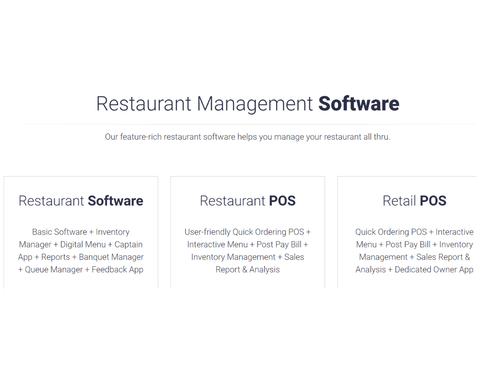
 Alerts Billing & Invoicing Analytics & Reporting Customer Management Feedbacks Menu Management Inventory Management KOT Management Point of Sale (POS) Table Management Payment Gateway Queue Management Data Security Role-based access Cloud Storage

Watch the demo video to explore key features, real workflows, and how the software fits your business needs.
 Windows
  Android
  Desktop
  Mobile
  Tablet
  Cloud-Based
  Perpetual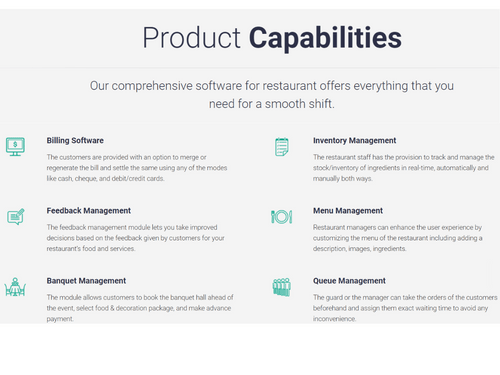
Small Business
Designed for startups and growing businesses
Medium Business
Built for business growth and flexibility
Enterprises
Designed for complex and large-scale business needs
4.7
Out of 5

Overall Rating
Based on
8 Verified Reviews
Rating Breakdown
86% Recommend this Product
Add ReviewCustomers generally express high satisfaction with the Penguin App, praising its ease of use, effective support system, and robust features for restaurant management and POS solutions. Many users highlight the software's adaptability and efficiency, particularly in managing multiple clients and inventory. However, while feedback is overwhelmingly positive, there are few reviews that suggest a desire for additional features or improvements, indicating room for growth. Overall, users recommend the product for its reliability and time-saving capabilities.

Feb 13, 2019
Techjockey Verified
“Nice restaurant management software”
Pros
Best software for eatery the board with incredible highlights. I'm utilizing this item over a half year. it's extremely simple to utilize and adaptable. I unquestionably prescribed.
Cons
NO CONS
Jun 27, 2018
Techjockey Verified
“they will save a lot of time”
Pros
Techjockey was the perfect place to start in our search for a software solution. After a short call they were able to provide me 5 possible vendors and then help me get in contact with them to obtain more information & setup demonstrations. While we did add some additional vendors to our review process, the ones Techjockey provided ended up being the best suited
Cons
N/A
May 10, 2019
Techjockey Verified
“best pos software”
Pros
Its support system. Always available on call whenever required. Haven't seen such fast service in any other POS.
Cons
NO CONS

Penguin App
Price On Request
Desktop
Mobile
Web based
On Premises
Windows
Mac OS

POSist
₹ 36800
Desktop
Mobile
Web based
On Premises
Windows
Mac OS

Limetray
Price On Request
Desktop
Mobile
Web based
On Premises
Windows
Mac OS

Etable Restro Manager
₹ 5988
Desktop
Mobile
Web based
On Premises
Windows
Mac OS

eRe4u
₹ 4000
Desktop
Mobile
Web based
On Premises
Windows
Mac OS

Eatlot
Price On Request
Desktop
Mobile
Web based
On Premises
Windows
Mac OS
OrderSeva
₹ 2000
Desktop
Mobile
Web based
On Premises
Windows
Mac OS

HDRestaurant
Price On Request
Desktop
Mobile
Web based
On Premises
Windows
Mac OS
ALLPOS Restaurant HUB
₹ 10000
Desktop
Mobile
Web based
On Premises
Windows
Mac OS

FoodBox
₹ 61654
Desktop
Mobile
Web based
On Premises
Windows
Mac OS

Smart Dine-in
Price On Request
Desktop
Mobile
Web based
On Premises
Windows
Mac OS
(0) Product(s) selected
Available
Price on Request
Available
Price on Request
Starting Price:
₹10,000 /Outlet/Year
Starting Price:
₹2,990 /Month

Starting Price:
₹12,500

Starting Price:
$349 /Month

Starting Price:
₹10,000 /yearly

Starting Price:
₹5,500 /Yearly

Available
Price on Request

Starting Price:
$330 /Month/Location
Penguin is a complete Wi-Fi Restaurant Management App that includes Wi-Fi thermal printers, Wi-Fi Token Display, Admin main software, Queue, Kitchen, and Captain applications. In conventional restaurant management, Captains take an order on paper, pass it to the waiter for making its entry with the operator, and later take it to the kitchen, bar, or pantry. In this situation, not only does the legwork of the waiter increases, but a lot of manual interaction and interpretation is required. This results in wastage of time where the customers have to wait for the service from the waiter leading to increased pressure and poor order management. With PENGUIN Sim-less Tablet, the Captain can take orders on a wireless touchpad. The Captain has to just add the item and order from his Tablet, and soon the KOT/BOT is generated at the respective departments thru Wi-Fi and portable thermal printer. Likewise, the same reflects on the cash counter machines (server). The Captain and waiter need not leave the service area which helps in providing the customers with better service. (Captain can add remarks in the order like less spicy, medium, Jain, ½, etc.)
SAAS (Software as a Service) model gives you a flexible and convenient option to deploy Penguin App at your Restaurant. No big investment is needed as it has monthly subscription payment method. Pay a little to make your restaurant hi-tech.
This is the wrong perception conceived by the customers. It is feasible at small restaurants too. It depends on your business requirements, say, you have two Captains in your service area so you may go for two Tablets. Similarly, if you have two kitchen areas, you may go for two Wi-Fi Printers. Small restaurants are avail this system and increase their profit and sales. PENGUIN works as the way you want.
The system gives flexibility to work in the stress-free environment, as now the Captain doesn’t need to move around much. Now, they can address their customers’ needs and help in better positioning of the restaurant. The cashier can view the entire table status and monitor the order items. The waiters have minimal work i.e. to pick up the order and serve on the table. They do not need to wait for the entry or preparation of items. We’ve developed an intelligible system that anyone can avail. The system is fully customized and admired by renowned hospitality groups.
We provide different rights to every member of the restaurant which helps the owner to track the transactions done by all the users but other employees have limited access to the data as set according to the owners’ permission. All the roles are pre-defined which lets you assign provisions to your employees as per your necessity. You don’t need to worry about any misuse.
Penguin App is a comprehensive restaurant management software system designed to help you manage all aspects of your restaurant's operations, from billing and inventory to customer feedback.
Penguin App pricing details are available on request on techjockey.com.
Penguin App includes a wide range of features such as a user-friendly POS for billing, inventory management, menu customization, customer feedback management, banquet booking, and queue management.
Penguin App helps restaurant staff manage daily operations by enabling paperless ordering, managing customer queues, creating kitchen order tickets, and providing complete control over activities like billing and inventory.
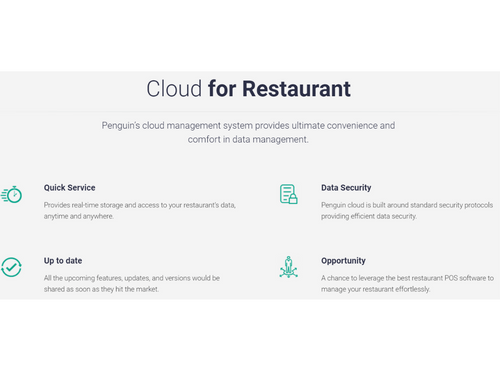
Yes, Penguin App is a cloud-based system that provides real-time storage and secure access to your restaurant's data from anywhere at any time.
Yes, the banquet management module allows customers to book a hall for an event, select food and decoration packages, and make advance payments directly through the system.
The inventory management feature allows restaurant staff to track and manage the stock of ingredients in real-time, with options for both automatic and manual updates.
Yes, the menu management feature allows you to customize your menu by adding descriptions, images, and ingredient details to enhance the customer experience.
Penguin App is ideal for fine-dining and multi-cuisine restaurants, quick-service restaurants (QSRs), restaurant chains and franchises, cafes, bakeries, bistros, banquet facilities, food courts, and other retail food outlets that need tools to manage orders, inventory, billing, and queues.
20,000+ Software Listed
Best Price Guranteed
Free Expert Consultation
2M+ Happy Customers
Terms and Condtions

Users with registered businesses can purchase goods from merchants on the platform to satisfy their business needs. Users are not permitted to utilize any products acquired through the platform for resale, advertising, business, or further distribution.
For each purchase made, users will receive a Tax Invoice (or 'GST invoice') that includes specific details such as:
the GSTIN of the user associated with their registered business, and
the specified Entity Name for their business.
It should be noted that not all products are eligible for GST Invoice. Only the products displayed by participating sellers with the 'GST-based Invoice Available' callout on the product description page would qualify.
Certain goods and services are not eligible to get a GST Invoice, including items with VAS, i.e., Value Added Services (e.g., Total Mobile Protection/Assured Buyback) and those involving an exchange offer at the time of purchase.
Users must ensure the accuracy of the GSTIN, and business entity name provided for the GST Invoice. Requests for corrections into GST Invoice would not be accommodated by Techjockey.com or any Seller, and any issues arising from user-provided information are the sole responsibility of users.
Techjockey.com is not liable for the GST Invoice or any associated input tax credit. To efficiently claim an input tax credit, users should select the registered place of business address as per the GST authority's data and follow the provisions of the GST Act and rules.
To claim an input tax credit, the delivery and billing addresses must match. Furthermore, input tax credits will not be granted if the delivery address and GSTIN on the invoice are from different states. In case of incorrect GST details provided during the order placement, the order will be canceled automatically.