 USA
USA UAE
UAESmall Business
Designed for startups and growing businesses


See More




Brand: RARlab
WinRAR is a data compression tool that creates an archive of the compressed files in an organized manner. Its user interface is graphical with a simple drag and drop functionality. WinRAR ZIP software allows you to create ZIP and RAR files and archive them. This ZIP software allows you to split archives and catalog them into separate volumes. It further stores the archived files across multiple ...
See MoreHave you used WinRAR before?
Share your insights for better experience
View plans
 Save upto 18%, Get GST Invoice on your business purchase T&C Buy Now & Pay Later, Check offer on payment page.
  Processing of ZIP and other non-RAR archives Scanning archives for viruses Data Compression Multi file formats Support Integration Archiving ZIP Support AES Encryption Split Volumes Self-Extracting Repair Tool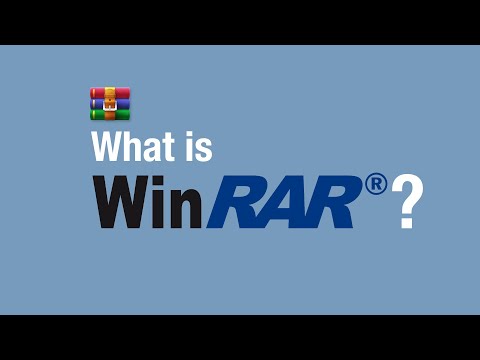

Watch the demo video to explore key features, real workflows, and how the software fits your business needs.
 Windows
  Android
  Desktop
  Mobile
  Perpetual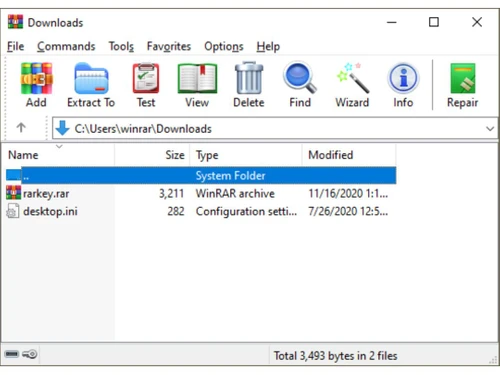
Small Business
Designed for startups and growing businesses
Medium Business
Built for business growth and flexibility
Enterprises
Designed for complex and large-scale business needs
4.5
Out of 5

Overall Rating
Based on
3 Verified Reviews
Rating Breakdown
86% Recommend this Product
Add ReviewUsers generally appreciate WinRAR for its efficiency in zipping files, with many noting long-term satisfaction and reliability. The software is recognized for saving time and simplifying tasks, making it a valuable tool for various users. However, some have expressed dissatisfaction with the updates, indicating a desire for improvements in that area. Overall, the sentiment is positive, highlighting the software's effectiveness while acknowledging room for enhancement.

Aug 13, 2020
Techjockey Verified
“The best one”
Pros
The best program to zipping my files , using it from 7 years
Cons
I don't like the updates
Sep 28, 2018
Techjockey Verified
“they will save a lot of time”
Pros
Very pleased with the service I received. Very informative and understanding. Easy way to narrow down from so many options.
Cons
N/A
Sep 21, 2018
Techjockey Verified
“Techjockey Made My Job Easier”
Pros
To be honest I was very skeptical at first with the price of the software. After purchasing and receiving the key not once did I have any problems or hiccups, definitely will be using their services again.
Cons
N/A

WinRAR
₹ 3299.00 excl. GST
Desktop
Mobile
Web based
On Premises
Windows
Mac OS

Google Workspace
₹ 325
Desktop
Mobile
Web based
On Premises
Windows
Mac OS

Cold Turkey
Price On Request
Desktop
Mobile
Web based
On Premises
Windows
Mac OS

Office 365 E3
₹ 1740
Desktop
Mobile
Web based
On Premises
Windows
Mac OS

InboxPro
Price On Request
Desktop
Mobile
Web based
On Premises
Windows
Mac OS

Snippets AI
Price On Request
Desktop
Mobile
Web based
On Premises
Windows
Mac OS

Office 365 E5
₹ 3240
Desktop
Mobile
Web based
On Premises
Windows
Mac OS

Raycast
Price On Request
Desktop
Mobile
Web based
On Premises
Windows
Mac OS

Microsoft 365 F3
₹ 996
Desktop
Mobile
Web based
On Premises
Windows
Mac OS

Microsoft 365 F1
₹ 300
Desktop
Mobile
Web based
On Premises
Windows
Mac OS

SmartPanels
Price On Request
Desktop
Mobile
Web based
On Premises
Windows
Mac OS
(0) Product(s) selected
Starting Price:
₹2,499 /One-Time
Starting Price:
$24
Starting Price:
$6 /User/Month
Starting Price:
$10 /Month
Starting Price:
$40 /Year

Starting Price:
$4 /Monthly

Starting Price:
$7 /Month

Starting Price:
$10

Starting Price:
$8 /Monthly

Starting Price:
$60

Starting Price:
$17 /Month









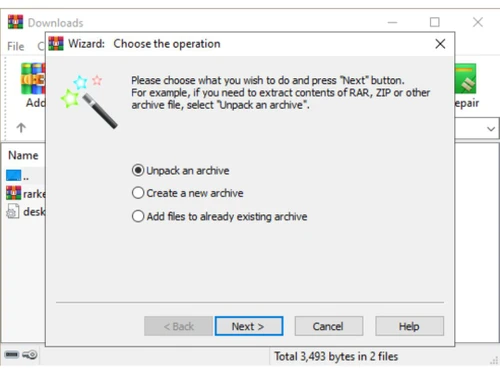
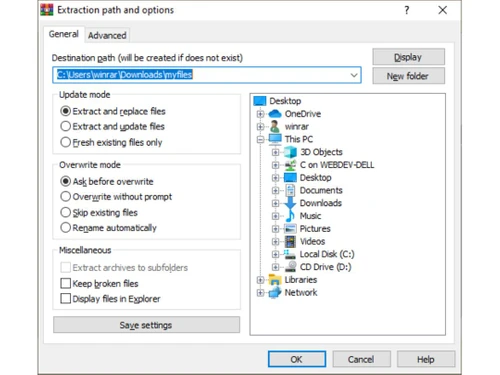
WinRAR provides complete support for RAR files, so you may both create and unpack them. If you installed WinRAR on your computer and downloaded a RAR file from the Internet, you may double click on the RAR file icon to open it in WinRAR, select all files, press the Extract To button, enter a destination path and press OK. Another way is to click on the RAR file in Explorer using the right mouse Button. If you enabled the Shell integration option when installing WinRAR, the file context menu will contain the Extract to item.
In addition to WinRAR you will find, in the distributive, the file rar.exe. It is also a 32-bit RAR version for Windows, but it supports only the command line, text mode interface. It is useful to call console RAR from BAT and CMD files, to use it in the DOS prompt and so on. It supports a larger number of command line switches and commands when compared with WinRAR, but it does't support ZIP and other formats.
In order to extract a file using WinRAR in the shell mode you must first open the required archive in WinRAR. This may be achieved in one of several ways: double-click or press Enter on the archive name in the Windows shell (Explorer or Desktop). If WinRAR was associated with archives during installation (the default installation option), an archive will be opened in WinRAR. You also may associate WinRAR with archives after installation using the Integration settings dialog; double-click or press Enter on the archive name in the WinRAR window; drag-and-drop an archive to the WinRAR icon or window. Before doing this ensure that WinRAR does not already display another archive, otherwise the dropped archive will be added to the currently displayed archive; run WinRAR from the command line with a single parameter - the archive name.
Go to the official site and choose downloads in the left-hand side menu. Select the download link for your version of Windows (64 bit/ 32 bit). Open the installer in Downloads folder. View the information and click install. Select your preferences and click OK. Click on Done to finish WinRAR download.
WinRAR supports several formats like RAR, ZIP, LZH, ACE, TAR, CAB, ARJ, GZip, ISO, UUE, JAR, and more.
Open WinRAR software. With the help of file browser, select storage location of the file(s) or folder(s) you want to compress. Use Ctrl key to select multiple file(s) or folder(s). Select Add?icon at the top or press Alt + A. Enter a name for your archive. Choose archive format (ZIP for sending it to someone who does not have WinRAR). Choose Update mode and compression method (Store, Fastest, Fast, Normal, Good, Best). Click OK.
Test all possible character combinations (brute force). Otherwise, you can use a third-party software and upload the file you want to recover. Choose Unlock file option. Then, you can download the file.
Add a shortcut in the folder WinRAR to archived file. The format is Shortcut: DestType > SrcName > DestFolder > Description > ShortcutName > ShortcutIcon > Enter >DestType> as D for desktop.
You will have an in-built app from play store for opening WinRAR file. Otherwise, you can download WinRAR for Android platform.
Place the key file that you received in the same folder as WinRAR exe setup file. If you have previously installed WinRAR, then license key will be present in the installation folder.
Consider cost, format support, compression ratio, ease of use, Explorer integration, and RAR compatibility.
0 0
7-Zip and PeaZip handle large files and batch compression well, with command-line support for automation.
0 0
7-Zip, Bandizip, and NanaZip integrate well with the Windows right-click context menu.
0 0
Most archivers, including 7-Zip and PeaZip, can open and extract existing RAR files directly, though they create ZIP or 7z going forward.
0 0
WinZip offers paid commercial support, while 7-Zip and PeaZip rely on community forums and documentation.
0 0
20,000+ Software Listed
Best Price Guranteed
Free Expert Consultation
2M+ Happy Customers
Terms and Condtions

Users with registered businesses can purchase goods from merchants on the platform to satisfy their business needs. Users are not permitted to utilize any products acquired through the platform for resale, advertising, business, or further distribution.
For each purchase made, users will receive a Tax Invoice (or 'GST invoice') that includes specific details such as:
the GSTIN of the user associated with their registered business, and
the specified Entity Name for their business.
It should be noted that not all products are eligible for GST Invoice. Only the products displayed by participating sellers with the 'GST-based Invoice Available' callout on the product description page would qualify.
Certain goods and services are not eligible to get a GST Invoice, including items with VAS, i.e., Value Added Services (e.g., Total Mobile Protection/Assured Buyback) and those involving an exchange offer at the time of purchase.
Users must ensure the accuracy of the GSTIN, and business entity name provided for the GST Invoice. Requests for corrections into GST Invoice would not be accommodated by Techjockey.com or any Seller, and any issues arising from user-provided information are the sole responsibility of users.
Techjockey.com is not liable for the GST Invoice or any associated input tax credit. To efficiently claim an input tax credit, users should select the registered place of business address as per the GST authority's data and follow the provisions of the GST Act and rules.
To claim an input tax credit, the delivery and billing addresses must match. Furthermore, input tax credits will not be granted if the delivery address and GSTIN on the invoice are from different states. In case of incorrect GST details provided during the order placement, the order will be canceled automatically.


