 USA
USA UAE
UAESmall Business
Designed for startups and growing businesses


See More



Brand: BytePhase Technologies
Have you used SmartCenter before?
Share your insights for better experience
Brand: BytePhase Technologies
Founded Year: 2020
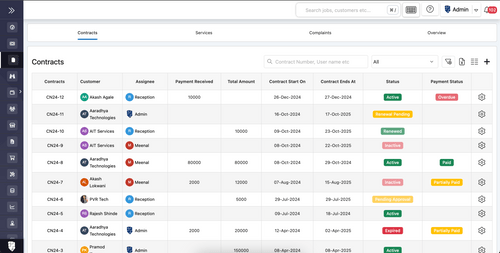
BytePhase is cloud-based repair shop management software used by 2,000+ businesses in 32+ countries. Manage repair tickets, inventory, billing & payments with automated SMS, WhatsApp & email updates, OTP-verified delivery and native Android & iOS apps. 15
Looking for The Right Pricing?
Share your requirements and get a plan built around your business.
Price Available on Request
Get personalised SmartCenter pricing that fits your needs. Our team will connect with you.
Customer Data Management (CDM)
 Contact Management Account Management Customer Profiles Contact Segmentation Activity History
 Sales Management
Quote Management Workflow Automation and Management Order Management Opportunity & Pipeline Management Contract Management Sales Forecasting Territory Management Lead Management Deal Management Sales Automation Marketing Automation
Email Marketing Campaign Management Lead Nurturing Customer Journey Tracking Customer Segmentation Event-Triggered Workflows Automated Campaigns Data Sourcing / Integrations
Data Import/Export Social Media Integration Calendar Integration Email Marketing Tools Integration Marketing Tools Integration Third Party Integrations API Access eCommerce Integrations Interactive Voice Response (IVR) Integration Collaboration Tools
Task / Activity Management Team Communication Document Sharing & File Storage Omnichannel Support & Engagement Security & Compliance
Role-Based Access Control (RBAC) Data Encryption Backup & Disaster Recovery GDPR & Data Privacy Audit Trail AI & Machine Learning
Predictive Analytics Lead Scoring Chatbots Reporting & Analytics
Predictive Analytics Custom Dashboards Real Time Analytics Sales Performance Reports Customer Insights Campaign Performance Forecasting & Trends Performance Tracking Alerts & Notifications
Event-Triggered Notifications Custom Workflow Alerts System Errors/Failures Customer Interaction Alerts Workflow Trigger Alerts SLA Violations Lead Activity Alerts Others
Billing & Invoicing Inventory Management Alerts & Reminders Expense Management Data Recovery Access Controls 

Watch the demo video to explore key features, real workflows, and how the software fits your business needs.
 Ubuntu
  Windows
  iOS
iOS  Android MacOS Windows(Phone)
  Desktop
  Mobile
  Cloud-Based

Small Business
Designed for startups and growing businesses
Medium Business
Built for business growth and flexibility
Enterprises
Designed for complex and large-scale business needs
4.9
Out of 5

Overall Rating
Based on
13 Verified Reviews
Rating Breakdown
97% Recommend this Product
Add ReviewPros
"Client login feature for direct access to repair tickets, quotations, invoices, and comments, Strengthened customer relationships and loyalty."
"Real-time notifications via WhatsApp, Email, and SMS. Improved customer communication and timely updates on repair ticket status."
"Effortless ticket management, customizable repair statuses, seamless export to Excel, convenient quotation approval via SMS, Email, and Whatsapp."
Cons
"The interface may take some time for team members to get familiar with, especially those who are new to specialized ticketing systems."
"A perpetual licensing option would make BytePhase more economical for businesses looking for long-term usage without recurring costs."
"There's a lot to setup, and Take a time to understand features because have lot of customize settings, but worth it!!!!"

Sep 7, 2026
Techjockey Verified
“So Happy to Use This CRM for Data Recovery Services”
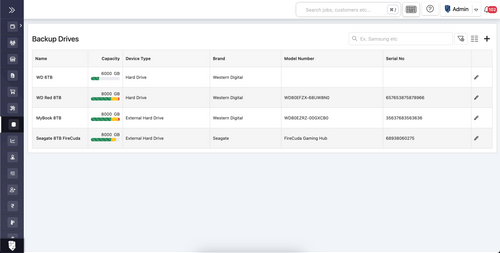
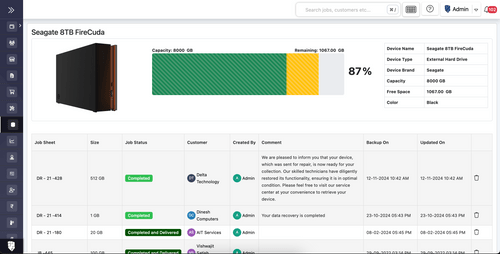
We use this CRM for our data recovery service, and it has made our daily operations much smoother. Managing recovery cases, backup drives, and billing from one place has reduced manual tracking and improved team organization. Overall, it has helped us work more efficiently and speed up turnaround times.
Pros
The CRM offers specialized features for data recovery and repair shop workflows, with a centralized dashboard for managing cases, storage media, backup drives, and billing. It has improved team organization and overall service efficiency.
Cons
The interface may take some time for team members to get familiar with, especially those who are new to specialized ticketing systems.
Reason to switch
It helped me day to day operations automatic.
Sep 1, 2026
Techjockey Verified
“BytePhase Made Our Laptop Repair Business Hassle-Free”
I have been using BytePhase for my laptop repair business for the past month, and it has made our daily operations much easier. The software is simple for both me and my engineers to use, and it has replaced our handwritten billing process with organized digital records.
Pros
BytePhase makes job sheet creation, quotations, billing, and payment tracking quick and easy. Its user-friendly interface also helps engineers record and manage their work efficiently.
Cons
A perpetual licensing option would make BytePhase more economical for businesses looking for long-term usage without recurring costs.
Reason to switch
Managing all things under one platform
Jul 1, 2023
Techjockey Verified
“Seamless Customer Communication”
Pros
Client login feature for direct access to repair tickets, quotations, invoices, and comments, Strengthened customer relationships and loyalty.
Cons
There's a lot to setup, and Take a time to understand features because have lot of customize settings, but worth it!!!!
Reason to switch
This is the ultimate software for repair professionals. It simplifies processes, provides regular updates with new features, and offers excellent customer support. While there are limitations in customization and a learning curve for new users, the overall experience is highly satisfactory.

SmartCenter
Price On Request
Desktop
Mobile
Web based
On Premises
Windows
Mac OS
Bitrix24
₹ 2390
Desktop
Mobile
Web based
On Premises
Windows
Mac OS

Zoho CRM
₹ 1300
Desktop
Mobile
Web based
On Premises
Windows
Mac OS

Odoo CRM
₹ 760
Desktop
Mobile
Web based
On Premises
Windows
Mac OS

CrmOne
Price On Request
Desktop
Mobile
Web based
On Premises
Windows
Mac OS

Solid Performers CRM
₹ 500
Desktop
Mobile
Web based
On Premises
Windows
Mac OS

Kylas CRM
₹ 12999
Desktop
Mobile
Web based
On Premises
Windows
Mac OS

Zendesk Sell
Price On Request
Desktop
Mobile
Web based
On Premises
Windows
Mac OS

Cleomitra
₹ 999
Desktop
Mobile
Web based
On Premises
Windows
Mac OS

In-Sync CRM
₹ 5000
Desktop
Mobile
Web based
On Premises
Windows
Mac OS

HighLevel
Price On Request
Desktop
Mobile
Web based
On Premises
Windows
Mac OS
(0) Product(s) selected
Starting Price:
$99 /Month
Starting Price:
$19 /Agent/Month
Starting Price:
₹999 /Month ₹2,000
Starting Price:
₹5,000 /Month
Starting Price:
$97 /Month
Starting Price:
€300 /User/Year
Starting Price:
₹3,900 /Year ₹4,900

Starting Price:
₹1,299 /Month

Starting Price:
$10 /User/Month

Available
Price on Request

Starting Price:
₹350




You can upgrade/downgrade from one plan to another anytime after subscribing to a particular plan.
Our firewall and Amazon RDS integration, as well as daily automatic backups, ensure the safety of your data. Your data is securely stored and information is transferred via SSL encryption and can only be viewed using the encrypted link for each account. Our privacy policy also ensures that your data is protected and is not sold to any third party.
Not at all. There are no hidden fees or extra charges. Depending on the plan you choose, you will only have to pay the yearly subscription fee. Moreover, Smart Center installation is free. Add-on (SMS) charges are applicable.
We offer one of the best customer support services to ensure customer satisfaction. You can reach us via email, phone, and live chat.
20,000+ Software Listed
Best Price Guranteed
Free Expert Consultation
2M+ Happy Customers
Terms and Condtions

Users with registered businesses can purchase goods from merchants on the platform to satisfy their business needs. Users are not permitted to utilize any products acquired through the platform for resale, advertising, business, or further distribution.
For each purchase made, users will receive a Tax Invoice (or 'GST invoice') that includes specific details such as:
the GSTIN of the user associated with their registered business, and
the specified Entity Name for their business.
It should be noted that not all products are eligible for GST Invoice. Only the products displayed by participating sellers with the 'GST-based Invoice Available' callout on the product description page would qualify.
Certain goods and services are not eligible to get a GST Invoice, including items with VAS, i.e., Value Added Services (e.g., Total Mobile Protection/Assured Buyback) and those involving an exchange offer at the time of purchase.
Users must ensure the accuracy of the GSTIN, and business entity name provided for the GST Invoice. Requests for corrections into GST Invoice would not be accommodated by Techjockey.com or any Seller, and any issues arising from user-provided information are the sole responsibility of users.
Techjockey.com is not liable for the GST Invoice or any associated input tax credit. To efficiently claim an input tax credit, users should select the registered place of business address as per the GST authority's data and follow the provisions of the GST Act and rules.
To claim an input tax credit, the delivery and billing addresses must match. Furthermore, input tax credits will not be granted if the delivery address and GSTIN on the invoice are from different states. In case of incorrect GST details provided during the order placement, the order will be canceled automatically.



