linkedin
Switchboard logo
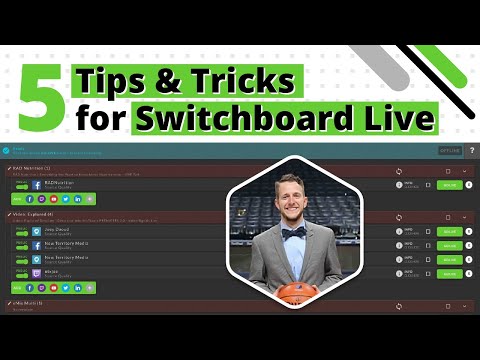
play 5 Switchboard Live Tips and Tricks for Multistreaming
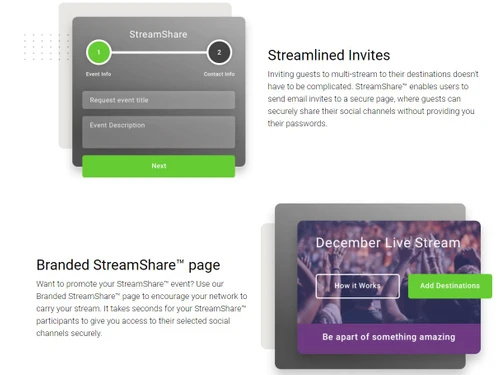
switchboard streamlined invites
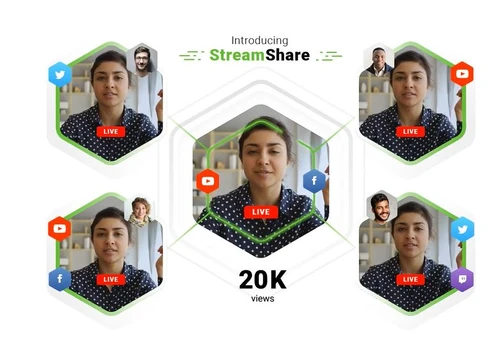
switchboard streamshare

Switchboard

Brand: Switchboard live

  • 4.4

  • 4 Ratings

Expand your audience reach by easily multistreaming to unlimited destinations with Switchboard, the simple and reliable live video management platform.

See More

Have you used Switchboard before?

Share your insights for better experience

Add a Review

Price Available on Request

Questions about pricing or customization? We’re here to help, just a click away.

100% Genuine
Products
Best Price
Guaranteed
Safe & Secure
Payment
  • Description

  • Pricing

  • Features

  • Specification

  • Review

  • Compare

  • Alternatives

  • FAQ

Switchboard Software Overview

What is Switchboard?

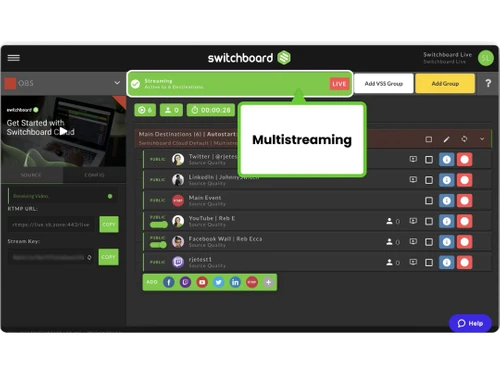
Switchboard is a comprehensive, web-based live streaming software designed to simplify and scale video distribution. It functions as a central management platform that allows content creators, businesses, and organizations to multistream a single video source to an unlimited number of destinations simultaneously. By ingesting one video feed from an encoder, Switchboard efficiently rebroadcasts it across various social media platforms, websites, and custom destinations.

Engineered for reliability and ease of use, the platform serves a wide range of users, from startups and small businesses to large enterprises and government agencies. Its core purpose is to eliminate the logistical complexities of broadcasting to multiple channels, enabling users to focus on creating engaging content while maximizing audience reach and engagement across the digital landscape.

Why Choose Switchboard?

  • Maximize Audience Reach: The primary value of Switchboard is its ability to broadcast to an unlimited number of destinations. This allows you to engage with your audience on their preferred platformsbe it Facebook, YouTube, Twitch, or a custom websiteall at the same time, without dividing your viewership.
  • Streamline Your Workflow: Instead of managing multiple separate streams, you only need to send one feed to Switchboard. The platform handles the complex task of distribution, saving significant time and reducing the potential for technical errors. Features like Auto Start/Stop further automate the process.
  • Professional and Reliable Broadcasting: Trusted by universities, government agencies, and media organizations, Switchboard is recognized for its fidelity, security, and stability. It provides a robust infrastructure for mission-critical events like public meetings, product launches, and professional webinars.
  • Collaborate Securely: The unique StreamShare feature allows you to stream directly to a partner's or guest's social media channels without ever needing to exchange sensitive login credentials, enhancing both security and collaboration.

Advanced Features of Switchboard

  • Unlimited Destinations: Break free from limitations. Whether you need to stream to five platforms or fifty, Switchboard can handle it without imposing a cap on the number of simultaneous destinations.
  • StreamShare: A proprietary feature that enables seamless, password-free streaming to the social media accounts of guests, partners, or sponsors, simplifying cross-promotion and collaborative events.
  • Auto Start/Stop Destinations: For a truly hands-free experience, this feature automatically starts and stops your destination streams in sync with your primary encoder. When you go live, all your channels go live.
  • SRT & RTMP Input Support: Switchboard supports both the industry-standard RTMP protocol and the modern, low-latency SRT (Secure Reliable Transport) protocol, giving you flexibility and superior video transport quality.
  • Stream Archives: Automatically create and store a downloadable archive of your live stream in the Switchboard Cloud. This is perfect for content repurposing, record-keeping, or creating on-demand versions of your broadcast.
  • Scheduled Start/Stop: (Coming Soon) A planned enhancement that will allow users to pre-configure a specific time for their destination streams to automatically start and stop, ideal for scheduling events in advance.

Key Capabilities of Switchboard

  1. Centralized Stream Management: The dashboard serves as a command center where you can add, authorize, and group an unlimited number of destinations for easy management.
  2. Custom Destination Support: Beyond native social media integrations, Switchboard allows you to add any custom RTMP destination, ensuring you can stream to virtually any platform, private server, or content delivery network (CDN).
  3. Team Collaboration: Plans include support for multiple team members, allowing digital producers, marketers, and technicians to collaborate within a single account. Enterprise plans offer advanced account hierarchies for larger organizations.
  4. Cross-Platform Engagement: By simultaneously broadcasting to diverse platforms, Switchboard helps organizations engage with different audience segments where they are most active, fostering greater interaction and community growth.

How to Use Switchboard?

  1. Connect Your Source: In your preferred streaming software or hardware encoder (like OBS, vMix, or a TriCaster), configure your output to point to the unique stream URL and key provided by your Switchboard account.
  2. Configure Destinations: Within the Switchboard dashboard, add and authorize all the destinations you want to stream to. This one-time setup connects your social media accounts (Facebook, YouTube, etc.) and custom RTMP endpoints.
  3. Go Live: Simply click Start Streaming in your encoder. Switchboard will automatically detect the incoming feed and distribute it to all the destinations you have enabled for that broadcast.

Switchboard Price

Switchboard price starts at USD 99 per monthat Techjockey. The pricing model is based on different parameters, including extra features, deployment type, and the total number of users. For further queries related to the product, you can contact our product expert and learn more about the pricing and offers.

Read more

Switchboard live Company Details

Founded Year:  2016

Switchboard Live is a Cloud that serves as a live multistreaming distribution management platform.

Director/Founders Jason Kotte, Joshua Sachs, Rudiger J. (Rudy) Ellis
Company Size 1-100 Employees

Switchboard Pricing & Plans

Looking for The Right Pricing?

Share your requirements and get a plan built around your business.

  • Define your business needs
  • Get customised pricing
  • Choose features that fit your workflow

Price Available on Request

Get personalised Switchboard pricing that fits your needs. Our team will connect with you.

Switchboard Features

  • icon_check Unlimited Destinations
  • icon_check StreamShare
  • icon_check Quick Setup
  • icon_check Embed Player
  • icon_check Unlimited Team members
  • icon_check Email/Live Chat Support
Switchboard Demo Video play icon

Get Switchboard Demo

Watch the demo video to explore key features, real workflows, and how the software fits your business needs.

Understand
Key Features
Personal
Demo Insights
Interactive
Demo Support

Switchboard Specifications

Supported Platforms
Windows Windows
Devices
Desktop Desktop
Deployment
Cloud-Based Cloud-Based
Suitable For
All Industries
Business Specific
All Businesses
Language
English

Explore the Best Alternative Solutions Similar to Your Business Size and Needs

Small Business

Designed for startups and growing businesses

vMix

4.5

GoBrunch

4.5

Restream

4.4

See More

Switchboard Review

4.4

Out of 5

img

Overall Rating

Based on
4 Verified Ratings

Rating Breakdown

  • Features 4.2
  • Value for Money 4.6
  • Ease of Use 4.5
  • Customer Support 4.2

87% Recommend this Product

Add Review

Techjockey Trusted Reviews from Verified Users

No reviews are currently available for Switchboard. Discover similar Live Streaming Software reviews

  • GudSho

    4.3

    Whats great - I can create branded channels for each subject, allowing me to organize my content and cater to different learning styles. read more

  • Yostream

    4.8

    Whats great - We had to organize a virtual event at very short notice. Yostream was perfect for our case, in a couple of minutes we were re... read more

  • OBS Studio

    4.2

    Whats great - Highly customizable, supports multiple sources (webcams, screen capture, images, etc.), excellent for live streaming on vario... read more

Compare Switchboard With other Live Streaming Software

Products
Ratings
Pricing
Device Supported
Deployment
Supported Platforms
  • img

    Switchboard

  • 4.4

  • Price On Request

  • Desktop

    Mobile

  • Web based

    On Premises

  • Windows

    Mac OS

  • img

    Livebox

  • 4.4

  • ₹ 1170

  • Desktop

    Mobile

  • Web based

    On Premises

  • Windows

    Mac OS

  • img

    Castr

  • 4.3

  • Price On Request

  • Desktop

    Mobile

  • Web based

    On Premises

  • Windows

    Mac OS

  • img

    Grabyo

  • 4.3

  • Price On Request

  • Desktop

    Mobile

  • Web based

    On Premises

  • Windows

    Mac OS

  • img

    Riverside

  • 4.1

  • Price On Request

  • Desktop

    Mobile

  • Web based

    On Premises

  • Windows

    Mac OS

  • img

    Yostream

  • 4.8

  • ₹ 1250

  • Desktop

    Mobile

  • Web based

    On Premises

  • Windows

    Mac OS

  • img

    Prism live Studio

  • 4.2

  • Price On Request

  • Desktop

    Mobile

  • Web based

    On Premises

  • Windows

    Mac OS

  • img

    Wirecast

  • 4.1

  • Price On Request

  • Desktop

    Mobile

  • Web based

    On Premises

  • Windows

    Mac OS

  • img

    Evmux

  • 4.5

  • Price On Request

  • Desktop

    Mobile

  • Web based

    On Premises

  • Windows

    Mac OS

  • img

    Vimeo Pro

  • 4.2

  • Price On Request

  • Desktop

    Mobile

  • Web based

    On Premises

  • Windows

    Mac OS

  • img

    Dacast

  • 4.4

  • Price On Request

  • Desktop

    Mobile

  • Web based

    On Premises

  • Windows

    Mac OS

(0) Product(s) selected

Switchboard Alternatives

See All Switchboard Alternatives

Starting Price:

$20 /Month

Available

Price on Request

Starting Price:

$29 /Month

Starting Price:

$25

Starting Price:

$39

Starting Price:

$49 /year

Starting Price:

$59 /month

Starting Price:

$39 /Month

Starting Price:

$70 /Month

Articles for Switchboard

See All Related Articles

Which operating system does Switchbaord support?

Switchbaord is compatible with Windows operating systems.

Is there any Switchbaord app?

Switchbaord app is not available.

What is deployment type of Switchbaord?

Switchbaord supports Web-Based.

Who are the potential users of Switchbaord?

Switchbaord is typically used in All Industries.

Is there any Switchbaord demo or free trial?

Switchbaord demo is available for free with Techjockey.com.

Is Switchbaord free?

Switchbaord Live Streaming Software offers a free trial. However, the premium plan with advanced features available at Techjockey.com.

How can you download Switchbaord?

For Switchbaord installation, insert the given CD/USB flash storage in your system and open the Setup Wizard to get started. The web-based version can be accessed directly through Switchbaord portal.

How does Switchbaord work?

Switchbaord Live Streaming Software helps with Multi Destination,Video Streaming,Quick Installation and Embed Presentation. It's a complete solution for Unlimited Team members and Email/Live Chat Support.

Are there any hidden charges for Switchbaord updates?

Switchbaord regular updates are available free of cost. There are no hidden software update charges.

What is Switchbaord used for?

Switchbaord Live Streaming Software used for Multi Destination,Video Streaming,Quick Installation and Embed Presentation.

How do I contact Switchbaord support?

You can directly visit Switchbaord portal and get in touch with Switchbaord customer support for any software-related query.

How to get Switchbaord lifetime deal?

Please contact our product experts to get Switchbaord lifetime deal with exclusive offers.

What does Switchboard do?

Switchboard is a live stream management platform that allows you to simultaneously broadcast your live video content to an unlimited number of destinations like Facebook, YouTube, and other platforms from one central dashboard.

How does Switchboard Live work?

Switchboard Live works by taking a single video feed from your encoder and simultaneously broadcasting it to an unlimited number of pre-configured destinations, allowing you to reach your entire audience across multiple channels with one workflow.

Is Switchboard Live free?

While Switchboard Live offers a way to "Get Started For Free," which suggests a free trial, its primary services are provided through paid subscription plans designed for various business and organizational needs.

How much does Switchboard cost?

Switchboard price is available on request at techjockey.com.

Is there a limit to how many platforms I can stream to at once?

No, Switchboard allows you to multistream to an unlimited number of destinations simultaneously, including social media platforms and any custom RTMP endpoint.

What is the StreamShare feature?

StreamShare is a feature that enables you to stream directly to a partner's or guest's social media channels without requiring them to share their private account passwords or login credentials with you.

Can I automate when my streams go live on different platforms?

Yes, Switchboard offers an Auto Start/Stop feature for hands-free streaming, which automatically begins broadcasting to your selected destinations as soon as you start your streaming software or encoder.

Is Switchboard suitable for government or public sector use?

Yes, Switchboard is a government-approved platform specifically designed to help public sector agencies and campaigns stream events like public meetings, town halls, and policy announcements to a broader audience.

20,000+ Software Listed

Best Price Guranteed

Free Expert Consultation

2M+ Happy Customers

Terms and Condtions

close

Users with registered businesses can purchase goods from merchants on the platform to satisfy their business needs. Users are not permitted to utilize any products acquired through the platform for resale, advertising, business, or further distribution.

For each purchase made, users will receive a Tax Invoice (or 'GST invoice') that includes specific details such as:

  • the GSTIN of the user associated with their registered business, and

  • the specified Entity Name for their business.

It should be noted that not all products are eligible for GST Invoice. Only the products displayed by participating sellers with the 'GST-based Invoice Available' callout on the product description page would qualify.

Certain goods and services are not eligible to get a GST Invoice, including items with VAS, i.e., Value Added Services (e.g., Total Mobile Protection/Assured Buyback) and those involving an exchange offer at the time of purchase.

Users must ensure the accuracy of the GSTIN, and business entity name provided for the GST Invoice. Requests for corrections into GST Invoice would not be accommodated by Techjockey.com or any Seller, and any issues arising from user-provided information are the sole responsibility of users.

Techjockey.com is not liable for the GST Invoice or any associated input tax credit. To efficiently claim an input tax credit, users should select the registered place of business address as per the GST authority's data and follow the provisions of the GST Act and rules.

To claim an input tax credit, the delivery and billing addresses must match. Furthermore, input tax credits will not be granted if the delivery address and GSTIN on the invoice are from different states. In case of incorrect GST details provided during the order placement, the order will be canceled automatically.