linkedin
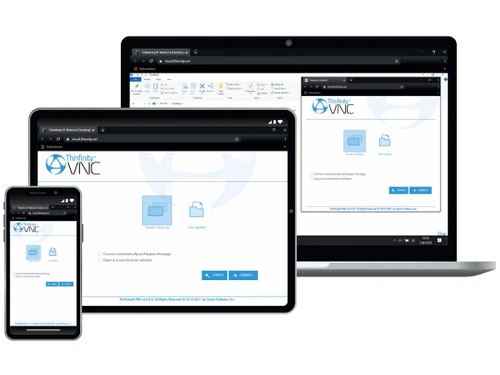
Thinfinity VNC logo
Thinfinity VNC remote access
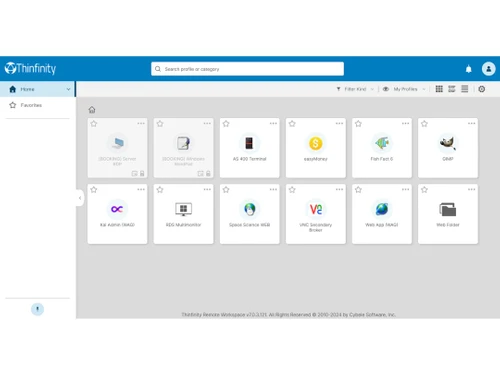
Thinfinity VNC dashboard
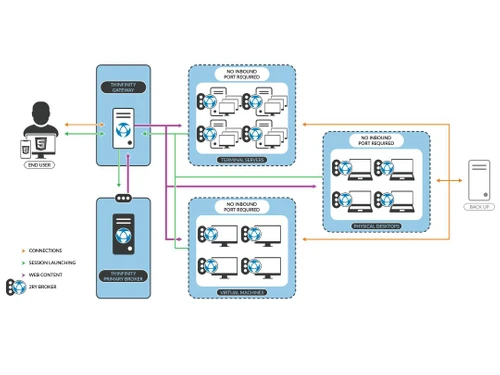
Thinfinity VNC server

Thinfinity VNC

Brand: Cybele Software

  • 4.1

  • 6 Ratings

Thinfinity VNC is a versatile remote access software that allows users to securely connect and control devices from any location. Built with cross-platform support, it offers high performance, secure data encryption, and multiple features, making it ideal for businesses seeking efficient and secure ...

See More

Have you used Thinfinity VNC before?

Share your insights for better experience

Add a Review

Price Available on Request

Questions about pricing or customization? We’re here to help, just a click away.

100% Genuine
Products
Best Price
Guaranteed
Safe & Secure
Payment
  • Description

  • Pricing

  • Features

  • Specification

  • Review

  • Compare

  • Alternatives

  • FAQ

Thinfinity VNC Software Overview

What is Thinfinity VNC?

Thinfinity VNC is a remote desktop and virtual network computing (VNC) software that enables users to access and control computers remotely over the internet. As a versatile remote desktop software, Thinfinity VNC is designed for businesses and professionals who need secure, high-performance access to their systems from any location and on any device. Whether you’re working from home, assisting clients, or managing multiple devices, Thinfinity VNC provides seamless connectivity and functions as essential business software and collaboration software, ensuring you can access your system files, applications, and data without disruptions.

With features like cross-platform support, SSL encryption, two-factor authentication (2FA), and file transfer, Thinfinity VNC is a comprehensive solution for remote work. It ensures that users can work on their desktops from anywhere, securely, and without worrying about compatibility issues. Its ease of use, combined with strong security measures, makes it suitable for businesses looking for efficient and cost-effective remote access solutions. Available on Techjockey, Thinfinity VNC is an ideal choice for organizations looking to enhance productivity while maintaining data security.

Why Choose Thinfinity VNC?

  • Cross-Platform Compatibility: Connect seamlessly across various devices and operating systems, ensuring full flexibility.
  • Reliable Performance: Thinfinity VNC provides smooth and fast remote access, reducing lag and improving productivity.
  • Enhanced Security: The software uses advanced encryption and authentication to safeguard sensitive data.
  • User-Friendly Interface: Easy to set up and navigate, it’s perfect for users of all technical backgrounds.
  • Affordable and Scalable: Offers cost-effective plans with scalable features, making it suitable for small to large enterprises.

Benefits of Thinfinity VNC

  • Secure Remote Access: Enables safe, remote desktop access with features like two-factor authentication and SSL encryption.
  • Improved Productivity: High performance and low latency mean you can work seamlessly, even from a distance.
  • Flexible File Sharing: Transfer files quickly between connected devices, making collaboration easier.
  • Data Protection: Encryption and secure data transfer protocols ensure the safety of your information.
  • Easy Session Management: Record sessions for future reference or security audits, helping businesses maintain quality and compliance.
  • Compatibility with Any Device: Thinfinity VNC’s cross-platform support ensures that users can connect from any device, enhancing accessibility.

Pricing of Thinfinity VNC Remote Desktop Software

Thinfinity VNC price is available on request at techjockey.com.

The pricing model is based on different parameters, including extra features, deployment type, and the total number of users. For further queries related to the product, you can contact our product team and learn more about the pricing and offers.

Read more

Cybele Software Company Details

Founded Year:  2002

Cybele Software is a provider of software solutions that increase the efficiency & portability of remote desktop access and legacy systems.

Director/Founders Gustavo Ricardi
Company Size 1-100 Employees

Thinfinity VNC Pricing & Plans

Looking for The Right Pricing?

Share your requirements and get a plan built around your business.

  • Define your business needs
  • Get customised pricing
  • Choose features that fit your workflow

Price Available on Request

Get personalised Thinfinity VNC pricing that fits your needs. Our team will connect with you.

Thinfinity VNC Features

Connection & Accessibility

  • icon_check Remote printing
    Print files from a remote device to a local printer instantly.
  • icon_check Unattended Access
    Securely access devices without user intervention for maintenance or updates.
  • icon_check Cross-Platform Compatibility
    Seamless access across Windows, macOS, Linux, iOS, and Android devices.
  • icon_check Browser-Based Access
    Use remote desktop features directly via a web browser without additional software.
  • icon_check Mobile Access Support
    Remotely control systems using smartphones or tablets anytime, anywhere.
  • icon_check Multi-Window Control
    Manage multiple application windows on the remote device in one session.
  • icon_check Multi-Monitor Navigation
    View and control multiple monitors on the remote system efficiently.
  • icon_check Persistent Session
    Automatically reconnect to maintain active sessions during interruptions.
  • icon_check Clipboard Syncing
    Copy and paste text or files between local and remote devices seamlessly.

Session Management & Control

  • icon_check Multi Session Support
    Handle multiple remote sessions simultaneously with ease.
  • icon_check Session Recording & Playback
    Record sessions for review, training, or compliance purposes.
  • icon_check Session Handover
    Transfer active sessions to another technician without disruptions.
  • icon_check Queue & Schedule Sessions
    Organize and schedule remote sessions for efficient workflow.
  • icon_check Session Timeout & Auto-Lock
    Automatically end or lock sessions after a period of inactivity.
  • icon_check Real-Time Control Customization
    Adjust settings like resolution and bandwidth during sessions.
  • icon_check Remote Reboot Options
    Reboot devices remotely, including into Safe Mode if needed.
  • icon_check Blank Screen Mode
    Blackout the remote screen to ensure privacy during access.

System Management & Support

  • icon_check Remote Task Manager
    Manage processes and applications on the remote device effectively.
  • icon_check Bulk File Transfer
    Transfer multiple files or folders in a single operation.
  • icon_check Two-Way File Transfer
    Send and receive files securely between local and remote devices.
  • icon_check System Health Monitoring
    Track CPU, memory, and disk usage in real-time during sessions.
  • icon_check Automated System Diagnostics
    Run diagnostics to identify and resolve issues remotely.
  • icon_check Remote Command Prompt Access
    Access and execute commands in the terminal remotely.
  • icon_check Session Note Taking
    Record notes during sessions for follow-ups or documentation.
  • icon_check Direct File Access Permissions
    Control access to specific files during remote sessions.
  • icon_check File Sync & Auto Update
    Synchronize and update files automatically across devices.

Collaboration & Communication

  • icon_check Video Conferencing
    Engage in video calls for collaboration or troubleshooting.
  • icon_check Screen Sharing with Control
    Share and allow control of screens for collaborative tasks.
  • icon_check User Grouping & Management
    Organize users into groups for better session management.
  • icon_check In-Session Chat
    Communicate with users during remote sessions via real-time chat.
  • icon_check Annotation & Drawing Tools
    Highlight or annotate on the screen to guide users effectively.
  • icon_check Multiple Technician Access
    Allow multiple technicians to join and manage a session.
  • icon_check Shared Toolbox
    Share diagnostic tools and resources among team members.
  • icon_check Two-Way Desktop Sharing
    Share and receive desktop control for joint troubleshooting.

Security & Compliance

  • icon_check Audit Logs
    Record detailed user and system activity logs for compliance and tracking.
  • icon_check Multi-Factor Authentication (MFA)
    Add an extra layer of security with multi-factor verification.
  • icon_check End-to-End Encryption
    Secure data transmission with 256-bit AES encryption.
  • icon_check Role-Based Access Control (RBAC)
    Restrict permissions based on user roles and responsibilities.
  • icon_check Dynamic IP Whitelisting
    Limit access to predefined IP addresses for enhanced security.
  • icon_check GDPR/CCPA Compliance
    Ensure data privacy compliance with GDPR/CCPA standards.
  • icon_check HIPAA Compliance
    Adhere to healthcare data protection regulations.

Customization & Personalization

  • icon_check Customizable Branding
    Add company logos and themes for a professional interface.
  • icon_check Customizable Toolbars
    Tailor toolbars to suit specific workflows and preferences.
  • icon_check Flexible UI Layout
    Adjust interface elements for improved usability and efficiency.
  • icon_check Session Scripting
    Automate repetitive tasks using custom scripts during sessions.
  • icon_check Custom Keyboard Mapping
    Create custom shortcuts for efficient remote operations.
  • icon_check Language Localization
    Support multiple languages for global users.

Automation & Workflow

  • icon_check Task Automation
    Automate repetitive processes during or after remote sessions.
  • icon_check Workflow Automation
    Simplify operations by automating workflows across devices.
  • icon_check Scheduled Tasks
    Set specific tasks to run at predefined times for efficiency.
  • icon_check Remote Wake-on-LAN
    Power on devices remotely from a low-power or off state.

Analytics & Reporting

  • icon_check Detailed Session Reports
    Generate session summaries with time and activity logs.
  • icon_check User Activity Reports
    Track login history and session activities for all users.
  • icon_check Performance Metrics
    Monitor connection speed, uptime, and session quality metrics.
  • icon_check Error Logs
    Record system errors for troubleshooting and resolution.
  • icon_check Customizable Dashboards
    Personalize dashboards for quick access to key metrics.

Integrations

  • icon_check API Integration
    Connect with third-party tools via API for enhanced functionality.
  • icon_check Third Party Integration
    Enable compatibility with existing software ecosystems.
  • icon_check Ticket Management
    Integrate with helpdesk software for seamless support workflows.
  • icon_check Patch Management
    Monitor and deploy software updates to ensure system security.

Administrative Features

  • icon_check User Access Management
    Control user roles and permissions
  • icon_check Access Logs
    A record of user access events, detailing who accessed the system
  • icon_check Centralized Connection Management
    Manage all remote connections from one interface.
  • icon_check Patch Management
    Monitor and deploy software updates to ensure system security.
  • icon_check Device Management
    Centrally manage connected devices across an organization.
  • icon_check Admin Console
    Oversee user activity and session management from a central console.

Thinfinity VNC Specifications

Supported Platforms
Windows Windows MacOS MacOS Linux Linux
Devices
Desktop Desktop
Deployment
Cloud-Based Cloud-Based
Suitable For
All Industries
Business Specific
All Businesses
Business Size
Small Business Startups Medium Business Enterprises
Customer Support
Email Communities
Language
English
Training Resources
Videos

Explore the Best Alternative Solutions Similar to Your Business Size and Needs

Thinfinity VNC Review

4.1

Out of 5

img

Overall Rating

Based on
6 Verified Ratings

Rating Breakdown

  • Features 4.2
  • Value for Money 4.2
  • Ease of Use 3.9
  • Customer Support 4.1

90% Recommend this Product

Add Review

Techjockey Trusted Reviews from Verified Users

No reviews are currently available for Thinfinity VNC. Discover similar Remote Desktop Software reviews

  • AnyDesk

    4.6

    Whats great - Lightning-fast remote desktop connections, allowing you to access your computer from anywhere with minimal delay. read more

  • TeamViewer

    4.4

    Whats great - It is extremely easy to use and fast. It allows connecting to a computer from any device with a simple ID and password. It in... read more

  • Parsec

    4.2

    Whats great - Lightweight, runs smoothly even on weak devices. read more

Compare Thinfinity VNC With other Remote Desktop Software

Products
Ratings
Pricing
Device Supported
Deployment
Supported Platforms
  • img

    Thinfinity VNC

  • 4.1

  • Price On Request

  • Desktop

    Mobile

  • Web based

    On Premises

  • Windows

    Mac OS

  • img

    AnyDesk

  • 4.6

  • ₹ 14580

  • Desktop

    Mobile

  • Web based

    On Premises

  • Windows

    Mac OS

  • img

    TeamViewer

  • 4.3

  • ₹ 8628

  • Desktop

    Mobile

  • Web based

    On Premises

  • Windows

    Mac OS

  • img

    UltraViewer

  • 4.2

  • Price On Request

  • Desktop

    Mobile

  • Web based

    On Premises

  • Windows

    Mac OS

  • img

    RustDesk

  • 4.3

  • Price On Request

  • Desktop

    Mobile

  • Web based

    On Premises

  • Windows

    Mac OS

  • img

    Parsec

  • 4.2

  • Price On Request

  • Desktop

    Mobile

  • Web based

    On Premises

  • Windows

    Mac OS

  • img

    Iperius Remote

  • 4.1

  • Price On Request

  • Desktop

    Mobile

  • Web based

    On Premises

  • Windows

    Mac OS

  • img

    Impero Connect

  • 4.2

  • Price On Request

  • Desktop

    Mobile

  • Web based

    On Premises

  • Windows

    Mac OS

  • img

    NoMachine

  • 4.1

  • Price On Request

  • Desktop

    Mobile

  • Web based

    On Premises

  • Windows

    Mac OS

(0) Product(s) selected

Thinfinity VNC Alternatives

See All Thinfinity VNC Alternatives

Starting Price:

$10 /Month

Starting Price:

$45 /Year

Starting Price:

£3 /Month

Available

Price on Request

Starting Price:

$22

Starting Price:

$33 /Device/Year
Articles for Thinfinity VNC

See All Related Articles

What is Thinfinity VNC used for?

Thinfinity VNC is used to access and control computers remotely, providing secure and flexible desktop access from any device.

How secure is Thinfinity VNC?

Thinfinity VNC is highly secure, offering features like SSL encryption and two-factor authentication to protect user data.

Can I use Thinfinity VNC on multiple devices?

Yes, Thinfinity VNC supports cross-platform access, allowing you to connect from various devices, including desktops, laptops, and tablets.

Does Thinfinity VNC support file transfers?

Yes, it has a file transfer feature that enables users to easily share files between connected devices during remote sessions.

Is Thinfinity VNC compatible with Mac and Windows?

Yes, Thinfinity VNC is compatible with both Mac and Windows operating systems, ensuring flexible connectivity.

How does Thinfinity VNC ensure data security?

Thinfinity VNC uses SSL encryption and two-factor authentication to secure data and prevent unauthorized access.

What is session recording in Thinfinity VNC?

Session recording allows users to record their remote sessions, which can be useful for audits, training, or compliance.

Does Thinfinity VNC support two-factor authentication?

Yes, it includes two-factor authentication, which adds an additional layer of security to user accounts.

How fast is Thinfinity VNC?

Thinfinity VNC is designed for high performance, offering a responsive and smooth experience with minimal lag.

What type of businesses benefit from Thinfinity VNC?

Thinfinity VNC is beneficial for businesses of all sizes, especially those that require secure and flexible remote access.

20,000+ Software Listed

Best Price Guranteed

Free Expert Consultation

2M+ Happy Customers

Terms and Condtions

close

Users with registered businesses can purchase goods from merchants on the platform to satisfy their business needs. Users are not permitted to utilize any products acquired through the platform for resale, advertising, business, or further distribution.

For each purchase made, users will receive a Tax Invoice (or 'GST invoice') that includes specific details such as:

  • the GSTIN of the user associated with their registered business, and

  • the specified Entity Name for their business.

It should be noted that not all products are eligible for GST Invoice. Only the products displayed by participating sellers with the 'GST-based Invoice Available' callout on the product description page would qualify.

Certain goods and services are not eligible to get a GST Invoice, including items with VAS, i.e., Value Added Services (e.g., Total Mobile Protection/Assured Buyback) and those involving an exchange offer at the time of purchase.

Users must ensure the accuracy of the GSTIN, and business entity name provided for the GST Invoice. Requests for corrections into GST Invoice would not be accommodated by Techjockey.com or any Seller, and any issues arising from user-provided information are the sole responsibility of users.

Techjockey.com is not liable for the GST Invoice or any associated input tax credit. To efficiently claim an input tax credit, users should select the registered place of business address as per the GST authority's data and follow the provisions of the GST Act and rules.

To claim an input tax credit, the delivery and billing addresses must match. Furthermore, input tax credits will not be granted if the delivery address and GSTIN on the invoice are from different states. In case of incorrect GST details provided during the order placement, the order will be canceled automatically.