linkedin
Timetastic logo
play Timetastic - Stay on top of your team's holidays
timetastic-dashboard
timetastic-calendar

Timetastic

Brand: Timetastic

  • 4.3

  • 6 Ratings & 1 Review

Effortlessly manage employee leave with Timetastic—no forms, no spreadsheets. Simplify time-off tracking, boost efficiency, and stay organized.

See More

Have you used Timetastic before?

Share your insights for better experience

Add a Review
Starting Price
$2

View plans

100% Genuine
Products
Best Price
Guaranteed
Safe & Secure
Payment
  • Description

  • Pricing

  • Features

  • Specification

  • Review

  • Compare

  • Alternatives

  • FAQ

  • Questions

Starting at $2

Timetastic Software Overview

What is Timetastic?

Timetastic is a user-friendly leave management software designed to eliminate the hassles of traditional methods like paper forms and spreadsheets. It provides a centralized platform for tracking staff absences, ensuring seamless communication and efficient planning for businesses of all sizes.

Additionally, employees can easily request leave via mobile or desktop, while managers get instant updates for approvals and planning. With this leave softeware, managing time off becomes effortless, saving time and boosting efficiency across your organization.

Why Choose Timetastic Leave Management Software?

Timetastic is built for small to medium-sized businesses who want to optimize their recruiting process. Here are the top reasons why companies love this platform:

  • Simplified Leave Booking: Employees can request time off via mobile or desktop in just a few clicks, making the process faster and stress-free.
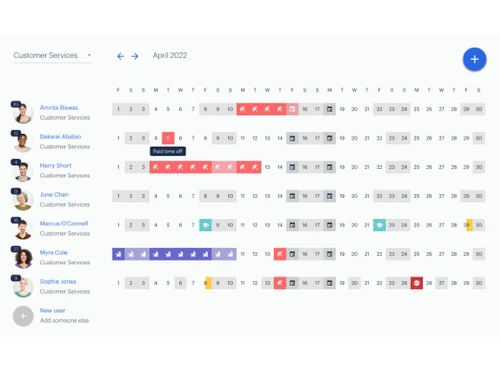
  • Centralized Wallchart: View all team absences in one place with the wallchart feature, making it easier to plan workloads and avoid scheduling conflicts.
  • Real-Time Updates: Another benefit of using Timetastic leave management software is that it can keep track of remaining leave allowances, upcoming absences, and annual trends with instant updates for both employees and managers.
  • Instant Notifications: Receive email notifications for leave approvals or rejections, ensuring timely communication and reducing back-and-forth.
  • Time-Saving Automation: Say goodbye to manual data entry—Timetastic automatically calculates leave balances and tracks holiday usage for you.
  • Loved by Teams Everywhere: Over 200,000 users trust this software for its simplicity and effectiveness, with glowing reviews from businesses across industries.

Additional Features of Timetastic

This Leave Management software provides a wide range of features designed to optimize your leave management process:

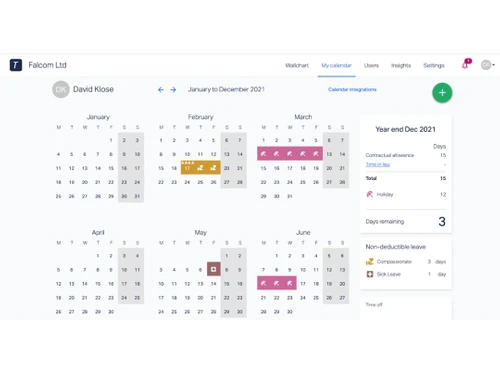
  • Personalized Holiday Tracker: Every employee gets their own calendar to view allowances, track usage, and plan time off.
  • Daily and Weekly Digests: Stay informed with daily or weekly summaries of upcoming absences for better planning.
  • Seamless Integration: Sync with popular calendar apps like Google Calendar and Outlook to keep your schedules aligned.
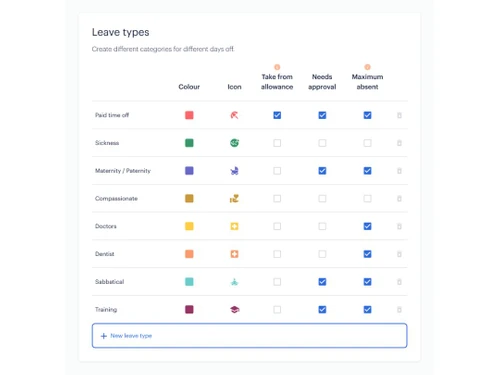
  • Custom Absence Types: This feature of Timetastic lets you create and manage custom leave categories like sick days, remote work, or training days.
  • Annual Trends Analysis: Gain insights into time-off patterns and make data-driven decisions for resource management.
  • Compliance Support: With this Timetastic feature, you can access templates for staff absence policies and holiday calculators to stay compliant with HR regulations.
  • Multi-Device Access: Enjoy a smooth experience across desktop, tablet, and mobile devices, empowering employees to book leave anytime, anywhere.
  • Eco-Friendly B Corp Certified: This Leave Management Software is committed to sustainability, being part of the 1% for the Planet initiative.

Pricing of Timetastic

Timetastic offers two affordable plans starting at just $1.50 per user/month, both with a 30-day free trial. Choose between the Basic plan for simple leave management or the Pro plan for advanced features like burnout alerts and absence insights.

Read more

Timetastic Company Details

Founded Year:  2012

We're the ones who make your favourite web app for booking time off work - Timetastic.

Director/Founders Gary Bury, Matt Roberts
Company Size 1-100 Employees

Timetastic Pricing & Plans

Timetastic
Starting at $2
    • Users

      Users
      Users
    • Monthly

      Monthly
      Monthly

Key Features

  • Unlimited users and departments

  • Shared calendar and view of who’s off

  • Holiday allowance record

  • Holiday approvals

  • Mobile and desktop app

Timetastic Pro
Starting at $3
    • Users

      Users
      Users
    • Monthly

      Monthly
      Monthly

Key Features

  • All the features of our basic plan plus...

  • Limit bookings on individual leave types

  • Absence trends and insights

  • Alerts if team members are at risk of burnout

  • Company-wide absence reports straight to your inbo

  • Enhanced user profiles

  • Integration with multiple platforms, including Tea

  • Single sign-on

Timetastic Features

  • icon_check Absence Reports
  • icon_check Leave Policy Customization
  • icon_check User Access Management
  • icon_check Approval Workflow
  • icon_check Email Notifications
  • icon_check Holiday Calendar
  • icon_check In-App Notifications
  • icon_check Third Paty Integration
Timetastic Demo Video play icon

Get Timetastic Demo

Watch the demo video to explore key features, real workflows, and how the software fits your business needs.

Understand
Key Features
Personal
Demo Insights
Interactive
Demo Support

Timetastic Specifications

Supported Platforms
Ubuntu Ubuntu Windows Windows iOS iOS Android Android MacOS MacOS Linux Linux
Devices
Desktop Desktop Mobile Mobile
Deployment
Cloud-Based Cloud-Based
Suitable For
All Industries
Business Specific
All Businesses
Business Size
Small Business Startups Medium Business
Customer Support
Email Communities
Language
English
Integration
API Integration
Training Resources
Videos

Explore the Best Alternative Solutions Similar to Your Business Size and Needs

Timetastic Review

4.3

Out of 5

img

Overall Rating

Based on
1 Verified Review

Rating Breakdown

  • Features 4
  • Value for Money 4.5
  • Ease of Use 4.1
  • Customer Support 4.7

96% Recommend this Product

Add Review

Timetastic Video Review

youtubeVideoId

4.1

“Timetastic Review: Complete Step By Step Guide ”

Review by: Dans

Compare Timetastic With other Leave Management Software

Products
Ratings
Pricing
Device Supported
Deployment
Supported Platforms
  • img

    Timetastic

  • 4.3

  • Price On Request

  • Desktop

    Mobile

  • Web based

    On Premises

  • Windows

    Mac OS

  • img

    Planmyleave

  • 4.2

  • Price On Request

  • Desktop

    Mobile

  • Web based

    On Premises

  • Windows

    Mac OS

  • img

    absence.io

  • 4.3

  • Price On Request

  • Desktop

    Mobile

  • Web based

    On Premises

  • Windows

    Mac OS

  • img

    CaptureLeave

  • 5

  • Price On Request

  • Desktop

    Mobile

  • Web based

    On Premises

  • Windows

    Mac OS

  • img

    LeaveBoard

  • 4.3

  • Price On Request

  • Desktop

    Mobile

  • Web based

    On Premises

  • Windows

    Mac OS

  • img

    Vacation Tracker

  • 4.1

  • Price On Request

  • Desktop

    Mobile

  • Web based

    On Premises

  • Windows

    Mac OS

  • img

    Timeular

  • 4.3

  • Price On Request

  • Desktop

    Mobile

  • Web based

    On Premises

  • Windows

    Mac OS

  • img

    edays

  • 4.1

  • Price On Request

  • Desktop

    Mobile

  • Web based

    On Premises

  • Windows

    Mac OS

  • img

    Leave Dates

  • 4.0

  • Price On Request

  • Desktop

    Mobile

  • Web based

    On Premises

  • Windows

    Mac OS

  • img

    LeaveSource

  • 4.2

  • Price On Request

  • Desktop

    Mobile

  • Web based

    On Premises

  • Windows

    Mac OS

(0) Product(s) selected

Timetastic Alternatives

See All Timetastic Alternatives

Starting Price:

$2 /User/Month

Available

Price on Request

Available

Price on Request

Articles for Timetastic

See All Related Articles

Who can use Timetastic?

Timetastic is ideal for businesses of all sizes, from startups to established companies across industries.

Does Timetastic integrate with calendar apps?

Yes, Timetastic syncs with Google Calendar, Outlook, and other popular platforms for seamless scheduling.

Is training required to use Timetastic?

No training is needed! Timetastic’s intuitive design ensures a smooth experience for both employees and managers.

Can I customize absence types?

Absolutely! You can define custom absence categories to suit your organization’s specific needs.

What happens after the free trial?

You can continue using Timetastic by choosing a paid plan. There’s no obligation, and you can cancel anytime.

How secure is Timetastic?

Timetastic prioritizes data security with advanced encryption and compliance with privacy standards.

How much does Timetastic Cost?

Timetastic pricing starts at $1.50/month per user.

Does Timetastic offer a free trial?

Yes, Timetastic offers a 30-day free trial.

How does Timetastic Work?

Timetastic simplifies leave management by providing a centralized system for requesting, approving, and tracking time off. Employees can submit leave requests via mobile or desktop, while managers receive instant notifications for approvals. The shared calendar keeps everyone informed of absences, ensuring seamless team coordination.

Timetastic Questions

Q:

How to Set Who Approves Leave in Timetastic?

Haylie Haysley Jan 11, 2025
A:

To Set Who Approves Leave in Timetastic, follow the steps given below:

  • Open your Timetastic account
  • Navigate to 'Settings'
  • Click on 'Departments'
  • Edit the department and assign a manager or approver for leave requests.
  • Hit Save
Satish Jan 13, 2025
A:

To Delete, Archive, or Remove Users in Timetastic, follow the steps given below:

  • Open Timetastic
  • Open your Timetastic account
  • Go to 'Users' management
  • Click on the user to delete, archive, or remove
  • Choose the appropriate action
  • Hit confirm.
Piyush Intodia Jan 8, 2025
A:

To add or remove directors in Timetastic, follow the steps given below:

  • Open your Timetastic account
  • Navigate to the 'Settings' section
  • Add or remove users from the directors list by editing their profiles or choosing the director role
  • Hit Save
murthy vvv sn Jan 9, 2025
Q:

How can we add or remove account ownership in Timetastic?

Neeraj Chandra Joshi Jan 6, 2025
A:

To add or remove account ownership in Timetastic, follow the steps given below:

  • Open your Timetastic admin account
  • Navigate to the 'Settings' or 'Admin' section
  • Select the user to assign as the new account owner
  • Confirm the transfer
  • Hit Save
Gurmeet Singh Jan 10, 2025
A:

To add users without an email address in Timetastic, follow the steps given below:

  • Open your Timetastic admin panel
  • Navigate to the 'Users' section
  • Hit 'Add New User'
  • Enter the user's details but leave the email field blank
  • Hit Save
Mani Jan 6, 2025
See All Timetastic Questions

20,000+ Software Listed

Best Price Guranteed

Free Expert Consultation

2M+ Happy Customers

Terms and Condtions

close

Users with registered businesses can purchase goods from merchants on the platform to satisfy their business needs. Users are not permitted to utilize any products acquired through the platform for resale, advertising, business, or further distribution.

For each purchase made, users will receive a Tax Invoice (or 'GST invoice') that includes specific details such as:

  • the GSTIN of the user associated with their registered business, and

  • the specified Entity Name for their business.

It should be noted that not all products are eligible for GST Invoice. Only the products displayed by participating sellers with the 'GST-based Invoice Available' callout on the product description page would qualify.

Certain goods and services are not eligible to get a GST Invoice, including items with VAS, i.e., Value Added Services (e.g., Total Mobile Protection/Assured Buyback) and those involving an exchange offer at the time of purchase.

Users must ensure the accuracy of the GSTIN, and business entity name provided for the GST Invoice. Requests for corrections into GST Invoice would not be accommodated by Techjockey.com or any Seller, and any issues arising from user-provided information are the sole responsibility of users.

Techjockey.com is not liable for the GST Invoice or any associated input tax credit. To efficiently claim an input tax credit, users should select the registered place of business address as per the GST authority's data and follow the provisions of the GST Act and rules.

To claim an input tax credit, the delivery and billing addresses must match. Furthermore, input tax credits will not be granted if the delivery address and GSTIN on the invoice are from different states. In case of incorrect GST details provided during the order placement, the order will be canceled automatically.