linkedin
Planmyleave logo
play Planmyleave demo
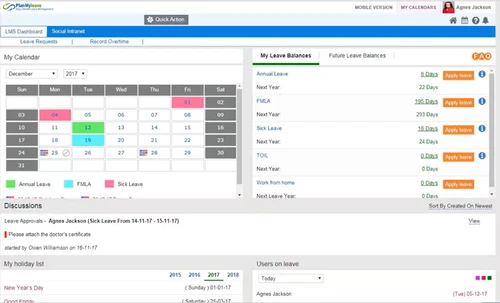
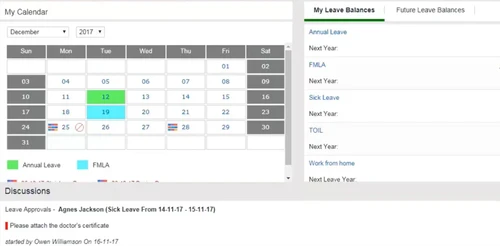
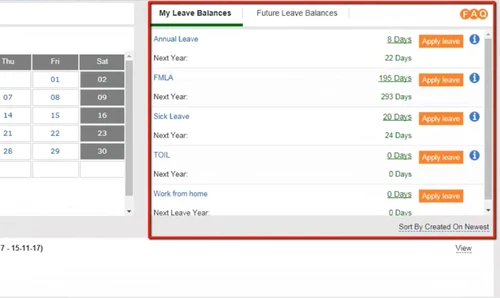
Planmyleave lms dashboard
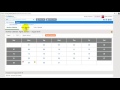
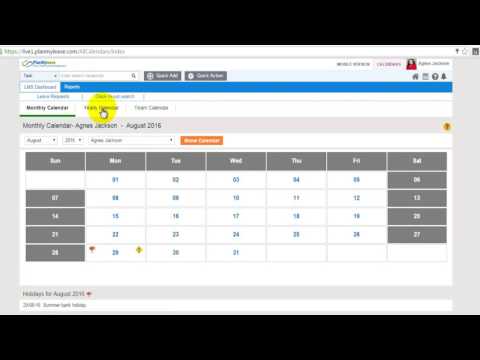
Planmyleave calender

Planmyleave

Brand: PlanMyleave

  • 4.2

  • 4 Ratings

Planmyleave is a leave management software for small, medium and large business enterprises. Using the software, employees can make leave related applications and get easier access to other leave-based services in an efficient way. The software is compatible with a variety of international languages from all around the globe. Planmyleave offers hassle-free integration with external biometric devi...

See More

Have you used Planmyleave before?

Share your insights for better experience

Add a Review
Starting Price
$30

View plans

100% Genuine
Products
Best Price
Guaranteed
Safe & Secure
Payment
  • Description

  • Pricing

  • Features

  • Specification

  • Review

  • Compare

  • Alternatives

  • FAQ

Starting at $30

Planmyleave Software Overview

What is Planmyleave?

Planmyleave is a leave management software for small, medium and large business enterprises. Using the software, employees can make leave related applications and get easier access to other leave-based services in an efficient way. The software is compatible with a variety of international languages from all around the globe. Planmyleave offers hassle-free integration with external biometric devices, ERP, and payroll management solutions like QuickBooks, XERO, ADP and more.

Further, HR managers can also schedule automated leave accruals and policies. Planmyleave calculates the overtimes done by individual employees in an automated way. The software also sends in leave specific reminders to the managers. All data stored within the particular software is protected by 256-bit SSL grade encryption.  

How is Planmyleave beneficial for the HR managers?

Planmyleave with its multi-variant modules makes it easy for HR managers to monitor and approve employee-generated leaves in an efficient manner in less time. 

  1. Quick View: The software offers a quick view of the entire leave history, making it easy for the managers to find out about leaves taken by an individual employee within a particular time period and make relevant decisions in real-time. 
  2. Multipurpose Calendar: Planmyleave offers team-based yearly calendars making it easy for HRs to find out about the availability of staff within a particular time frame and approve or deny further requests for leave. 
  3. Planning and Customization: HRs of a multinational company can plan to leave related schedules as per the location of their office. The system offers a two-way transparent view, eliminating chances of leave related disputes between employees and HRs.       

Benefits of PlanMyLeave

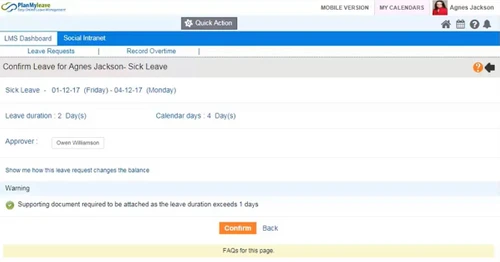
  • Easy Leave Application: Employees can easily apply for leave using their leave balance and over-time banking from a single window. They can also attach relevant medical documents along with their application while applying for sick-leaves.
  • Faster Leave Approvals: The HR managers or admins can set up custom rules for automated leave approval. Thus saving a lot of time for both the employees and management.
  • Escalation: The software escalates the requested leaves to a different manager in case no actions are taken against the particular manager within a scheduled time period. 
  • Approval Paths: Admins can set up to 5 leave approvers. They can also schedule the particular as per location, employee levels and individual departments within the company. Moreover, admins can also set individual approval paths for each leave type. 

Additional Features of PlanMyLeave Leave Management Software

  • Customizable Leave Rules: Configure leave policies to match company-specific needs, such as probation restrictions, gender-based leave types, and accrual rules. You can Set up restrictions like minimum/maximum leave durations or prior notice requirements.
  • Advanced Approval Workflows: PlanMyLeave leave management software can automate multi-level approval paths with up to five approvers.
  • Shift Management and Work Patterns: Create and manage shifts for teams with varying schedules. Also, customize work patterns for accurate leave duration calculations for shift workers.
  • Comprehensive Reporting Tools: Access detailed reports on leave balances, trends, and adjustments.
  • Integrated Alerts and Notifications: Notify employees and managers about upcoming leaves, carry-over expirations, and special events like birthdays and work anniversaries.
  • Employee Self-Service Portal: Empower employees to track leave balances, upload documents, and edit requests with ease.
  • Multi-Language and Multi-Location Support: Enable location-based leave policies with region-specific holidays, start dates, and week formats.
  • Enterprise-Grade Security and Integrations: Enjoy seamless integration with payroll providers, ERP systems, and tools like Zapier, Slack, and Google Drive.

Pricing of PlanMyLeave

The pricing of PlanMyLeave is available on request at techjockey.com. You can request for a callback request and our in-house product experts will get back to you in no time.

Read more

Planmyleave Pricing & Plans

Leave Management only
Key Features
  • Multi Language Support
  • Leave Management
  • Overtime Management
  • Shift Management
  • Reminders & Notifications
Starting at $30
    • Users

      Users
      Users
    • Monthly

      Monthly
      Monthly

Key Features

  • Multi Language Support

  • Leave Management

  • Overtime Management

  • Shift Management

  • Reminders & Notifications

Planmyleave Features

  • icon_check Multi Language Support
    Planmyleave supports a wide variety of languages from all around the globe, including English, Chinese, German, French, Hindi,
  • icon_check Integration
    The software supports Biometric security integration and ERP. You can also integrate with QuickBooks, XERO, ADP and more.
  • icon_check Calendar
    Managers can monitor employee specific monthly and annual calendars. The integration of Microsoft Outlook and Google Calendar is
  • icon_check Leave Management
     It allows employees to apply for compulsory off, overtimes and TOIL leaves along with proper documents. HRs are notified in
  • icon_check Leave Approval/Rejection
    The software offers automated approval workflows regarding leave request management. Up to 5 approvers can be added within a
  • icon_check Overtime Management
     Overtime is calculated in an automatic manner and employees can bank on them. They can make comp off requests. HRs can also
  • icon_check Shift Management
     Admins can generate multiple shift-based schedules as per the working patterns of their individual employees. Thus ensuring
  • icon_check Reports
    Planmyleave offers downloadable reports in pdf and Excel formats. The software offers reports on leave balances, taken leaves,
  • icon_check Reminders & Notifications
    HR and employees get real-time reminders of leave requests, approval, and rejections. They can also forward information to
  • icon_check Multi User login & Role based access
    All the access rights are granted and restricted depending on the employee role. Managers can set IT restrictions along with two
  • icon_check Security
    Planmyleave’s servers and corresponding data flow are heavily guarded with 256-bit SSL encryption. The software uses multiple
  • icon_check Document Management
    Upload, store, and share documents using Google Drive and Dropbox. Employees can also upload relevant documents with their leave
  • icon_check Applicant Tracking
    Employees can track their leaves, travel expenses, and overtime hours, while management can track all the application requests
  • icon_check Asset Tracking
    Real-time asset tracking is available for better management and distribution of the company’s resources.
  • icon_check Workflow Automation
     Companies can automate the entire workflow and manage leave requests in an efficient manner. 
Planmyleave Demo Video play icon

Get Planmyleave Demo

Watch the demo video to explore key features, real workflows, and how the software fits your business needs.

Understand
Key Features
Personal
Demo Insights
Interactive
Demo Support

Planmyleave Specifications

Supported Platforms
Windows Windows iOS iOS Android Android
Devices
Desktop Desktop Mobile Mobile Tablet Tablet iPad iPad
Deployment
Cloud-Based Cloud-Based
Suitable For
All Industries
Business Specific
All Businesses
Business Size
Small Business Medium Business Enterprises
Customer Support
Email Communities
Language
English
Training Resources
Videos

Explore the Best Alternative Solutions Similar to Your Business Size and Needs

Planmyleave Review

4.2

Out of 5

img

Overall Rating

Based on
4 Verified Ratings

Rating Breakdown

  • Features 4.3
  • Value for Money 4.2
  • Ease of Use 4.1
  • Customer Support 4.3

90% Recommend this Product

Add Review

Techjockey Trusted Reviews from Verified Users

No reviews are currently available for Planmyleave. Discover similar Leave Management Software reviews

  • CaptureLeave

    5.0

    Whats great - Great tracking and great admin tools. Very accurate calculations super easy to use. read more

  • HROne

    4.8

    Whats great - None read more

  • Keka HR

    4.4

    Whats great - We were a small sized business but grew rapidly in the pandemic. We had been using biometric devices before the pandemic and ... read more

Compare Planmyleave With other Leave Management Software

Products
Ratings
Pricing
Device Supported
Deployment
Supported Platforms
  • img

    Planmyleave

  • 4.2

  • Price On Request

  • Desktop

    Mobile

  • Web based

    On Premises

  • Windows

    Mac OS

  • img

    absence.io

  • 4.3

  • Price On Request

  • Desktop

    Mobile

  • Web based

    On Premises

  • Windows

    Mac OS

  • img

    Timetastic

  • 4.3

  • Price On Request

  • Desktop

    Mobile

  • Web based

    On Premises

  • Windows

    Mac OS

  • img

    Vacation Tracker

  • 4.1

  • Price On Request

  • Desktop

    Mobile

  • Web based

    On Premises

  • Windows

    Mac OS

  • img

    CaptureLeave

  • 5

  • Price On Request

  • Desktop

    Mobile

  • Web based

    On Premises

  • Windows

    Mac OS

  • img

    edays

  • 4.1

  • Price On Request

  • Desktop

    Mobile

  • Web based

    On Premises

  • Windows

    Mac OS

  • img

    LeaveBoard

  • 4.3

  • Price On Request

  • Desktop

    Mobile

  • Web based

    On Premises

  • Windows

    Mac OS

  • img

    Timeular

  • 4.3

  • Price On Request

  • Desktop

    Mobile

  • Web based

    On Premises

  • Windows

    Mac OS

  • img

    Leave Dates

  • 4.0

  • Price On Request

  • Desktop

    Mobile

  • Web based

    On Premises

  • Windows

    Mac OS

  • img

    LeaveSource

  • 4.2

  • Price On Request

  • Desktop

    Mobile

  • Web based

    On Premises

  • Windows

    Mac OS

(0) Product(s) selected

Planmyleave Alternatives

See All Planmyleave Alternatives

Starting Price:

$2 /User/Month

Available

Price on Request

Available

Price on Request

Articles for Planmyleave

See All Related Articles

Does Planmyleave offer data backup and emergency support?

Yes, Planmyleave conducts daily backups. You can request a full restore in case of any emergency.

Can I export my stored data from Planmyleave?

Yes, you can export your data in CSV format. You can also download the particulars in PDF and Excel format.

Can I get a demo of Planmyleave?

Yes, you can request an online demo of Planmyleave. Our software experts will get in touch with you as per the requested time schedule.

What is the use of a backup manager module within Planmyleave?

As an admin, you can set a backup manager within Planmyleave. The software will forward the entire procedure to the scheduled manager when the approval manager in charge will be on leave.

Is there a dedicated mobile app for Planmyleave?

No, the software does not have a dedicated mobile app as of now.

20,000+ Software Listed

Best Price Guranteed

Free Expert Consultation

2M+ Happy Customers

Terms and Condtions

close

Users with registered businesses can purchase goods from merchants on the platform to satisfy their business needs. Users are not permitted to utilize any products acquired through the platform for resale, advertising, business, or further distribution.

For each purchase made, users will receive a Tax Invoice (or 'GST invoice') that includes specific details such as:

  • the GSTIN of the user associated with their registered business, and

  • the specified Entity Name for their business.

It should be noted that not all products are eligible for GST Invoice. Only the products displayed by participating sellers with the 'GST-based Invoice Available' callout on the product description page would qualify.

Certain goods and services are not eligible to get a GST Invoice, including items with VAS, i.e., Value Added Services (e.g., Total Mobile Protection/Assured Buyback) and those involving an exchange offer at the time of purchase.

Users must ensure the accuracy of the GSTIN, and business entity name provided for the GST Invoice. Requests for corrections into GST Invoice would not be accommodated by Techjockey.com or any Seller, and any issues arising from user-provided information are the sole responsibility of users.

Techjockey.com is not liable for the GST Invoice or any associated input tax credit. To efficiently claim an input tax credit, users should select the registered place of business address as per the GST authority's data and follow the provisions of the GST Act and rules.

To claim an input tax credit, the delivery and billing addresses must match. Furthermore, input tax credits will not be granted if the delivery address and GSTIN on the invoice are from different states. In case of incorrect GST details provided during the order placement, the order will be canceled automatically.