 USA
USA UAE
UAE





Small Business
Designed for startups and growing businesses


See More

 Employee Management Payroll Management Statutory Compliances Attendance Management Shift & Roster Management Leave Management Recruitment Management Employee Onboarding Performance Management Employee Self Service Employee Engagement Task Management Document Management Real-Time Analytics Overtime Management Approval Workflow

Watch the demo video to explore key features, real workflows, and how the software fits your business needs.
 Windows
  iOS
iOS  Android MacOS
  Desktop
  Mobile
  Cloud-Based
  Perpetual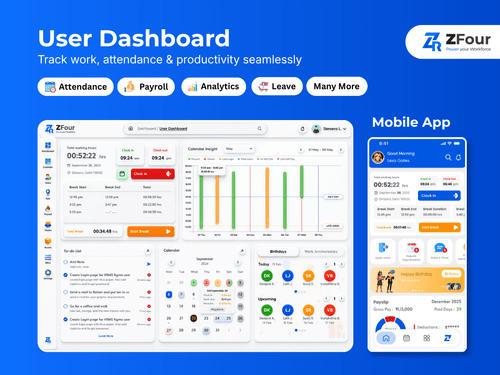
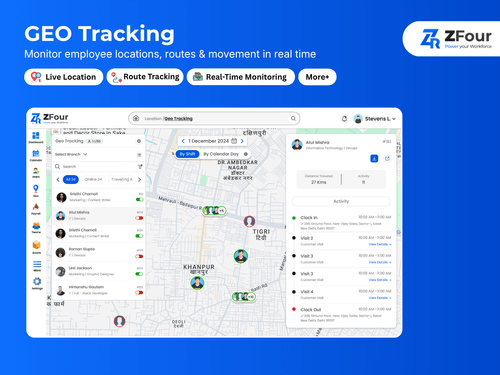
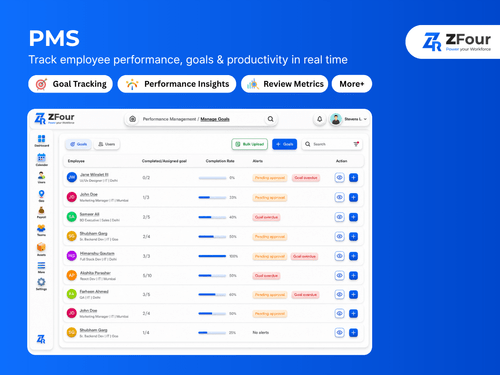
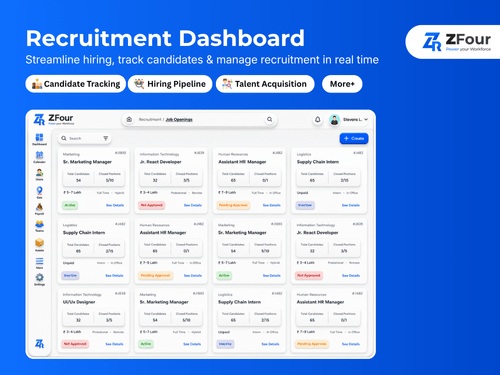
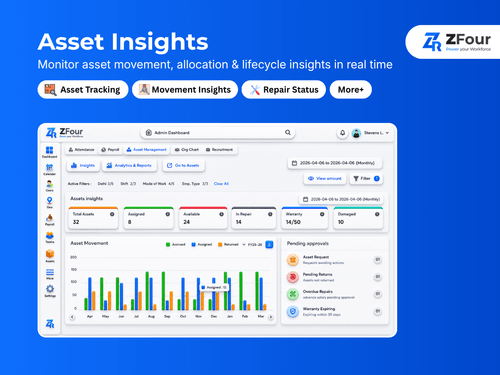
Small Business
Designed for startups and growing businesses
Medium Business
Built for business growth and flexibility
Enterprises
Designed for complex and large-scale business needs
4.9
Out of 5

Overall Rating
Based on
224 Verified Reviews
Rating Breakdown
95% Recommend this Product
Add ReviewOverall, customer sentiment towards Zfour HRMS is overwhelmingly positive, with users frequently praising its user-friendly interface, automation capabilities, and efficiency in managing HR tasks such as payroll, attendance, and employee records. Many appreciate the software's ability to simplify complex processes and reduce manual work, leading to significant time savings. However, some users note that the extensive feature set can be overwhelming for smaller teams, and there are occasional mentions of the need for better customization options and reporting capabilities. Despite these minor concerns, the majority find Zfour HRMS to be a reliable and effective solution for their HR needs.
Pros
"One of the best things about Zfour HRMS is how it automates repetitive HR tasks. It reduces manual work and helps HR teams focus on more important things."
"Zfour HRMS helps keep all employee details organized and easy to find. It feels much more manageable compared to traditional systems or spreadsheets."
"Practical, user-friendly HRMS that boosts efficiency and saves time"
Cons
"Zfour did not have any downtime or issues, ensuring reliability."
"Zfour has no cons, providing smooth and accurate HR processes."
"Zfour did not reveal any shortcomings, as it performed very well."

Sep 7, 2025
Techjockey Verified
“Professional and User-Friendly Service”
This product has genuinely impressed me with its smooth performance and user-friendly interface. Everything feels well thought out, from design to functionality. The reliability and speed make daily usage effortless, and the overall build quality instils confidence. I also appreciate how easy it is to get started, even for someone who is not very technical. It clearly shows that the developers focused on both quality and customer experience. Overall, it delivers great value and is highly reliable
Pros
The service is professional, user-friendly, and genuinely helpful. Highly recommend to anyone looking for quality and trust.
Cons
NO CONS
Reason to switch
Before switching to ZFour HRMS, I tried other HR management tools, but they often felt complex, slow, or lacked the flexibility I needed. Many platforms were either too expensive or came with unnecessary features that made them difficult to use. Zimyo stood out for its simplicity, affordability, and user-friendly design. The onboarding process was smooth, and the customer support team was prompt in resolving queries. The switch has helped improve efficiency, reduce manual workload, and made managing HR operations far more seamless.
Jan 9, 2026
Techjockey Verified
“A Practical HR Solution for Growing Teams”
ZFour HRMS offers a clean interface with essential HR and Payroll feature. setup was quick and it helps keep HR operations organised without unnecessary complexity.
Pros
quick setup with reliable support reducing daily HR manual work.
Cons
reporting feature are basic and improve overtime
Reason to switch
The interface was complicated and user experience was not upto the mark
Jan 9, 2026
Techjockey Verified
“My experience was more then my expectation”
HRMS (Human Resource Management System) software is a valuable tool that helps organizations streamline and automate HR processes such as payroll, attendance, recruitment, performance management, and employee records. It improves efficiency by reducing manual work, minimizes errors, and provides real-time access to HR data. With user-friendly dashboards and reporting features, HRMS software supports better decision-making and enhances overall employee experience. It is especially useful for growing organizations looking to manage their workforce more effectively and professionally.
Pros
Improves efficiency by automating routine HR tasks and reducing manual errors.
Cons
Initial setup and training may take time, but it helps the organization build a more structured and scalable HR system in the long run.
Reason to switch
the software was not working smoothly

Zfour HRMS
₹ 45.00 excl. GST
Desktop
Mobile
Web based
On Premises
Windows
Mac OS

ClusterHR
₹ 40
Desktop
Mobile
Web based
On Premises
Windows
Mac OS

Fix HR
₹ 600
Desktop
Mobile
Web based
On Premises
Windows
Mac OS

SignalHRM
₹ 648
Desktop
Mobile
Web based
On Premises
Windows
Mac OS

WeekMate
₹ 3999
Desktop
Mobile
Web based
On Premises
Windows
Mac OS

Spine HR
Price On Request
Desktop
Mobile
Web based
On Premises
Windows
Mac OS

TankhaPay
₹ 40
Desktop
Mobile
Web based
On Premises
Windows
Mac OS

WoCo
₹ 50
Desktop
Mobile
Web based
On Premises
Windows
Mac OS

Keka HR
Price On Request
Desktop
Mobile
Web based
On Premises
Windows
Mac OS

TruHR
₹ 2200
Desktop
Mobile
Web based
On Premises
Windows
Mac OS

Kredily
₹ 1749
Desktop
Mobile
Web based
On Premises
Windows
Mac OS
(0) Product(s) selected
Starting Price:
₹40 /Month
Starting Price:
₹600 /Month ₹900
Starting Price:
₹3,999
Starting Price:
₹2,200 /Month

Starting Price:
₹49 /Month

Starting Price:
₹890 /Month
Starting Price:
₹5,000 /Month

Available
Price on Request

Starting Price:
$49 /Month
Available
Price on Request









Zfour HRMS prices start from INR 45 on techjockey.com.
Yes, ZFour HRMS provides a mobile app for iOS & Android
Zfour HRMS is compatible with web browsers on Windows(Phone), Windows and macOS.
Yes, Zfour HRMS offers a free trial.
ZFour HRMS automates HR tasks like payroll, attendance, and recruitment through a cloud-based, AI-powered platform with a user-friendly dashboard.
Businesses of all sizes, from startups to enterprises, use ZFour HRMS to streamline HR operations and enhance employee engagement.
Yes, ZFour offers a free demo to explore its features and suitability for your organization.
ZFour HRMS is not free, but it offers a free trial to test its functionality before subscribing.
20,000+ Software Listed
Best Price Guranteed
Free Expert Consultation
2M+ Happy Customers
Terms and Condtions

Users with registered businesses can purchase goods from merchants on the platform to satisfy their business needs. Users are not permitted to utilize any products acquired through the platform for resale, advertising, business, or further distribution.
For each purchase made, users will receive a Tax Invoice (or 'GST invoice') that includes specific details such as:
the GSTIN of the user associated with their registered business, and
the specified Entity Name for their business.
It should be noted that not all products are eligible for GST Invoice. Only the products displayed by participating sellers with the 'GST-based Invoice Available' callout on the product description page would qualify.
Certain goods and services are not eligible to get a GST Invoice, including items with VAS, i.e., Value Added Services (e.g., Total Mobile Protection/Assured Buyback) and those involving an exchange offer at the time of purchase.
Users must ensure the accuracy of the GSTIN, and business entity name provided for the GST Invoice. Requests for corrections into GST Invoice would not be accommodated by Techjockey.com or any Seller, and any issues arising from user-provided information are the sole responsibility of users.
Techjockey.com is not liable for the GST Invoice or any associated input tax credit. To efficiently claim an input tax credit, users should select the registered place of business address as per the GST authority's data and follow the provisions of the GST Act and rules.
To claim an input tax credit, the delivery and billing addresses must match. Furthermore, input tax credits will not be granted if the delivery address and GSTIN on the invoice are from different states. In case of incorrect GST details provided during the order placement, the order will be canceled automatically.


