 USA
USA UAE
UAE
Small Business
Designed for startups and growing businesses
See More





Brand: VUnify Technology Private Limited
Optimize your HR processes with advanced HR management software. Efficient payroll, attendance tracking, and employee management made easy!
See More
12+ people visited in last 30 minutes
Looking for The Right Pricing?
Share your requirements and get a plan built around your business.
Price Available on Request
Get personalised Spine HR pricing that fits your needs. Our team will connect with you.
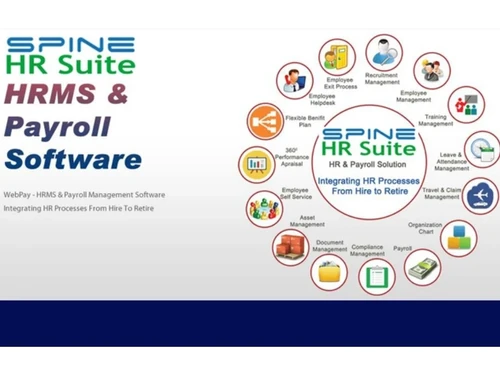
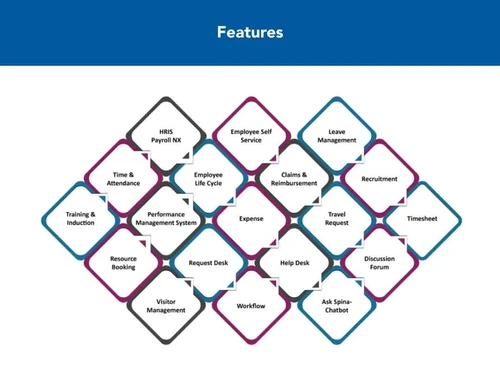
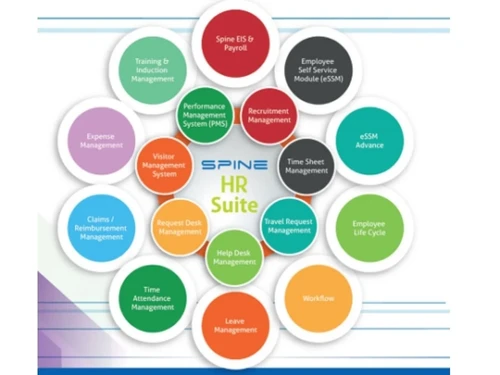
 Payroll Management Employee Self Service Employee Lifecycle Management Leave Management Claim Management Resource Booking AI Chatbot Workflow Management Attendance Management Expense Management Learning Management Performance Management Recruitment Management Shift Management Helpdesk Management Loan Management Document Management MIS Reports Travel Requests Management Timesheets Employee Documents Compensation Management

Watch the demo video to explore key features, real workflows, and how the software fits your business needs.
 Windows
  Android
  Desktop
  Mobile
  Cloud-Based
  Perpetual
Small Business
Designed for startups and growing businesses
Medium Business
Built for business growth and flexibility
Enterprises
Designed for complex and large-scale business needs
4.3
Out of 5

Overall Rating
Based on
53 Verified Reviews
Rating Breakdown
85% Recommend this Product
Add ReviewCustomer sentiment towards Spine HR is mixed, with many praising its user-friendly interface and comprehensive HR management capabilities. Users appreciate the software's ability to streamline HR tasks and provide timely updates, making it suitable for both small and large organizations. However, complaints about slow performance, technical issues, and inadequate customer support are common, particularly among larger companies. While some users find it effective and easy to use, others express frustration with implementation challenges and the need for more robust support.
Pros
"Spine HR is a powerful tool that is also simple to use. Unlike any other HRMS software, it focuses on daily mundane processes rather than flashy graphs."
"It provided reports in all form and is user-friendly. Helpful in employee taxation also."
"I would like to say this is very good software for all of us. Employee can easily check their attendance, Leaves, Their own Salary Slips on their individual account."
Cons
"In case stuck somewhere in between no offline or documented support ids there"
"Shift scheduled is not showing proper attendance despite general shift"
"- Too much hurry to close the ticket whichever raised by team"



Aug 24, 2023
Techjockey Verified
“SpineHR My recommend based on my experience not to go with cheapest software#SpineHR #spinehr”
Pros
No comments
Cons
Slowness <200 Kbps speed, Application down all sudden and no response, you have to run manually in excel, Emp. id are not shown in all reports which is very difficult to handle, No proper escalation matrix where followed, you have to break your head by following each and individual from SpineHR, All SPOCs keep silent if you are in tribble, we experienced this in less then 3 month, 2200 employees count payroll runs approx. more the 3 hrs. due to server slowness My recommendation based on my experience not to go with the cheapest software.
Aug 12, 2023
Techjockey Verified
“Great tool for Human Resource management.”
Pros
Spine HRMS by Spine Technologies Singapore offers a comprehensive solution for human resource management. The software boasts a user-friendly interface that simplifies various HR tasks such as employee onboarding, attendance tracking, leave management and performance evaluation. Its integrated approach allows for seamless data management and reporting, enabling businesses to streamline their HR operations efficiently. Additionally, the system's scalability makes it suitable for both small businesses and larger enterprises. However, like any software, there may be room for improvement, and it's important to consider factors such as customer support and pricing before making a decision.
Cons
Not arises
Reason to switch
Nothing remarkable
Jul 7, 2023
Techjockey Verified
“Best HRMS”
Pros
It helped me enter and maintain all the records including diagnostic reports. One of the best HRMS software. It helped me integrate the reports on time with efficiency. Truly amazing interface.
Cons
Needs extensive training
Reason to switch
Upgrade

Spine HR
Price On Request
Desktop
Mobile
Web based
On Premises
Windows
Mac OS

ClusterHR
₹ 40
Desktop
Mobile
Web based
On Premises
Windows
Mac OS

Fix HR
₹ 600
Desktop
Mobile
Web based
On Premises
Windows
Mac OS

WeekMate
₹ 3999
Desktop
Mobile
Web based
On Premises
Windows
Mac OS

TankhaPay
₹ 40
Desktop
Mobile
Web based
On Premises
Windows
Mac OS

Kredily
₹ 1749
Desktop
Mobile
Web based
On Premises
Windows
Mac OS

WoCo
₹ 50
Desktop
Mobile
Web based
On Premises
Windows
Mac OS

Zfour HRMS
₹ 45
Desktop
Mobile
Web based
On Premises
Windows
Mac OS

PayTime
₹ 20000
Desktop
Mobile
Web based
On Premises
Windows
Mac OS

RGrowth HCM
₹ 4250
Desktop
Mobile
Web based
On Premises
Windows
Mac OS

Keka HR
Price On Request
Desktop
Mobile
Web based
On Premises
Windows
Mac OS
(0) Product(s) selected
Starting Price:
₹40 /Month
Starting Price:
₹600 /Month ₹900
Starting Price:
₹3,999

Starting Price:
₹890 /Month
Available
Price on Request

Starting Price:
₹2,200 /Month
Starting Price:
₹5,000 /Month

Available
Price on Request

Starting Price:
₹1,499 /Month

Starting Price:
₹49 /Month








Spine HR helps with basic employee management and payroll functions, such as, deductions, tax components, basic, HRA, etc. It includes PF calculation, as well.
The functions of Spine HR software fall into three major areas: staffing, employee compensation and benefits, and defining/designing work. Essentially, the purpose of Spine HRM is to maximize the productivity of an organization by optimizing the effectiveness of its employees.
Spine HR is accessed through a web browser. Hence, there are no mandatory system requirements for running the Spine HR efficiently.
The price of Spine HR is Rs 40500 per annum. Please request a call and our team will get in touch with you.
Spine HR & Payroll can be used in all types of organizations i.e., start-ups, SMEs, agencies, enterprises of all sizes.
Spine HR works smoothly on all operating software. It works for both Windows and MacOS.
To use Spine HR app for Android, you should purchase Spine HR login. Customize the settings and give Spine HRMS login access to employees. Everyone can install the app on their Android phones from the Google Play Store. After Spine HRMS login on app, they get access to all the mobile app functionalities.
You can run Spine HRMS on one license instance for several companies. You can import and export All your data through excel files if your HRMS is outsourced. The admin can login to the online portal using the credentials provided at the time of purchase. After login, the admit can change the settings as per organization requirements and assign roles/ access rights for different activities to different workers. For more details, refer Spine HRMS manual.
You can use Spine HR and payroll software to automate complex payroll processes for hundreds of employees. The HR & payroll software gives you the option to calculate employee salaries, increments, taxes, insurance, and more. Spine HR & payroll software also assists with leave management, reporting, performance management, visitor management & timesheet management.
The default password for Spine HR is the Employee Code in all capital letters. It is however, advised to change the default password upon login.
Spine HR offers a hybrid data storage system that utilizes both cloud and on-premise deployment for smooth data collection.
0 0
Yes, users can create customized security roles and manage access rights using Spine HR. Most of these tasks can also be automated via a database administrator.
0 0
Spine HRMS software is available as a SaaS model with cloud deployment and an on-premise solution. In standalone download, you get web based, mobile, or complete installation options. Web-based solution is quite popular as there are no hardware or memory requirements.
0 0
If you are using Spine HRMS version 5 (like Spine HR 5.0.1), you can upgrade to version Spine HR 6.0.0 or later 6.x.x. Visit the official website of the company and go to the downloads page. Download the necessary requirements. Open the zip file and follow the installation steps.
0 0
From CD, double-click SpinePayroll-Install.exe. Click Next. Select I agree with the above terms and conditions option and click Next. Choose the path and click Next. Click the Yes button in the pop-up. Click on Start, then Next, and finally Exit. You will get a folder on your desktop. Generate the key from the CD and place it in the folder. Send the key details to the company and you will be emailed the activation key. Download, Extract, and overwrite the activation key in a folder and register it by using the Start > Run window command.
0 0
20,000+ Software Listed
Best Price Guranteed
Free Expert Consultation
2M+ Happy Customers
Terms and Condtions

Users with registered businesses can purchase goods from merchants on the platform to satisfy their business needs. Users are not permitted to utilize any products acquired through the platform for resale, advertising, business, or further distribution.
For each purchase made, users will receive a Tax Invoice (or 'GST invoice') that includes specific details such as:
the GSTIN of the user associated with their registered business, and
the specified Entity Name for their business.
It should be noted that not all products are eligible for GST Invoice. Only the products displayed by participating sellers with the 'GST-based Invoice Available' callout on the product description page would qualify.
Certain goods and services are not eligible to get a GST Invoice, including items with VAS, i.e., Value Added Services (e.g., Total Mobile Protection/Assured Buyback) and those involving an exchange offer at the time of purchase.
Users must ensure the accuracy of the GSTIN, and business entity name provided for the GST Invoice. Requests for corrections into GST Invoice would not be accommodated by Techjockey.com or any Seller, and any issues arising from user-provided information are the sole responsibility of users.
Techjockey.com is not liable for the GST Invoice or any associated input tax credit. To efficiently claim an input tax credit, users should select the registered place of business address as per the GST authority's data and follow the provisions of the GST Act and rules.
To claim an input tax credit, the delivery and billing addresses must match. Furthermore, input tax credits will not be granted if the delivery address and GSTIN on the invoice are from different states. In case of incorrect GST details provided during the order placement, the order will be canceled automatically.



