linkedin
Runtime HRMS logo
play Runtime HRMS Product Introduction
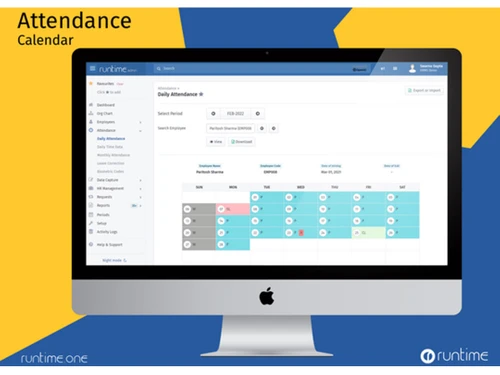
Runtime HRMS Attendance
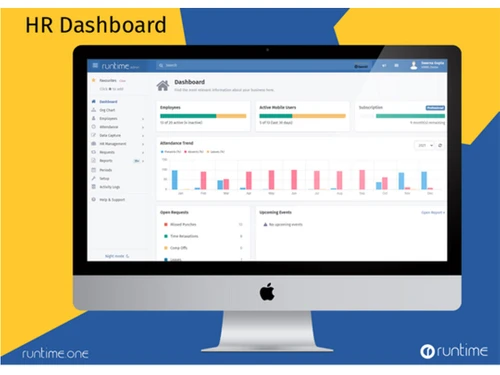
Runtime HRMS Dashboard

Runtime HRMS

Brand: Runtime Software Private Limited

  • 4.5

  • 10 Ratings & 10 Reviews

Runtime HRMS is a comprehensive cloud HR solution designed to integrate and streamline the HR processes of SMBs and MSMEs. Runtime HRMS helps HR managers make better decisions with workflow management tools designed for handling onboarding, leaves, salary, and claims. Runtime Cloud HR system offers this distinctive feature for adding more than one company under a single login for increasing busin...

See More

Have you used Runtime HRMS before?

Share your insights for better experience

Add a Review
Starting Price
₹60 excl.GST
₹ 71 incl. GST

View plans

100% Genuine
Products
Best Price
Guaranteed
Safe & Secure
Payment
  • Description

  • Pricing

  • Features

  • Specification

  • Review

  • Compare

  • Alternatives

  • FAQ

Starting at ₹60

Runtime HRMS Software Overview

What is Runtime HRMS?

Runtime HRMS is a comprehensive cloud HR solution designed to integrate and streamline the HR processes of SMBs and MSMEs. Runtime HRMS helps HR managers make better decisions with workflow management tools designed for handling onboarding, leaves, salary, and claims. Runtime Cloud HR system offers this distinctive feature for adding more than one company under a single login for increasing business productivity.

Features of Runtime HRMS

  • Automatic Greetings for sending birthday, wedding, and work anniversary wishes
  • Multi-level approvals and customizable forms for designing workflows
  • Bulk operations management with excel templates for uploading business data in bulk
  • Leave automation for defining lapse, encashment & auto grants rules for leaves.
  • Quick Claim Settlement and requests directly within the Payroll
  • Helpdesk Support to let employees submit their requests easily

Why Use Runtime HR Management Software?

  • Human Resource Management: Runtime HRMS helps businesses go paperless by storing documents and employee information online. The feature offers a history of increments, salary revisions, and promotions for human resource tasks and better administrative decisions.
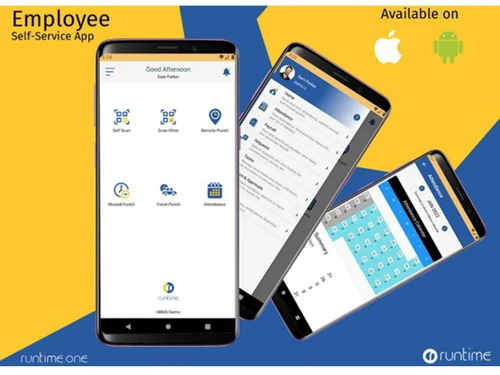
  • Employee Self-Service Mobile & Web Portal: Workman – our employee self-service app is available without any extra charge for all your employees. Workman is available on both Google Play Store and Apple App Store. Employees can access their attendance, download payslips, apply for leaves, and do a lot more using Workman. Our Professional plan also includes employee self-service web access.
  • Statutory Compliance: Runtime suite supports compliance with Employees’ State Insurance (ESI), Provident Fund (PF), Professional Tax and Income Tax. The statutory deductions are automatically calculated and deducted from employee salaries. You can also generate ESI, PF and Income Tax returns to file your compliance.
  • Employee Self-Onboarding: Speed up employee onboarding by sending self-onboarding form to new-hires. Once the new hire submits the form, you can review and approve to automatically add employee record.
  • HR Letter Automation: Generate frequently used Letters like appointment letter, experience certificate, relieving letter and more by saving the templates. Customize with your business logo, header, and footer. Generate letter for one or more employee with a single click. Download and/or send to employee’s email automatically.
  • Publish Company Policies: Create and public your company policies like leave policy, claim reimbursement policy, travel policy etc. our rich text builder. Employees can access these policies on their mobile application and/or self-service portal.
  • Send Notifications: Send bulk notifications to all or selected employees related to important official information. Runtime Suite sends push notifications to Workman mobile app on your employees’ mobile phones. You can also choose to send the notifications via email to the selected employees.
  • 35+ Rich Reports: Runtime HRMS offers 35+ rich reports for management information related to salary, employees, attendance, statutory and compliance.

Benefits of Using Runtime Suite

  • Paperless documentation and employee data management.
  • Employee database for storing the entire employee data, letters & history
  • Self-onboarding for effortless hiring and employee data collection
  • Pre-defined templates for easy offer, appointment, and termination letter generation.
  • Easy publication of business policies for a transparent business work culture
  • Send push notifications for updating teams with the latest announcements
  • Customizable reports to study employee data & make informed decisions

How Does Runtime Human Resource Management Software Work?

Runtime HRMS is a cloud-based solution built for modern businesses with an intuitive interface that is very simple to use. Runtime supports integration with multiple bio-metric machines to import attendance. Runtime HRMS has a wide range of services and great online documentation that can provide you with online help whenever you are stuck. 

How to use Runtime HRMS?

Get started with Runtime HRMS in simple steps:

Step 1: Buy Runtime HRMS installation key from techjockey.com

Step 2: Directly login through the official website

Step 3: Sign up & create your account

Step 4: Add employees using on-screen UI or import from excel

Step 5: Start tracking attendance by installing Workman mobile app on all your employees' phones

Step 6: Generate payroll at end of the month with just one click.

What is the price of Runtime HRMS?

Runtime HRMS price in India is ₹ 60 per employee per month. There are no hidden charges or additional monthly fees to use the service.

Read more

Runtime Software Private Limited Company Details

Founded Year:  2023

Runtime Software Private Limited is a software company involved in developing modern software solutions for small and medium businesses in India.

Director/Founders Mr. Prashant Agarwal
Company Size 1-100 Employees

Runtime HRMS Pricing & Plans

Basic

Calculated Price

60 Exclusive of all taxes
    • Employees

      Employees
      Employees
    • Monthly

      Monthly
      Monthly

Key Features

  • Everything in Starter +

  • Multiple Users

  • Biometric Integration

  • Statutory Compliance

  • Employee Loans

  • Automatic Greetings

  • Payslip Distribution

Professional

Calculated Price

90 Exclusive of all taxes
    • Employees

      Employees
      Employees
    • Monthly

      Monthly
      Monthly

Key Features

  • Everything in Basic +

  • Web Portal for Employees

  • Employee Self-Onboarding

  • HR Letter Automation

  • Policy Publishing

  • Bulk Notifications

  • Claim Settlement

  • Custom Workflows

Runtime HRMS Features

  • icon_check Asset Management
    Asset management will help you to track your assets that you have given yo your employees. You can see the list of issued assets
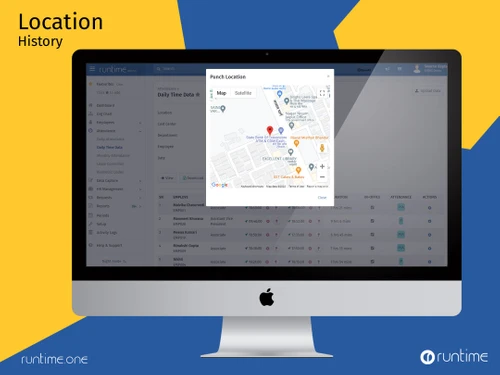
  • icon_check Travel Tracking
    Track employee travel and site visits with automatic distance calculation using GPS.
  • icon_check Custom URL
    Host Runtime HRMS HR and ESS Portal on your company's domain or sub-domain.
  • icon_check Employee Information System
    The system stores all employee information for defining policies and detailed task management.
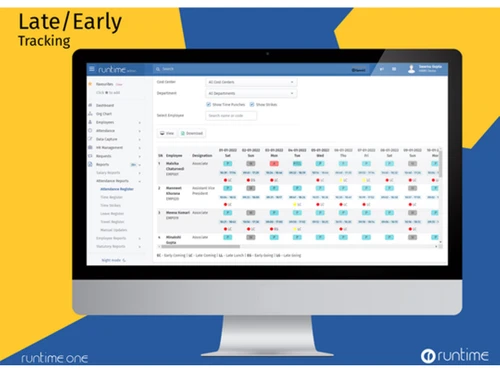
  • icon_check Attendance Management
    Track time and attendance, leaves, breaks, and overtime or accurate payroll processing.
  • icon_check Leave Management
    Leave automation helps to regulate employee leaves and define leave encashment rules.
  • icon_check Holidays & Weekly Offs
    The feature lets you define the holiday types & assign them department or employee-wise.
  • icon_check Payroll Processing
    calculating the net pay after making the necessary tax adjustments & deductions and generating Payslips.
  • icon_check Statutory Compliances
    Runtime tracks the organization's statutory dues like TDS, PF, ESIC, etc., to maintain legal compliance.
  • icon_check Employee Self Onboarding
    HR managers, can efficiently collect and perform all processes related to new hires.
  • icon_check Loans & Advances
    Define repayment schedule, extend advance facilities, and transact loans with this module.
  • icon_check Salary Structures
    Use the module for defining the salary, increment, and incentive rules for.
  • icon_check Policy Publication
    Rich text builder helps publish policies related to leaves, expenses & claims that employees can access on the portal
  • icon_check Employee Self Service
    ESS portal helps employees update their info, apply for reimbursement, view leaves remaining, etc.
Runtime HRMS Demo Video play icon

Get Runtime HRMS Demo

Watch the demo video to explore key features, real workflows, and how the software fits your business needs.

Understand
Key Features
Personal
Demo Insights
Interactive
Demo Support

Runtime HRMS Specifications

Supported Platforms
Windows Windows iOS iOS Android Android
Devices
Desktop Desktop Mobile Mobile
Deployment
Cloud-Based Cloud-Based
Suitable For
All Industries
Business Specific
All Businesses
Business Size
Small Business Startups Medium Business Enterprises SMBs SMEs MSMBs MSMEs
Customer Support
Phone Email Communities
Language
English
Training Resources
Videos

Explore the Best Alternative Solutions Similar to Your Business Size and Needs

Runtime HRMS Reviews

4.5

Out of 5

img

Overall Rating

Based on
10 Verified Reviews

Rating Breakdown

  • Features 4.3
  • Value for Money 4.4
  • Ease of Use 4.8
  • Customer Support 4.8

94% Recommend this Product

Add Review

Pros

  • "One of the best HR solutions with a lot of features such as payroll, employee management attendance tracking, Tax deduction etc. Highly recommended software to all the HR's"

    Mohan Sep 8, 2023

  • "I found it has good customization options. We are using Runtime HRMS software from last 3 months without any issue. Customer support is also approachable on email and call."

    Nitesh Nadar Feb 20, 2022

  • "This software is Very easy to use interface, great attendance and leaves system."

    Nisha PandyaApr 5, 2021

Cons

  • "This software does not track employee activity when they are working on the PC. They do not have such add-on which would be a good addition."

    Hemant KothariFeb 22, 2022

Mohan

Manager

Industry: Human Resources User since: 6-12 months

5

Reviewed on: Sep 8, 2023

Techjockey Verified

“Best Comprehensive HR software”

Pros

One of the best HR solutions with a lot of features such as payroll, employee management attendance tracking, Tax deduction etc. Highly recommended software to all the HR's

Cons

NO CONS

Amy Clements

Director

Industry: Education User since: 6-12 months

4.2

Reviewed on: Mar 22, 2022

Techjockey Verified

“Good Payroll & HRMS Software in the Market”

Pros

I must say, its a good payroll & HRMS software. I am using this software from 6 months and i am very happy. I can easily calculate my all employees salary, their overtime and income tax also. The support team is very good. , in case any new requirement you want, then their team try to add it in next release.

Cons

Please add face recognition option in mobile application

Reason to switch

Budget Friendly Software & Easy to use

Amee Parikh

Administrator

Industry: IT User since: 1-2 years

4.5

Reviewed on: Mar 16, 2022

Techjockey Verified

“Good HRMS & Payroll Software for Small and Medium Enterprises”

Pros

Runtime software comes with amazing features. The best part is you can remotely use it from anywhere. You can manage your attendance and check the latest updates shared by your organizations. I really appreciate your efforts guys, the way you are updating the features, the speed of your service and help support is really appreciable. I am using runtime from last 1.5 years.

Cons

Not yet

Switched from Keka HRMS

Reason to switch

Easy to use and User friendly Software under my budget.

See All Runtime HRMS Reviews

Compare Runtime HRMS With other HR Software

Products
Ratings
Pricing
Device Supported
Deployment
Supported Platforms
  • img

    Runtime HRMS

  • 4.5

  • ₹ 60.00 excl. GST

  • Desktop

    Mobile

  • Web based

    On Premises

  • Windows

    Mac OS

  • img

    Spine HR

  • 4.3

  • Price On Request

  • Desktop

    Mobile

  • Web based

    On Premises

  • Windows

    Mac OS

  • img

    ClusterHR

  • 5

  • ₹ 40

  • Desktop

    Mobile

  • Web based

    On Premises

  • Windows

    Mac OS

  • img

    Fix HR

  • 4.9

  • ₹ 600

  • Desktop

    Mobile

  • Web based

    On Premises

  • Windows

    Mac OS

  • img

    Zfour HRMS

  • 4.9

  • ₹ 45

  • Desktop

    Mobile

  • Web based

    On Premises

  • Windows

    Mac OS

  • img

    WeekMate

  • 4.6

  • ₹ 3999

  • Desktop

    Mobile

  • Web based

    On Premises

  • Windows

    Mac OS

  • img

    SignalHRM

  • 4.6

  • ₹ 648

  • Desktop

    Mobile

  • Web based

    On Premises

  • Windows

    Mac OS

  • img

    WoCo

  • 4.8

  • ₹ 50

  • Desktop

    Mobile

  • Web based

    On Premises

  • Windows

    Mac OS

  • img

    Presence360

  • 4.9

  • ₹ 2999

  • Desktop

    Mobile

  • Web based

    On Premises

  • Windows

    Mac OS

  • img

    TruHR

  • 4.9

  • ₹ 2200

  • Desktop

    Mobile

  • Web based

    On Premises

  • Windows

    Mac OS

  • img

    Keka HR

  • 4.4

  • Price On Request

  • Desktop

    Mobile

  • Web based

    On Premises

  • Windows

    Mac OS

(0) Product(s) selected

Runtime HRMS Alternatives

See All Runtime HRMS Alternatives

Starting Price:

₹600 /Month ₹900

SAVE UPTO 33%

Starting Price:

₹2,200 /Month

Starting Price:

₹49 /Month

Starting Price:

₹890 /Month

Starting Price:

₹1,499 /Month

Starting Price:

$49 /Month

Available

Price on Request

Starting Price:

₹5,000 /Month

Articles for Runtime HRMS

See All Related Articles

What is the payment frequency?

Subscription charges can be paid for 1 month, 6 months, 1 year, 2 year or 5 years. Go for 6 months or more for attractive discounts.

How to make the payment?

Once you are logged into the application, click on your profile picture at top right and then click 'My Businesses'. Under your business name, click on 'Manage Subscription'. From the subscription details page, click 'Renew' and select renewal duration to generate an invoice. Pay using net banking, cards, UPI or wallets for instant renewal of your subscription.

Can I pay offline or a direct bank transfer?

We recommend to pay using online payment facility. This ensures that your service is renewed immediately upon successful payment. If you choose to pay offline, you can do so by way of NEFT transfer to our bank account. However, it may take up-to 72 hours to renew your account. To find details of our bank account for NEFT payments, write to us at: connect@runtime.one

Is there a trial available?

Yes, we offer a 7-day free trial without any pre-payment or credit card information.

20,000+ Software Listed

Best Price Guranteed

Free Expert Consultation

2M+ Happy Customers

Terms and Condtions

close

Users with registered businesses can purchase goods from merchants on the platform to satisfy their business needs. Users are not permitted to utilize any products acquired through the platform for resale, advertising, business, or further distribution.

For each purchase made, users will receive a Tax Invoice (or 'GST invoice') that includes specific details such as:

  • the GSTIN of the user associated with their registered business, and

  • the specified Entity Name for their business.

It should be noted that not all products are eligible for GST Invoice. Only the products displayed by participating sellers with the 'GST-based Invoice Available' callout on the product description page would qualify.

Certain goods and services are not eligible to get a GST Invoice, including items with VAS, i.e., Value Added Services (e.g., Total Mobile Protection/Assured Buyback) and those involving an exchange offer at the time of purchase.

Users must ensure the accuracy of the GSTIN, and business entity name provided for the GST Invoice. Requests for corrections into GST Invoice would not be accommodated by Techjockey.com or any Seller, and any issues arising from user-provided information are the sole responsibility of users.

Techjockey.com is not liable for the GST Invoice or any associated input tax credit. To efficiently claim an input tax credit, users should select the registered place of business address as per the GST authority's data and follow the provisions of the GST Act and rules.

To claim an input tax credit, the delivery and billing addresses must match. Furthermore, input tax credits will not be granted if the delivery address and GSTIN on the invoice are from different states. In case of incorrect GST details provided during the order placement, the order will be canceled automatically.