linkedin
TimeTrack logo
TimeTrack-overview
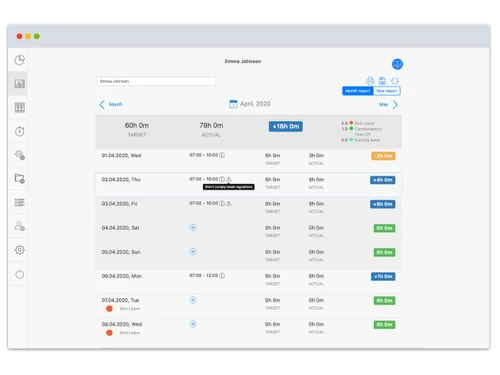
TimeTrack-timesheets
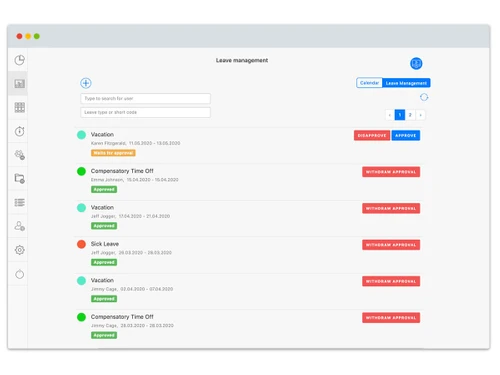
TimeTrack-leave

TimeTrack

Brand: TimeTrack

  • No Ratings & Reviews

TimeTrack helps businesses manage employee work hours, attendance, projects, scheduling, payroll, and productivity in one platform.

See More

Have you used TimeTrack before?

Share your insights for better experience

Add a Review
Starting Price
€7

View plans

100% Genuine
Products
Best Price
Guaranteed
Safe & Secure
Payment
  • Description

  • Pricing

  • Features

  • Specification

  • Review

  • Compare

  • Alternatives

  • FAQ

Starting at €7

TimeTrack Software Overview

What is TimeTrack?

TimeTrack is a time tracking software that helps businesses record employee working hours, manage projects, track attendance, handle workforce scheduling, and create invoices from one platform.

It allows employees to track time through mobile apps, web apps, tablets, or time terminals easily. The software supports project-based time tracking, absence management, overtime calculation, and expense tracking. Businesses can monitor project progress, employee productivity, and work schedules in real time. TimeTrack also provides reporting, analytics, payroll integration, and invoicing tools for better business management.

It supports cloud-based and on-premise deployment for flexible usage. The software includes workforce scheduling and shift planning features to help companies manage teams efficiently. GPS-based tracking and mobile access make it useful for remote and field employees. TimeTrack is commonly used by businesses, HR teams, project managers, and enterprises across different industries.

Why Choose TimeTrack Software?

  • Accurate Time Tracking: Records employee working hours efficiently.
  • Project Time Management: Tracks time spent on different projects easily.
  • Attendance Monitoring: Manages employee attendance digitally.
  • Workforce Scheduling: Simplifies shift and staff scheduling processes.
  • Payroll Integration: Supports payroll calculations using tracked work hours.
  • Cloud-Based Access: Access data securely from anywhere online.
  • Mobile App Support: Allows employees to track time through mobile devices.
  • GPS Tracking Features: Monitors remote and field employee locations.
  • Real-Time Reporting: Provides instant workforce and project insights.
  • Automated Timesheets: Reduces manual time entry and paperwork.
  • Overtime Management: Calculates overtime hours accurately.
  • Absence Tracking: Manages leave, holidays, and absences efficiently.
  • Expense Tracking: Records and monitors business expenses easily.
  • Invoice Generation: Creates invoices directly from tracked project hours.
  • Improved Productivity: Helps businesses optimize employee performance.

Benefits of TimeTrack Software

  • Employee Self-Service: Allows staff to manage their own time records.
  • Detailed Analytics: Generates reports for better decision-making.
  • Reduced Administrative Work: Automates workforce management tasks.
  • Flexible Deployment Options: Supports cloud and on-premise installation.
  • Project Progress Monitoring: Tracks task completion and project status.
  • Team Management Tools: Helps managers organize teams effectively.
  • Customizable Features: Adapts according to business requirements.
  • Secure Data Management: Protects employee and business information safely.
  • HR Management Support: Assists HR teams with workforce operations.
  • Scalable Business Solution: Suitable for small businesses and enterprises.
  • Accurate Workforce Records: Maintains organized employee work data.
  • Remote Work Support: Useful for hybrid and remote work environments.

TimeTrack Pricing

TimeTrack price starts at Euro 7 on techjockey.com.

The pricing model is based on different parameters, including extra features, deployment type, and the total number of users. For further queries related to the product, you can contact our product team and learn more about the pricing and offers.

Read more

TimeTrack Pricing & Plans

Standard
Starting at €7
    • Users

      Users
      Users
    • Monthly

      Monthly
      Monthly

Key Features

  • Digital Time Clock

  • Attendances

  • Timesheets

  • Break Recording

  • Vacation Management

Premium
Starting at €11
    • Users

      Users
      Users
    • Monthly

      Monthly
      Monthly

Key Features

  • Everything in Standard, plus

  • Project Time Clock

  • Project Documentation

  • Project Evaluation

  • Shift/Duty Scheduling

Gold
Starting at €13
    • Users

      Users
      Users
    • Monthly

      Monthly
      Monthly

Key Features

  • Everything in Premium, plus

  • Project Billing

  • Travel Expense Management

  • Appointment Scheduling

  • Integrations

TimeTrack Features

  • icon_check Time Tracking
    Track work hours accurately using manual timers, one-click start/stop, or automatic background time recording.
  • icon_check Attendance Management
    Monitor employee clock-in and clock-out times in real time to ensure attendance accuracy and compliance.
  • icon_check Timesheet Management
    Generate automated timesheets that summarize daily, weekly, or monthly working hours for payroll review.
  • icon_check Project Tracking
    Assign time entries to projects and tasks to measure effort, costs, and overall project performance.
  • icon_check Shift Scheduling
    Create and manage employee work schedules with flexible shifts, recurring plans, and availability rules.
  • icon_check Absence & Leave Management
    Track vacation, sick leave, and absences with approval workflows and clear visibility for managers.
  • icon_check Mobile Time Tracking
    Allow employees to record time, view schedules, and manage absences directly from mobile devices.
  • icon_check GPS Location
    Verify work locations with optional GPS tracking to ensure accurate time logging for remote teams.
  • icon_check Overtime Calculation
    Automatically calculate overtime hours based on defined rules to reduce payroll errors and disputes.
  • icon_check Reporting & Analytics
    Generate detailed reports on work hours, attendance, productivity, and project costs for data-driven decisions.
  • icon_check Role-Based Access Control (RBAC)
    Define user roles and permissions to control access to time data, reports, and administrative settings.
  • icon_check Payroll Export
    Export approved timesheets to payroll systems to simplify salary processing and reduce manual work.
  • icon_check Integrations
    Connect with accounting, HR, and payroll tools to streamline workflows and centralize data.
  • icon_check Cloud Synchronization
    Sync data securely across devices in real time, ensuring access to up-to-date time records anywhere.
  • icon_check Compliance Management
    Support labor law compliance by tracking working hours, breaks, and overtime accurately.

TimeTrack Specifications

Supported Platforms
Windows Windows iOS iOS Android Android MacOS MacOS
Devices
Desktop Desktop Mobile Mobile Tablet Tablet iPad iPad
Deployment
Cloud-Based Cloud-Based Perpetual Perpetual
Suitable For
All Industries
Business Specific
All Businesses
Business Size
Small Business Startups Medium Business Enterprises
Customer Support
Email Communities
Language
English
Integration
API Integration
Training Resources
Videos

Explore the Best Alternative Solutions Similar to Your Business Size and Needs

TimeTrack Review

Techjockey Trusted Reviews from Verified Users

No reviews are currently available for TimeTrack. Discover similar Time Tracking Software reviews

  • Desklog

    4.6

    Whats great - It's really a good time slot to have the demo version for 40 days. It is more than enough to understand all the features and ... read more

  • Ontime Employee Manager

    4.3

    Whats great - I needed to schedule regular meetings with employees to evaluate performance and also to chart out the future plan of action.... read more

  • Work Hour Monitor

    5.0

    Whats great - it is a time tracking software that helps the organization to track the employee's active time on the system it is software f... read more
Compare TimeTrack With other Time Tracking Software

Products
Ratings
Pricing
Device Supported
Deployment
Supported Platforms
  • img

    TimeTrack

  • Price On Request

  • Desktop

    Mobile

  • Web based

    On Premises

  • Windows

    Mac OS

  • img

    Hubstaff

  • 4.3

  • Price On Request

  • Desktop

    Mobile

  • Web based

    On Premises

  • Windows

    Mac OS

  • img

    ADP SecurTime

  • 4.0

  • Price On Request

  • Desktop

    Mobile

  • Web based

    On Premises

  • Windows

    Mac OS

  • img

    Time Doctor

  • 4.4

  • Price On Request

  • Desktop

    Mobile

  • Web based

    On Premises

  • Windows

    Mac OS

  • img

    TopTracker

  • 4.4

  • Price On Request

  • Desktop

    Mobile

  • Web based

    On Premises

  • Windows

    Mac OS

  • img

    DeskViu

  • 4.1

  • ₹ 100

  • Desktop

    Mobile

  • Web based

    On Premises

  • Windows

    Mac OS

  • img

    TimeChart

  • 4.1

  • Price On Request

  • Desktop

    Mobile

  • Web based

    On Premises

  • Windows

    Mac OS

  • img

    OnTheClock

  • 4.4

  • Price On Request

  • Desktop

    Mobile

  • Web based

    On Premises

  • Windows

    Mac OS

  • img

    Beebole

  • 4.3

  • Price On Request

  • Desktop

    Mobile

  • Web based

    On Premises

  • Windows

    Mac OS

(2) Product(s) selected

TimeTrack Alternatives

See All TimeTrack Alternatives

Available

Price on Request

Available

Price on Request

Starting Price:

€9 /User/Month

Starting Price:

$50 /Month

Starting Price:

$28 /Month

Starting Price:

$12 /Month
Starting Price:

$4 /Month

Starting Price:

$14 /Seat/Month

Articles for TimeTrack

See All Related Articles

How much does TimeTrack Software cost?

TimeTrack price starts at 7 Euros on techjockey.com.

Is there a mobile app available for TimeTrack Software?

Yes, TimeTrack mobile app is available on iOS and Android.

Which operating systems are compatible with TimeTrack Software?

TimeTrack is compatible with Windows and macOS.

Does TimeTrack Software offer a free trial?

TimeTrack offers a free trial for users who want to test its workforce and time tracking features.

How does TimeTrack Software function?

TimeTrack Software functions by tracking employee work hours, attendance, projects, schedules, payroll, and productivity through web and mobile-based tools.

Who uses TimeTrack Software?

TimeTrack Software is used by businesses, HR teams, project managers, enterprises, and organizations managing employee time and workforce operations.

Is a free demo available for TimeTrack Software?

Yes, TimeTrack Software provides demos and consultations for businesses interested in its features.

Is TimeTrack Software available for free?

No, TimeTrack is not available for free.

20,000+ Software Listed

Best Price Guranteed

Free Expert Consultation

2M+ Happy Customers

Terms and Condtions

close

Users with registered businesses can purchase goods from merchants on the platform to satisfy their business needs. Users are not permitted to utilize any products acquired through the platform for resale, advertising, business, or further distribution.

For each purchase made, users will receive a Tax Invoice (or 'GST invoice') that includes specific details such as:

  • the GSTIN of the user associated with their registered business, and

  • the specified Entity Name for their business.

It should be noted that not all products are eligible for GST Invoice. Only the products displayed by participating sellers with the 'GST-based Invoice Available' callout on the product description page would qualify.

Certain goods and services are not eligible to get a GST Invoice, including items with VAS, i.e., Value Added Services (e.g., Total Mobile Protection/Assured Buyback) and those involving an exchange offer at the time of purchase.

Users must ensure the accuracy of the GSTIN, and business entity name provided for the GST Invoice. Requests for corrections into GST Invoice would not be accommodated by Techjockey.com or any Seller, and any issues arising from user-provided information are the sole responsibility of users.

Techjockey.com is not liable for the GST Invoice or any associated input tax credit. To efficiently claim an input tax credit, users should select the registered place of business address as per the GST authority's data and follow the provisions of the GST Act and rules.

To claim an input tax credit, the delivery and billing addresses must match. Furthermore, input tax credits will not be granted if the delivery address and GSTIN on the invoice are from different states. In case of incorrect GST details provided during the order placement, the order will be canceled automatically.