linkedin
Toast POS logo
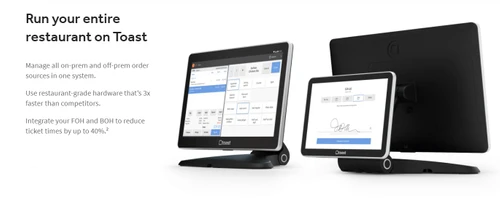
play Toast basic ordering
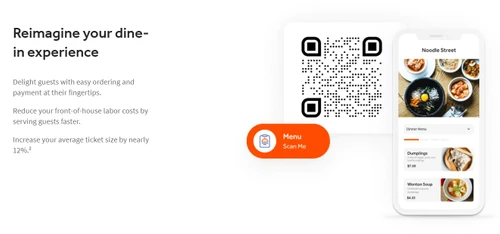
toast pos contactless ordering
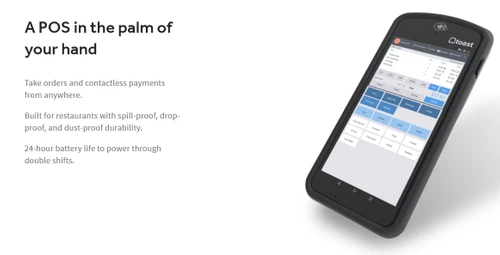
toast pos handhelds

Toast POS

Brand: Toast

  • 4.3

  • 6 Ratings

Toast POS is a cloud-based restaurant management and point-of-sale (POS) platform that helps restaurants manage menus, staff, orders, payments, customer loyalty, reporting, and day-to-day operations from a unified system.

See More

Have you used Toast POS before?

Share your insights for better experience

Add a Review
Starting Price
$69

View plans

100% Genuine
Products
Best Price
Guaranteed
Safe & Secure
Payment
  • Description

  • Pricing

  • Features

  • Specification

  • Review

  • Compare

  • Alternatives

  • FAQ

Starting at $69

Toast POS Software Overview

What is Toast POS?

Toast POS is a comprehensive, cloud-based restaurant management software platform designed to streamline every aspect of food and beverage operations. It provides an all-in-one solution that combines point of sale, front of house, back of house, and guest-facing technology into a single, cohesive system. Engineered to handle peak volume, slim margins, and complex workflows, Toast is a trusted partner for over 171,000 locations. Its versatile architecture makes it suitable for a wide range of businesses, from small startups and single-location SMBs to large, multi-location enterprises.

Why Choose Toast POS?

  • Cloud-Based Platform: Accessible from anywhere, the cloud-based system allows you to manage your restaurant, view reports, and update menus from any device with an internet connection.
  • Restaurant-Grade Hardware: Toast's hardware is purpose-built and rigorously tested to withstand the demanding conditions of a busy restaurant, including spills, heat, and constant use.
  • Reliable Offline Mode: Keep your business running smoothly even when the Wi-Fi isn't. The system can continue to take orders and process payments, automatically syncing everything once connectivity is restored.
  • 24/7 Customer Support: Gain peace of mind with round-the-clock access to a dedicated support team of real people who provide real solutions when you need them most.
  • Seamless Integrations: With a network of over 300 trusted partners, Toast integrates effortlessly with the tools you already use for accounting, delivery, marketing, and more.
  • Proven ROI: Many restaurants see a tangible return on their investment. For example, some users report a 15% lift in average check sizes by implementing features like Toast Mobile Order & Pay.

Advanced Features of Toast POS

  • Menu Management: Easily customize and update menus, pricing, and item availability in real-time. Changes can be pushed instantly across all devices, locations, and online ordering platforms.
  • Employee Management: Simplify staff scheduling, time tracking, and role-based permissions with fully integrated tools. Monitor labor costs and performance from a central dashboard.
  • Customer Relationship Management (CRM): Build a comprehensive guest database to track purchase history, visit frequency, and preferences. Use this data to create personalized marketing campaigns and foster loyalty.
  • Loyalty and Rewards Program: Design and manage custom loyalty programs to reward repeat customers. Offer points-based or visit-based rewards to drive engagement and increase repeat business.
  • Reporting & Analytics: Access detailed, easy-to-understand reports on sales, labor, and product mix. Gain valuable insights to make informed, data-driven decisions that optimize your operations.
  • Gift Card Management: Offer and manage both physical and digital gift cards to attract new customers and boost revenue. Gift card balances are tracked seamlessly across all locations.

Modules of Toast POS

  • xtraCHEF by Toast: An advanced cost management tool for automating invoice processing, tracking plate costs against fluctuating ingredient prices, and optimizing inventory to improve margins.
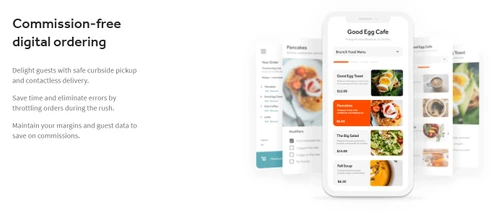
  • Online Ordering & Delivery: A fully integrated suite for commission-free online orders through your website, delivery management (including self-delivery and third-party integration), and a branded mobile app experience.
  • Toast Payroll & Team Management: A specialized solution that syncs with your POS data for streamlined payroll, HR, and team management, helping to control labor costs and ensure compliance.
  • Marketing: A suite of tools to create automated email marketing campaigns, collect guest feedback, and run targeted promotions to keep customers coming back.

How to Use Toast POS?

  1. Request a Demo: The first step is to schedule a personalized online demo with a Toast specialist to see how the platform can address your unique challenges and goals.
  2. Custom Configuration: Work with the Toast team to select the right hardware and software modules for your service model, from countertop terminals and handheld devices to kitchen display systems (KDS).
  3. Onboarding and Training: Toast provides dedicated support to get your system installed and your team trained on its day-to-day functions, including order taking, payment processing, and menu management.
  4. Ongoing Management: Utilize the cloud-based back-end to update menus, manage staff schedules, view real-time analytics, and run marketing campaigns from any device.
  5. Leverage Support & Resources: Take full advantage of 24/7 customer support and a vast library of online resources to optimize your use of the platform and troubleshoot any issues that arise.

Toast POS Pricing

Toast POS price starts at USD 69 at techjockey.com.

The pricing model is based on different parameters, including extra features, deployment type, and the total number of users. For further queries related to the product, you can contact our product team and learn more about the pricing and offers.

Read more

Toast Company Details

Founded Year:  2011

Toast is an all-in-one point-of-sale and restaurant management platform for businesses in the food service and hospitality space.

Director/Founders Aman Narang, Jonathan Grimm, Steve Fredette
Company Size 1000+ Employees

Toast POS Pricing & Plans

Point of Sale
Key Features
  • Cloud-based point of sale
  • Custom hardware configuration
  • Real-time fraud monitoring
  • Table and order management
Starting at $69
    • Licenses

      Licenses
      Licenses
    • Monthly

      Monthly
      Monthly

Key Features

  • Cloud-based point of sale

  • Custom hardware configuration

  • Real-time fraud monitoring

  • Table and order management

Toast POS Features

  • icon_check Menu Management
    Easily customize and update menus, pricing, and item availability in real-time across all locations and devices.
  • icon_check Employee Management
    Simplify scheduling, time tracking, and permissions for staff with integrated employee management tools.
  • icon_check Customer Relationship Management (CRM)
    Store customer data, track purchase history, and personalize promotions to enhance loyalty and repeat visits.
  • icon_check Loyalty and Rewards Program
    Create custom loyalty programs and reward returning customers to drive engagement and brand loyalty.
  • icon_check Reporting & Analytics
    Gain insights with detailed sales, labor, and performance reports to make data-driven business decisions easily.
  • icon_check Third Party Integrations
    Connect with 200+ popular restaurant apps, including accounting, delivery, and marketing platforms seamlessly.
  • icon_check Gift Card Management
    Offer and manage physical or digital gift cards that sync with your POS for easy redemption and tracking.
  • icon_check POS
    Cloud-based, Android-powered point-of-sale terminals and handheld devices designed for restaurant front-of-house use.
  • icon_check Kitchen Display System
    Digital kitchen screens replace paper tickets, route orders by prep time, and alert servers when dishes are ready.
  • icon_check Self Ordering Kiosk
    Enables customers to order and pay via self-serve kiosks, improving throughput and reducing staff workload.
  • icon_check Inventory Management
    Track ingredient-level inventory in real time, set alerts for low stock, and view usage reports to optimize purchasing.
  • icon_check Multi-Location Management
    Manage menus, pricing and operations across multiple restaurant locations via a centralized dashboard.
  • icon_check Integration
    Open API and built-in integrations with loyalty platforms, online ordering, accounting systems, and third-party apps.
  • icon_check Payment Processing
    Built-in, PCI-compliant payments support credit cards, contactless methods (Apple Pay/Google Pay), and more.
Toast POS Demo Video play icon

Get Toast POS Demo

Watch the demo video to explore key features, real workflows, and how the software fits your business needs.

Understand
Key Features
Personal
Demo Insights
Interactive
Demo Support

Toast POS Specifications

Supported Platforms
Windows Windows iOS iOS Android Android
Devices
Desktop Desktop Mobile Mobile
Deployment
Cloud-Based Cloud-Based
Suitable For
Restaurant Cafe
Business Specific
Restaurants
Business Size
Small Business Medium Business SMBs
Customer Support
Phone Email Forums
Language
English
Training Resources
Videos

Explore the Best Alternative Solutions Similar to Your Business Size and Needs

Toast POS Review

4.3

Out of 5

img

Overall Rating

Based on
6 Verified Ratings

Rating Breakdown

  • Features 4.5
  • Value for Money 4.5
  • Ease of Use 3.8
  • Customer Support 4.4

90% Recommend this Product

Add Review

Techjockey Trusted Reviews from Verified Users

No reviews are currently available for Toast POS. Discover similar Restaurant POS Software reviews
  • Petpooja

    4.1

    Whats great - The software is easy to use and understand. Currently, it has all the features required to run a restaurant efficiently. read more

  • Mink Foodiee Restaurant POS

    4.8

    Whats great - Works with almost all devices, Very easy to setup and use with many services like crm, loyalty programs, inventory managemen... read more

  • TMBill POS

    4.2

    Whats great - No expertise and solution offered, only duping people. read more

Compare Toast POS With other Restaurant POS Software

Products
Ratings
Pricing
Device Supported
Deployment
Supported Platforms
  • img

    Toast POS

  • 4.3

  • Price On Request

  • Desktop

    Mobile

  • Web based

    On Premises

  • Windows

    Mac OS

  • img

    Petpooja

  • 4.2

  • ₹ 10000

  • Desktop

    Mobile

  • Web based

    On Premises

  • Windows

    Mac OS

  • img

    Feedo

  • 4.7

  • ₹ 899

  • Desktop

    Mobile

  • Web based

    On Premises

  • Windows

    Mac OS

  • img

    SpotOn

  • 4.3

  • Price On Request

  • Desktop

    Mobile

  • Web based

    On Premises

  • Windows

    Mac OS

  • img

    SpeedLine POS

  • 4.5

  • Price On Request

  • Desktop

    Mobile

  • Web based

    On Premises

  • Windows

    Mac OS

  • img

    Rezku POS

  • 4.4

  • Price On Request

  • Desktop

    Mobile

  • Web based

    On Premises

  • Windows

    Mac OS

  • img

    Track My Table

  • 4.2

  • ₹ 399

  • Desktop

    Mobile

  • Web based

    On Premises

  • Windows

    Mac OS

  • img

    RestoMPOS

  • 4.3

  • Price On Request

  • Desktop

    Mobile

  • Web based

    On Premises

  • Windows

    Mac OS

  • img

    Solo Billing

  • 4.1

  • ₹ 8000

  • Desktop

    Mobile

  • Web based

    On Premises

  • Windows

    Mac OS

  • img

    TMBill POS

  • 4.4

  • ₹ 5999

  • Desktop

    Mobile

  • Web based

    On Premises

  • Windows

    Mac OS

  • img

    FoodyQueen

  • 4.1

  • ₹ 4188

  • Desktop

    Mobile

  • Web based

    On Premises

  • Windows

    Mac OS

(0) Product(s) selected

Toast POS Alternatives

See All Toast POS Alternatives

Starting Price:

$55 /Month

Starting Price:

$49 /Month

Available

Price on Request

Lavu

4.1

Available

Price on Request

Starting Price:

$49 /Month

Available

Price on Request

Is there any free trial or demo for Toast Pos?

Toast Pos Restaurant Billing Software demo is available for free at Techjockey.com.

Is Toast Pos free?

Toast Pos Restaurant Billing Software offers a free trial. However, the premium plan with advanced features available at Techjockey.

How can you download Toast Pos?

For Toast Pos Restaurant Billing Software installation, insert the given CD/USB flash storage in your system and open the Setup Wizard to get started.

How much does Toast POS cost per month?

Toast POS price starts at USD 69 at techjockey.com.

Who can use Toast POS?

Toast is ideal for full-service restaurants, fine-dining and casual-dining establishments, quick-service and fast-casual restaurants, cafes, bakeries, bars, breweries, lounges, pizzerias, food trucks, hotels, and retail or hybrid food businesses such as convenience stores, butcher shops, grocers, and bottle shops that need restaurant POS and management tools.

Is Toast POS only for restaurants?

No, Toast POS is designed for a variety of businesses including restaurants, bars, and cafes, as well as retail businesses like convenience stores, bottle shops, and grocery stores.

Can Toast POS integrate with other software I use?

Yes, Toast POS offers seamless integrations with over 200 trusted partners, including popular accounting, delivery, and marketing platforms.

What kind of hardware does Toast POS use?

Toast provides custom, restaurant-grade hardware configurations that are specifically tested to withstand the toughest conditions of a busy restaurant environment.

What is xtraCHEF by Toast?

xtraCHEF by Toast is an add-on module for invoice and cost management that helps you track expenses, automate invoice processing, and optimize menu item profitability.

What kind of customer support does Toast offer?

Toast provides 24/7 customer support with real people available to provide solutions whenever you need assistance with your POS system.

20,000+ Software Listed

Best Price Guranteed

Free Expert Consultation

2M+ Happy Customers

Terms and Condtions

close

Users with registered businesses can purchase goods from merchants on the platform to satisfy their business needs. Users are not permitted to utilize any products acquired through the platform for resale, advertising, business, or further distribution.

For each purchase made, users will receive a Tax Invoice (or 'GST invoice') that includes specific details such as:

  • the GSTIN of the user associated with their registered business, and

  • the specified Entity Name for their business.

It should be noted that not all products are eligible for GST Invoice. Only the products displayed by participating sellers with the 'GST-based Invoice Available' callout on the product description page would qualify.

Certain goods and services are not eligible to get a GST Invoice, including items with VAS, i.e., Value Added Services (e.g., Total Mobile Protection/Assured Buyback) and those involving an exchange offer at the time of purchase.

Users must ensure the accuracy of the GSTIN, and business entity name provided for the GST Invoice. Requests for corrections into GST Invoice would not be accommodated by Techjockey.com or any Seller, and any issues arising from user-provided information are the sole responsibility of users.

Techjockey.com is not liable for the GST Invoice or any associated input tax credit. To efficiently claim an input tax credit, users should select the registered place of business address as per the GST authority's data and follow the provisions of the GST Act and rules.

To claim an input tax credit, the delivery and billing addresses must match. Furthermore, input tax credits will not be granted if the delivery address and GSTIN on the invoice are from different states. In case of incorrect GST details provided during the order placement, the order will be canceled automatically.