linkedin
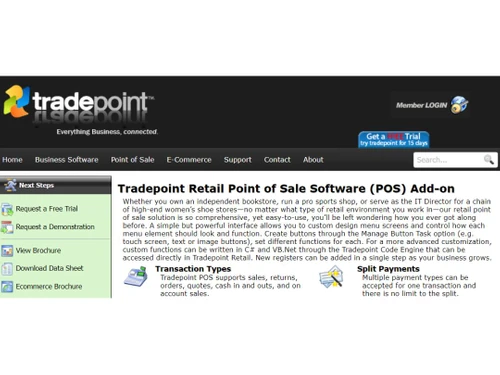
Tradepoint logo
tradepoint-add-on
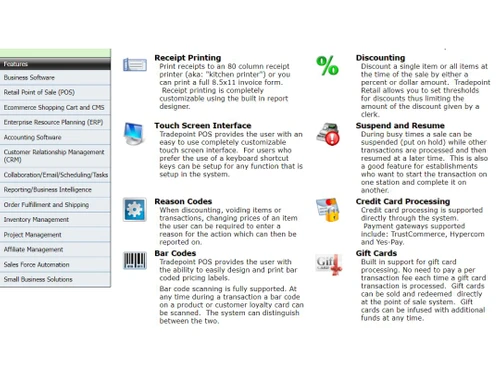
tradepoint-features
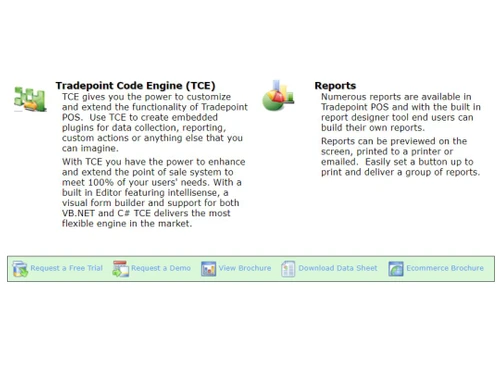
tradepoint-reports

Tradepoint

Brand: Tradepoint 360

  • 4.2

  • 3 Ratings

Tradepoint streamlines inventory management with automated ordering, real-time stock control, and advanced analysis to help reduce overhead.

See More

Have you used Tradepoint before?

Share your insights for better experience

Add a Review

Price Available on Request

Questions about pricing or customization? We’re here to help, just a click away.

100% Genuine
Products
Best Price
Guaranteed
Safe & Secure
Payment
  • Description

  • Pricing

  • Features

  • Specification

  • Review

  • Compare

  • Alternatives

  • FAQ

Tradepoint Software Overview

What is Tradepoint?

Tradepoint is a comprehensive inventory management software designed to provide end-to-end solutions for a wide range of businesses. It serves as a centralized platform for managing all aspects of inventory, from costing and reorder lead times to turnover and projected run-rates. With a focus on automation and real-time data, Tradepoint aims to simplify complex inventory processes, allowing businesses to lower overhead and increase sales. The software features a simple, intuitive interface and is engineered to support startups, small to medium-sized businesses (SMBs), and agencies in optimizing their supply chain operations.

Why Choose Tradepoint?

  • Reduce Manual Workload: By automating day-to-day processes, Tradepoint allows your team to focus on strategic activities like sales growth and supplier negotiations rather than manual inventory counts and data entry.
  • Proactive Stock Management: The system automatically reports on low-stock inventory and notifies the appropriate personnel, preventing stockouts and ensuring you can always meet customer demand.
  • Enhanced Financial Oversight: Tradepoint automatically tracks crucial financial metrics such as inventory turnover and overhead, providing clear insights into the efficiency and profitability of your stock management.
  • Real-Time Data Accuracy: Inventory counts are reported in real-time to all quotes, orders, and invoices, eliminating discrepancies and ensuring all departments work with the most current information.

Advanced Features of Tradepoint

  • Automatic Inventory Analysis and Ordering: Tradepoint utilizes groundbreaking analysis of usage patterns, incorporating Key Performance Indicators (KPIs) like period usage, year-to-date (YTD) figures, and real reorder times. It projects future inventory needs with high accuracy, suggests what to reorder and from which supplier, and can even automatically generate purchase orders.
  • Optimized Purchase Ordering: The software allows your sales process to drive purchasing. It can be configured to automatically reorder when a sales order causes inventory to drop below a set threshold or create drop-ship purchase orders. It also optimizes ordering to achieve minimum quantity, weight, and volume discounts from suppliers.
  • Automated Shipment Receipt: Receiving goods is simplified with a one-click process. Users can validate items via barcode scanning, manage damaged or un-requested goods, and assign items to multiple bin locations. The system tracks serial numbers and batches for full recall capability and immediately updates inventory valuations upon receipt.
  • Advanced Costing Methods: Tradepoint supports three unique inventory costing methods that can be set as a default or applied on a per-product basis, providing flexibility in how inventory is valued and accounted for.
  • Automated Inventory Transfers: Supports transfers between an unlimited number of warehouses, including across separate divisions or companies, with accounting automatically handled behind the scenes eliminating time-consuming, error-prone manual journal entries. Transfers are tracked separately so they don't distort inventory turnover calculations.

Key Capabilities of Tradepoint

  • Real-Time Inventory Control: Automatically updates stock levels across all business functions, from sales quotes to final invoices. Includes tracking for serial numbers, batches, and multiple bin locations.
  • Automated Purchasing and Reordering: Uses predictive analytics based on historical sales data and KPIs to suggest and automate purchase orders, ensuring optimal stock levels while minimizing overhead.
  • Sales and Order Integration: Seamlessly connects inventory data to the sales process, allowing sales-driven purchasing, automatic drop-shipping, and accurate stock availability on all orders.
  • Shipment and Receiving Management: Streamlines the inbound logistics process with one-click shipment receipt, barcode validation, and automatic updates to stock and accounting records.
  • Accounting and Valuation: Integrates directly with accounting functions, allowing inventory to be sold immediately upon receipt. It supports multiple costing methods for accurate financial reporting and valuation.
  • Sell Immediately on Receipt: Tradepoint's Inventory Liability accounting system lets you sell goods the moment they arrive in your warehouse, without waiting for the supplier's bill a distinct advantage over systems that require an invoice before inventory can be sold.
  • Automated Order Fulfillment: Processes sales orders in two clicks automatically identifying orders that can be fulfilled from current inventory, removing stock upon shipment, and scheduling shipments with integrated carrier documentation.

How to Use Tradepoint?

  1. Acquire License: Obtain your Tradepoint installation key or license from an authorized vendor.
  2. Install or Login: Install the software on your device for an on-premise deployment or log in directly through the official website for the web-based version.
  3. Create Your Account: Complete the sign-up process to create your primary company account.
  4. Add Users: Invite your team members and assign specific roles and permissions based on their responsibilities.
  5. Begin Operations: Start importing your product data, configuring your settings, and utilizing the platform for your daily inventory management tasks.

Tradepoint Pricing

Tradepoint pricing details are available on request on techjockey.com.

The pricing model is based on different parameters, including extra features, deployment type, and the total number of users. For further queries related to the product, you can contact our product team and learn more about the pricing and offers.

Read more

Tradepoint 360 Company Details

Founded Year:  2010

Tradepoint 360, Inc. is a North America based software design and manufacturing company creating Windows based ERP software, web based software using the DotNetNuke platform, and Ecommerce solutions

Director/Founders Rene Liocouras Nielsen
Company Size 1-100 Employees

Tradepoint Pricing & Plans

Looking for The Right Pricing?

Share your requirements and get a plan built around your business.

  • Define your business needs
  • Get customised pricing
  • Choose features that fit your workflow

Price Available on Request

Get personalised Tradepoint pricing that fits your needs. Our team will connect with you.

Tradepoint Features

  • icon_check Inventory Management
    Maintain real-time inventory levels across multiple warehouses with automated updates upon receiving and invoicing.
  • icon_check Automatic Inventory Analysis and Ordering
    Set automated reorder levels and receive low-stock alerts to streamline purchasing decisions.
  • icon_check Optimized Purchase Ordering
    Generate purchase orders based on inventory trends and supplier availability to ensure timely restocking.
  • icon_check Automated Shipment Receipt
    Automatically update inventory data upon receiving goods, reducing manual entry and errors.
  • icon_check Advanced Inventory Costing Methods
    Automatically update inventory data upon receiving goods, reducing manual entry and errors.
  • icon_check Warehouse
    Monitor stock movement between warehouses and manage inventory across multiple locations.
  • icon_check Automated Sales Order Fulfillment with Integrated
    Streamline order processing from sales to fulfillment, integrating seamlessly with accounting functions.

Tradepoint Specifications

Supported Platforms
Windows Windows
Devices
Desktop Desktop
Deployment
Cloud-Based Cloud-Based
Suitable For
All Industries
Business Specific
All Businesses
Business Size
Small Business Startups Medium Business SMBs
Language
English

Explore the Best Alternative Solutions Similar to Your Business Size and Needs

Tradepoint Review

4.2

Out of 5

img

Overall Rating

Based on
3 Verified Ratings

Rating Breakdown

  • Features 3.6
  • Value for Money 4.3
  • Ease of Use 3.8
  • Customer Support 5

86% Recommend this Product

Add Review

Techjockey Trusted Reviews from Verified Users

No reviews are currently available for Tradepoint. Discover similar Inventory Management Software reviews

  • Fishbowl Inventory

    4.0

    Whats great - Fishbowl has improved our inventory visibility and management. read more

  • aStock ERP

    4.4

    Whats great - Supports large inventories, dynamic categories, excellent data export options. read more

  • Pro-Biz

    4.9

    Whats great - User-Friendly Interface.Easy navigation for users of all skill levels, reducing training time. Real-Time Tracking. Keeps accu... read more

Compare Tradepoint With other Inventory Management Software

Products
Ratings
Pricing
Device Supported
Deployment
Supported Platforms
  • img

    Tradepoint

  • 4.2

  • Price On Request

  • Desktop

    Mobile

  • Web based

    On Premises

  • Windows

    Mac OS

  • img

    Pro-Biz

  • 4.8

  • ₹ 5999

  • Desktop

    Mobile

  • Web based

    On Premises

  • Windows

    Mac OS

  • img

    Megaventory

  • 4.1

  • Price On Request

  • Desktop

    Mobile

  • Web based

    On Premises

  • Windows

    Mac OS

  • img

    Stock It

  • 4.4

  • ₹ 620

  • Desktop

    Mobile

  • Web based

    On Premises

  • Windows

    Mac OS

  • img

    Netstock

  • 4.4

  • Price On Request

  • Desktop

    Mobile

  • Web based

    On Premises

  • Windows

    Mac OS

  • img

    EaseMargin

  • 4.4

  • ₹ 7188

  • Desktop

    Mobile

  • Web based

    On Premises

  • Windows

    Mac OS

  • img

    Finale Inventory

  • 4.3

  • Price On Request

  • Desktop

    Mobile

  • Web based

    On Premises

  • Windows

    Mac OS

  • img

    Quartzy

  • 4.1

  • Price On Request

  • Desktop

    Mobile

  • Web based

    On Premises

  • Windows

    Mac OS

  • img

    Zoho Inventory

  • 4.3

  • ₹ 2299

  • Desktop

    Mobile

  • Web based

    On Premises

  • Windows

    Mac OS

  • img

    Prediko

  • 4.1

  • Price On Request

  • Desktop

    Mobile

  • Web based

    On Premises

  • Windows

    Mac OS

(2) Product(s) selected

Tradepoint Alternatives

See All Tradepoint Alternatives

Available

Price on Request

Starting Price:

$249 /Month

Starting Price:

$49 /Month

Starting Price:

₹350,000 /OneTime

Articles for Tradepoint

See All Related Articles

Is there any free trial or demo for Tradepoint?

Tradepoint Inventory Management Software demo is available for free at Techjockey.

Is Tradepoint free?

Tradepoint Inventory Management Software offers a free trial. However, the premium plan with advanced features available at Techjockey.

How can you download Tradepoint?

For Tradepoint Inventory Management Software installation, insert the given CD/USB flash storage in your system and open the Setup Wizard to get started.

What is Tradepoint software?

Tradepoint is a complete inventory management software designed to help businesses manage all aspects of their inventory, including costing, reorder lead times, and turnover, with real-time inventory control.

How much does Tradepoint cost?

Tradepoint pricing details are available on request on techjockey.com.

Is Tradepoint a good ERP?

Tradepoint is described as a comprehensive inventory management system with integrated features for purchasing, accounting, and sales process automation rather than a full ERP system.

Who uses Tradepoint?

Tradepoint is designed to serve a wide range of businesses that require inventory management solutions, including Startups, SMBs, SMEs, and Agencies.

How does Tradepoint automate inventory updates?

The software automatically updates inventory counts in real-time as a result of daily business processes like shipping, receiving, and invoicing, and it also reports on low-stock levels.

Can Tradepoint help with reordering inventory?

Yes, Tradepoint analyzes inventory usage patterns and other key indicators to provide hyper-accurate ordering suggestions and can automatically create purchase orders for suppliers.

How does the software handle receiving new stock?

Tradepoint simplifies receiving goods with a one-click shipment receipt process that supports validation by barcode, tracks serial numbers and batches, and automatically puts received items into stock.

Does Tradepoint support different purchasing strategies?

Yes, the system can be configured to automatically create drop ship purchase orders and can optimize purchasing to ensure minimum quantity, weight, and volume discounts are achieved.

Who can use Tradepoint?

Tradepoint is ideal for startups, SMBs, SMEs, and agencies that need to automate inventory management, optimize stock levels, and reduce operational costs.

20,000+ Software Listed

Best Price Guranteed

Free Expert Consultation

2M+ Happy Customers

Terms and Condtions

close

Users with registered businesses can purchase goods from merchants on the platform to satisfy their business needs. Users are not permitted to utilize any products acquired through the platform for resale, advertising, business, or further distribution.

For each purchase made, users will receive a Tax Invoice (or 'GST invoice') that includes specific details such as:

  • the GSTIN of the user associated with their registered business, and

  • the specified Entity Name for their business.

It should be noted that not all products are eligible for GST Invoice. Only the products displayed by participating sellers with the 'GST-based Invoice Available' callout on the product description page would qualify.

Certain goods and services are not eligible to get a GST Invoice, including items with VAS, i.e., Value Added Services (e.g., Total Mobile Protection/Assured Buyback) and those involving an exchange offer at the time of purchase.

Users must ensure the accuracy of the GSTIN, and business entity name provided for the GST Invoice. Requests for corrections into GST Invoice would not be accommodated by Techjockey.com or any Seller, and any issues arising from user-provided information are the sole responsibility of users.

Techjockey.com is not liable for the GST Invoice or any associated input tax credit. To efficiently claim an input tax credit, users should select the registered place of business address as per the GST authority's data and follow the provisions of the GST Act and rules.

To claim an input tax credit, the delivery and billing addresses must match. Furthermore, input tax credits will not be granted if the delivery address and GSTIN on the invoice are from different states. In case of incorrect GST details provided during the order placement, the order will be canceled automatically.