USA
USA UAE
UAESmall Business
Designed for startups and growing businesses
See More




Brand: TradeZero
TradeZero is an online brokerage trading platform that provides commission-free stock, ETF trading, short selling, and options trading.
See MoreHave you used TradeZero before?
Share your insights for better experience
Brand: TradeZero
Founded Year: 2015
TradeZero International is an online broker-dealer that offers retail investors commission-free stock trading and direct market access to US stocks. TradeZero’s advanced desktop, web-based, and mobile software platform suite accommodates all types of traders.
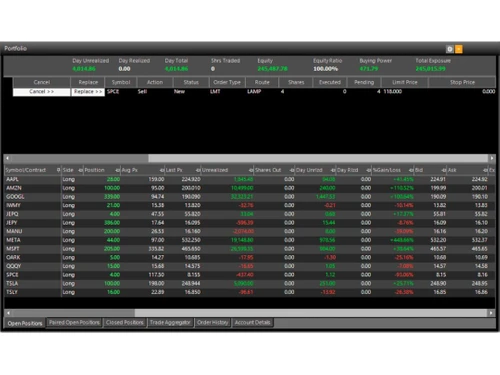
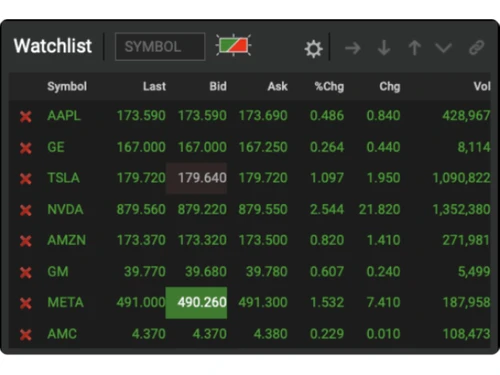
 Real-Time Charting Watchlist Options Trailing Stops Portfolio Management Trading Indicators Notification

Watch the demo video to explore key features, real workflows, and how the software fits your business needs.
 Ubuntu
  Windows
  iOS
iOS  Android MacOS
  Linux
Linux  Desktop
  Mobile
  Tablet
  iPad
iPad  Cloud-Based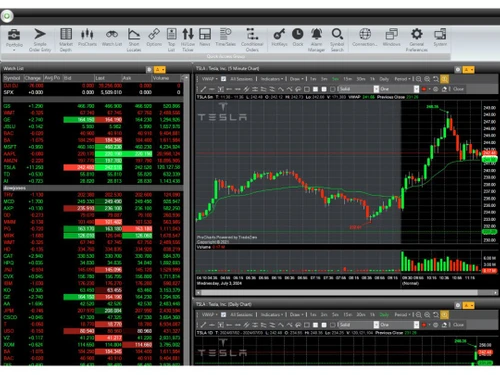
Small Business
Designed for startups and growing businesses
Medium Business
Built for business growth and flexibility
Enterprises
Designed for complex and large-scale business needs
4.8
Out of 5

Overall Rating
Based on
2 Verified Reviews
Rating Breakdown
100% Recommend this Product
Add Review

TradeZero
Price On Request
Desktop
Mobile
Web based
On Premises
Windows
Mac OS

Masterswift 2.0
Price On Request
Desktop
Mobile
Web based
On Premises
Windows
Mac OS

AlgoTest
Price On Request
Desktop
Mobile
Web based
On Premises
Windows
Mac OS

Pocketful
Price On Request
Desktop
Mobile
Web based
On Premises
Windows
Mac OS

StockMock
₹ 349
Desktop
Mobile
Web based
On Premises
Windows
Mac OS

Bajaj Broking
Price On Request
Desktop
Mobile
Web based
On Premises
Windows
Mac OS

Edelweiss TX3
Price On Request
Desktop
Mobile
Web based
On Premises
Windows
Mac OS

Zerodha Kite
Price On Request
Desktop
Mobile
Web based
On Premises
Windows
Mac OS

Bigul
Price On Request
Desktop
Mobile
Web based
On Premises
Windows
Mac OS

QuantShare
Price On Request
Desktop
Mobile
Web based
On Premises
Windows
Mac OS
Trading Terminal
Price On Request
Desktop
Mobile
Web based
On Premises
Windows
Mac OS
(2) Product(s) selected
Available
Price on Request
Starting Price:
$99

Available
Price on Request

Available
Price on Request
Available
Price on Request

Available
Price on Request

Available
Price on Request

Available
Price on Request

Available
Price on Request
TradeZero offers margin trading that allows you to borrow funds to increase your purchasing power. Margin requirements vary based on the type of securities and your account status.
ZeroPro requires Windows 7 SP1 or later (Mac not supported) and.NET Framework 4.6.2 or above.
TradeZero particularly serves in the United States and Canada. However, it is also available internationally.
You can contact TradeZero through email, live chat, and phone.
Yes, TradeZero supports options trading. But make sure to check pricing as an additional fee may apply.
TradeZero provides extended trading hours from 4:00 AM to 8:00 PM ET.
Yes, TradeZero offers a demo account to help users familiarize themselves with the platform’s features.
TradeZero is compatible with Windows, macOS, iOS, and Android platforms.
TradeZero is ideal for active day traders, short-sellers, and investors seeking flexible trading options.
Yes, limit orders are commission-free on TradeZero, but conditions apply based on order routing choices.
TradeZero supports market, limit, stop, and stop-limit orders for precise trading strategies.
TradeZero uses SSL encryption and two-factor authentication to secure user data and accounts.
TradeZero provides advanced charting tools, including real-time data, technical indicators, and customizable chart layouts.
TradeZero pricing starts from $59 per month at techjockey.com.
Yes, TradeZero accounts are exempt from the Pattern Day Trading (PDT) rule, supporting active trading.
0 0
TradeZero requires a minimum deposit of $500 for margin accounts offering leverage.
0 0
TradeZero distinguishes itself by modern technology, competitive pricing, a diverse selection of trading instruments, and a commitment to providing a frictionless trading experience.
However, the ideal option for you is determined by your specific requirements and preferences. When comparing TradeZero to other brokerages, take into account trading platform features, available markets, costs, and customer service.
0 0
Yes, you can withdraw funds from your TradeZero account. The withdrawal charge may differ depending on the withdrawal method and account type. For the most up-to-date information, refer to TradeZero's charge schedule.
0 0
The average fee for locating and borrowing shares for a short sale on TradeZero varies according on the securities, market conditions, and account type. However, it is typically a percentage of the borrowed share's value.
0 0
20,000+ Software Listed
Best Price Guranteed
Free Expert Consultation
2M+ Happy Customers
Terms and Condtions

Users with registered businesses can purchase goods from merchants on the platform to satisfy their business needs. Users are not permitted to utilize any products acquired through the platform for resale, advertising, business, or further distribution.
For each purchase made, users will receive a Tax Invoice (or 'GST invoice') that includes specific details such as:
the GSTIN of the user associated with their registered business, and
the specified Entity Name for their business.
It should be noted that not all products are eligible for GST Invoice. Only the products displayed by participating sellers with the 'GST-based Invoice Available' callout on the product description page would qualify.
Certain goods and services are not eligible to get a GST Invoice, including items with VAS, i.e., Value Added Services (e.g., Total Mobile Protection/Assured Buyback) and those involving an exchange offer at the time of purchase.
Users must ensure the accuracy of the GSTIN, and business entity name provided for the GST Invoice. Requests for corrections into GST Invoice would not be accommodated by Techjockey.com or any Seller, and any issues arising from user-provided information are the sole responsibility of users.
Techjockey.com is not liable for the GST Invoice or any associated input tax credit. To efficiently claim an input tax credit, users should select the registered place of business address as per the GST authority's data and follow the provisions of the GST Act and rules.
To claim an input tax credit, the delivery and billing addresses must match. Furthermore, input tax credits will not be granted if the delivery address and GSTIN on the invoice are from different states. In case of incorrect GST details provided during the order placement, the order will be canceled automatically.