linkedin
Tranquil logo
play Best Cloud ERP Software | Inventory | HR and Payroll | Accounting software | Tranquil
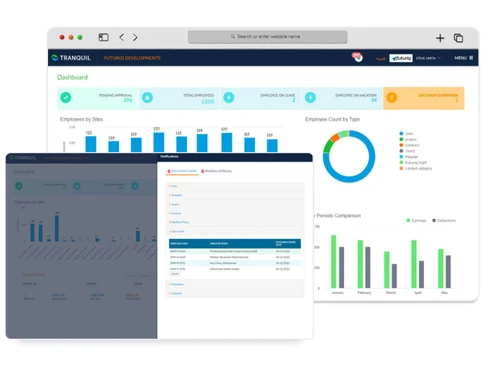
Tranquil-dashboard
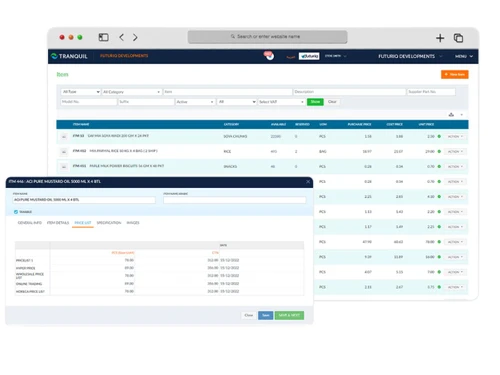
Tranquil-item

Tranquil

Brand: Tranquil

  • No Ratings & Reviews

Tranquil is your customizable cloud ERP, simplifying project, inventory, and HR management for contracting, trading, and manufacturing businesses, accessible anywhere, anytime.

See More

Have you used Tranquil before?

Share your insights for better experience

Add a Review

Price Available on Request

Questions about pricing or customization? We’re here to help, just a click away.

100% Genuine
Products
Best Price
Guaranteed
Safe & Secure
Payment
  • Description

  • Pricing

  • Features

  • Specification

  • Review

  • Compare

  • Alternatives

  • FAQ

Tranquil Software Overview

What is Tranquil?

Tranquil is a comprehensive, cloud-based Enterprise Resource Planning (ERP) software designed to streamline and simplify business operations for companies in the contracting, trading, and manufacturing sectors. Primarily serving the GCC region, tranquil provides a unified platform to manage core business processes without the need for extensive paperwork. As a cloud solution, it offers the flexibility to access critical business data from any location at any time.

The software integrates essential functions into a single, cohesive system, allowing businesses to gain complete control over their operations. This includes managing quotes, jobs, invoices, payments, inventory, and projects. By centralizing these activities, tranquil helps organizations improve efficiency, enhance visibility across departments, and make more informed, data-driven decisions for better business performance.

Why Choose Tranquil?

  • Industry-Specific Functionality: Tranquil is not a one-size-fits-all solution. It is purpose-built for the specific needs of general trading, manufacturing, distribution, service management, and mechanical contracting industries, ensuring that the features and workflows are relevant and effective.
  • Unified Cloud Platform: By consolidating disparate processes into one superior cloud solution, tranquil eliminates data silos. This integration of project management, manufacturing, HR, and accounting provides a single source of truth for your entire organization.
  • Enhanced Accessibility & Flexibility: The cloud-based nature of tranquil means your team can access real-time business data from anywhere, whether in the office, on a job site, or working remotely. This fosters collaboration and quick decision-making.
  • Process Simplification: A core philosophy of tranquil is to simplify complex operations. It automates routine tasks, reduces manual data entry, and digitizes workflows, freeing up valuable time for your team to focus on strategic growth activities.
  • Customizable & Scalable: As a leading customizable ERP in the GCC, tranquil can be tailored to fit your unique business processes. It is designed to scale with your company, supporting your growth without requiring a complete system overhaul.

Advanced Features of Tranquil

  • Integrated Job Costing & Estimating: The platform estimating capabilities are fully integrated with all tasks and materials. This allows you to compare current project costs against the original quote in real-time, ensuring profitability. You can track every task and job cost with precision to surface project-level profitability instantly.
  • Intelligent Inventory & Warehouse Management: Go beyond simple stock counting. tranquil allows you to track inventory across multiple warehouse locations and even technicians' vehicles. It automates stock adjustments, facilitates full stock takes, and helps anticipate stock level issues. The system also supports Just-in-Time (JIT) purchasing to align material orders with demand.
  • Dynamic Staff Scheduling & Payroll: tranquil scheduling tools do more than just assign tasks. The system automates payroll calculations based on variable employee pay rates, job titles, and work locations. A visual chart view gives managers a quick read on available capacity, helping to make confident scheduling decisions that account for material availability and current workloads.
  • Mobile Work Order Management: Empower your field technicians with mobile access. They can share job updates, log billable hours, request materials, and send invoices directly from their smartphone or mobile device. This eliminates paperwork, reduces costly errors, and provides office staff with instant visibility into field operations.
  • Comprehensive Sales & Customer Management: The ERP includes tools to sharpen your sales process. You can assign sales representatives to accounts, engage with prospective customers, capture demographic information for marketing, and segment customers by various categories to personalize your approach.

Modules of Tranquil

  • Project Management: An end-to-end module that manages the complete project lifecycle, from initial enquiry and estimation to project execution, invoicing, and final delivery.
  • Manufacturing: A sophisticated module designed for both Make-to-Order (MTO) and Make-to-Stock (MTS) businesses, providing accurate and visible control over the entire production process.
  • HR & Payroll: A complete human resources solution that handles everything from employee management to complex payroll calculations tailored for the contracting and service industries.
  • Inventory Management: A powerful module for controlling stock levels, managing warehouse locations, automating purchase orders, and ensuring materials are available when and where they are needed.
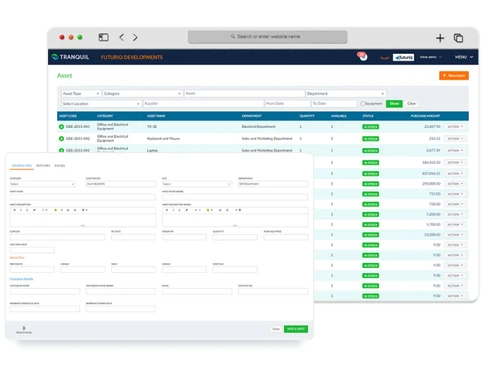
  • Fixed Asset Management: This module allows you to track and manage all company assets, from office furniture and IT equipment to heavy machinery on-site, throughout their lifecycle.
  • Accounting: A robust financial module that provides a clear view of your company's financial health, streamlines accounting processes, and supports better business performance through accurate reporting.

How to Use Tranquil?

  1. Initial Consultation: The process begins when you request a free quote or schedule a demo. A dedicated Customer Success Advisor will contact you to understand your business challenges, operational workflows, and strategic goals.
  2. Personalized Demonstration: Based on the initial consultation, the tranquil team will provide a personalized software demonstration, showcasing the features and modules most relevant to your industry and specific requirements.
  3. Implementation & Onboarding: Once you decide to move forward, a structured implementation process begins. This includes system configuration, data migration, and comprehensive training for your team to ensure a smooth transition and high user adoption.
  4. Ongoing Support: As a cloud-based solution, tranquil is continually updated. You will have access to ongoing customer support to resolve any issues and help you leverage the full power of the platform as your business evolves.

Tranquil Price

Tranquil ERP software price is available on request at Techjockey. The pricing model is based on different parameters, including extra features, deployment type, and the total number of users. For further queries related to the product, you can contact our product expert and learn more about the pricing and offers.

"
Read more

Tranquil Company Details

Founded Year:  2012

Tranquil Software provides industry business software designed around the needs of manufacturing, distribution and services organizations.

Director/Founders Fahad Othman Al Ghamdi
Company Size 1-100 Employees

Tranquil Pricing & Plans

Looking for The Right Pricing?

Share your requirements and get a plan built around your business.

  • Define your business needs
  • Get customised pricing
  • Choose features that fit your workflow

Price Available on Request

Get personalised Tranquil pricing that fits your needs. Our team will connect with you.

Tranquil Features

Financial/Accounts Management

  • icon_check Tax Management
    Automates tax calculations, compliance, and reporting, ensuring accuracy and adherence to regulations.
  • icon_check Fixed Asset Management
    Track, manage, and depreciate assets.
  • icon_check General Ledger
    Unified accounting hub with real-time updates.
  • icon_check Bank Reconciliation
    Matches ERP records with bank statements to ensure financial accuracy and detect discrepancies.
  • icon_check Budgeting And Forecasting
    Planning financials based on historical and predictive data.
  • icon_check Accounts Payable & Accounts Receivable
    Invoice tracking and payment processing.
  • icon_check Multi-Currency Support
    Handling transactions in various currencies.

Human Resource Management (HRM)

  • icon_check Payroll Management
    Automatic calculations for salaries, benefits, and deductions.
  • icon_check Time and Attendance
    Tracking work hours and attendance schedules.
  • icon_check Employee Information Management
    Centralized database for employee data.
  • icon_check Recruitment and Onboarding
    Tools for hiring, job postings, and new hire integration.
  • icon_check Performance Management
    Employee appraisals, KPI tracking, and reviews.
  • icon_check Learning Management
    Training programs and skill assessments.

Supply Chain Management

  • icon_check Demand Planning
    Forecasting tools to predict inventory needs.
  • icon_check Inventory Management
    Real-time tracking of stock levels and warehouse locations.
  • icon_check Transportation Management
    Manages logistics, shipment tracking, and carrier performance for efficient delivery.
  • icon_check Route Planning
    Optimizes delivery routes to minimize costs and ensure timely deliveries.
  • icon_check Supplier Relationship Management
    Monitoring supplier performance and communications.
  • icon_check Procurement and Purchasing
    Supplier management and purchase order automation.
  • icon_check Logistics and Distribution
    Shipment tracking and delivery scheduling.

Manufacturing

  • icon_check Maintenance Management
    Tracks and schedules maintenance tasks to ensure equipment reliability and reduce downtime.
  • icon_check Work Order Management
    Scheduling and tracking production tasks.
  • icon_check Bill Of Materials (BOM)
    Manage components and materials for product creation.
  • icon_check Production Planning and Scheduling
    Resource allocation and timeline planning.
  • icon_check Quality Control Management
    Tools for tracking and enforcing production standards.
  • icon_check Shop Floor Management
    Integration with IoT for real-time production data.
  • icon_check Material Requirement Planning (MRP)
    Plans material needs based on demand, inventory, and lead times to prevent shortages.

Customer Relationship Management (CRM)

  • icon_check Contact Management
    Centralized database for customer interactions.
  • icon_check Lead Management
    Captures, tracks, and nurtures leads to improve sales conversions and pipeline efficiency.
  • icon_check Sales Pipeline Management
    Tracking leads, opportunities, and deals.
  • icon_check Marketing Automation
    Tools for email, SMS, and social media campaigns.
  • icon_check Audience Segmentation
    Insights into customer behavior and preferences.

Project Management

  • icon_check Time Tracking
    Recording billable and non-billable hours.
  • icon_check Collaboration Tools
    Shared workspaces, chat, and document sharing.
  • icon_check Resource Management
    Allocation of team members and tools.
  • icon_check Task Scheduling
    Gantt charts and timelines for projects.
  • icon_check Cost Management
    Monitoring expenses and staying within budget.

Reporting and Analytics

  • icon_check Predictive Analytics
    Tools to forecast trends and outcomes.
  • icon_check Sales Reports
    Analyzes sales trends, revenue, and top performers to guide strategy.
  • icon_check Dashboards
    Real-time performance insights with KPIs.
  • icon_check Financial Reports
    Provides insights into financial health with balance sheets, income, and cash flow statements.
  • icon_check Business Intelligence
    Advanced analytics, dashboards, and KPIs for strategic insights and trend forecasting.
  • icon_check Custom Reports
    Tailored reports for various business needs.
  • icon_check Regulatory Compliance Reports
    Ensure adherence to industry standards.
  • icon_check Real Time Reports
    Delivers live data and metrics for faster, informed decision-making.

Integrations

  • icon_check Customer Support
    Integration with helpdesk and ticketing systems.
  • icon_check API Integration
    Connects ERP with third-party tools for seamless data exchange and process automation.
  • icon_check Third Party Integration
    Seamless integration with third-party applications.
  • icon_check Ecommerce Integration
    Syncs ERP with e-commerce platforms for real-time order, inventory, and customer data updates.
  • icon_check Payment Gateway Integration
    Support for various payment methods.

Security and Compliance

  • icon_check Data Encryption
    Protect sensitive information.
  • icon_check Audit Management
    Plan, execute and track audits within organisation
  • icon_check Role-Based Access Control (RBAC)
    Granular permissions for users.
  • icon_check GDPR and Other Compliance
    Features to adhere to global data regulations.
  • icon_check Disaster Recovery
    Backup and recovery options for business continuity.

Administrative Features

  • icon_check Workflow Automation
    Customizable triggers for repetitive tasks.
  • icon_check Data Import/Export
    Transfers data efficiently using standard formats like CSV and Excel.
  • icon_check Admin Panel
    Central hub for user, system, and workflow management with real-time control.
  • icon_check User Access Management
    Controls user permissions and access for enhanced security.
  • icon_check Workflow Approval
    Automates approval processes with role-based actions to streamline tasks.
  • icon_check Centralized Database
    Stores all business data in one system, eliminating silos and ensuring accuracy.

Alerts & Notifications

  • icon_check Email and SMS Notifications
    Automates alerts for approvals, reminders, and updates via email/SMS.
  • icon_check Custom Event Alerts
    Triggers alerts for specific events like overdue payments or inventory shortages.
  • icon_check Non-Compliance Issues
    Flags and resolves regulatory or policy breaches for compliance adherence.
  • icon_check Security Alerts
    Notifies of suspicious activities like unauthorized logins to protect data.
Tranquil Demo Video play icon

Get Tranquil Demo

Watch the demo video to explore key features, real workflows, and how the software fits your business needs.

Understand
Key Features
Personal
Demo Insights
Interactive
Demo Support

Tranquil Specifications

Supported Platforms
Ubuntu Ubuntu Windows Windows MacOS MacOS Linux Linux
Devices
Desktop Desktop
Deployment
Cloud-Based Cloud-Based
Suitable For
All Industries
Business Specific
All Businesses
Business Size
Small Business Startups Medium Business Enterprises SMBs SMEs MSMEs
Customer Support
Phone Email Live Chat
Language
English
Integration
API Integration
Training Resources
In Person Live Online Documentation
Technology
Next Generation

Explore the Best Alternative Solutions Similar to Your Business Size and Needs

Tranquil Review

Techjockey Trusted Reviews from Verified Users

No reviews are currently available for Tranquil. Discover similar ERP Software reviews

  • Dynamics 365 Business Central

    4.4

    Whats great - The capacity to use Excel to mass input data into the system and to extract data. read more

  • DataNote ERP

    4.8

    Whats great - The most impressive thing with this ERP is the reporting and analytics. I'm daily using the AI reports available in various f... read more

  • Eazy ERP

    4.7

    Whats great - Real-time data. Better sales tracking. Customizable reports. Since using EAZY ERP, our work and sales tracking have improved ... read more
Compare Tranquil With other ERP Software

Products
Ratings
Pricing
Device Supported
Deployment
Supported Platforms
  • img

    Tranquil

  • Price On Request

  • Desktop

    Mobile

  • Web based

    On Premises

  • Windows

    Mac OS

  • img

    Presence360

  • 4.9

  • ₹ 2999

  • Desktop

    Mobile

  • Web based

    On Premises

  • Windows

    Mac OS

  • img

    Fablead ERP

  • 5

  • ₹ 999

  • Desktop

    Mobile

  • Web based

    On Premises

  • Windows

    Mac OS

  • img

    Odoo ERP

  • 4.7

  • ₹ 760

  • Desktop

    Mobile

  • Web based

    On Premises

  • Windows

    Mac OS

  • img

    iXpert ERP

  • 4.7

  • ₹ 19999

  • Desktop

    Mobile

  • Web based

    On Premises

  • Windows

    Mac OS

  • img

    Bigsun ERP

  • 4.0

  • ₹ 6000

  • Desktop

    Mobile

  • Web based

    On Premises

  • Windows

    Mac OS

  • img

    Axolon ERP

  • 5

  • Price On Request

  • Desktop

    Mobile

  • Web based

    On Premises

  • Windows

    Mac OS

  • img

    MenThee ERP

  • 4.2

  • Price On Request

  • Desktop

    Mobile

  • Web based

    On Premises

  • Windows

    Mac OS

(0) Product(s) selected

Tranquil Alternatives

See All Tranquil Alternatives

Starting Price:

₹6,000 /User/Month

Starting Price:

$300 /Year

Available

Price on Request

Available

Price on Request

Available

Price on Request

Articles for Tranquil

See All Related Articles

What does tranquil do?

Tranquil is a cloud-based ERP software designed to simplify business management for contracting, trading, and manufacturing companies, allowing them to manage their entire business processes without paperwork from anywhere, anytime.

How much does tranquil cost?

Tranquil ERP software price is available on request at Techjockey.com.

What are the main features of tranquil?

Tranquil ERP offers core features including Project Management, Manufacturing, HR & Payroll, Fixed Asset management, Inventory & Warehouse tracking, Production, and Accounting, all designed to streamline business operations.

Is there a free trial for tranquil?

While Tranquil ERP does not explicitly mention a free trial, they offer options to request a free quote and schedule a demo to explore the software's capabilities.

Who can use tranquil?

Tranquil ERP is primarily designed for contracting, trading, and manufacturing companies, including those in general trading, distribution, service management, and mechanical contracting sectors.

How does Tranquil ERP support project management?

Tranquil ERP streamlines project management from enquiry to estimation, execution, and invoicing, offering tools for staff scheduling, activity tracking, precise costing, and real-time work activity updates to ensure projects are completed efficiently.

What inventory management capabilities does Tranquil offer?

Tranquil provides powerful inventory management, allowing users to track inventory and warehouse locations, manage materials from warehouse to technician vehicles, automate stock adjustments, and facilitate just-in-time purchasing.

Can Tranquil ERP help with HR and payroll?

Yes, Tranquil ERP includes a comprehensive HR & Payroll solution specifically designed for the industry, which not only manages HR functions but also automates payroll for various job titles and work locations.

Is Tranquil ERP accessible remotely?

Yes, as a cloud-based ERP software, Tranquil provides users with access to their business data anywhere, at any time, ensuring flexibility and remote management capabilities.

21,000+ Software Listed

Best Price Guranteed

Free Expert Consultation

5M+ Happy Customers

Terms and Condtions

close

Users with registered businesses can purchase goods from merchants on the platform to satisfy their business needs. Users are not permitted to utilize any products acquired through the platform for resale, advertising, business, or further distribution.

For each purchase made, users will receive a Tax Invoice (or 'GST invoice') that includes specific details such as:

  • the GSTIN of the user associated with their registered business, and

  • the specified Entity Name for their business.

It should be noted that not all products are eligible for GST Invoice. Only the products displayed by participating sellers with the 'GST-based Invoice Available' callout on the product description page would qualify.

Certain goods and services are not eligible to get a GST Invoice, including items with VAS, i.e., Value Added Services (e.g., Total Mobile Protection/Assured Buyback) and those involving an exchange offer at the time of purchase.

Users must ensure the accuracy of the GSTIN, and business entity name provided for the GST Invoice. Requests for corrections into GST Invoice would not be accommodated by Techjockey.com or any Seller, and any issues arising from user-provided information are the sole responsibility of users.

Techjockey.com is not liable for the GST Invoice or any associated input tax credit. To efficiently claim an input tax credit, users should select the registered place of business address as per the GST authority's data and follow the provisions of the GST Act and rules.

To claim an input tax credit, the delivery and billing addresses must match. Furthermore, input tax credits will not be granted if the delivery address and GSTIN on the invoice are from different states. In case of incorrect GST details provided during the order placement, the order will be canceled automatically.