 USA
USA UAE
UAESmall Business
Designed for startups and growing businesses
See More



Brand: NAVEST
Trustify helps businesses boost revenue and customer trust by centralizing reviews, collecting feedback, and strengthening their online presence for sustainable growth.
See MoreHave you used Trustify before?
Share your insights for better experience
Brand: NAVEST
Founded Year: 2018
Trustify provides tools to collect and manage customer reviews from platforms, including Google, Facebook, and TripAdvisor.
 Review Collection Review Monitoring Review Management Sentiment Analysis Multi-Platform Integration Survey Management Customer Feedback Management Analytics & Reporting Reputation Tracking Multi-Location SEO Optimization Review Publishing Customer Engagement User Access Management
  Ubuntu
  Windows
  MacOS
MacOS  Linux
Linux  Desktop
  Cloud-Based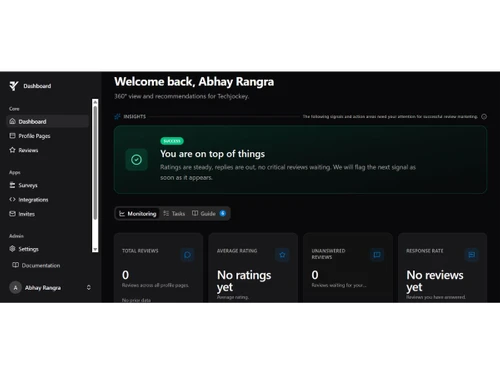
Small Business
Designed for startups and growing businesses
Medium Business
Built for business growth and flexibility
Enterprises
Designed for complex and large-scale business needs
Techjockey Trusted Reviews from Verified Users
No reviews are currently available for Trustify. Discover similar Online Reputation Management Software reviews

Birdeye
Whats great - AI responses and sentiment analysis are standout features. read more

Sprout Social
Whats great - Your social customer care's effectiveness and quality can be evaluated with the aid of Sprout. To track the health of your bu... read more

Djubo Hospitality Management
Whats great - But it did eventually just download what I had requested, although the time it took might well have been for the whole packag... read more

Trustify
Price On Request
Desktop
Mobile
Web based
On Premises
Windows
Mac OS

RateMyBiz
₹ 15000
Desktop
Mobile
Web based
On Premises
Windows
Mac OS

Tetherlo
Price On Request
Desktop
Mobile
Web based
On Premises
Windows
Mac OS

Vendasta
Price On Request
Desktop
Mobile
Web based
On Premises
Windows
Mac OS

Famepilot
Price On Request
Desktop
Mobile
Web based
On Premises
Windows
Mac OS

Digitify360
₹ 299
Desktop
Mobile
Web based
On Premises
Windows
Mac OS

AppReply
Price On Request
Desktop
Mobile
Web based
On Premises
Windows
Mac OS

Rectangled
Price On Request
Desktop
Mobile
Web based
On Premises
Windows
Mac OS

Synup
Price On Request
Desktop
Mobile
Web based
On Premises
Windows
Mac OS

GatherUp
Price On Request
Desktop
Mobile
Web based
On Premises
Windows
Mac OS

Chatmeter
Price On Request
Desktop
Mobile
Web based
On Premises
Windows
Mac OS
(0) Product(s) selected
Starting Price:
$99 /Month

Available
Price on Request
Available
Price on Request

Available
Price on Request

Available
Price on Request

Available
Price on Request

Available
Price on Request

Starting Price:
$199 /Month
Trustify is an all-in-one online reputation management software that generates valuable customer reviews, centralizes feedback from various platforms, and provides modern marketing tools to boost revenue and build customer trust. It transforms customer feedback into measurable business growth by improving online visibility and conversion rates.
Trustify price starts at USD 34 at techjockey.com.
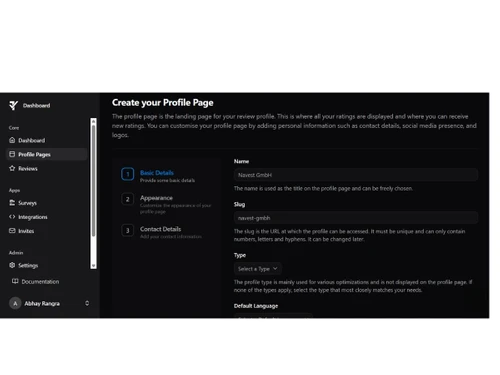
Trustify offers a comprehensive suite of features including centralized review management from over 12 platforms, customizable profile pages, targeted customer surveys, powerful analytics, integrations, campaigns, invites, and support for master and child profiles for complex business structures. It also enhances SEO and GEO visibility and allows for dynamic review content with pictures and videos.
Yes, Trustify offers an option to Start for free now, allowing users to explore a selection of its features and discover the platform in action.
Trustify is designed for companies of all sizes and structures, particularly those with multiple locations, industries, or markets, as it supports master and child profiles to efficiently manage reviews and reputation across various business entities. It is optimized for diverse industries to effectively reach their target audience.
Trustify significantly boosts SEO and online visibility by optimizing review content for search engines, generating rich snippets, and helping businesses get found better in local searches and generative AI applications. It also actively supports the conversion rate of paid search campaigns (SEA) for improved results.
Yes, Trustify allows businesses to create custom, targeted surveys in multiple languages to collect valuable, in-depth data from customers about specific products, services, or experiences, going beyond standard reviews to gain detailed insights for improvement. These surveys can be strategically deployed with unique URLs and collect additional information alongside reviews in one step.
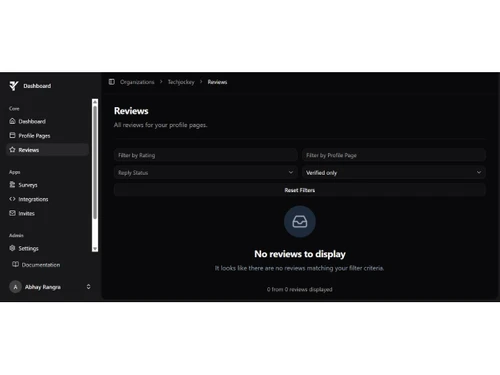
Trustify centralizes customer voices by automatically importing and uniting reviews from over 12 external platforms, including Google, TripAdvisor, and Booking.com, for effortless presentation and management in one place. This consolidation helps businesses build trust and convince potential customers more effectively.
Trustify's analytics transform reviews into actionable insights, enabling businesses to recognize trends, identify areas for improvement, and understand customer sentiment at a glance through real-time monitoring of important metrics. It also measures reach by tracking profile page visits and widget impressions to understand the actual impact of reviews.
20,000+ Software Listed
Best Price Guranteed
Free Expert Consultation
2M+ Happy Customers
Terms and Condtions

Users with registered businesses can purchase goods from merchants on the platform to satisfy their business needs. Users are not permitted to utilize any products acquired through the platform for resale, advertising, business, or further distribution.
For each purchase made, users will receive a Tax Invoice (or 'GST invoice') that includes specific details such as:
the GSTIN of the user associated with their registered business, and
the specified Entity Name for their business.
It should be noted that not all products are eligible for GST Invoice. Only the products displayed by participating sellers with the 'GST-based Invoice Available' callout on the product description page would qualify.
Certain goods and services are not eligible to get a GST Invoice, including items with VAS, i.e., Value Added Services (e.g., Total Mobile Protection/Assured Buyback) and those involving an exchange offer at the time of purchase.
Users must ensure the accuracy of the GSTIN, and business entity name provided for the GST Invoice. Requests for corrections into GST Invoice would not be accommodated by Techjockey.com or any Seller, and any issues arising from user-provided information are the sole responsibility of users.
Techjockey.com is not liable for the GST Invoice or any associated input tax credit. To efficiently claim an input tax credit, users should select the registered place of business address as per the GST authority's data and follow the provisions of the GST Act and rules.
To claim an input tax credit, the delivery and billing addresses must match. Furthermore, input tax credits will not be granted if the delivery address and GSTIN on the invoice are from different states. In case of incorrect GST details provided during the order placement, the order will be canceled automatically.

![[Infographic] What is Online Best Reputation Management Software - ORM Guide](https://cdn.techjockey.com/blog/wp-content/uploads/2017/12/26135645/infographic-best-online-reputation-management_feature.jpg?d=265x163 "Blog - [Infographic] What is Online Best Reputation Management Software - ORM Guide")