USA
USA UAE
UAESmall Business
Designed for startups and growing businesses

See More



Brand: Turia
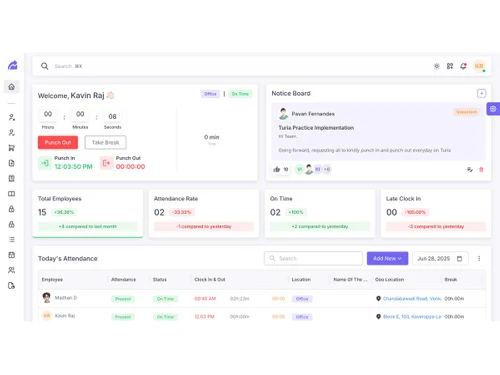
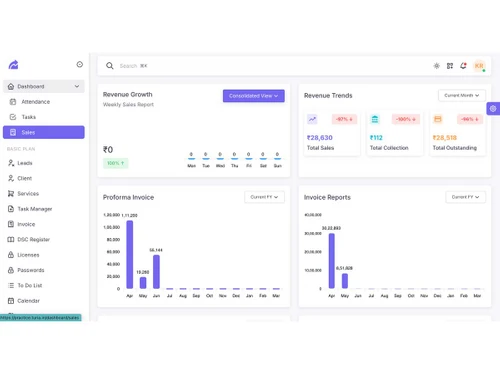
An office management software that helps CA offices and professionals manage compliance, clients, billing, and tasks all in one easy platform.
See MoreHave you used Turia before?
Share your insights for better experience
Brand: Turia
Founded Year: 2020
ria is India’s first AI-powered Practice Management Software built exclusively for CA and Audit firms. From task automation to team collaboration, Turia simplifies operations for modern firms – all in one place.
 Cloud-Based Access Employee Self Service Smart Payroll Engine Biometric Integration Real-Time Attendance Leave Management Statutory Compliances Client Master Client Portal Compliance Tracker Automated Reminders & Alerts Notices Management Task Management Team Management Billing & Collection
  Windows
  iOS
iOS  Android
  Desktop
  Mobile
  Cloud-Based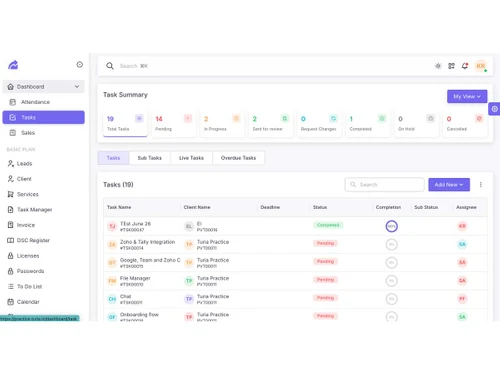
Small Business
Designed for startups and growing businesses
Medium Business
Built for business growth and flexibility
Enterprises
Designed for complex and large-scale business needs
4.7
Out of 5

Overall Rating
Based on
5 Verified Reviews
Rating Breakdown
93% Recommend this Product
Add ReviewPros
"The product is stable, meets business requirements, and offers reliable functionality. Its supportive team adds value to the overall user experience."
"Turia has a very responsive and supportive team that provides helpful assistance whenever required."
Cons
"No major drawbacks have been noticed so far, and the software meets our current CA practice management needs."
"New feature updates could be communicated more proactively so users are aware of the latest improvements and capabilities."
"Additional customization options would be helpful for CA firms with specific workflows and operational requirements."

Sep 21, 2026
Techjockey Verified
“Stable and Feature-Rich Product for Business Needs”
The product offers strong functionality and has remained stable without failures or downtime during nine months of use. Its supportive team makes daily operations easier for our audit firm.
Pros
The product is stable, meets business requirements, and offers reliable functionality. Its supportive team adds value to the overall user experience.
Cons
The gap between product demos and onboarding could be improved. Better technical handholding, implementation support, and clearly assigned responsibilities could help prevent project delays and ensure successful adoption.
Reason to switch
We are at minimum usage at present. Only 1/4 of our team is onboard.
Sep 2, 2026
Techjockey Verified
“One of the Best CA Practice Management Solutions”
Turia is one of the best CA practice management software solutions in India. Its reliable features and supportive team make it a useful choice for managing day-to-day CA practice operations.
Pros
Turia has a very responsive and supportive team that provides helpful assistance whenever required.
Cons
No major drawbacks have been noticed so far, and the software meets our current CA practice management needs.
Reason to switch
Better Support . More features
Sep 1, 2026
Techjockey Verified
“Turia Has Genuinely Improved Our CA Practice Management”
We have been using Turia CA Practice Management for the past two years, and it has genuinely helped improve our firm's daily operations. The Sprint Planner, WhatsApp integration, and compliance tracker have saved time, improved productivity, and made our work more organised.
Pros
The WhatsApp automation, AI agents, and compliance tracker are particularly useful. Features like the Sprint Planner and WhatsApp integration save time and help improve our firm's overall productivity.
Cons
New feature updates could be communicated more proactively so users are aware of the latest improvements and capabilities.
Reason to switch
Its honestly been a very convenient tool for me to use and manage my business - has a good number of features, will send daily digest mails in the morning to keep me upto speed All in all beneficial to me

Turia
₹ 100.00 excl. GST
Desktop
Mobile
Web based
On Premises
Windows
Mac OS

Jamku Office Management Software
Price On Request
Desktop
Mobile
Web based
On Premises
Windows
Mac OS
Spectrum Cloud CA
₹ 6300
Desktop
Mobile
Web based
On Premises
Windows
Mac OS

EasyCloudBooks
Price On Request
Desktop
Mobile
Web based
On Premises
Windows
Mac OS

CADashboard
₹ 12000
Desktop
Mobile
Web based
On Premises
Windows
Mac OS

ERPCA
₹ 1000
Desktop
Mobile
Web based
On Premises
Windows
Mac OS

MyTask
₹ 690
Desktop
Mobile
Web based
On Premises
Windows
Mac OS

CAProWin
₹ 100
Desktop
Mobile
Web based
On Premises
Windows
Mac OS

eProcessify
₹ 600
Desktop
Mobile
Web based
On Premises
Windows
Mac OS

Smart Office Management System
₹ 10000
Desktop
Mobile
Web based
On Premises
Windows
Mac OS

CA Cloud Desk
₹ 3000
Desktop
Mobile
Web based
On Premises
Windows
Mac OS
(0) Product(s) selected
Starting Price:
₹6,300 /Year ₹7,200
Starting Price:
₹1,000
Starting Price:
₹10,000 /Year

Available
Price on Request

Available
Price on Request

Available
Price on Request

Available
Price on Request

Starting Price:
₹1,788 User/Month

Starting Price:
£4 /Month

Starting Price:
₹600 /Month

Available
Price on Request
The price of Turia starts at INR 100 excl. GST. The cost may vary based on features, deployment, and the number of users.
Turia works by combining compliance tracking, task management, billing, and client communication into one software.
Turia is mostly used by Chartered Accountants, tax consultants, auditors, and compliance professionals.
Yes, Turia has automated alerts that notify users about compliance dates and important tasks.
Yes, it comes with a secure client portal for sharing documents and updates with clients.
Yes, Turia is scalable and works well for both small practices and large CA offices.
Yes, it has built-in billing and payment tracking features for better financial management.
Yes, its team management tools make task assignment and tracking easier for managers.
Yes, Turia ensures data safety with secure access and organized storage for all client records.
Yes, the notices management feature allows users to track and respond to government notices.
20,000+ Software Listed
Best Price Guranteed
Free Expert Consultation
2M+ Happy Customers
Terms and Condtions

Users with registered businesses can purchase goods from merchants on the platform to satisfy their business needs. Users are not permitted to utilize any products acquired through the platform for resale, advertising, business, or further distribution.
For each purchase made, users will receive a Tax Invoice (or 'GST invoice') that includes specific details such as:
the GSTIN of the user associated with their registered business, and
the specified Entity Name for their business.
It should be noted that not all products are eligible for GST Invoice. Only the products displayed by participating sellers with the 'GST-based Invoice Available' callout on the product description page would qualify.
Certain goods and services are not eligible to get a GST Invoice, including items with VAS, i.e., Value Added Services (e.g., Total Mobile Protection/Assured Buyback) and those involving an exchange offer at the time of purchase.
Users must ensure the accuracy of the GSTIN, and business entity name provided for the GST Invoice. Requests for corrections into GST Invoice would not be accommodated by Techjockey.com or any Seller, and any issues arising from user-provided information are the sole responsibility of users.
Techjockey.com is not liable for the GST Invoice or any associated input tax credit. To efficiently claim an input tax credit, users should select the registered place of business address as per the GST authority's data and follow the provisions of the GST Act and rules.
To claim an input tax credit, the delivery and billing addresses must match. Furthermore, input tax credits will not be granted if the delivery address and GSTIN on the invoice are from different states. In case of incorrect GST details provided during the order placement, the order will be canceled automatically.