linkedin
Typeless logo
play Typeless Beyond Dictation: Al Voice Commands for Writing and Comprehension
typeless-steps
typeless-dictation

Typeless

Brand: Typeless

  • 4.3

  • 4 Ratings

Typeless is an AI voice dictation tool that converts speech into polished text while removing filler words, repetition, and conversational clutter automatically.

See More

Have you used Typeless before?

Share your insights for better experience

Add a Review
Starting Price
$30

View plans

100% Genuine
Products
Best Price
Guaranteed
Safe & Secure
Payment
  • Description

  • Pricing

  • Features

  • Specification

  • Review

  • FAQ

Starting at $30

TypelessSoftware Overview

What is Typeless?

Typeless is a transcription software platform that works as a smart voice keyboard for dictating emails, notes, and messages. This utility software transforms raw speech into structured, professional text by removing filler words like 'um' and 'uh,' eliminating repetition, and applying formatting based on context. It supports AI auto-editing, tone adaptation for different apps, multilingual dictation, and real-time translation. The platform works across Mac, Windows, iOS, and Android and follows a zero data retention policy for privacy.

Why Choose Typeless?

  • Intelligent Dictation: Converts speech into finished, structured text instead of raw transcription by removing filler words and repetition.
  • Ask AI Editing: Allows voice-based editing commands like 'make this shorter' or 'change tone to professional.'
  • Translate Feature: Enables real-time translation while dictating in natural speech.
  • AI Auto-Editing and Formatting: Automatically structures text, corrects grammar, and formats lists and paragraphs.
  • App-Specific Tone Adaptation: Adjusts writing style based on the app (casual for Slack, professional for Gmail, polished for Notion).
  • Whisper Mode: Allows low-voice or near-silent dictation for quiet environments.
  • Ask Anything Assistant: Generates content from spoken prompts, similar to an AI writing assistant.
  • Zero Data Retention: Audio and transcripts are not stored or used for training, ensuring privacy.

Benefits of Typeless

  • Increases Writing Speed by 4x: Voice input produces finished text faster than typing.
  • Removes Filler Words Automatically: Eliminates 'um,' 'uh,' repetition, and conversational noise.
  • Enables Voice-Based Editing: Lets users modify text using spoken commands instead of keyboard input.
  • Real-Time Translation: Converts speech into different languages instantly for global communication.
  • Adapts to App Context: Automatically adjusts tone depending on where the text is being written.
  • Works Across All Applications: Compatible with Google Docs, Notion, Slack, Teams, Gmail, and more.
  • Supports 100+ Languages: Handles multilingual speech with automatic detection.
  • Learns User Vocabulary: Improves accuracy over time by remembering custom words and names.
  • Enables Silent Dictation: Useful in offices, meetings, or shared spaces.
  • Ensures Privacy Protection: No storage of voice or text data due to strict zero-retention policy.

Pricing

Typeless price starts at USD 30 at Techjockey.com. The pricing model is based on different parameters, including extra features, deployment type, and the total number of users. For further queries related to the product, you can contact our product team and learn more about the pricing and offers.

Read more

Typeless Pricing & Plans

Pro
Key Features
  • Unlimited words per week
  • Prioritized feature requests
  • Early access to new features
  • Team member management
  • Lightning fast voice-typing
  • AI auto-editing with dictation
  • Support for 100+ languages
Starting at $30
    • Users

      Users
      Users
    • Monthly

      Monthly
      Monthly

Key Features

  • Unlimited words per week

  • Prioritized feature requests

  • Early access to new features

  • Team member management

  • Lightning fast voice-typing

  • AI auto-editing with dictation

  • Support for 100+ languages

Typeless Features

  • icon_check AI Filler Removal
    Automatically identifies and deletes vocal disfluencies like "um" and "uh" to ensure transcribed text remains professional.
  • icon_check Real Time Editing
    Recognizes mid-sentence self-corrections and updates the text to reflect the user's final intended message without clutter.
  • icon_check Contextual Formatting
    Organizes spoken lists and key points into structured elements like bulleted lists and numbered steps during the dictation.
  • icon_check Multi-Language Support
    Supports transcription and detection for over 100 languages, allowing users to switch or mix languages during a session.
  • icon_check System Integration
    Operates as a background service that inserts text directly into any active cursor field across macOS and Windows apps.
  • icon_check Hotkey Triggering
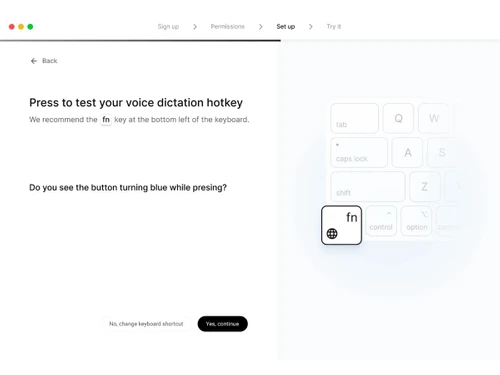
    Utilizes a customizable keyboard shortcut, such as the Function key, to initiate and terminate the voice capture process.
  • icon_check Zero Data Retention Policy
    Processes voice data through secure channels without storing audio or text on external servers after the initial task.
  • icon_check Speak to Edit Mode
    Allows users to select existing text and use verbal commands to modify specific words, punctuation, or structural layout.
  • icon_check Markdown Support
    Applies standard Markdown styling, including headers and bold text, directly to the transcribed output via voice instructions.
  • icon_check Team Management
    Includes an administrative dashboard for managing member seats, license allocations, and centralized billing for groups.
  • icon_check Offline Processing
    Supports local execution for core dictation tasks to maintain functionality when an internet connection is unavailable.
Typeless Demo Video play icon

Get Typeless Demo

Watch the demo video to explore key features, real workflows, and how the software fits your business needs.

Understand
Key Features
Personal
Demo Insights
Interactive
Demo Support

Typeless Specification

Supported Platforms
Windows Windows iOS iOS MacOS MacOS
Devices
Desktop Desktop Mobile Mobile
Deployment
Perpetual Perpetual
Suitable For
All Industries
Business Specific
All Businesses
Business Size
Individual Freelancers
Customer Support
Email Communities
Language
English
Training Resources
Videos
AI Features
AI Integrated

Typeless Review

4.3

Out of 5

img

Overall Rating

Based on
4 Verified Ratings

Rating Breakdown

  • Features 4.5
  • Value for Money 4.5
  • Ease of Use 4
  • Customer Support 4.3

80% Recommend this Product

Add Review

Techjockey Trusted Reviews from Verified Users

No reviews are currently available for Typeless. Discover similar Transcription Software reviews

  • Happy Scribe

    4.5

    Whats great - Team responsive by email, generally helpful read more

  • Gotranscript

    4.4

    Whats great - For long interviews, academic lectures, multi-speaker recordings, GoTranscript handles them well; human transcribers don’t pa... read more

  • Obsidian

    4.4

    Whats great - There are so many cool plugins that let me do things like task management thanks to community plugins. read more

How much does Typeless cost?

Typeless price starts at USD 30 at Techjockey.com, with a free tier offering 4,000 to 8,000 words per week.

How does Typeless work?

You activate a keyboard shortcut, speak into your microphone, and Typeless converts speech into polished, formatted text while removing filler words and adapting tone based on the app.

Who uses Typeless?

It is used by professionals, writers, content creators, and anyone who wants to write faster using voice input.

What is Whisper Mode?

A feature that allows low-voice or near-silent dictation for quiet or shared environments.

Does it remove filler words?

Yes, it automatically removes filler words like um, uh and repetitive speech.

Can it translate while dictating?

Yes, it can convert spoken language into another language in real time.

What is the Ask feature?

A voice-based command feature that lets users edit text or generate new content using spoken instructions.

Does it work in any app?

Yes, it works anywhere you can type, including Google Docs, Notion, Slack, Teams, and Gmail.

How many languages does it support?

It supports over 100 languages with automatic detection and mixed-language dictation.

Is my data private?

Yes, it follows a zero data retention policy, meaning audio and transcripts are not stored or used for training.

20,000+ Software Listed

Best Price Guranteed

Free Expert Consultation

2M+ Happy Customers

Terms and Condtions

close

Users with registered businesses can purchase goods from merchants on the platform to satisfy their business needs. Users are not permitted to utilize any products acquired through the platform for resale, advertising, business, or further distribution.

For each purchase made, users will receive a Tax Invoice (or 'GST invoice') that includes specific details such as:

  • the GSTIN of the user associated with their registered business, and

  • the specified Entity Name for their business.

It should be noted that not all products are eligible for GST Invoice. Only the products displayed by participating sellers with the 'GST-based Invoice Available' callout on the product description page would qualify.

Certain goods and services are not eligible to get a GST Invoice, including items with VAS, i.e., Value Added Services (e.g., Total Mobile Protection/Assured Buyback) and those involving an exchange offer at the time of purchase.

Users must ensure the accuracy of the GSTIN, and business entity name provided for the GST Invoice. Requests for corrections into GST Invoice would not be accommodated by Techjockey.com or any Seller, and any issues arising from user-provided information are the sole responsibility of users.

Techjockey.com is not liable for the GST Invoice or any associated input tax credit. To efficiently claim an input tax credit, users should select the registered place of business address as per the GST authority's data and follow the provisions of the GST Act and rules.

To claim an input tax credit, the delivery and billing addresses must match. Furthermore, input tax credits will not be granted if the delivery address and GSTIN on the invoice are from different states. In case of incorrect GST details provided during the order placement, the order will be canceled automatically.