 USA
USA UAE
UAESmall Business
Designed for startups and growing businesses


See More




Brand: Gotranscribe
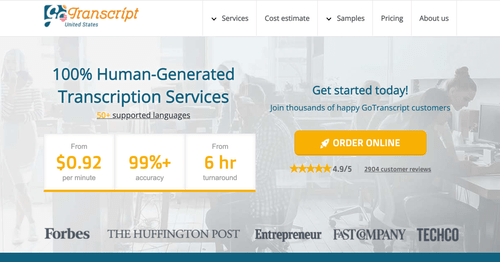
GoTranscript provides transcription services by converting spoken or recorded speech into written text. All the transcriptions produced by GoTranscript professionals are 100% human generated and authentic. One of the most notable features of GoTranscript services is its assurance of 99% accuracy. Their robust monitoring system ensures that users get the highest quality transcription services with...
See MoreHave you used Gotranscript before?
Share your insights for better experience
Brand: Gotranscribe
Founded Year: 2005
GoTranscript is an online 100% human-generated transcription and translation service provider company.
Looking for The Right Pricing?
Share your requirements and get a plan built around your business.
Price Available on Request
Get personalised Gotranscript pricing that fits your needs. Our team will connect with you.
 Customer Loyalty Discount 100% Guarantee Verbatim Results Rush Order Option Instant Ordering Custom Order & Integration

Watch the demo video to explore key features, real workflows, and how the software fits your business needs.
 Windows
  Desktop
  Cloud-Based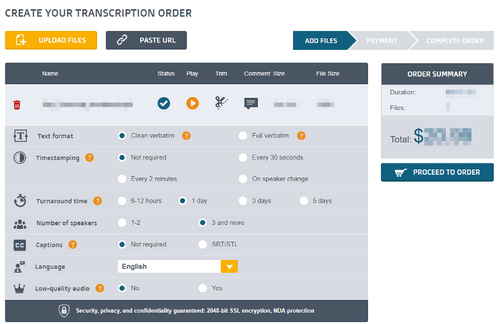
Small Business
Designed for startups and growing businesses
Medium Business
Built for business growth and flexibility
Enterprises
Designed for complex and large-scale business needs
4.4
Out of 5

Overall Rating
Based on
13 Verified Reviews
Rating Breakdown
89% Recommend this Product
Add ReviewOverall, users express high satisfaction with GoTranscript, particularly praising its accuracy for complex and lengthy audio files, as well as its effective subtitle and captioning services. Many appreciate the competitive pricing, especially for students and researchers, and commend the responsive customer support. However, some users note limitations with turnaround times, especially for urgent requests, and mention that navigation on the website could be improved. Additionally, concerns about pay rates for transcriptionists and handling of non-dialogue audio are recurring themes.
Pros
"Offers subtitles, closed captioning, foreign subtitles etc.; helpful for video creators. Accuracy good, especially for standard dialogue."
"Reviewers often say flexible work, remote opportunity, variety of audios (medical, general, lectures)."
"Uploading files, selecting service options (rush vs standard), format options are fairly straightforward."
Cons
"Music/sound effects / non-dialogue audio sometimes mishandled; guidelines not always followed unless explicitly provided. "
"Many complain about low pay per audio minute or per file, delays in payment, or uneven work availability. "
"Website navigation sometimes confusing; finding pricing, rush orders, or service details isn’t always intuitive. The transcript editor UI could be more polished."


Jul 20, 2025
Techjockey Verified
“Great Overall for Complex / Longer Audio, But Patience Needed”
I often have hour-long recorded sessions (round-tables, podcast interviews). GoTranscript’s human transcription gives me high confidence, so editing is minimal, but I budget the time for waiting.
Pros
For long interviews, academic lectures, multi-speaker recordings, GoTranscript handles them well; human transcribers don’t panic at long or complex audio. High accuracy is maintained.
Cons
Such long files sometimes take full standard turnaround period; revisions take time. If audio is noisy or technical vocabulary, some errors are expected.
Reason to switch
I left automated-first tools for long, complex audio because their transcripts needed massive cleanup; GoTranscript trades speed for accuracy and that's what I needed for important, longer recordings.
Sep 19, 2025
Techjockey Verified
“Excellent for Subtitle & Captioning Projects”
For my video content and YouTube uploads, I needed captions. GoTranscript’s closed-caption service saved me a lot of time vs doing it manually, and the caption timing was pretty accurate.
Pros
Offers subtitles, closed captioning, foreign subtitles etc.; helpful for video creators. Accuracy good, especially for standard dialogue.
Cons
Music/sound effects / non-dialogue audio sometimes mishandled; guidelines not always followed unless explicitly provided.
Reason to switch
I switched from using DIY captions because GoTranscript’s captioning was more affordable and quality of timed subtitles was good enough for my audience without much editing.
Aug 8, 2025
Techjockey Verified
“Mixed Feedback from Workers / Transcribers Side”
As a transcriptionist I tried working with GoTranscript. I liked the flexibility—work when I want, from home. But found that pay per minute for harder audio (bad quality, accents) doesn’t seem to scale sufficiently, and sometimes I would wait for tasks.
Pros
Reviewers often say flexible work, remote opportunity, variety of audios (medical, general, lectures).
Cons
Many complain about low pay per audio minute or per file, delays in payment, or uneven work availability.
Reason to switch
I switched from Rev tasks to GoTranscript initially because tasks seemed plentiful and support seemed responsive; later because pay and stability were key, I might shift back or mix platforms to maximize income.

Gotranscript
Price On Request
Desktop
Mobile
Web based
On Premises
Windows
Mac OS
Wispr Flow
₹ 400
Desktop
Mobile
Web based
On Premises
Windows
Mac OS

Tactiq
Price On Request
Desktop
Mobile
Web based
On Premises
Windows
Mac OS
tl;dv
₹ 2764
Desktop
Mobile
Web based
On Premises
Windows
Mac OS
Scribejoy
Price On Request
Desktop
Mobile
Web based
On Premises
Windows
Mac OS

Audext
Price On Request
Desktop
Mobile
Web based
On Premises
Windows
Mac OS
AutoSubtitles
Price On Request
Desktop
Mobile
Web based
On Premises
Windows
Mac OS

Typeless
Price On Request
Desktop
Mobile
Web based
On Premises
Windows
Mac OS

Speechify
Price On Request
Desktop
Mobile
Web based
On Premises
Windows
Mac OS

Happy Scribe
Price On Request
Desktop
Mobile
Web based
On Premises
Windows
Mac OS

Revoicer
Price On Request
Desktop
Mobile
Web based
On Premises
Windows
Mac OS
(0) Product(s) selected
Starting Price:
₹400 /Month
Starting Price:
$12 /User/Month
Starting Price:
$49 /Provider/Month
Available
Price on Request
Starting Price:
$30 /User/Month

Starting Price:
$14 /Month

Starting Price:
$29 /Month
Starting Price:
$36 /Month

Starting Price:
$12 /Month

Available
Price on Request
GoTranscript is compatible with Windows, Android, iOS and Mac operating systems.
GoTranscript app is available for iOS and Android devices.
GoTranscript supports web-based deployment type.
GoTranscript pricing is available on request at techjockey.com.
GoTranscript is typically used in industries namely medical, legal, academic & enterprise.
GoTranscript demo is available for free with techjockey.com.
GoTranscript offers a free trial. However, the premium plan with advanced features is available at techjockey.com with exciting deals.
GoTranscript installation is not required, as it is web-based. Just open the Setup Wizard to get started.
Yes, you can put the exact requirement in your order details. In addition, when you upload the file, leave a message with important instructions to follow, if any.
20,000+ Software Listed
Best Price Guranteed
Free Expert Consultation
2M+ Happy Customers
Terms and Condtions

Users with registered businesses can purchase goods from merchants on the platform to satisfy their business needs. Users are not permitted to utilize any products acquired through the platform for resale, advertising, business, or further distribution.
For each purchase made, users will receive a Tax Invoice (or 'GST invoice') that includes specific details such as:
the GSTIN of the user associated with their registered business, and
the specified Entity Name for their business.
It should be noted that not all products are eligible for GST Invoice. Only the products displayed by participating sellers with the 'GST-based Invoice Available' callout on the product description page would qualify.
Certain goods and services are not eligible to get a GST Invoice, including items with VAS, i.e., Value Added Services (e.g., Total Mobile Protection/Assured Buyback) and those involving an exchange offer at the time of purchase.
Users must ensure the accuracy of the GSTIN, and business entity name provided for the GST Invoice. Requests for corrections into GST Invoice would not be accommodated by Techjockey.com or any Seller, and any issues arising from user-provided information are the sole responsibility of users.
Techjockey.com is not liable for the GST Invoice or any associated input tax credit. To efficiently claim an input tax credit, users should select the registered place of business address as per the GST authority's data and follow the provisions of the GST Act and rules.
To claim an input tax credit, the delivery and billing addresses must match. Furthermore, input tax credits will not be granted if the delivery address and GSTIN on the invoice are from different states. In case of incorrect GST details provided during the order placement, the order will be canceled automatically.



