linkedin
Maestra logo
Maestra-transcription
Maestra-subtitle
Maestra-video dubbing

Maestra

Brand: Katara Tech

  • No Ratings & Reviews

Maestra is an AI-powered media localization platform that provides transcription, translation, and subtitling in 125+ languages for live and on-demand content.

See More

Have you used Maestra before?

Share your insights for better experience

Add a Review
Starting Price
$12

View plans

100% Genuine
Products
Best Price
Guaranteed
Safe & Secure
Payment
  • Description

  • Pricing

  • Features

  • Specification

  • Review

  • Compare

  • Alternatives

  • FAQ

Starting at $12

Maestra Software Overview

What is Maestra?

Maestra is an advanced, all-in-one AI media localization platform designed for content creators, businesses, and educators. It provides a comprehensive suite of tools for transcribing, translating, subtitling, and dubbing both on-demand media files and live streams. Trusted across 150+ countries, Maestra leverages cutting-edge artificial intelligence to deliver highly accurate and natural-sounding results. The platform supports over 125 languages and offers more than 100 unique AI voices and accents, making it a powerful solution for reaching a global audience and making content more accessible.

Whether you need to generate precise text from an audio file, add multilingual subtitles to a video, or create a professional voiceover, Maestra streamlines the entire workflow. Its capabilities extend to real-time applications, offering live captions and voice translation for meetings, webinars, and broadcasts, ensuring every participant can engage in their native language.

Why Choose Maestra?

  • Unified Solution: Access transcription, subtitling, translation, and AI dubbing tools within one seamless interface, saving time and simplifying your production workflow.
  • Extensive Language Support: Break down language barriers by localizing your content into over 125 languages, ensuring your message resonates with audiences worldwide.
  • Real-Time Capabilities: Stand out with live transcription, translation, and dubbing for events, meetings, and streams. This feature fosters inclusivity and enhances engagement for a diverse audience.
  • AI-Powered Precision: The platform AI is engineered to understand context and tone, providing highly accurate transcriptions with automatic punctuation and speaker detection, as well as translations that feel natural.
  • Seamless Integrations: Maestra fits directly into your existing ecosystem, offering integrations with popular tools like Zoom, Microsoft Teams, OBS, vMix, and thousands more through Zapier.

Advanced Features of Maestra

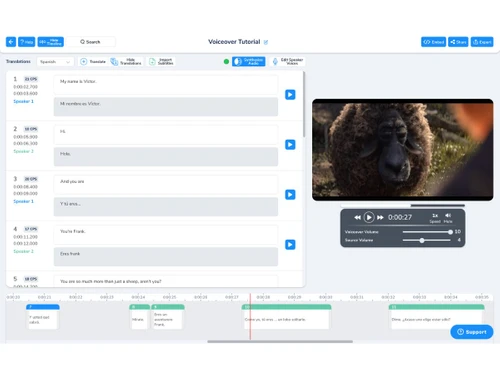
  • AI Dubbing & Voice Cloning: Generate realistic, human-like voiceovers using a vast library of AI voices. For ultimate brand consistency, the voice cloning feature can replicate a specific voice, while AI-powered lip-sync technology ensures a polished final product.
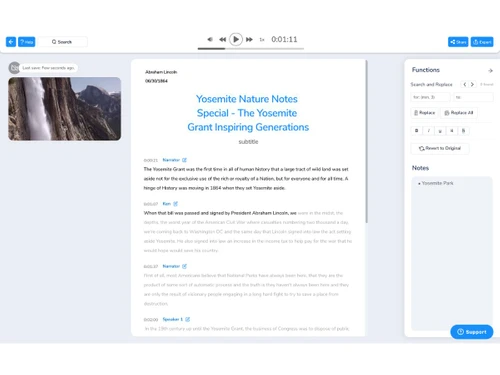
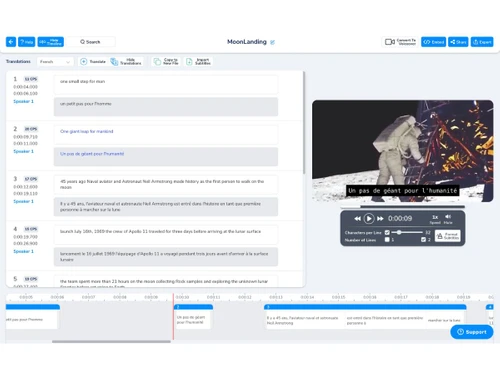
  • Comprehensive Subtitle Editor: Gain full control over your subtitles. You can auto-generate them in seconds, import existing files, and use the powerful editor to adjust timing, text, and styling with precision. Subtitles can be exported in various formats or burned directly into your video.
  • Maestra Teams: Designed for collaboration, this feature allows organizations to manage multiple users under a single account with centralized billing. It streamlines project management and ensures consistency across team outputs.
  • Live Event Localization: Transform live events into fully multilingual experiences. The platform provides instant voice translation and captions, making online sessions and broadcasts accessible and inclusive for a global audience.
  • Developer API Access: For businesses requiring custom solutions, Maestra offers API access to integrate its powerful localization engine directly into proprietary applications and automated workflows.

Modules of Maestra

  • Transcription: A highly accurate speech-to-text engine that converts audio and video files (MP3, WAV, MP4, MOV, etc.) into editable text. It automatically adds timestamps, punctuation, and identifies different speakers. It also supports live transcription for real-time captioning.
  • Translation: Localize your audio and video content with AI that preserves the original tone and context. This module supports file-based translation as well as live voice and subtitle translation for dynamic events.
  • Subtitling: An end-to-end solution for creating and managing subtitles. It includes automatic subtitle generation, a feature-rich editor for fine-tuning, and the ability to translate subtitles into any of the 125+ supported languages.
  • Dubbing & Voiceover: Create professional voiceovers from scratch using text-to-speech or dub existing content with a wide selection of natural-sounding AI voices. Advanced features like voice cloning and lip-sync are available for premium results.

How to Use Maestra?

  1. Upload or Connect: Begin by uploading your audio or video file to the platform. For live events, connect Maestra to your streaming source, such as Zoom, OBS, or Microsoft Teams.
  2. Select Your Service: Choose the primary function you need Transcription, Subtitling, Translation, or Dubbing.
  3. Configure Languages: Select the original language of your content and the target language(s) for your output.
  4. Process and Review: The AI will process your request in minutes. Once complete, use the intuitive online editor to review the output, make any necessary adjustments, and perfect the result.
  5. Export and Share: Download your completed project in your desired format (e.g., TXT, SRT, VTT, MP4) or share it directly from the platform.

Maestra Pricing

Maestra price starts at USD 12 at techjockey.com.

The pricing model is based on different parameters, including extra features, deployment type, and the total number of users. For further queries related to the product, you can contact our product team and learn more about the pricing and offers.

Read more

Katara Tech Company Details

Founded Year:  2018

Maestra specializes in content creation, strategy, and public relations, focusing on social consciousness.

Director/Founders Ali San Kaya
Company Size 1-100 Employees

Maestra Pricing & Plans

Pay As You Go
Starting at $12
    • Licenses

      Licenses
      Licenses
    • Monthly

      Monthly
      Monthly

Key Features

  • Transcription in 125+ languages - 60 mins

Lite
Starting at $29
    • Licenses

      Licenses
      Licenses
    • Monthly

      Monthly
      Monthly

Key Features

  • Transcription in 125+ languages - 180 mins

Basic
Starting at $49
    • Licenses

      Licenses
      Licenses
    • Monthly

      Monthly
      Monthly

Key Features

  • Transcription in 125+ languages - 360 mins

  • AI summary

  • Custom dictionary

  • MaestraCloud file sharing

Premium
Starting at $99
    • Licenses

      Licenses
      Licenses
    • Monthly

      Monthly
      Monthly

Key Features

  • Transcription in 125+ languages - 900 mins

  • Maestra Teams & centralized billing

  • 1 additional team member

  • API access

Maestra Features

  • icon_check AI Transcription
    Converts audio and video recordings into accurate text transcripts automatically using advanced AI models.
  • icon_check Automatic Subtitle Generation
    Creates synchronized subtitles from video content with minimal manual editing requirements.
  • icon_check Multilingual
    Translates transcripts, subtitles, and media content into more than 125 global languages quickly.
  • icon_check AI Video Dubbing
    Generates natural-sounding dubbed audio tracks for videos in multiple languages automatically.
  • icon_check AI Voice Cloning
    Replicates speaker voices to maintain tone and identity across translated and dubbed content.
  • icon_check Speaker Identification
    Detects and separates multiple speakers within recordings for organized transcription output.
  • icon_check Live Captioning
    Provides real-time captions for meetings, webinars, and live events to improve accessibility.
  • icon_check Subtitle Editing
    Offers an in-browser editor to modify subtitle timing, formatting, and translated content easily.
  • icon_check Lip Sync Support
    Synchronizes generated voiceovers with speaker lip movements for natural video localization.
  • icon_check Batch Processing
    Processes multiple audio or video files simultaneously to reduce manual operational effort.
  • icon_check Export Options
    Supports exporting transcripts and subtitles in formats such as SRT, TXT, DOCX, and VTT files.
  • icon_check Team Collaboration
    Enables teams to review, edit, and manage projects together from a shared workspace securely.
  • icon_check API Integration
    Provides APIs for integrating transcription, translation, and dubbing capabilities into applications.
  • icon_check Cloud-Based
    Runs entirely in the cloud, allowing users to access projects without local installations required.
  • icon_check Searchable Transcripts
    Creates searchable text records that simplify content review, editing, and information retrieval.

Maestra Specifications

Supported Platforms
Windows Windows MacOS MacOS Linux Linux
Devices
Desktop Desktop
Deployment
Cloud-Based Cloud-Based
Suitable For
All Industries
Business Specific
All Businesses
Business Size
Individual Small Business Startups Medium Business Enterprises SMBs SMEs Freelancers
Customer Support
Phone Email Live Chat
Language
English
Integration
API Integration
Training Resources
Live Online Documentation Videos
AI Features
AI Integrated
Technology
Next Generation

Explore the Best Alternative Solutions Similar to Your Business Size and Needs

Small Business

Designed for startups and growing businesses

Rask AI

4.4

Dubverse

4.5

Audext

4.5

See More

Maestra Review

Techjockey Trusted Reviews from Verified Users

No reviews are currently available for Maestra. Discover similar Transcription Software reviews

  • Happy Scribe

    4.5

    Whats great - Team responsive by email, generally helpful read more

  • Gotranscript

    4.4

    Whats great - For long interviews, academic lectures, multi-speaker recordings, GoTranscript handles them well; human transcribers don’t pa... read more

  • Obsidian

    4.4

    Whats great - There are so many cool plugins that let me do things like task management thanks to community plugins. read more

Compare Maestra With other Transcription Software

Products
Ratings
Pricing
Device Supported
Deployment
Supported Platforms
  • img

    Maestra

  • Price On Request

  • Desktop

    Mobile

  • Web based

    On Premises

  • Windows

    Mac OS

  • img

    Wispr Flow

  • 4.3

  • ₹ 400

  • Desktop

    Mobile

  • Web based

    On Premises

  • Windows

    Mac OS

  • img

    Tactiq

  • 4.0

  • Price On Request

  • Desktop

    Mobile

  • Web based

    On Premises

  • Windows

    Mac OS

  • img

    tl;dv

  • 4.4

  • ₹ 2764

  • Desktop

    Mobile

  • Web based

    On Premises

  • Windows

    Mac OS

  • img

    Scribejoy

  • 4.3

  • Price On Request

  • Desktop

    Mobile

  • Web based

    On Premises

  • Windows

    Mac OS

  • img

    Audext

  • 4.5

  • Price On Request

  • Desktop

    Mobile

  • Web based

    On Premises

  • Windows

    Mac OS

  • img

    Typeless

  • 4.3

  • Price On Request

  • Desktop

    Mobile

  • Web based

    On Premises

  • Windows

    Mac OS

  • img

    AutoSubtitles

  • 3.9

  • Price On Request

  • Desktop

    Mobile

  • Web based

    On Premises

  • Windows

    Mac OS

  • img

    Speechify

  • 4.5

  • Price On Request

  • Desktop

    Mobile

  • Web based

    On Premises

  • Windows

    Mac OS

  • img

    Happy Scribe

  • 4.3

  • Price On Request

  • Desktop

    Mobile

  • Web based

    On Premises

  • Windows

    Mac OS

  • img

    Revoicer

  • 4.5

  • Price On Request

  • Desktop

    Mobile

  • Web based

    On Premises

  • Windows

    Mac OS

(2) Product(s) selected

Maestra Alternatives

See All Maestra Alternatives

Starting Price:

$12 /User/Month

Starting Price:

$49 /Provider/Month

Starting Price:

$30 /User/Month

Starting Price:

$14 /Month

Starting Price:

$29 /Month

Starting Price:

$20
Available

Price on Request

What does Maestra do?

Maestra is an AI media localization platform that provides real-time and on-demand services for translation, transcription, dubbing, and subtitling across over 125 languages. It helps users convert audio and video files into text, generate subtitles, translate content, and create voiceovers with AI voices.

How much does Maestra cost?

Maestra price starts at USD 12 at techjockey.com.

What are the main features of Maestra?

Maestra's main features include AI translation for audio and video, highly accurate speech-to-text transcription with speaker detection, auto-generated and editable subtitles, and AI dubbing with natural voices, lip sync, and voice cloning. It also supports live translation, transcription, and dubbing, and offers integrations with popular platforms like Zoom and OBS.

Is there a free trial for Maestra?

Yes, Maestra offers a free trial to allow users to get started and experience its transcription, translation, subtitling, and dubbing capabilities.

Who can use Maestra?

Maestra is designed for a wide range of users, including content creators, businesses, educators, event organizers, and anyone needing to localize media content for a global audience. Its features cater to those requiring accurate transcription, translation, subtitling, or dubbing for videos, audio, meetings, or live streams.

Does Maestra support real-time translation and transcription?

Yes, Maestra provides cutting-edge live tools for real-time speech translation, live transcription for meetings and streams, and live dubbing for broadcasts. These features enable inclusive and multilingual events by instantly providing captions and translations.

What languages does Maestra support?

Maestra supports an extensive range of over 125 languages for its AI-powered translation, transcription, subtitling, and dubbing services. This broad language support allows users to localize their media content for a truly global audience.

Can I integrate Maestra with other platforms?

Yes, Maestra offers integrations with various popular platforms and tools to streamline workflows. These include Zoom Meetings & Webinars, Microsoft Teams, OBS, vMix, YouTube, TikTok Ads, Slack, and Zapier for over 2,000 automations.

Does Maestra offer voice cloning and lip-sync capabilities?

Yes, Maestra's AI dubbing features include advanced options such as lip sync and voice cloning. These capabilities help maintain a consistent voice and natural appearance when localizing content into different languages, enhancing the quality of dubbed media.

21,000+ Software Listed

Best Price Guranteed

Free Expert Consultation

5M+ Happy Customers

Terms and Condtions

close

Users with registered businesses can purchase goods from merchants on the platform to satisfy their business needs. Users are not permitted to utilize any products acquired through the platform for resale, advertising, business, or further distribution.

For each purchase made, users will receive a Tax Invoice (or 'GST invoice') that includes specific details such as:

  • the GSTIN of the user associated with their registered business, and

  • the specified Entity Name for their business.

It should be noted that not all products are eligible for GST Invoice. Only the products displayed by participating sellers with the 'GST-based Invoice Available' callout on the product description page would qualify.

Certain goods and services are not eligible to get a GST Invoice, including items with VAS, i.e., Value Added Services (e.g., Total Mobile Protection/Assured Buyback) and those involving an exchange offer at the time of purchase.

Users must ensure the accuracy of the GSTIN, and business entity name provided for the GST Invoice. Requests for corrections into GST Invoice would not be accommodated by Techjockey.com or any Seller, and any issues arising from user-provided information are the sole responsibility of users.

Techjockey.com is not liable for the GST Invoice or any associated input tax credit. To efficiently claim an input tax credit, users should select the registered place of business address as per the GST authority's data and follow the provisions of the GST Act and rules.

To claim an input tax credit, the delivery and billing addresses must match. Furthermore, input tax credits will not be granted if the delivery address and GSTIN on the invoice are from different states. In case of incorrect GST details provided during the order placement, the order will be canceled automatically.