linkedin
Obsidian logo
Obsidian Telepathy
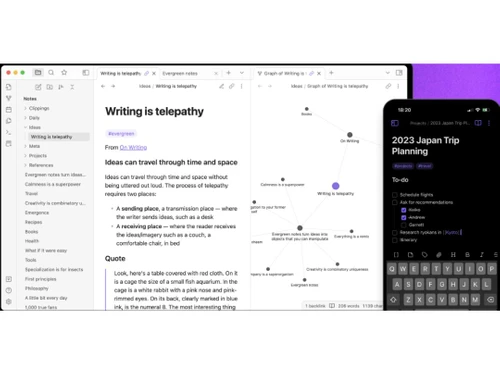
Obsidian Graph
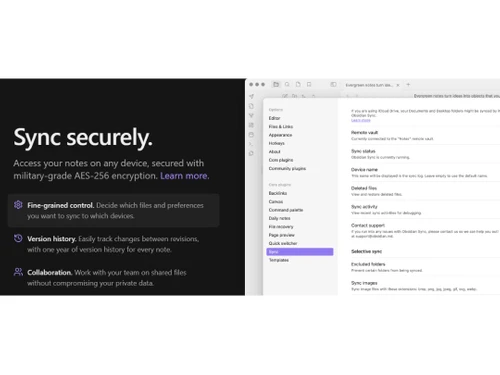
Obsidian Sync Securely

Obsidian

Brand: Obsidian

  • 4.4

  • 13 Ratings & 13 Reviews

Obsidian is a note-taking software that operates on Markdown files and allows to make internal links for notes.

See More

Have you used Obsidian before?

Share your insights for better experience

Add a Review
Starting Price
$50

View plans

100% Genuine
Products
Best Price
Guaranteed
Safe & Secure
Payment
  • Description

  • Pricing

  • Features

  • Specification

  • Review

  • Compare

  • Alternatives

  • FAQ

  • Questions

Starting at $50

Obsidian Software Overview

What is Obsidian Software?

Obsidian is a powerful note-taking software that organizes your ideas and notes in one place. With its unique features, Obsidian makes scanning and importing physical documents easy, converting them into digital files for easy access and organization. You can save time using customizable templates for various types of notes and project outlines, ensuring consistency in your work.

It goes beyond note-taking; it allows you to extend its capabilities and integrate with other tools using the API, creating a personalized knowledge ecosystem. With its user-friendly note-taking interface, you can capture your thoughts effortlessly and tailor the software to suit your specific needs with various plugins that expand its functionality.

You don't have to struggle with debugging issues - Obsidian's robust tools help you identify and resolve problems quickly, ensuring a smooth and seamless user experience. Plus, you can personalize your workspace with customizable themes, making it uniquely yours and enhancing visual comfort. Obsidian empowers you to create a centralized knowledge hub, whether a researcher, writer, student, or professional.

Core Features of Obsidian

  • Plugins and Themes: Obsidian has a wide range of plugins and themes, allowing you to tailor the program to your specific workflow. This versatility allows you to improve functionality and adjust the visual design.
  • Links Insertion: Make links between your notes by connecting various components such as ideas, people, places, and books. This enables you to create a network of relevant information.
  • Secure Sync: With end-to-end encryption, users can access notes on any device with more security. It provides confidentiality and privacy across all devices.
  • Version History: This feature allows users to check and track their changes across the notes. Moreover, they can also compare multiple notes simultaneously and can restore their previous history of notes.
  • Collaboration: This collaboration feature allows individuals to share and collaborate with other people without compromising any private data. Further, they can also customize the permission level like can edit or can view.
  • Customization: Users can customise their notes by using themes, custom domains, password protection, and other features. It allows them to personalise their workspace to reflect their own style and interests.
  • Easy Editing: Users can publish their notes directly from the Obsidian app, allowing them to easily navigate their web of ideas.

Why Choose Obsidian?

Knowledge workers, project managers, and creative professionals can leverage Obsidian to enhance team collaboration and efficiency. The software's versatility in accommodating various plugins and custom themes allows teams to tailor it to their specific workflow needs, ensuring a seamless and productive work environment. Obsidian ensures a smooth user experience and minimizes disruptions during critical projects by providing robust debugging tools.

Obsidian is a powerful tool that caters to a wide range of individuals, providing the means to organize, connect, and visualize their ideas with utmost ease and efficiency. Connect your ideas, cross-reference information, and bring clarity to your projects with the powerful features of Obsidian.

Benefits of Using Obsidian

  • Organize your ideas like never before with Obsidian's all-in-one knowledge hub.
  • Effortlessly scan and import documents for easy digital organization.
  • Save time with customizable templates for consistent and efficient note-taking.
  • Extend functionality and create a personalized ecosystem using the API.
  • Seamlessly capture and connect thoughts with an intuitive note-taking interface.
  • Enhance productivity with a wide range of plugins and robust debugging tools.

Obsidian Pricing

Obsidian is free for personal use. However, if there is any commercial usage, the pricing starts from $50 USD per user, per year.

The pricing may increase based on add-ons.

Here is the pricing of add-ons:

  1. Sync: $4 USD Per user, per month, billed annually
  2. Public: $8 USD Per site, per month, billed annually
  3. Catalyst: $25+ USD One-time payment

For further queries related to the product, you can contact our product team and learn more about the pricing and offers.

Read more

Obsidian Company Details

Founded Year:  2020

Obsidian is a powerful knowledge base that works on top of a local folder of plain text Markdown files.

Director/Founders Erica Xu, Shida Li
Company Size 1-100 Employees

Obsidian Pricing & Plans

Obsidian Commercial Use
Key Features
  • 14-day free trial
  • Commercial use license
  • Priority support
Starting at $50
    • Licenses

      Licenses
      Licenses
    • Yearly

      Yearly
      Yearly

Key Features

  • 14-day free trial

  • Commercial use license

  • Priority support

Obsidian Features

Primary Features

  • icon_check Templates
    Use pre-built layouts for meetings, journals, and more.
  • icon_check Annotations
    Mark up images or PDFs with comments and highlights.
  • icon_check Version History
    Access previous versions of notes to track changes.
  • icon_check Bookmarks
    Mark important notes for easy access later.
  • icon_check To-do lists
    Create and check off tasks within your notes.
  • icon_check Voice Notes
    Record audio notes directly within the app.
  • icon_check Offline Access
    View and edit notes without an internet connection.
  • icon_check Text Formatting
    Style text with bold, italics, headers, bullet points, and more.
  • icon_check Search Functionality
    Quickly locate notes with a powerful keyword search.
  • icon_check Web Clipper
    Save content from the web directly to your notes.
  • icon_check Reminders
    Set alerts to stay on top of important notes and tasks.
  • icon_check Hierarchy Management
    Organize notes with folders and subfolders.
  • icon_check Tagging and Labelling
    Add tags for easy note categorization and retrieval.
  • icon_check File Attachments
    Attach files to notes for richer, more detailed information.

Search and Retrieval

  • icon_check Activity History
    View a timeline of recent changes and updates.
  • icon_check Full-Text Search with Filters
    Find notes using keywords and advanced filters.
  • icon_check OCR (Optical Character Recognition)
    Search text within images or scanned files.
  • icon_check NLP-based Search
    Search intuitively using natural language queries.

Collaboration

  • icon_check Note Sharing
    Share notes with collaborators or external viewers.
  • icon_check Commenting and Feedback
    Add comments and feedback on shared notes.
  • icon_check Permissions Control
    Control who can view or edit each note.
  • icon_check Real Time Editing
    Edit notes simultaneously with team members.

Customization & Personalization

  • icon_check End-to-End Encryption
    Secure notes with encryption for privacy.
  • icon_check Themes and Colour Options
    Choose dark, light, or custom themes.
  • icon_check Custom Fonts and Styles
    Personalize text with unique fonts and styles.
  • icon_check Quick Access Widgets
    Add widgets for instant note access from the home screen.

Security and Privacy

  • icon_check Password Protection
    Lock individual notes with a password.
  • icon_check Version Control
    Revert to previous note versions if needed.
  • icon_check Biometric Login
    Use fingerprint or facial recognition for secure access.
  • icon_check Note Recovery
    Restore deleted notes easily within the app.

Alerts & Notifications

  • icon_check Email Notifications
    Receive email updates for note changes or tasks.
  • icon_check Customizable Reminders
    Set personalized reminders for notes or tasks.
  • icon_check Due Date Notifications
    Receive alerts before a task’s due date.
  • icon_check Event Reminders
    Link notes with events and get timely reminders.
  • icon_check Calendar Alerts
    Sync with your calendar to schedule reminders.
  • icon_check Snooze Reminders
    Delay reminders to focus and prioritize.
  • icon_check Push Notifications
    Get instant alerts on mobile and desktop.

Administrative Features

  • icon_check User Access Management
    Control user roles and permissions.
  • icon_check Auto Backup
    Automatically save notes to prevent data loss.
  • icon_check Export Notes
    Export notes as PDFs, DOCX, or HTML.
  • icon_check Import Notes
    Easily import notes from other platforms.
  • icon_check Access Logs
    Track access history for shared notes.

Integrations

  • icon_check API Access
    Use APIs to integrate with custom tools or apps.
  • icon_check Third Party Integration
    Connect with Google Drive, Dropbox, and more.
  • icon_check Calendar Integration
    Sync notes with your calendar events.
  • icon_check Add-Ons
    Extend functionality with plugins and add-ons.
  • icon_check API Integration
    Connect with other apps using the note-taking app's API.

AI Capabilities

  • icon_check Voice-to-Text
    Convert audio recordings into written text.
  • icon_check Summarisation
    Generate summaries of long notes or articles.
  • icon_check Smart Recommendations
    Suggested tags or related notes based on content.
  • icon_check Image Recognition
    Detect text or objects within images.
  • icon_check Content Generation
    Use AI to brainstorm or draft note content.

Obsidian Specifications

Supported Platforms
Ubuntu Ubuntu Windows Windows iOS iOS Android Android MacOS MacOS Linux Linux
Devices
Desktop Desktop Mobile Mobile
Deployment
Cloud-Based Cloud-Based
Suitable For
All Industries
Business Specific
All Businesses
Business Size
Small Business Startups Medium Business MSMBs MSMEs
Customer Support
Email Communities
Language
English
Training Resources
Videos
AI Features
AI Integrated

Explore the Best Alternative Solutions Similar to Your Business Size and Needs

Obsidian Reviews

4.4

Out of 5

img

Overall Rating

Based on
13 Verified Reviews

Rating Breakdown

  • Features 4.5
  • Value for Money 4.3
  • Ease of Use 4.5
  • Customer Support 4.3

88% Recommend this Product

Add Review

Pros

  • "There are so many cool plugins that let me do things like task management thanks to community plugins."

    Vishu KundarJan 21, 2025

  • "I like that I can use the Markdown files. It feels lightweight and super future-proof."

    Nitin Kalra Jan 1, 2025

  • "I like how there is a search functionality. I can find older notes easily with the integrated search bar."

    Banty BabuDec 11, 2024

Cons

  • "There is no built-in sync or set up something like Dropbox. This makes syncing across devices a hassle."

    Vishu KundarJan 21, 2025

  • "It has a limited mobile app. The app is not as smooth or feature-packed as the desktop version."

    Nitin Kalra Jan 1, 2025

  • "There is no pin lock. I wish I could add an extra layer of protection for some notes."

    Banty BabuDec 11, 2024

Obsidian Video Reviews

youtubeVideoId

4.8

“What I learned after 1 year of note-taking in Obsidian”

Review by: Vicky Zhao

youtubeVideoId

4.6

“I Tried Obsidian Note Taking for a Week... Obsidian Review”

Review by: John Mavrick

youtubeVideoId

4.6

“Obsidian Notes Review: Is It Worth It?”

Review by: Bryan

Vishu Kundar

Digital Marketer

Industry: Marketing and Advertising User since: < 6 months

4.5

Reviewed on: Jan 21, 2025

Techjockey Verified

“Best for Customization but Syncing is a Hassle”

Obsidian allows me to use so many amazing community plugins, including task management ones. It truly enables me to personalize my process. However, syncing multiple devices can be a bit of a pain.

Pros

There are so many cool plugins that let me do things like task management thanks to community plugins.

Cons

There is no built-in sync or set up something like Dropbox. This makes syncing across devices a hassle.

Switched from Notejoy

Reason to switch

I moved from Notejoy to Obsidian since it was more flexible and a more customizable tool with better organization options.

Nitin Kalra

Content Writer

Industry: Market Research User since: < 6 months

4.6

Reviewed on: Jan 1, 2025

Techjockey Verified

“Lightweight and Future Proof but Needs Better Mobile App”

Obsidian’s use of Markdown files is a huge plus. I like how future-proof it is and how light it feels. When I need to check my notes while on the road, it can be annoying because the mobile app is not as optimized.

Pros

I like that I can use the Markdown files. It feels lightweight and super future-proof.

Cons

It has a limited mobile app. The app is not as smooth or feature-packed as the desktop version.

Switched from Basecamp

Reason to switch

I moved to Obsidian since Basecamp was too much like a project management tool rather than a note-taking tool.

Banty Babu

IT Manager

Industry: E-Learning User since: < 6 months

4.5

Reviewed on: Dec 11, 2024

Techjockey Verified

“Amazing Search Feature but Needs More Security”

The search feature in Obsidian is great. I save a lot of deal of time since I can easily and quickly locate old notes. But for more security on some notes, I wish there were a way to apply a pin lock.

Pros

I like how there is a search functionality. I can find older notes easily with the integrated search bar.

Cons

There is no pin lock. I wish I could add an extra layer of protection for some notes.

Switched from Coda

Reason to switch

I needed a more straightforward and flexible solution for my notes, and Obsidian was miles ahead of Coda.

See All Obsidian Reviews

Compare Obsidian With other Note Taking Software

Products
Ratings
Pricing
Device Supported
Deployment
Supported Platforms
  • img

    Obsidian

  • 4.4

  • Price On Request

  • Desktop

    Mobile

  • Web based

    On Premises

  • Windows

    Mac OS

  • img

    GoodNotes

  • 4.6

  • Price On Request

  • Desktop

    Mobile

  • Web based

    On Premises

  • Windows

    Mac OS

  • img

    Evernote

  • 4.4

  • ₹ 449

  • Desktop

    Mobile

  • Web based

    On Premises

  • Windows

    Mac OS

  • img

    Turbo AI

  • 4.5

  • ₹ 339

  • Desktop

    Mobile

  • Web based

    On Premises

  • Windows

    Mac OS

  • img

    Notability

  • 4.5

  • Price On Request

  • Desktop

    Mobile

  • Web based

    On Premises

  • Windows

    Mac OS

  • img

    Microsoft OneNote

  • 4.3

  • Price On Request

  • Desktop

    Mobile

  • Web based

    On Premises

  • Windows

    Mac OS

  • img

    Joplin

  • 4.2

  • Price On Request

  • Desktop

    Mobile

  • Web based

    On Premises

  • Windows

    Mac OS

  • img

    Notein

  • 4.4

  • Price On Request

  • Desktop

    Mobile

  • Web based

    On Premises

  • Windows

    Mac OS

  • img

    Zoho Notebook

  • 4.2

  • ₹ 99

  • Desktop

    Mobile

  • Web based

    On Premises

  • Windows

    Mac OS

  • img

    Apple Notes

  • 4.3

  • Price On Request

  • Desktop

    Mobile

  • Web based

    On Premises

  • Windows

    Mac OS

  • img

    RemNote

  • 4.4

  • ₹ 400

  • Desktop

    Mobile

  • Web based

    On Premises

  • Windows

    Mac OS

(2) Product(s) selected

Obsidian Alternatives

See All Obsidian Alternatives

Starting Price:

€3 /Month

Starting Price:

$6 /Month

Starting Price:

$5 /Seat/Month

Starting Price:

$15 /Month

Nebo

4.3

Available

Price on Request

Starting Price:

$2 /Month

Starting Price:

$12 /Month

Articles for Obsidian

See All Related Articles

Which operating system does Obsidian Software Support?

Obsidian software is compatible with Windows, macOS, Linux, iOS, and Android.

Is there any Obsidian Note-Making App?

Yes, the Obsidian Note-Making app is available on Android and iOS devices.

What is the deployment type of the Obsidian System?

Obsidian Note Making system supports on-premises deployment.

How much does Obsidian Cost?

Obsidian is free to use for personal use. However, you need to pay $50 USD per user, per year for any commercial use. It may increase if you want to use any add-ons.

Who are the potential users of Obsidian Note Maker?

Obsidian solutions can be used by students, teachers, and anyone needing note-making software.

Is there any free trial or demo for Obsidian Software?

The Obsidian demo is available for free with techjockey.com

How can you download Obsidian software?

For Obsidian software installation, you can go directly to Techjockey’s official website and buy this solution. Once purchased, you will receive a key to download the same via email.

How does Obsidian Note Maker Work?

Obsidian is a versatile note-taking app that allows users to capture and organize their thoughts in a private and customizable manner. It provides adaptability to individual thinking patterns, and with its Android compatibility, it becomes accessible across various platforms.

Obsidian Questions

Q:

What customization options does Obsidian provide?

Mohd umar ibrahim Oct 16, 2024
A:

There are various customization options that Obsidian provides. It majorly includes Themes, Plugins, Markdown Customization, Hotkeys, Templates, and Graph Views.

Naresh Dharmaji Oct 16, 2024
Q:

Does Obsidian support version control?

vikas dhingra Oct 16, 2024
A:

Obsidian does not provide built-in version control, but it does support it using other tools. Notes are stored as plain text markdown files, so users can manage them with version control systems such as Git.

This enables change monitoring, collaboration, and the preservation of edit histories.

Gopal Oct 16, 2024
Q:

What markdown features are supported in Obsidian?

Dhirendra Kumar Oct 16, 2024
A:

The major markdown features supported in Obsidian are given below:

  • Headings
  • Lists
  • Links
  • Images
  • Blockquotes
  • Code Blocks
  • Tables
  • Strikethrough
fahim ahmad Oct 16, 2024
Q:

What are the syncing options available in Obsidian?

Dr Nilesh Fatale Oct 16, 2024
A:

There are many syncing options available in Obsidian. They are the following:

  • Obsidian Sync
  • Third-Party Cloud Service
  • Git Integration
Jai kishan Vajpayee Oct 16, 2024
Q:

What are the biggest pros and cons of Obsidian?

A.R PARDHASARADHI Oct 16, 2024
A:

The major pros and cons of Obsidian are the following:

Pros:

  • It offers local storage of data.
  • It offers linking and graph views within the platform.
  • It provides high customization.
  • It has markdown support for users.

Cons:

  • There might be a learning curve.
  • Syncing complexity might be available.
  • There is no built-in publishing.
Prasanta Kumar Oct 16, 2024
See All Obsidian Questions

20,000+ Software Listed

Best Price Guranteed

Free Expert Consultation

2M+ Happy Customers

Terms and Condtions

close

Users with registered businesses can purchase goods from merchants on the platform to satisfy their business needs. Users are not permitted to utilize any products acquired through the platform for resale, advertising, business, or further distribution.

For each purchase made, users will receive a Tax Invoice (or 'GST invoice') that includes specific details such as:

  • the GSTIN of the user associated with their registered business, and

  • the specified Entity Name for their business.

It should be noted that not all products are eligible for GST Invoice. Only the products displayed by participating sellers with the 'GST-based Invoice Available' callout on the product description page would qualify.

Certain goods and services are not eligible to get a GST Invoice, including items with VAS, i.e., Value Added Services (e.g., Total Mobile Protection/Assured Buyback) and those involving an exchange offer at the time of purchase.

Users must ensure the accuracy of the GSTIN, and business entity name provided for the GST Invoice. Requests for corrections into GST Invoice would not be accommodated by Techjockey.com or any Seller, and any issues arising from user-provided information are the sole responsibility of users.

Techjockey.com is not liable for the GST Invoice or any associated input tax credit. To efficiently claim an input tax credit, users should select the registered place of business address as per the GST authority's data and follow the provisions of the GST Act and rules.

To claim an input tax credit, the delivery and billing addresses must match. Furthermore, input tax credits will not be granted if the delivery address and GSTIN on the invoice are from different states. In case of incorrect GST details provided during the order placement, the order will be canceled automatically.